Review
Anycubic Kobra S1 Combo Review
Most multi-color printers sell the color unit separately and leave the filament to fend for itself in room air. This one puts a heated four-spool feeder in the box. The interesting part of the specification is not the headline numbers but the footnotes underneath them.
By Scooter M. · Published · Last reviewed
How this page is funded: the buy links below are affiliate links. If you buy through one we earn a commission, at no extra cost to you. It does not change the order of the picks or a word of what we say about them. Full disclosure.
Printers we claim to have tested: 0. Everyone in this category says they tested twenty machines. We have not tested any, and we would rather say so. What we did instead is on this page: the manufacturer’s own published specification for every pick, cited and dated; the arithmetic on what it costs to run, with the inputs shown; a live price rather than a remembered one; and a plain answer on who should skip each machine.
The short answer
Buy it if you want multi-color printing inside an enclosure and you want to buy it as one box. Anycubic publishes a fully enclosed CoreXY machine with 250 mm cubed, a 320 °C nozzle, a 120 °C plate and the ACE Pro four-color unit included, which dries filament while it prints. Read three footnotes before ordering: the ACE Pro dries at 55 °C at most, TPU cannot go through it, and eight colors needs a second unit plus an extra module.
What this machine is for
Somebody who has already decided two things: that they want more than one color in a single print, and that they want a box around the printer. That is a narrower buyer than most “best printer” lists assume, and it is the buyer this machine is built for.
If only one of those is true, there are better answers. Multi-color on an open frame is cheaper, and an enclosure without multi-color is simpler. Both routes are on the multi-color roundup and the enclosed roundup.
Everything below is read from Anycubic’s own specification table and footnotes on 2026-09-17. We have not printed on this machine.
The specification, and what each figure means for you
250 × 250 × 250 mm, fully enclosed CoreXY. Six millimeters short of the 256 mm cube on the Bambu P series in each axis. Nothing you are likely to print notices that difference.
120 °C plate, 320 °C nozzle. The plate figure is the highest published for any enclosed printer on this site, and it is the one that matters: plate temperature is what keeps a large ABS or ASA part stuck down for the hours it takes to print. The nozzle ships at 0.4 mm; Anycubic notes that 0.25, 0.6 and 0.8 mm sizes are sold separately.
300 mm/s recommended, 600 mm/s maximum. Anycubic publishes both figures, and the recommended one is the honest one. The acceleration row follows the same pattern: 10,000 mm/s² recommended, 20,000 maximum. Rated speeds are straight-line ceilings, which we explain on how long a 3D print takes.
PLA, PETG, ABS, ASA and TPU 95A. The list you would expect from an enclosed machine, with an important asterisk on the last entry that we cover below.
LeviQ 3.0 auto-leveling, Z-offset and flow calibration. The three setup steps that historically defeated beginners are all automated, alongside resonance compensation. Anycubic also lists power-loss resume, filament run-out detection with auto-resume, filament entanglement detection and AI spaghetti detection.
18 kg for the printer, 4.6 kg for the ACE Pro. The printer alone is 400 × 410 × 490 mm, and the feeder is another 366 × 283 × 235 mm on top of that. Together they need a sturdy, dedicated surface — measure before ordering, and read where to put your 3D printer.
44-46 dB. Anycubic publishes 46 dB or below in standard mode and 44 dB or below in quiet mode, and footnotes that the measurement was taken one meter from the front and that individual machines may deviate. It is one of very few published noise figures in this category, and it is worth treating as indicative rather than as a promise.
The ACE Pro: what is genuinely good about it
It is in the box. On most multi-color systems the color unit is a separate purchase, which means the price you first see is not the price of printing in color. Here the Combo price includes the feeder. When you compare this machine against anything else, compare Combo prices, not base prices.
It dries while it prints. A multi-color print is often long, and four spools sitting in room air for twelve hours is exactly how filament picks up the moisture that causes stringing and popping. Anycubic publishes active drying in the ACE Pro, which addresses the problem where it actually happens rather than before the print starts.
It handles the jobs that ruin multi-color prints. Anycubic lists anti-entanglement and automatic filament refill. A tangle that stalls one of four spools is the classic way a long multi-color print fails at hour nine.
The three footnotes to read before you order
This is the part most reviews skip, and it is all on Anycubic’s own product page.
1. The dryer stops at 55 °C. That covers the published drying routines for PLA — Overture publishes 50 °C, Polymaker 55 °C for its PLA Pro. It falls short of the 60 °C both publish for PETG, and well short of the 70 °C Polymaker publishes for ABS and ASA. In practice the ACE Pro keeps dry filament dry; it is not a substitute for a proper dry of a spool that is already wet. For that, see the best filament dryers.
2. TPU cannot go through the ACE Pro. Anycubic states that TPU 95A is only suitable for single-color printing and cannot be used with the ACE Pro. That matches what we see elsewhere — Overture says its High Speed TPU is not compatible with Bambu’s AMS either — and the reason is mechanical: soft filament buckles on a long feed path. Flexible parts on this printer feed from a separate holder, one color at a time. The TPU filament page covers why.
3. Eight colors is not simply “buy another one.” Anycubic’s footnote says eight-color printing needs two ACE Pro units connected with an eight-color feeding module. Budget for both parts if eight colors is the plan, and think hard about whether it is: every color change purges filament, and eight colors means a great many more changes.
Kobra S1 Combo against the Bambu Lab P1S
The comparison most buyers are actually making, since both are enclosed CoreXY machines in a similar class.
Published figures. Kobra S1 Combo read from Anycubic's page on 2026-09-17; P1S read from Bambu Lab's store page on 2026-09-06.
| Anycubic Kobra S1 Combo | Bambu Lab P1S | |
|---|---|---|
| Build volume | 250 x 250 x 250 mm | 256 x 256 x 256 mm |
| Max plate temperature | 120 C | 100 C |
| Max nozzle temperature | 320 C | 300 C |
| Max acceleration | 20,000 mm/s2 | 20,000 mm/s2 (20 m/s2) |
| Multi-color unit | ACE Pro included in the Combo | AMS, sold separately or in a Combo |
| Drying in the feeder | Yes, up to 55 C, in the standard Combo | Available via the AMS 2 Pro Combo, which Bambu Lab describes as a dryer |
| Air filter | Activated carbon included in the box | Activated carbon |
| Printer weight | 18 kg | 12.95 kg |
| Published printer warranty | 1 year | 2 years (Bambu Lab store) |
On published figures the Kobra S1 Combo is ahead on plate and nozzle temperature, and it includes in-feeder drying in its standard Combo rather than in a pricier bundle. The P1S is lighter, smaller, and its maker publishes a longer warranty on its own store. The P1S also sits inside a large, long-established multi-color ecosystem, which is a real advantage when something goes wrong and you want somebody else’s answer. Our full account of that machine is on the P1S review.
Anycubic also now sells a newer Kobra S1 bundle with its ACE 2 Pro feeder. We have not assessed that version, and everything on this page refers to the Combo with the original ACE Pro.
Who should buy something else
Anyone printing in one color. You would be paying for a feeder and a box you do not need. An open-frame machine and a lot of filament is the better first year — start with the beginner picks.
Anyone who wants multi-color TPU. Anycubic says plainly that it does not work through the ACE Pro.
Anyone short on space. Two boxes totalling over 22 kg need a dedicated surface.
Anyone who weights ecosystem over specification. If the thought of being on a smaller platform when something breaks bothers you, the P1S or its replacement the P2S is the safer purchase — see which Bambu to buy.
What to buy with it
PLA for the first month, in four colors you actually want — our PLA picks are three mainstream spools. Anycubic recommends plastic spools rather than cardboard for smoother multi-color feeding, which is worth checking before you order. And read the multi-color roundup for the purge-waste arithmetic before your first four-color print, so the filament bill does not surprise you.
What we would buy for this
Chosen from the same registry as our roundups, on the manufacturer’s own published figures and a live price.
Anycubic Kobra S1 Combo
Anycubic · Multi-color printing in an enclosure, bought as one box
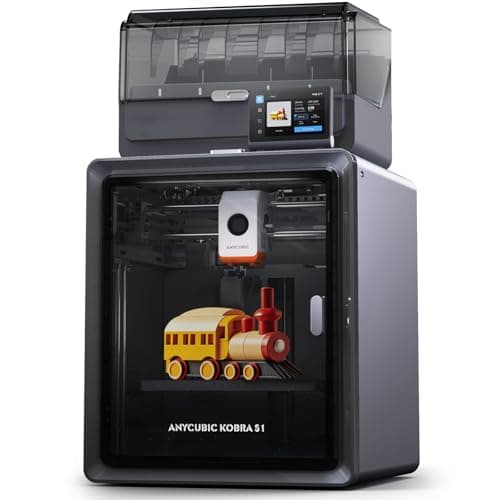
An enclosed CoreXY printer that ships with its four-color unit in the box, and that unit dries filament while it prints. Anycubic publishes a 320 C nozzle, a 120 C plate and 250 mm cubed. The catches are in its own footnotes: the dryer stops at 55 C, TPU cannot go through it, and eight colors means buying a second one.
#ad Price as of September 17, 2026, from Amazon. Prices change. How we make money.
What it actually is
A fully enclosed CoreXY printer bundled with the ACE Pro, Anycubic's four-spool feeder. The ACE Pro swaps filaments for multi-color prints and heats the spools while it does, so the filament stays dry during long jobs.
What the manufacturer states
| Figure | Value | Source |
|---|---|---|
| Build volume | 250 x 250 x 250 mm | Anycubic Kobra S1 Combo specification table |
| Construction | Fully enclosed CoreXY | Anycubic Kobra S1 Combo specification table |
| Print speed | 300 mm/s recommended; 600 mm/s maximum | Anycubic Kobra S1 Combo specification table |
| Acceleration | 10,000 mm/s2 recommended; 20,000 mm/s2 maximum | Anycubic Kobra S1 Combo specification table |
| Nozzle | 320 C max; 0.4 mm standard, 0.25 / 0.6 / 0.8 mm sold separately | Anycubic Kobra S1 Combo specification table |
| Plate | 120 C max, PEI spring steel | Anycubic Kobra S1 Combo specification table |
| Supported filaments | PLA, PETG, ABS, ASA, TPU 95A (TPU not compatible with the ACE Pro) | Anycubic Kobra S1 Combo specification table |
| Multi-color | 4 colors with the included ACE Pro; 8 needs a second ACE Pro and an eight-color feeding module | Anycubic Kobra S1 Combo specification table |
| Active drying | Supported in the ACE Pro, up to 55 C | Anycubic Kobra S1 Combo specification table |
| Leveling and calibration | LeviQ 3.0 auto-leveling, Z-offset, flow calibration, resonance compensation | Anycubic Kobra S1 Combo specification table |
| Noise | 46 dB or below standard, 44 dB or below quiet mode, measured 1 m from the front | Anycubic Kobra S1 Combo specification table |
| Weight | Printer 18 kg; ACE Pro 4.6 kg | Anycubic Kobra S1 Combo specification table |
| Dimensions | Printer 400 x 410 x 490 mm; ACE Pro 365.94 x 282.84 x 234.5 mm | Anycubic Kobra S1 Combo specification table |
| Camera | Built in, 480P | Anycubic Kobra S1 Combo specification table |
Read from Anycubic, Kobra S1 Combo product page and specification table on 2026-09-17. Where a manufacturer does not publish a figure, there is no row for it here.
What is good about it
- The four-color unit is in the box, so the Combo price is the multi-color price
- The ACE Pro heats spools while printing, per Anycubic, which keeps filament dry through a long multi-color job
- A 120 C plate and a 320 C nozzle - the highest published plate temperature of any enclosed printer on this site
- Anycubic publishes filament entanglement detection and AI spaghetti detection alongside auto-resume after run-out
What is not
- The ACE Pro dries at 55 C at most, below the 60 C PETG and 70 C ABS and ASA routines filament makers publish
- TPU 95A cannot go through the ACE Pro, per Anycubic's own footnote - flexible filament is single-color only
- Eight colors needs a second ACE Pro and an extra feeding module, not just a second unit
- An 18 kg printer plus a 4.6 kg feeder is a lot of desk, and Anycubic lists a 1-year printer warranty
Skip this one if
Skip it if multi-color is not the reason you are buying. You are paying for a feeder and a box, and a single-color first year is better spent on an open-frame machine and a lot of filament. Skip it too if TPU in multiple colors is the plan, because Anycubic says that combination does not work.
What we cannot tell you
We have not printed on this machine. How reliably the ACE Pro swaps filament over hundreds of changes, whether 55 C drying keeps PETG usable in a humid room, and how the published noise figures compare to a real room are all owner questions.
How it scored for a beginner
- Setup out of the box8.0
- Auto-calibration9.0
- First-layer forgiveness8.5
- Parts and filament availability8.0
- Running cost7.0
- Help when it goes wrong7.5
Beginner fit 7.9 / 10. That is our editorial read of how well this suits someone buying their first printer, taken off the published specifications — not a test result, and not a verdict on absolute quality. It is deliberately not marked up as a rating in this page’s structured data. How we pick.
How these were picked
We have not printed on these machines and we do not pretend to have. What we did was read each manufacturer’s own specification page, take their stated build volume, temperatures and speeds, check that every pick genuinely fits the job in this page’s title, confirm it is still being sold, and pull a live price rather than a remembered one. Every figure names the source it came from, so you can check it yourself in about a minute.
How we pick sets out the full method, including what would change a ranking.
Questions people actually ask
+−Is the Anycubic Kobra S1 Combo good for beginners?
It is capable of being a first printer — Anycubic publishes LeviQ 3.0 auto-leveling, Z-offset and flow calibration, so the hard setup steps are automated. It is not the easiest first printer, because multi-color and an enclosure are both things a first year rarely needs.
+−Can the Kobra S1 Combo print TPU in multiple colors?
No. Anycubic’s own footnote states that TPU 95A is only suitable for single-color printing and cannot be used with the ACE Pro. TPU feeds from a separate holder, one color at a time.
+−Does the ACE Pro dry filament?
Yes, while printing, up to 55 °C according to Anycubic. That covers typical PLA drying temperatures but is below the 60 °C filament makers publish for PETG and the 70 °C Polymaker publishes for ABS and ASA. It keeps dry filament dry; a wet spool still needs a proper dryer.
+−Kobra S1 Combo or Bambu Lab P1S?
On published figures the Kobra S1 Combo has the hotter plate and nozzle and includes a drying feeder in its standard Combo. The P1S is lighter, carries a longer published warranty on Bambu Lab’s store, and sits in a larger ecosystem. Compare Combo prices, since the P1S multi-color unit is a separate purchase or bundle.
+−How do I get eight colors on the Kobra S1?
According to Anycubic, eight-color printing needs two ACE Pro units connected with an eight-color feeding module. Budget for both, and expect more filament purged at the extra color changes.