Roundup
The Best Filament Dryers
A spool that printed perfectly last month and pops and strings today has not broken. It has absorbed water from the room. A dryer is the machine that undoes that, and the cheapest one on this page does most of the job.
By Scooter M. · Published · Last reviewed
How this page is funded: the buy links below are affiliate links. If you buy through one we earn a commission, at no extra cost to you. It does not change the order of the picks or a word of what we say about them. Full disclosure.
Printers we claim to have tested: 0. Everyone in this category says they tested twenty machines. We have not tested any, and we would rather say so. What we did instead is on this page: the manufacturer’s own published specification for every pick, cited and dated; the arithmetic on what it costs to run, with the inputs shown; a live price rather than a remembered one; and a plain answer on who should skip each machine.
The short answer
Buy the Creality Space Pi. It is the cheapest box here and the cheapest one that reaches 70 °C, which is the ceiling Polymaker’s own ABS and ASA routine asks for, and its 0-48 hour timer means an overnight dry looks after itself. Step up to the EIBOS Cyclopes for two spools at once and a published ± 2 °C control precision, or the SUNLU FilaDryer S4 if you run several colors at once. And if none of your filament has started misbehaving yet, buy none of them — this is a month-three purchase.
Before the picks: what a dryer is actually for, because a lot of people buy one to fix a problem it does not touch, and a lot of other people spend months blaming their printer for a problem it does fix.
What wet filament actually looks like
Filament absorbs water out of the air. PLA does it slowly, PETG and TPU noticeably faster, and nylon fast enough to matter within a day. When that filament reaches the hot end, the absorbed water flashes to steam inside the melt zone, and steam does several things you can see:
Popping and crackling while printing. The single most reliable symptom. If you can hear your printer snapping like a small campfire, the spool is wet and nothing else is wrong.
Stringing that will not tune out. Steam pushes plastic out of the nozzle during travel moves, which is exactly the mechanism that leaves hairs between towers. People spend evenings on retraction settings for this; the spool was the problem. The stringing page puts drying first for that reason.
A rough, dull, bubbled surface. Parts that used to come out glossy arrive pitted.
Weak parts that snap along layer lines. Steam disrupts the bond between layers, so the finished object looks right and fails under load.
Intermittent under-extrusion or a partial clog. Inconsistent flow that reads as a hardware fault. The ordered diagnosis is on the clogged nozzle page, and moisture is on that list for exactly this reason.
The common thread: every one of those symptoms looks like the printer breaking. That is why we call this the most misdiagnosed fault in the hobby, and why a dryer is a genuinely useful purchase at the right moment.
How we picked
Four criteria, in this order. Every figure below is the manufacturer’s own published number, read from their own product page, and we have not used any of these boxes ourselves.
1. Does it tell you whether it worked? Weighted highest, and it is the criterion most buying guides ignore. A heated box with no humidity readout gives you a warm spool and a guess. A box that shows relative humidity falling from 40 percent to 15 percent over six hours is showing you the job being done. All three picks publish a humidity readout; a great many cheaper boxes do not.
2. Does the temperature range cover your materials? This is where the picks genuinely separate. The published drying routines from the filament makers we cite are: Overture 50 °C for 7 hours for PLA and 60 °C for 5 hours for PETG; Polymaker 55 °C for 6 hours for PLA Pro, 60 °C for 6 hours for PETG and 70 °C for 6 hours for both ABS and ASA. A 65 °C ceiling covers everything except that last pair.
3. How many spools at once? Less about convenience than it sounds. If you print in four colors, a single-spool dryer means three spools sit in open air absorbing moisture while the fourth is being dried. Capacity is what turns drying from a chore into a state your filament simply lives in.
4. Can you print straight out of it? All three allow it, and it matters: a twelve-hour print with the spool sitting on top of the machine is twelve hours of re-absorption on a humid day.
Published figures, read from each manufacturer's own product page. Space Pi and FilaDryer S4 read 2026-09-13; Cyclopes read 2026-10-14.
| Dryer | Temperature | Humidity readout | Capacity | Timer |
|---|---|---|---|---|
| Creality Space Pi | 45 - 70 C | Real-time, published | Not published | 0 - 48 hours |
| EIBOS Cyclopes | 70 C and 80 C both published | Real-time, published | 2 spools, 217 x 80 mm each | 1 min - 24 h, or unlimited |
| SUNLU FilaDryer S4 | 35 - 70 C | Published | 4 spools | Not published |
Two cells there need saying out loud. Where it says not published, that is literal — Creality does not state a spool capacity on the Space Pi page, and SUNLU does not publish a timer for the S4. And the Cyclopes temperature cell is not a typo: EIBOS prints a ceiling of 80 °C in its specification table and 70 °C in the heading and feature text of the same page. We would rather show both numbers and the contradiction than pick the flattering one or fill the gap from a retailer listing.
The 70 degree question
It is the one specification worth thinking about before you order, because it is the only one that can make a dryer useless to you later.
PLA and PETG dry comfortably in the fifties and low sixties. Every picked box handles them. ABS and ASA are the exception: Polymaker publishes 70 °C for six hours for both, and a box that stops at 65 °C cannot reach that.
So the honest rule is: if you print PLA and PETG, the cheapest box here is not a compromise. If you have an enclosed printer and you are heading toward ABS or ASA, buy something that reaches 70 °C the first time.
One caution that applies to all of them: Overture warns on its own page that over-drying makes filament brittle. Longer and hotter is not better. Use the published routine for the spool you own.
How long a session takes, and what the readout does
The published routines give you the shape of it: Overture publishes 7 hours for PLA at 50 °C and 5 hours for PETG at 60 °C; Polymaker publishes 6 hours for PLA Pro, PETG, ABS and ASA at their respective temperatures. So an overnight session covers essentially everything, which is why a timer is worth something and why the boxes are designed to be left running.
What the humidity readout shows during that session is more useful than the clock. Relative humidity inside the box climbs first, as water leaves the filament and enters the air, then falls as the warm air carries it out, then flattens. That flattening is the signal that the spool has given up what it is going to give up at that temperature. Running it for another four hours after the curve has leveled achieves very little, and Overture explicitly warns that over-drying makes filament brittle.
How often you repeat it depends entirely on your room rather than on the filament. A sealed spool in a dry house may never need it. An open spool on a shelf through a humid summer may want it monthly. This is the argument for a box you can leave the working spool inside permanently: it converts drying from a recurring task into a condition the filament simply stays in.
Features we did not rank on, and why
Several things appear on dryer listings that we deliberately did not weight, because they are either universal or not decision-relevant.
Fan noise. Genuinely matters if the box lives in a bedroom, and none of these manufacturers publishes a decibel figure. We will not estimate one, so it is absent from the table rather than guessed at.
Pass-through ports. All three picks let the printer feed from the box, so it does not separate them. If you are comparing a cheaper box that does not, treat that as disqualifying rather than as a minor difference.
Stackability and footprint. Real considerations on a crowded desk, and highly dependent on your desk rather than on the product. Measure before ordering, especially for the four-spool box.
Auto shut-off. Nice to have. A timer, which the Space Pi publishes, does the same job more explicitly.
Claimed drying speed. Marketing figures for how fast a box dries a spool are not comparable between manufacturers, because none of them publishes the test conditions. We ignored them entirely and ranked on the specifications that are stated plainly: temperature range, humidity readout and capacity.
What a dryer does not fix
Worth being explicit, because a dryer gets blamed for not solving things it never addressed.
A first layer that will not stick. Almost always a dirty plate rather than wet filament. Wash it — the bed adhesion page orders the rest of the fixes.
Warping on ABS. That is chamber heat, not moisture. No dryer substitutes for an enclosure.
A worn or clogged nozzle. Dry filament reduces the odds of a clog. It does not clear one.
Filament that was poor to begin with. Drying a spool with inconsistent diameter gives you a dry spool with inconsistent diameter. Published tolerance is what prevents that, and it is one of the criteria on our PLA picks.
When to actually buy one
Our standing position across this site is that a dryer is not a day-one purchase, and we want to be specific about why rather than just repeating it.
A new spool arrives vacuum sealed with a desiccant pack inside. It is dry. Buying a dryer to dry a sealed spool is buying a solution to a problem you do not have yet, and the money is better spent on more filament in month one — which is why a dryer is deliberately not on the starter kit page.
The signal to buy is specific and unmistakable: a spool that used to print well starts popping, stringing or producing rough surfaces. That is usually somewhere between month two and month six, and sooner if you moved to PETG or TPU, both of which absorb faster than PLA. At that point the dryer stops being a gadget and becomes the thing that gets your filament back.
A note on the oven advice
You will find people recommending a kitchen oven on the lowest setting. We would not, for two practical reasons rather than squeamishness.
Domestic ovens cycle their elements around a setpoint, and the swing at the bottom of the dial is frequently wider than the gap between drying filament and deforming the spool. And most ovens do not read low enough to sit reliably at 50-55 °C in the first place. A purpose-built box holds a low temperature steadily and tells you the humidity while it does it, which is the entire point.
Quick picks
Ranked on how well each one fits the job in this page's title, read off the manufacturer's own published specifications. Tap any row for the full write-up, including who should skip it.
| # | Product | Best for | Beginner fit | Price |
|---|---|---|---|---|
| 1 | 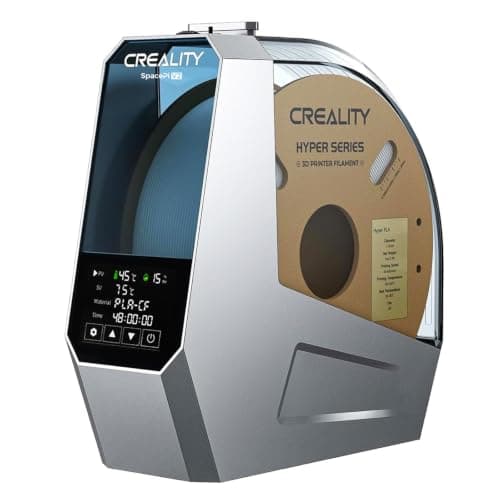 Creality Space Pi Filament DryerCreality Creality Space Pi Filament DryerCreality | Best for most people | 8.6 | $59.49 - Check price on Amazon |
| 2 | 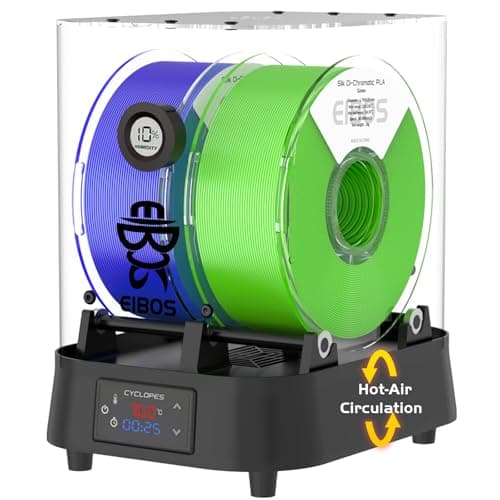 EIBOS CyclopesEIBOS EIBOS CyclopesEIBOS | Best temperature headroom | 8.5 | $89.99 - Check price on Amazon |
| 3 | 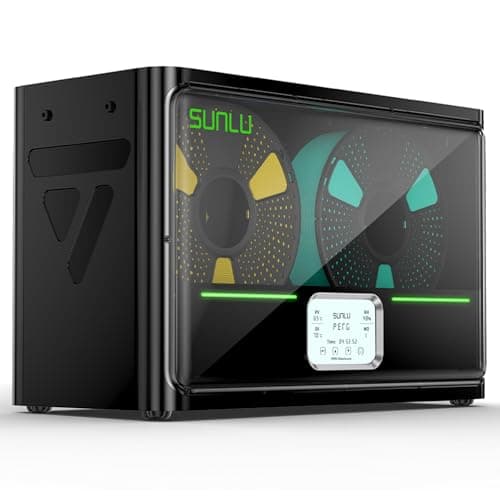 SUNLU FilaDryer S4SUNLU SUNLU FilaDryer S4SUNLU | Best if you run more than one color | 8.5 | $99.44 - Check price on Amazon |
#1 · Best for most people
Creality Space Pi Filament Dryer
Creality · Knowing when the spool is actually dry
The one that tells you whether it worked. Creality publishes real-time humidity and temperature monitoring alongside a 45-70 C range and a 0-48 hour timer, and the humidity readout is the difference between drying filament and hoping you dried filament.
#ad Price as of October 29, 2026, from Amazon. Prices change. How we make money.
What it actually is
A heated, fan-circulated box that holds a spool of filament and drives the absorbed moisture out of it. The filament can be fed to the printer while it sits inside, so it works as storage as well as a dryer.
Does it fit this page?
The cheapest one here and it does the whole job: 45-70 C, a 0-48 hour timer so an overnight dry looks after itself, and one-key presets for twelve filament types. That 70 C top end is what brings Polymaker's published ABS and ASA routine inside the range, which the cheaper single-spool boxes do not reach.
What the manufacturer states
| Figure | Value | Source |
|---|---|---|
| Temperature range | 45 - 70 C, adjustable | Creality Space Pi Filament Dryer product page |
| Drying timer | 0 - 48 hours | Creality Space Pi Filament Dryer product page |
| Monitoring | Real-time humidity and temperature readout | Creality Space Pi Filament Dryer product page |
| Heating | 360 degree PTC hot-air heating | Creality Space Pi Filament Dryer product page |
| Presets | One-key settings for 12 filament types | Creality Space Pi Filament Dryer product page |
| Spool capacity | Not published on the manufacturer's page | Creality Space Pi Filament Dryer product page |
Read from Creality, Space Pi Filament Dryer product page on 2026-09-13. Where a manufacturer does not publish a figure, there is no row for it here.
What is good about it
- A real-time humidity readout, which is the only way to tell a dry spool from a warm one
- 45-70 C covers PLA at the low end and the engineering plastics at the top
- A 0-48 hour timer, so a long overnight dry does not need babysitting
- One-key presets for twelve filament types removes the one setting people get wrong
What is not
- Creality does not publish a spool capacity or a wattage figure on the product page, so we cannot quote either
- Single-spool designs mean drying a second color is a second session
- A dryer is a month-three purchase, not a day-one one - your first spool arrives sealed
- Nothing about it helps a spool that is already fine
Skip this one if
Skip it if your filament lives in its sealed bag with the desiccant between prints. A sealed box and a fresh desiccant pack prevent the problem for a fraction of this price; a dryer fixes it after the fact.
What we cannot tell you
We have not used this dryer. How accurate the humidity sensor is, how evenly the box heats in a cold room, and how long a spool stays dry after a session are all things that need measurement we have not done.
How it scored for a beginner
- Ease for a beginner9.0
- Published data7.0
- Tells you it worked9.5
- Capacity6.5
- Value8.5
Beginner fit 8.6 / 10. That is our editorial read of how well this suits someone buying their first printer, taken off the published specifications — not a test result, and not a verdict on absolute quality. It is deliberately not marked up as a rating in this page’s structured data. How we pick.
#2 · Best temperature headroom
EIBOS Cyclopes
EIBOS · Two spools at once, and engineering plastics that want more than 65 C
The one here with real temperature headroom and a timer you can leave running forever. EIBOS publishes a +/- 2 C control precision, which nothing else on this page publishes at all - and it contradicts itself on the ceiling, printing both 70 C and 80 C on the same page.
#ad Price as of October 29, 2026, from Amazon. Prices change. How we make money.
What it actually is
A two-spool heated dry box with a built-in fan, a 100 W PTC heater, a real-time humidity readout and multiple filament exit holes, so the printer can feed straight out of it while the second spool dries.
Does it fit this page?
Two 1 kg spools at once, a 100 W heater, an unlimited timer mode alongside 1 minute to 24 hours, and the only published control precision on this page at +/- 2 C. Worth knowing before you buy: EIBOS prints both 70 C and 80 C as the ceiling on the same product page, so treat the top of the range as unsettled.
What the manufacturer states
| Figure | Value | Source |
|---|---|---|
| Temperature control range | EIBOS publishes two different ceilings on the same page: its specification table says 80 C or less, while the page heading and feature text say up to 70 C | EIBOS 3D Filament Dryer CYCLOPES product page and specification table |
| Temperature control precision | +/- 2 C | EIBOS 3D Filament Dryer CYCLOPES product page and specification table |
| Rated power | 100 W PTC heater | EIBOS 3D Filament Dryer CYCLOPES product page and specification table |
| Timer | 1 minute to 24 hours, or an unlimited mode that runs until stopped | EIBOS 3D Filament Dryer CYCLOPES product page and specification table |
| Spool capacity | Two spools at 217 mm diameter x 80 mm wide, or one spool at 217 x 170 mm; EIBOS also states four 0.5 kg rolls or two 1 kg rolls | EIBOS 3D Filament Dryer CYCLOPES product page and specification table |
| Capacity with expansion parts | Up to 250 x 170 mm | EIBOS 3D Filament Dryer CYCLOPES product page and specification table |
| Humidity monitoring | Real-time humidity monitor with temperature feedback on the display | EIBOS 3D Filament Dryer CYCLOPES product page and specification table |
| Filament compatibility | 1.75 mm as shipped; 2.85 mm requires swapping the Teflon tube. EIBOS names PLA, nylon and TPU | EIBOS 3D Filament Dryer CYCLOPES product page and specification table |
| Airflow | Built-in fan with multiple filament exit holes, so a spool can be used while drying | EIBOS 3D Filament Dryer CYCLOPES product page and specification table |
| Net weight | 1.5 kg in the specification table, 1.6 kg in the feature text; 2.3 kg total shipping weight | EIBOS 3D Filament Dryer CYCLOPES product page and specification table |
Read from EIBOS, 3D Filament Dryer CYCLOPES product page and specification table on 2026-10-14. Where a manufacturer does not publish a figure, there is no row for it here.
What is good about it
- A published +/- 2 C control precision, which no other dryer on this page publishes in any form
- Two 1 kg spools at once, so the spool you are not printing is drying rather than sitting in open air
- An unlimited timer mode as well as 1 minute to 24 hours, so an overnight dry needs no babysitting
- Either ceiling EIBOS publishes clears the 70 C that Polymaker's own ABS and ASA routine asks for
- Expansion parts take it to 250 x 170 mm, which covers the oversized reels a fixed box cannot
What is not
- EIBOS publishes 70 C and 80 C as the ceiling on the same page, so the top of the range cannot be stated with confidence
- It also publishes two different net weights, 1.5 kg and 1.6 kg, in the same place
- 100 W is more than double the 45 W of the single-spool boxes, so leaving it running costs more
- 2.85 mm filament needs a Teflon tube swap rather than just working
- EIBOS publishes no noise figure, and this is a fan unit that runs for the whole dry cycle
Skip this one if
Skip it if you print one material in one color and never touch ABS or ASA. A single-spool box does that job for less money and less power, and the second bay is capacity you would be paying for and not using.
What we cannot tell you
We have not used this dryer. Which of the two published ceilings the unit actually reaches, how accurate the +/- 2 C claim is against a separate probe, and how loud the fan is over a long cycle are all things the specification does not settle - and EIBOS publishing two different ceilings is itself a reason to measure rather than assume.
How it scored for a beginner
- Ease for a beginner8.0
- Published data7.5
- Tells you it worked8.5
- Capacity8.0
- Value8.0
Beginner fit 8.5 / 10. That is our editorial read of how well this suits someone buying their first printer, taken off the published specifications — not a test result, and not a verdict on absolute quality. It is deliberately not marked up as a rating in this page’s structured data. How we pick.
#3 · Best if you run more than one color
SUNLU FilaDryer S4
SUNLU · Filament that has been open more than a few weeks
The accessory that fixes a failure most beginners misdiagnose. Filament absorbs water from the air; wet filament pops, strings and prints badly, and no amount of leveling fixes it. Four spools at once and you can print straight out of the box.
#ad Price as of October 29, 2026, from Amazon. Prices change. How we make money.
What it actually is
A heated box that drives moisture out of filament and then keeps it dry while you print from it. Plastics like PETG and nylon pull water out of ordinary room air within days, and water in the filament turns to steam in the nozzle.
Does it fit this page?
Four spools at once and a 35-70 C range. That capacity is the difference between drying filament and having dry filament - a multi-color setup with one single-spool dryer means three spools are always sitting in open air waiting their turn.
What the manufacturer states
| Figure | Value | Source |
|---|---|---|
| Capacity | 4 x 1 kg spools | SUNLU FilaDryer S4 published specification |
| Temperature range | 35 - 70 C | SUNLU FilaDryer S4 published specification |
| Heater | 350 W PTC heater | SUNLU FilaDryer S4 published specification |
| Filament diameters supported | 1.75 mm, 2.85 mm, 3.0 mm | SUNLU FilaDryer S4 published specification |
Read from SUNLU, FilaDryer S4 product page on 2026-09-01. Where a manufacturer does not publish a figure, there is no row for it here.
What is good about it
- Four spools at once, which is the difference between drying filament and having dry filament
- 35 - 70 C covers PLA at the low end and nylon at the high end
- You can feed the printer directly from the box, so filament stays dry mid-print
- Fixes a whole class of print failures that look like machine problems
What is not
- A 350 W heater is more power than most printers here draw
- It is a large box that needs somewhere to live next to the printer
- Nothing about it helps on a fresh, sealed, dry spool
- Sealed boxes with desiccant do most of the same job for less money if you are only storing
Skip this one if
Skip it on day one. Your first spool arrives vacuum sealed and dry, and a dryer solves a problem you will not have for weeks. Buy it when a spool that used to print well starts popping and stringing.
What we cannot tell you
We have not used this dryer. How long a spool actually stays dry in a humid room, and how accurate the displayed temperature is, need measurement we have not done.
How it scored for a beginner
- Ease for a beginner9.0
- Fixes a real failure9.5
- Availability8.5
- Value7.5
Beginner fit 8.5 / 10. That is our editorial read of how well this suits someone buying their first printer, taken off the published specifications — not a test result, and not a verdict on absolute quality. It is deliberately not marked up as a rating in this page’s structured data. How we pick.
How these were picked
We have not printed on these machines and we do not pretend to have. What we did was read each manufacturer’s own specification page, take their stated build volume, temperatures and speeds, check that every pick genuinely fits the job in this page’s title, confirm it is still being sold, and pull a live price rather than a remembered one. Every figure names the source it came from, so you can check it yourself in about a minute.
How we pick sets out the full method, including what would change a ranking.
Questions people actually ask
+−Do I really need a filament dryer?
Not on day one — a new spool arrives vacuum sealed and dry. You need one when a spool that used to print well starts popping, stringing or producing rough surfaces, which is usually a few months in and sooner with PETG or TPU.
+−What temperature should I dry filament at?
Use the figure the manufacturer publishes for the spool you own. Overture publishes 50 °C for 7 hours for its PLA and 60 °C for 5 hours for its PETG; Polymaker publishes 55 °C for 6 hours for PLA Pro and 70 °C for 6 hours for ABS and ASA. Overture also warns that over-drying makes filament brittle.
+−Can I dry filament in the oven?
We would not. Domestic ovens cycle around their setpoint and the swing at the low end of the dial can be wider than the margin between drying a spool and deforming it, and many ovens will not hold 50-55 °C at all. A dedicated box holds the temperature and shows you the humidity.
+−How do I know when filament is dry?
By watching the humidity readout fall and level off — which is why we weight that feature highest. Without one you are relying on elapsed time and hoping. All three picks here publish a humidity display.
+−Is a sealed box with desiccant enough?
For prevention, usually yes, and it costs far less. Sealed storage stops filament absorbing moisture; a dryer removes moisture already absorbed. Most people want the box first and the dryer when prevention has already failed on a spool they care about.