Head to head
Bambu Lab A1 vs P1S
One question decides this and it is not about speed. Do you need an enclosure — for the materials, or for the room the printer lives in? If not, the extra money buys you very little in year one.
By Scooter M. · Published · Last reviewed
How this page is funded: the buy links below are affiliate links. If you buy through one we earn a commission, at no extra cost to you. It does not change the order of the picks or a word of what we say about them. Full disclosure.
Printers we claim to have tested: 0. Everyone in this category says they tested twenty machines. We have not tested any, and we would rather say so. What we did instead is on this page: the manufacturer’s own published specification for every pick, cited and dated; the arithmetic on what it costs to run, with the inputs shown; a live price rather than a remembered one; and a plain answer on who should skip each machine.
The short answer
Buy the A1 unless you need the enclosure. You need it for two reasons only: you want ABS or ASA, or the printer has to live in a room where noise and smell matter. Everything else the P1S adds is speed, and speed is the least important thing about a first printer.
What is genuinely different
From Bambu Lab's published technical specifications, read on 2026-09-01.
| Figure | A1 | P1S |
|---|---|---|
| Frame | Open, bed-slinger | Enclosed, CoreXY |
| Build volume | 256 x 256 x 256 mm | 256 x 256 x 256 mm |
| Max hot end temperature | 300 C | 300 C |
| Max build plate temperature | 100 C | 100 C |
| Max speed | 500 mm/s | 500 mm/s |
| Max acceleration | 10,000 mm/s2 | 20,000 mm/s2 |
| Filaments rated ideal | PLA, PETG, TPU, PVA | Adds ABS and ASA, via the enclosure |
Note what is identical: the build volume. These two machines make the same size of object. You are not buying more room, you are buying a different set of conditions to make it in.
The enclosure, honestly
What it unlocks. ABS and ASA shrink measurably as they cool. On an open frame the bottom of a tall part contracts while the top is still being laid down hot, and the corners lift. A warm chamber slows that down. This is why every open-frame machine on this site — including the A1 — lists those materials as not recommended.
What else it buys. Quiet, and containment of smell. Less discussed and frequently the actual reason people choose one. A printer running overnight in a studio flat is a very different proposition inside a box.
What it costs you beyond money. Routine maintenance is fiddlier through a door than across an open frame. And for PLA — which is what your first year is — a hot chamber is mildly counterproductive, because PLA prefers to be cooled quickly. Enclosed machines vent for exactly this reason, which is another way of saying the enclosure is switched off for the material you will use most.
CoreXY versus a bed-slinger
The A1 moves its print plate back and forth under a head that moves side to side. The P1S keeps the plate still and moves the head in two axes. Not accelerating the plate — and everything printed on it — is how the P1S reaches a published 20,000 mm/s² against the A1’s 10,000.
In practice this shows up as shorter prints and slightly better results on tall thin objects, where a moving bed is most likely to wobble the part. It makes nothing easier and it will not change your first month.
The honest recommendation for a first printer
The A1, and put the difference into filament and the starter kit. Five spools and a filament dryer will do more for your first three months than an enclosure will, because your first three months are PLA.
Buy the P1S when a project demands ABS, or when the answer to “where will this live” is a bedroom or a shared studio. Those are real reasons and they are the only two.
If the enclosure is what you want but not at this price, the enclosed band page includes a cheaper way in.
The P1S also has a successor now. Where each machine sits in Bambu Lab’s current lineup, and which of them are first printers at all, is on the best Bambu Lab printers.
What we would buy for this
Chosen from the same registry as our roundups, on the manufacturer’s own published figures and a live price.
Bambu Lab A1
Bambu Lab · A first printer you will not outgrow
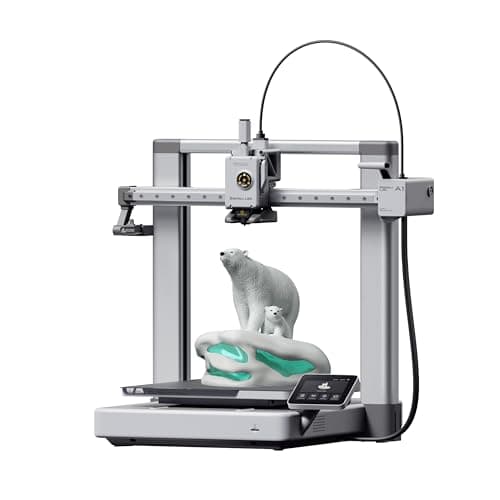
The A1 mini's larger sibling, and the better buy the moment you have a specific large thing in mind. Same self-calibration, 256 mm cubed instead of 180, and a 100 C bed rather than 80 C — which is the spec that actually widens what you can print.
#ad Price as of October 19, 2026, from Amazon. Prices change. How we make money.
What it actually is
The full-size version of the A1: same open-frame layout, same automatic calibration, a bigger bed and a hotter one. The extra bed temperature matters because materials that shrink as they cool need a warm plate to stay stuck to it.
What the manufacturer states
| Figure | Value | Source |
|---|---|---|
| Build volume | 256 x 256 x 256 mm | Bambu Lab A1 technical specifications |
| Max hot end temperature | 300 C | Bambu Lab A1 technical specifications |
| Max build plate temperature | 100 C | Bambu Lab A1 technical specifications |
| Max toolhead speed | 500 mm/s | Bambu Lab A1 technical specifications |
| Max toolhead acceleration | 10,000 mm/s2 | Bambu Lab A1 technical specifications |
| Filaments rated ideal | PLA, PETG, TPU, PVA | Bambu Lab A1 technical specifications |
| Machine dimensions | 465 x 410 x 430 mm | Bambu Lab A1 technical specifications |
| Net weight | 8.3 kg | Bambu Lab A1 technical specifications |
| Max power | 350 W at 110 V | Bambu Lab A1 technical specifications |
Read from Bambu Lab, A1 technical specifications on 2026-09-01. Where a manufacturer does not publish a figure, there is no row for it here.
What is good about it
- 256 mm cubed covers almost everything a first-year printer is asked to make
- 100 C bed rather than the mini's 80 C, which is the difference that makes larger PETG parts stick
- Identical hands-off calibration to the A1 mini, so nothing gets harder as the machine gets bigger
- Bambu Lab publishes a full specification sheet, so every number on this page is checkable in a minute
What is not
- 465 mm wide and 8.3 kg — it needs a dedicated shelf, not a corner of a desk
- 350 W at US voltage against the mini's 150 W, so it costs meaningfully more to run
- Still open-frame, so the material limits are the same as the mini's despite the hotter bed
- Multi-color is again a separate AMS lite purchase
Skip this one if
Skip it if your desk is the only place it can go and you have not measured that desk. It is nearly half a meter wide. If you are unsure whether you will use the extra volume, the mini is the cheaper mistake.
What we cannot tell you
We have not printed on this machine. Noise at full speed, long-term belt and rod wear, and how often the auto-calibration actually needs intervention are all beyond what a specification sheet can tell you.
How it scored for a beginner
- Setup out of the box9.5
- Auto-calibration10.0
- First-layer forgiveness9.5
- Parts and filament availability9.0
- Running cost8.0
- Help when it goes wrong9.0
Beginner fit 9.0 / 10. That is our editorial read of how well this suits someone buying their first printer, taken off the published specifications — not a test result, and not a verdict on absolute quality. It is deliberately not marked up as a rating in this page’s structured data. How we pick.
Bambu Lab P1S
Bambu Lab · A first printer for someone who already knows they want ABS or ASA
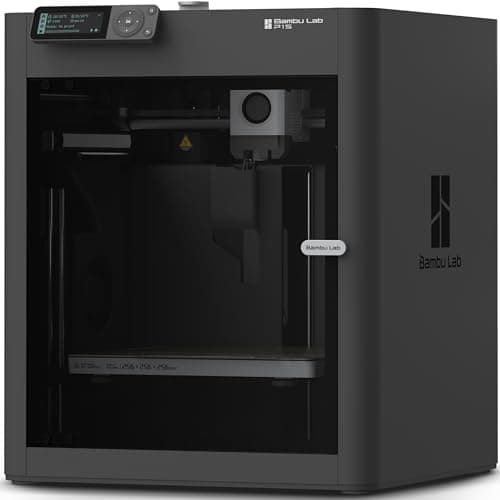
An enclosed CoreXY machine, which is a different class of thing from an A1: the bed stays still and the box holds heat, so the materials the A1 refuses become possible. It is more printer than a first-timer needs, and the right answer if you already know you want ABS.
#ad Price as of October 19, 2026, from Amazon. Prices change. How we make money.
What it actually is
A boxed printer using CoreXY motion — the print head moves in two axes while the bed only goes up and down. Keeping the bed still lets it move faster, and the enclosure keeps the chamber warm so plastics that shrink as they cool do not peel off the plate.
What the manufacturer states
| Figure | Value | Source |
|---|---|---|
| Build volume | 256 x 256 x 256 mm | Bambu Lab P1S technical specifications |
| Enclosure | Enclosed, plastic and glass | Bambu Lab P1S technical specifications |
| Max hot end temperature | 300 C | Bambu Lab P1S technical specifications |
| Max build plate temperature | 100 C | Bambu Lab P1S technical specifications |
| Max speed | 500 mm/s | Bambu Lab P1S technical specifications |
| Max acceleration | 20,000 mm/s2 | Bambu Lab P1S technical specifications |
| Nozzle | All-metal hot end, 0.4 mm included; 0.2, 0.6 and 0.8 mm optional | Bambu Lab P1S technical specifications |
| Filaments rated ideal | PLA, PETG, TPU, PVA, PET, ABS, ASA | Bambu Lab P1S technical specifications |
| Filaments rated capable | PA, PC | Bambu Lab P1S technical specifications |
| Air filter | Activated carbon | Bambu Lab P1S technical specifications |
| Physical dimensions | 389 x 389 x 458 mm | Bambu Lab P1S technical specifications |
| Net weight | 12.95 kg | Bambu Lab P1S technical specifications |
| Max power | 350 W at 110 V | Bambu Lab P1S technical specifications |
Read from Bambu Lab, P1S product page and specification table on 2026-09-06. Where a manufacturer does not publish a figure, there is no row for it here.
What is good about it
- Enclosed, so ABS and ASA are on the menu rather than off it
- CoreXY at 20,000 mm/s2 acceleration — twice the A1's rated figure
- Same 256 mm cubed volume as the A1 in a smaller footprint, because the bed does not travel
- The enclosure also contains most of the noise and the smell, which matters if it lives in a room you sit in
What is not
- Noticeably more expensive than an A1 for a beginner who will print PLA for a year
- The enclosure makes routine maintenance fiddlier than an open frame
- Nothing about it is easier to learn on than an A1 mini — it is just more capable
- Multi-color is again a separate AMS purchase
Skip this one if
Skip it if your honest answer to 'what will you print' is 'I am not sure yet'. Everything the P1S adds over an A1 is aimed at materials a beginner should not start with. Buy it when a specific project demands ABS, not before.
What we cannot tell you
We have not printed on this machine. Chamber temperature in a cold room, real ABS warping behavior and long-term fan noise are not on any specification sheet.
How it scored for a beginner
- Setup out of the box8.5
- Auto-calibration9.5
- First-layer forgiveness9.0
- Parts and filament availability9.0
- Running cost7.0
- Help when it goes wrong9.0
Beginner fit 8.4 / 10. That is our editorial read of how well this suits someone buying their first printer, taken off the published specifications — not a test result, and not a verdict on absolute quality. It is deliberately not marked up as a rating in this page’s structured data. How we pick.
How these were picked
We have not printed on these machines and we do not pretend to have. What we did was read each manufacturer’s own specification page, take their stated build volume, temperatures and speeds, check that every pick genuinely fits the job in this page’s title, confirm it is still being sold, and pull a live price rather than a remembered one. Every figure names the source it came from, so you can check it yourself in about a minute.
How we pick sets out the full method, including what would change a ranking.
Questions people actually ask
+−Is the P1S worth it over the A1?
Only if you need the enclosure — for ABS and ASA, or because the printer lives somewhere noise and smell matter. The build volume is identical and the extra acceleration will not change your first month.
+−Can the A1 print ABS if I build my own enclosure?
People do build enclosures for open-frame machines, and it can help with warping. It is not what the manufacturer rates the machine for, so you are on your own if something goes wrong, and electronics that were designed to sit in open air do not always appreciate being boxed in. We would not recommend it as a plan for a first printer.
+−Does the P1S print PLA better than the A1?
Not meaningfully, and on a warm day a hot chamber is mildly unhelpful for PLA, which prefers to be cooled quickly. Enclosed machines vent for that reason. The P1S is faster; the PLA objects are much the same.
Sources
Read next
- The Best Enclosed 3D Printers
- Elegoo Centauri Carbon vs Bambu Lab P1S
- Bambu Lab P1S Review
- Bambu Lab A1 vs A1 mini
- The Best 3D Printers Under $1,000
- Bambu Lab A1 Review
- The Best Bambu Lab 3D Printers
- Where to Put Your 3D Printer
- 3D Printer Filament Types and What They Are For
- The Best Filament for the Bambu Lab P1S
- Bambu Lab P1S vs P2S