Head to head
Prusa vs Bambu Lab
The most-argued comparison in this hobby, and the one where both sides are right. These two companies are not really selling the same product, and once you see what each is optimizing for the choice gets much easier.
By Scooter M. · Published · Last reviewed
How this page is funded: the buy links below are affiliate links. If you buy through one we earn a commission, at no extra cost to you. It does not change the order of the picks or a word of what we say about them. Full disclosure.
Printers we claim to have tested: 0. Everyone in this category says they tested twenty machines. We have not tested any, and we would rather say so. What we did instead is on this page: the manufacturer’s own published specification for every pick, cited and dated; the arithmetic on what it costs to run, with the inputs shown; a live price rather than a remembered one; and a plain answer on who should skip each machine.
The short answer
For a first printer, buy Bambu Lab. For a machine you intend to keep running for a decade and repair yourself, buy Prusa. The gap is not print quality — both publish comparable envelopes. It is price and philosophy: Prusa states that nothing on the CORE One+ is glued, that it comes apart with a screwdriver and that parts are stocked for years. You pay several times a beginner-machine price for that.
This argument is usually conducted as though one company makes better printers. They do not make the same kind of thing. Bambu Lab optimizes for the printer disappearing into the background; Prusa optimizes for the printer being knowable and fixable. Both are legitimate goals and they pull the hardware in different directions.
The published figures
Read from each manufacturer's own pages. Bambu Lab figures read 2026-09-06; Prusa figures read 2026-09-13.
| Prusa CORE One+ | Bambu Lab P2S | Bambu Lab A1 mini | |
|---|---|---|---|
| Build volume | 250 x 220 x 270 mm | 256 x 256 x 256 mm | 180 x 180 x 180 mm |
| Frame | Enclosed CoreXY, all-steel | Enclosed CoreXY | Open frame, bed-slinger |
| Chamber | Actively heated to 55 C | 50 C, flap-controlled | None |
| Max plate temperature | Not published on the product page | 110 C | 80 C |
| Advanced materials | ASA, ABS, PC, PA | ABS, ASA, PA, PC, PET, fiber-reinforced | Not recommended |
| Price band | Several times a beginner machine | Upper mid | Entry |
Read the build-volume row carefully, because it is the row people get wrong. Prusa’s CORE One+ is 14.9 liters in a taller, narrower box; the P2S is a 256 mm cube. Neither is meaningfully larger in practice, and both hold the great majority of what a hobbyist prints.
What Prusa is actually selling
Repairability, stated explicitly. Prusa’s own copy says the enclosure is structural rather than an accessory, nothing is glued, everything comes apart with a screwdriver, and replacement parts are stocked for years. That is an unusual promise to put in writing, and it is the core of the value proposition.
An actively controlled chamber. The CORE One+ heats its chamber to 55 °C and monitors it continuously, with smart ventilation so the door stays shut for PLA instead of being propped open. Active control is a genuine step beyond a passively warm box.
Open hardware and an ecosystem. Prusa publishes designs, runs its own slicer and its own model library, and the community around the machines is long-established. If the phrase “I want to understand my printer” describes you, this is where that instinct is best served.
A kit option. Prusa still sells assembly kits. Some people consider building the machine part of the value; most beginners should not.
What Bambu Lab is actually selling
The setup disappearing. Automatic bed leveling, automatic Z-offset probing and automatic flow calibration before every print. This is the single biggest predictor of whether somebody is still printing in six months, and it is why our beginner picks lead with Bambu machines.
Price. An A1 mini costs a fraction of a CORE One+. For somebody who is not yet certain they will use a 3D printer, that difference is not a detail — it is the difference between an experiment and a commitment.
A mature multi-color system. The AMS is the most-used multi-spool system in consumer printing. It still purges filament at every color change, which is a cost we think people underestimate, but the system works.
The honest criticisms of each
Against Prusa: the price is hard to justify for a first machine, and much of what you pay for — serviceability, parts availability for years, open design — is worth nothing to somebody who will never open the case. A CORE One+ bought by a person who wanted an appliance is money spent on values they do not hold.
Against Bambu Lab: the machines are more closed. You are further inside one company’s ecosystem for firmware, slicer and parts, and when something goes wrong you are more likely to be following the manufacturer’s process than a community one. Some people find that reassuring; others find it a reason to buy the other machine.
Where each one wins outright
Buy Prusa if: you want to repair rather than replace; you value open hardware and publish-it-all documentation; you are buying a machine for a workshop or a print farm that must be maintainable for years; or you genuinely enjoy assembly.
Buy Bambu Lab if: this is your first printer; you want objects rather than a hobby machine; your budget is anywhere near the beginner band; or multi-color matters to you soon.
If your real question is the enclosure rather than the brand, the cheaper ways into one are on the best enclosed 3D printers, and the other brand-level comparison most buyers face is Bambu Lab against Creality.
One note on where you buy the Prusa
The CORE One+ is listed on Amazon and sold there by Amazon itself, which is convenient. Prusa also sells direct, and for a machine at this price the warranty and support routing are worth checking before you order rather than after — where to buy a 3D printer covers what changes between channels.
What we would buy for this
Chosen from the same registry as our roundups, on the manufacturer’s own published figures and a live price.
Bambu Lab P2S
Bambu Lab · An enclosed printer bought to keep, not to learn on
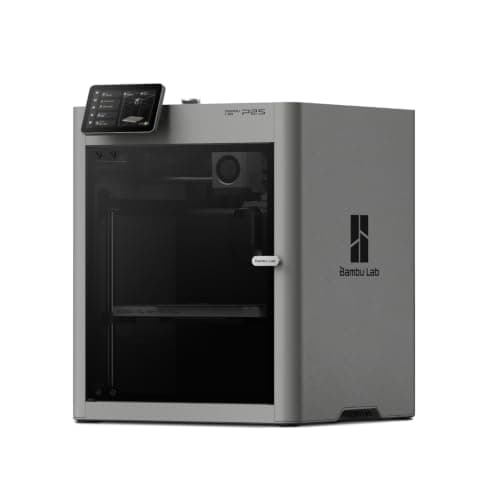
The P1S rebuilt: the same 256 mm cubed enclosed box, a hotter plate, a faster head and a cooling system that draws outside air so the door can stay shut on PLA. It is the enclosed Bambu to buy if you are buying one to keep, and it is still more machine than a first month needs.
#ad Price as of October 29, 2026, from Amazon. Prices change. How we make money.
What it actually is
An enclosed CoreXY printer — the head moves in two axes while the plate only rises, and a box surrounds the whole thing. The box holds heat, which is what keeps plastics that shrink as they cool stuck to the plate, and it holds most of the noise and smell as well.
What the manufacturer states
| Figure | Value | Source |
|---|---|---|
| Build volume | 256 x 256 x 256 mm | Bambu Lab P2S technical specifications |
| Enclosure | Enclosed; plastic and glass outer frame, plastic and steel chassis | Bambu Lab P2S technical specifications |
| Max nozzle temperature | 300 C | Bambu Lab P2S technical specifications |
| Max heatbed temperature | 110 C | Bambu Lab P2S technical specifications |
| Max toolhead speed | 600 mm/s | Bambu Lab P2S technical specifications |
| Max toolhead acceleration | 20,000 mm/s2 | Bambu Lab P2S technical specifications |
| Max hot end flow | 40 mm3/s | Bambu Lab P2S technical specifications |
| Nozzle | Hardened steel, 0.4 mm included; 0.2, 0.6 and 0.8 mm supported | Bambu Lab P2S technical specifications |
| Filaments supported | PLA, PETG, ABS, ASA, TPU, PET, PA, PC, PVA and carbon or glass fiber reinforced grades | Bambu Lab P2S technical specifications |
| Filtration | Activated carbon; VOC and particulate filtration supported | Bambu Lab P2S technical specifications |
| Physical dimensions | 392 x 406 x 478 mm | Bambu Lab P2S technical specifications |
| Net weight | 14.9 kg | Bambu Lab P2S technical specifications |
| Max power | 1000 W at 110 V | Bambu Lab P2S technical specifications |
Read from Bambu Lab, P2S technical specifications on 2026-09-04. Where a manufacturer does not publish a figure, there is no row for it here.
What is good about it
- Enclosed, with an activated carbon filter Bambu Lab rates for VOC and particulate filtration — the version of ABS printing that belongs in a room you sit in
- The Adaptive Airflow System draws cool air from outside the chamber, so Bambu Lab states low-temperature filaments can be printed with the door closed
- A 110 C plate against the P1S's 100 C and a rated 40 mm3/s flow, so large parts in engineering plastics are less of a gamble
- Auto bed leveling, nozzle offset and flow calibration are all documented and automatic, so nothing about setup is harder than an A1's
What is not
- It is the most expensive machine on this site's beginner shortlist, and every advantage it holds is aimed at materials a first year does not reach
- 1000 W at 110 V while the plate heats — several times the draw of an A1 mini, and worth knowing before it shares a circuit with a space heater
- 14.9 kg and 478 mm tall, so it is a shelf machine rather than a desk machine
- Multi-color still means buying the AMS 2 Pro, so the headline price is not the multi-color price
Skip this one if
Skip it if you have not yet printed anything. The P2S is a better machine than an A1 in every measurable way and not a better first machine, because almost none of what it adds shows up in PLA. Buy it when a project names ABS, ASA or a fiber-filled filament out loud.
What we cannot tell you
We have not printed on this machine. How quiet it really is with the door shut, whether the carbon filter meaningfully changes the smell of ABS in a small room, and how the servo extruder holds up over a year are not answerable from a specification sheet.
How it scored for a beginner
- Setup out of the box8.5
- Auto-calibration9.5
- First-layer forgiveness9.0
- Parts and filament availability9.0
- Running cost6.5
- Help when it goes wrong9.0
Beginner fit 8.5 / 10. That is our editorial read of how well this suits someone buying their first printer, taken off the published specifications — not a test result, and not a verdict on absolute quality. It is deliberately not marked up as a rating in this page’s structured data. How we pick.
Prusa CORE One+
Prusa Research · Somebody who wants to own the machine, not just its output
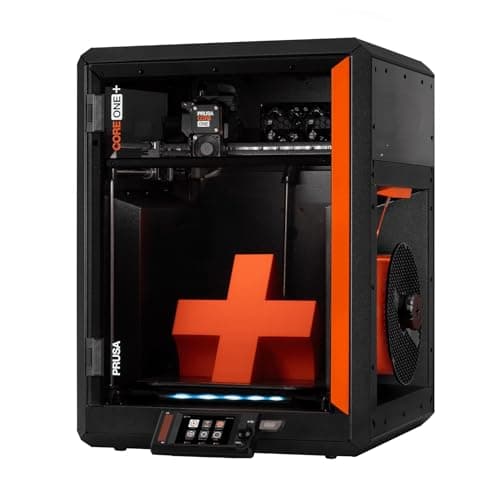
The machine people mean when they say they want something they can fix. Prusa publishes a 250 x 220 x 270 mm enclosed CoreXY with an actively controlled chamber up to 55 C, and says plainly that nothing on it is glued and everything comes apart with a screwdriver.
#ad Price as of October 29, 2026, from Amazon. Prices change. How we make money.
What it actually is
A fully enclosed CoreXY printer with a heated, ventilated chamber, built around an all-steel structural enclosure. It is designed to be disassembled and repaired, with spare parts stocked for years, and it costs several times what a first printer should.
What the manufacturer states
| Figure | Value | Source |
|---|---|---|
| Build volume | 250 x 220 x 270 mm (14.9 liters) | Prusa Research CORE One+ product page |
| Motion and frame | Fully enclosed CoreXY; all-steel structural enclosure | Prusa Research CORE One+ product page |
| Chamber | Actively controlled, heats to 55 C, with smart ventilation | Prusa Research CORE One+ product page |
| Materials | ASA, ABS, PC, PA and other advanced materials, plus standard 1.75 mm filament | Prusa Research CORE One+ product page |
| Vibration control | Input Shaper firmware compensation | Prusa Research CORE One+ product page |
| Serviceability | Nothing glued; disassembles with a screwdriver, spare parts stocked for years | Prusa Research CORE One+ product page |
Read from Prusa Research, CORE One+ product page on 2026-09-13. Where a manufacturer does not publish a figure, there is no row for it here.
What is good about it
- An actively heated chamber to 55 C, which is a genuine step beyond the passively warm boxes in the band below
- Built to be repaired: Prusa states nothing is glued, everything comes apart with a screwdriver, and parts are stocked for years
- Prusa publishes 50 percent less desk space than an MK4S in an enclosure with 30 percent more print volume
- Smart ventilation means the door stays shut for PLA rather than being propped open
What is not
- It costs several times what this site's beginner picks cost, and nothing about it makes a first month easier
- 250 x 220 x 270 mm is less floor area than the 256 mm cubed machines it competes with, even though total volume is higher
- The repairability that justifies the price is worth nothing to somebody who never intends to open the machine
- Sold on Amazon by Amazon rather than by Prusa, so warranty and support routing is worth checking before you order
Skip this one if
Skip it if this is your first printer. Everything you are paying for - the chamber, the steel, the serviceability - is aimed at somebody who already knows what they want to print and expects to keep the machine for a decade. Buy an A1 mini and come back in two years.
What we cannot tell you
We have not printed on this machine. Whether the chamber control makes ABS genuinely uneventful, how loud it is, and whether the repairability premium pays back over years are all owner questions we cannot answer from a specification page.
How it scored for a beginner
- Setup out of the box8.0
- Auto-calibration9.0
- First-layer forgiveness8.5
- Parts and filament availability10.0
- Running cost6.0
- Help when it goes wrong9.5
Beginner fit 7.4 / 10. That is our editorial read of how well this suits someone buying their first printer, taken off the published specifications — not a test result, and not a verdict on absolute quality. It is deliberately not marked up as a rating in this page’s structured data. How we pick.
Bambu Lab A1 mini
Bambu Lab · A genuine first printer
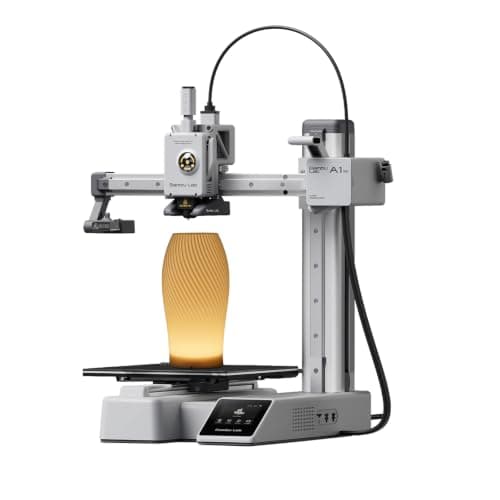
The one to get if you have never done this before. It calibrates itself before every print — bed mesh, Z-offset, flow, resonance — so the part of 3D printing that used to defeat beginners is a step you never see. The build volume is the price you pay.
#ad Price as of October 29, 2026, from Amazon. Prices change. How we make money.
What it actually is
A small open-frame filament printer. Filament is a 1.75 mm plastic string on a spool; the machine melts it and draws your object one layer at a time. Open-frame means there is no box around it, which is fine for PLA and a limitation for materials that warp.
What the manufacturer states
| Figure | Value | Source |
|---|---|---|
| Build volume | 180 x 180 x 180 mm | Bambu Lab A1 mini technical specifications |
| Max hot end temperature | 300 C | Bambu Lab A1 mini technical specifications |
| Max build plate temperature | 80 C | Bambu Lab A1 mini technical specifications |
| Max toolhead speed | 500 mm/s | Bambu Lab A1 mini technical specifications |
| Max toolhead acceleration | 10,000 mm/s2 | Bambu Lab A1 mini technical specifications |
| Filaments rated ideal | PLA, PETG, TPU, PVA | Bambu Lab A1 mini technical specifications |
| Filaments not recommended | ABS, ASA, PC, PA, PET, carbon/glass fiber reinforced | Bambu Lab A1 mini technical specifications |
| Machine dimensions | 347 x 315 x 365 mm | Bambu Lab A1 mini technical specifications |
| Net weight | 5.5 kg | Bambu Lab A1 mini technical specifications |
| Max power | 150 W | Bambu Lab A1 mini technical specifications |
Read from Bambu Lab, A1 mini technical specifications on 2026-09-01. Where a manufacturer does not publish a figure, there is no row for it here.
What is good about it
- Full auto-calibration on every print, per Bambu Lab's own specification — no paper-under-the-nozzle ritual
- Rated ideal for PLA, PETG, TPU and PVA, which covers everything a beginner should print in year one
- 150 W maximum power draw is the lowest of any printer on this site, so running cost is trivial
- 5.5 kg and 347 mm wide — it fits on a desk without rearranging the room
What is not
- 180 mm cubed is genuinely small. A full-size helmet or a large cosplay prop will not fit
- Bambu Lab rates ABS, ASA, PC and fiber-reinforced filaments as not recommended on this machine
- The multi-color AMS lite is a separate purchase, so the headline price is not the multi-color price
- Bambu Lab's own Amazon store lists this machine bundled with an LED lamp kit rather than on its own, so the price on our button is for that bundle. The bare printer is sold direct on Bambu Lab's store
- Open frame, so it is at the mercy of a draft from a window or an air conditioning vent
Skip this one if
Skip it if you already know the thing you want to print is bigger than a shoebox, or if you specifically want ABS or a carbon-fiber-filled filament. Bambu Lab itself lists those materials as not recommended here, and buying a machine you intend to use outside its rated envelope is how a first printer becomes a frustrating one.
What we cannot tell you
We have not printed on this machine. Long-term reliability, real-world noise in a quiet room, and how the textured plate holds up after a year are all things we cannot honestly report without owning one.
How it scored for a beginner
- Setup out of the box9.5
- Auto-calibration10.0
- First-layer forgiveness9.5
- Parts and filament availability9.0
- Running cost10.0
- Help when it goes wrong9.0
Beginner fit 9.2 / 10. That is our editorial read of how well this suits someone buying their first printer, taken off the published specifications — not a test result, and not a verdict on absolute quality. It is deliberately not marked up as a rating in this page’s structured data. How we pick.
How these were picked
We have not printed on these machines and we do not pretend to have. What we did was read each manufacturer’s own specification page, take their stated build volume, temperatures and speeds, check that every pick genuinely fits the job in this page’s title, confirm it is still being sold, and pull a live price rather than a remembered one. Every figure names the source it came from, so you can check it yourself in about a minute.
How we pick sets out the full method, including what would change a ranking.
Questions people actually ask
+−Is Prusa better than Bambu Lab?
Not better, different. Prusa sells repairability, open hardware and an actively heated chamber at several times the price; Bambu Lab sells automated setup and a mature multi-color system at a fraction of it. For a first printer Bambu is the easier recommendation.
+−Is a Prusa worth the extra money?
It is if you intend to keep and maintain the machine for years. Prusa states that nothing on the CORE One+ is glued, that it comes apart with a screwdriver and that parts are stocked for years. If you never plan to open the case, you are paying for a promise you will not use.
+−Which is better for a beginner, Prusa or Bambu?
Bambu Lab, on price and on automation. An A1 mini costs a fraction of a CORE One+ and removes the setup steps that historically ended people’s interest. Prusa is a better second printer than a first one.
+−Can a Prusa print the same materials as a Bambu?
At this level, broadly yes. Prusa publishes ASA, ABS, PC and PA for the CORE One+ thanks to its 55 °C actively heated chamber, and Bambu Lab publishes a similar list for the enclosed P2S. The open-frame Bambu machines are the exception — those are rated for PLA, PETG and TPU only.