Review
Bambu Lab A1 mini Review
Our pick for a first printer, on one specific argument: it removes the three setup steps that historically ended people's interest in 3D printing. The price of that is 180 millimeters in every direction.
By Scooter M. · Published · Last reviewed
How this page is funded: the buy links below are affiliate links. If you buy through one we earn a commission, at no extra cost to you. It does not change the order of the picks or a word of what we say about them. Full disclosure.
Printers we claim to have tested: 0. Everyone in this category says they tested twenty machines. We have not tested any, and we would rather say so. What we did instead is on this page: the manufacturer’s own published specification for every pick, cited and dated; the arithmetic on what it costs to run, with the inputs shown; a live price rather than a remembered one; and a plain answer on who should skip each machine.
The short answer
Buy it if this is your first printer. Bambu Lab publishes automatic bed leveling, automatic Z-offset probing and automatic flow calibration — the three steps that used to defeat beginners — and rates the machine ideal for PLA, PETG, TPU and PVA. The tradeoff is the 180 mm cubed build volume, which is genuinely small.
What this machine is for
Somebody who wants to print things rather than to own a printer. That distinction sounds glib and it is the whole argument. Historically, buying a first 3D printer meant buying a project: you assembled it, you leveled the bed with a sheet of paper and four thumbwheels, you discovered your Z-offset by trial and error over an evening, and then you started learning about the actual hobby. A great many people never got past that.
The A1 mini is one of the machines that made that history rather than the present. Bambu Lab’s own documentation states that it probes the bed with the nozzle to measure absolute Z-offset, levels the bed with no manual adjustment, and runs flow-dynamics and vibration calibration automatically. That is not a small convenience. It is the removal of the failure mode.
The specification, and what each figure means for you
180 × 180 × 180 mm build volume. Smaller than every other beginner machine we recommend. In practice it holds a desk organizer, a phone stand, a full set of board game inserts, most replacement parts, and terrain pieces. It does not hold a helmet, a full-size mask, or anything designed to be held in two hands.
300 °C maximum hot end, 80 °C maximum plate. The hot end is generous; the plate is the limiting figure. 80 °C is plenty for PLA and adequate for PETG on small parts. It is why the full-size A1 — which publishes a 100 °C plate — is the better machine for larger PETG work.
PLA, PETG, TPU and PVA rated ideal; ABS, ASA, PC, PA and fiber-reinforced not recommended. Read that as the manufacturer telling you what the machine is for. An open frame cannot hold chamber heat, and the plastics on the second list want chamber heat. This is a limit, not a defect, and it happens to match exactly what a first year should be printing.
150 W maximum power. The lowest figure of any machine on this site, by a factor of more than two. It makes the running cost effectively a rounding error — we do the arithmetic on the setup cost page.
347 × 315 × 365 mm, 5.5 kg. It fits on furniture you already own, which is not true of everything in this category.
What the AMS lite changes, and why we say buy it later
The A1 mini supports up to four colors with the AMS lite, sold separately. It works by feeding four spools into the single nozzle in turn, cutting and swapping filament at every color change — which means every change costs time and purges filament into a waste block.
Our advice is consistent across the site: buy the printer, learn it in one color, add the AMS lite in month three. It is one of the very few upgrades in this hobby that is genuinely deferrable, and deferring it means you are solving one problem at a time. The multi-color page goes through the full argument.
Who should skip it
Three people. Somebody who already knows the thing they want to print is bigger than a shoebox — buy the A1 instead, it is the same machine grown up. Somebody who specifically wants ABS or a carbon-fiber-filled filament, because Bambu Lab itself rates those as not recommended here. And somebody whose real interest is in understanding and modifying the machine, for whom the Ender-3 V3 SE is more rewarding and cheaper.
What to buy with it
A 1 kg spool of PLA at minimum — the coil in the box is a sample. The filament page for Bambu machines covers the one genuine advantage of the house-brand spool. Then read setting up your first printer before the box arrives, and bookmark the bed adhesion page, which has a section specific to this machine’s textured plate.
What we would buy for this
Chosen from the same registry as our roundups, on the manufacturer’s own published figures and a live price.
Bambu Lab A1 mini
Bambu Lab · A genuine first printer
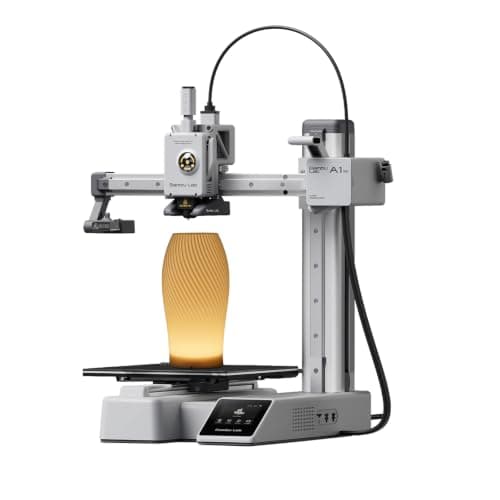
The one to get if you have never done this before. It calibrates itself before every print — bed mesh, Z-offset, flow, resonance — so the part of 3D printing that used to defeat beginners is a step you never see. The build volume is the price you pay.
#ad Price as of October 19, 2026, from Amazon. Prices change. How we make money.
What it actually is
A small open-frame filament printer. Filament is a 1.75 mm plastic string on a spool; the machine melts it and draws your object one layer at a time. Open-frame means there is no box around it, which is fine for PLA and a limitation for materials that warp.
What the manufacturer states
| Figure | Value | Source |
|---|---|---|
| Build volume | 180 x 180 x 180 mm | Bambu Lab A1 mini technical specifications |
| Max hot end temperature | 300 C | Bambu Lab A1 mini technical specifications |
| Max build plate temperature | 80 C | Bambu Lab A1 mini technical specifications |
| Max toolhead speed | 500 mm/s | Bambu Lab A1 mini technical specifications |
| Max toolhead acceleration | 10,000 mm/s2 | Bambu Lab A1 mini technical specifications |
| Filaments rated ideal | PLA, PETG, TPU, PVA | Bambu Lab A1 mini technical specifications |
| Filaments not recommended | ABS, ASA, PC, PA, PET, carbon/glass fiber reinforced | Bambu Lab A1 mini technical specifications |
| Machine dimensions | 347 x 315 x 365 mm | Bambu Lab A1 mini technical specifications |
| Net weight | 5.5 kg | Bambu Lab A1 mini technical specifications |
| Max power | 150 W | Bambu Lab A1 mini technical specifications |
Read from Bambu Lab, A1 mini technical specifications on 2026-09-01. Where a manufacturer does not publish a figure, there is no row for it here.
What is good about it
- Full auto-calibration on every print, per Bambu Lab's own specification — no paper-under-the-nozzle ritual
- Rated ideal for PLA, PETG, TPU and PVA, which covers everything a beginner should print in year one
- 150 W maximum power draw is the lowest of any printer on this site, so running cost is trivial
- 5.5 kg and 347 mm wide — it fits on a desk without rearranging the room
What is not
- 180 mm cubed is genuinely small. A full-size helmet or a large cosplay prop will not fit
- Bambu Lab rates ABS, ASA, PC and fiber-reinforced filaments as not recommended on this machine
- The multi-color AMS lite is a separate purchase, so the headline price is not the multi-color price
- Bambu Lab's own Amazon store lists this machine bundled with an LED lamp kit rather than on its own, so the price on our button is for that bundle. The bare printer is sold direct on Bambu Lab's store
- Open frame, so it is at the mercy of a draft from a window or an air conditioning vent
Skip this one if
Skip it if you already know the thing you want to print is bigger than a shoebox, or if you specifically want ABS or a carbon-fiber-filled filament. Bambu Lab itself lists those materials as not recommended here, and buying a machine you intend to use outside its rated envelope is how a first printer becomes a frustrating one.
What we cannot tell you
We have not printed on this machine. Long-term reliability, real-world noise in a quiet room, and how the textured plate holds up after a year are all things we cannot honestly report without owning one.
How it scored for a beginner
- Setup out of the box9.5
- Auto-calibration10.0
- First-layer forgiveness9.5
- Parts and filament availability9.0
- Running cost10.0
- Help when it goes wrong9.0
Beginner fit 9.2 / 10. That is our editorial read of how well this suits someone buying their first printer, taken off the published specifications — not a test result, and not a verdict on absolute quality. It is deliberately not marked up as a rating in this page’s structured data. How we pick.
How these were picked
We have not printed on these machines and we do not pretend to have. What we did was read each manufacturer’s own specification page, take their stated build volume, temperatures and speeds, check that every pick genuinely fits the job in this page’s title, confirm it is still being sold, and pull a live price rather than a remembered one. Every figure names the source it came from, so you can check it yourself in about a minute.
How we pick sets out the full method, including what would change a ranking.
Questions people actually ask
+−Is the Bambu Lab A1 mini good for beginners?
It is our first pick for exactly that, because it automates bed leveling, Z-offset and flow calibration — the three steps that historically caused most first-month failures. The one real caveat is the 180 mm cubed build volume, which is smaller than the alternatives.
+−What is the difference between the A1 and the A1 mini?
Build volume and bed temperature, mainly: 256 mm cubed and a 100 °C plate on the A1 against 180 mm cubed and 80 °C on the mini. The automation is identical. Our head-to-head page works through which one to buy.
+−Can the A1 mini print ABS?
Bambu Lab lists ABS, ASA, PC, PA, PET and fiber-reinforced filaments as not recommended for this machine. It is an open frame and cannot hold the chamber heat those plastics need. For ABS you want an enclosed machine — see the enclosed band.
+−Do I need the AMS lite?
Not to start. It adds four-color printing and it can be bought at any time, which makes it one of the few genuinely deferrable upgrades here. Learn the machine in one color first.