Guide
Where to Buy a 3D Printer
The machine is the same wherever you buy it. What changes is the warranty you can claim, the window you have to send it back, and whether you can carry it home this afternoon.
By Scooter M. · Published · Last reviewed
How this page is funded: the buy links below are affiliate links. If you buy through one we earn a commission, at no extra cost to you. It does not change the order of the picks or a word of what we say about them. Full disclosure.
Printers we claim to have tested: 0. Everyone in this category says they tested twenty machines. We have not tested any, and we would rather say so. What we did instead is on this page: the manufacturer’s own published specification for every pick, cited and dated; the arithmetic on what it costs to run, with the inputs shown; a live price rather than a remembered one; and a plain answer on who should skip each machine.
The short answer
Buy direct from the manufacturer if you want the longest warranty and the simplest support path. Buy from Amazon if you want a returns process you already understand. Buy from Micro Center or Best Buy if you want the printer today. The machine is identical in all four cases. What differs is what happens when something goes wrong, and how long you wait.
This page is about the purchase itself rather than which machine to get. If you have not chosen one yet, start at the beginner picks and come back. If you have, the next fifteen minutes are worth spending here, because the same printer bought from two different places can come with a two-year warranty or a one-year one.
Does it actually matter where you buy it?
For the box on your desk, no. A Bambu Lab A1 mini bought from Bambu Lab, from Amazon or from a shelf in a store is the same machine with the same firmware and the same parts.
For everything after the box, yes, in three specific ways.
Warranty length and who honors it. Manufacturers publish their own warranty terms for direct purchases. A retailer may match that, and a third-party marketplace seller may not. This is the single biggest practical difference between channels.
The returns window and what it costs you. A printer is heavy and awkward, and “free returns” is not the same promise everywhere. Read the shipping half of the return policy, not just the number of days.
Who you talk to when it breaks. Buying direct puts you in the manufacturer’s support queue with an order number they can see. Buying through a marketplace sometimes puts a seller between you and them.
1. Direct from the manufacturer
Bambu Lab, Elegoo and Creality all run their own US stores, and all three sell the machines we recommend. Read on 2026-09-09, Bambu Lab’s own product pages carry four service badges: free shipping, 30-day price protection, 30-day returns and a two-year warranty. Elegoo and Creality both list their current printers for direct sale as well.
The 30-day price protection is the one people miss and the one worth understanding. It means that if the price drops inside a month of your order, you can claim the difference. In a category where machines are discounted heavily and often, that is not a small feature — it removes the “should I wait for a sale?” question entirely.
What direct is good at: the longest published warranty, a support queue that can see your order, first access to new models, and the full accessory range in one basket — spare nozzles, build plates and the multi-color unit that a general retailer may not stock.
What direct is bad at: speed and consolidation. You are creating an account per manufacturer, paying shipping per manufacturer, and waiting on their fulfillment rather than a next-day network. If you want a printer from one company and filament from another, that is two orders and two deliveries.
2. Amazon
The default for most buyers, and the reason is not really price — it is that everybody already has an account, already knows how the returns work, and can put a printer, three spools of filament and a set of scrapers in one basket.
What Amazon is good at: breadth, a returns process you have used before, and buying the printer and everything it needs at once. If this is a gift, it is also the channel that will actually arrive by a date you can plan around.
What Amazon is bad at: telling you what you are buying. Listings blur model generations, mix the base machine with the multi-color combo, and rank by review volume rather than by whether a machine suits a beginner. Check who the seller is: a listing sold and shipped by the manufacturer or by Amazon is a different proposition from one sold by a marketplace account you have never heard of, and the warranty question above turns on exactly that. We wrote a separate page about shopping on Amazon for that reason.
3. In a store, today
This is the answer to “3D printers near me,” and it is a better answer than it was a couple of years ago.
Micro Center carries a genuine range, including Bambu Lab and Creality machines. A large share of its 3D printer listings are marked available for in-store pickup only, which is a real constraint and a real advantage at the same time: you cannot have it shipped, and you can have it in your hands in an hour if a store is near you. The catch is the store footprint — Micro Center has a limited number of locations, and if none is within driving distance this channel does not exist for you.
Best Buy now stocks Bambu Lab printers with its own brand pages and a 3D printer category, offers store pickup, and has demo units on display in some stores. That last part is genuinely useful: standing next to a running machine tells you how loud it is, which is a question no specification sheet on this site can answer for you, and which decides where the printer can live.
What buying in store is good at: today, no shipping damage, and a physical returns counter. If a printer arrives broken from a courier, carrying it back to a shop is a much shorter conversation than arranging a freight collection.
What it is bad at: range and price. The in-store selection is a fraction of what the manufacturer sells, and the headline price is less likely to be the discounted one.
4. Refurbished
Bambu Lab runs an official refurbished program in its own store, and states plainly what it is: refurbished prices with the same warranty as new. That combination is unusual enough to take seriously. A machine at a discount with the manufacturer’s full warranty behind it is a materially different proposition from a used printer from a classified ad.
The honest catch is availability rather than quality. Refurbished stock is whatever came back and was repaired, so the model and color you want may not be there this week, and the listing can disappear while you think about it. If the exact machine you want is in stock refurbished, it is frequently the best value in this whole page.
What we would not do is buy a used printer privately as a first machine. You inherit whatever the previous owner did to it, with no warranty and no way to tell a well-kept machine from a neglected one until the first layer fails. Our beginner mistakes page exists partly because starting on a machine with an unknown history is such a reliable way to give up.
What actually changes between channels
Read from each retailer's own pages on 2026-09-09. Terms change; check the page before you order.
| Channel | Strongest at | Weakest at | Watch out for |
|---|---|---|---|
| Manufacturer direct | Published warranty, price protection, full accessory range | Speed, one basket for everything | One account and one shipping charge per brand |
| Amazon | Familiar returns, buy everything at once, delivery dates | Telling you which generation you are buying | Who the seller actually is |
| Micro Center | Have it today, physical returns counter | Store footprint; many models are pickup only | No shipping option on much of the range |
| Best Buy | Store pickup, demo units you can hear running | Narrower range than the others | Less likely to carry the discounted price |
| Official refurbished | Price, with the manufacturer's warranty behind it | Availability of a specific model or color | Stock disappears while you deliberate |
Seven things to check before you press buy
1. Is it the current model? This category iterates fast and old generations linger in listings. If a page recommends a machine, check the date on the page as well as the price.
2. Base machine or combo? The multi-color unit is a separate product on almost every printer we recommend, and the combo bundle costs meaningfully more. Decide deliberately — our standing advice is to buy the base machine and add multi-color later.
3. Who is the seller? On any marketplace, sold-by matters more than the product photograph. It decides your warranty.
4. What does the return actually cost? Days are only half the policy. Find out who pays the return shipping on a 12 kg box before you need to know.
5. Is there price protection? If the seller offers it, a price drop next week is a refund rather than a regret. If it does not, that is an argument for waiting through a sale event.
6. Is filament in the basket? The coil in the box is a sample, not a spool. A printer with no filament is an ornament — order a kilogram of PLA at the same time.
7. Where will it go? Measure the surface before the box arrives rather than after. Some of these machines are half a meter wide and need somewhere they can be left running.
Should you wait for a sale?
Usually not, and price protection is the reason. If the channel you are buying from will refund the difference when the price drops inside a month — as Bambu Lab states on its own product pages — then waiting buys you nothing except a later start. Order now, and if it goes on sale in three weeks, claim the difference.
Where waiting does make sense is the opposite case: a channel with no price protection, on a machine that has been discounted repeatedly this year. There the question is genuinely whether you would rather have the printer or the money, and only you can answer that.
What to order at the same time
Filament, and almost nothing else. The accessories that genuinely prevent a bad first week are cheap and short in number — the starter kit page lists the four that earn their place and names the ones that do not.
If you want the whole cost picture before you commit, including what the first month adds up to beyond the machine itself, what a 3D printer costs has the arithmetic with its inputs shown.
What we would buy for this
Chosen from the same registry as our roundups, on the manufacturer’s own published figures and a live price.
Bambu Lab A1 mini
Bambu Lab · A genuine first printer
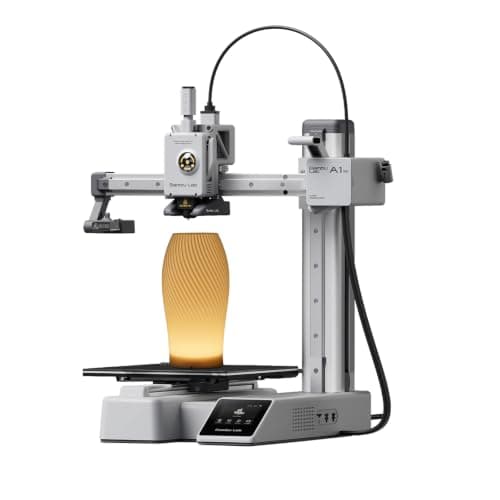
The one to get if you have never done this before. It calibrates itself before every print — bed mesh, Z-offset, flow, resonance — so the part of 3D printing that used to defeat beginners is a step you never see. The build volume is the price you pay.
#ad Price as of October 24, 2026, from Amazon. Prices change. How we make money.
What it actually is
A small open-frame filament printer. Filament is a 1.75 mm plastic string on a spool; the machine melts it and draws your object one layer at a time. Open-frame means there is no box around it, which is fine for PLA and a limitation for materials that warp.
What the manufacturer states
| Figure | Value | Source |
|---|---|---|
| Build volume | 180 x 180 x 180 mm | Bambu Lab A1 mini technical specifications |
| Max hot end temperature | 300 C | Bambu Lab A1 mini technical specifications |
| Max build plate temperature | 80 C | Bambu Lab A1 mini technical specifications |
| Max toolhead speed | 500 mm/s | Bambu Lab A1 mini technical specifications |
| Max toolhead acceleration | 10,000 mm/s2 | Bambu Lab A1 mini technical specifications |
| Filaments rated ideal | PLA, PETG, TPU, PVA | Bambu Lab A1 mini technical specifications |
| Filaments not recommended | ABS, ASA, PC, PA, PET, carbon/glass fiber reinforced | Bambu Lab A1 mini technical specifications |
| Machine dimensions | 347 x 315 x 365 mm | Bambu Lab A1 mini technical specifications |
| Net weight | 5.5 kg | Bambu Lab A1 mini technical specifications |
| Max power | 150 W | Bambu Lab A1 mini technical specifications |
Read from Bambu Lab, A1 mini technical specifications on 2026-09-01. Where a manufacturer does not publish a figure, there is no row for it here.
What is good about it
- Full auto-calibration on every print, per Bambu Lab's own specification — no paper-under-the-nozzle ritual
- Rated ideal for PLA, PETG, TPU and PVA, which covers everything a beginner should print in year one
- 150 W maximum power draw is the lowest of any printer on this site, so running cost is trivial
- 5.5 kg and 347 mm wide — it fits on a desk without rearranging the room
What is not
- 180 mm cubed is genuinely small. A full-size helmet or a large cosplay prop will not fit
- Bambu Lab rates ABS, ASA, PC and fiber-reinforced filaments as not recommended on this machine
- The multi-color AMS lite is a separate purchase, so the headline price is not the multi-color price
- Bambu Lab's own Amazon store lists this machine bundled with an LED lamp kit rather than on its own, so the price on our button is for that bundle. The bare printer is sold direct on Bambu Lab's store
- Open frame, so it is at the mercy of a draft from a window or an air conditioning vent
Skip this one if
Skip it if you already know the thing you want to print is bigger than a shoebox, or if you specifically want ABS or a carbon-fiber-filled filament. Bambu Lab itself lists those materials as not recommended here, and buying a machine you intend to use outside its rated envelope is how a first printer becomes a frustrating one.
What we cannot tell you
We have not printed on this machine. Long-term reliability, real-world noise in a quiet room, and how the textured plate holds up after a year are all things we cannot honestly report without owning one.
How it scored for a beginner
- Setup out of the box9.5
- Auto-calibration10.0
- First-layer forgiveness9.5
- Parts and filament availability9.0
- Running cost10.0
- Help when it goes wrong9.0
Beginner fit 9.2 / 10. That is our editorial read of how well this suits someone buying their first printer, taken off the published specifications — not a test result, and not a verdict on absolute quality. It is deliberately not marked up as a rating in this page’s structured data. How we pick.
Creality Ender-3 V3 SE
Creality · The smallest sensible amount of money
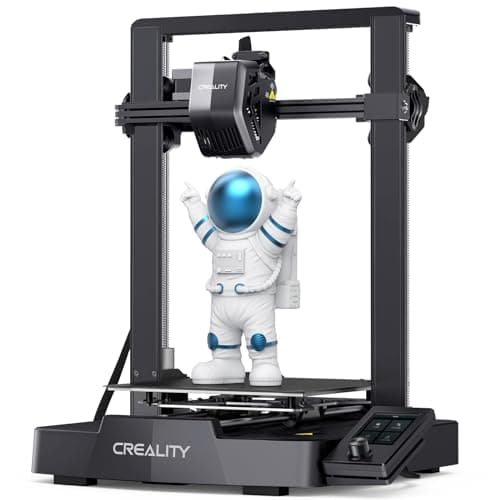
The cheap way in, and a genuinely modern one: auto bed leveling with CR Touch, automatic Z-offset from a strain sensor, and a direct-drive extruder. You will still learn more about your printer than an A1 owner does. Whether that is a feature or a cost is the whole decision.
#ad Price as of October 24, 2026, from Amazon. Prices change. How we make money.
What it actually is
An open-frame bed-slinger — the plate moves back and forth under a head that moves side to side and up. It is the classic hobby-printer layout, and this generation added the automatic setup steps the older Enders famously lacked.
What the manufacturer states
| Figure | Value | Source |
|---|---|---|
| Build volume | 220 x 220 x 250 mm | Creality Ender-3 V3 SE product specifications |
| Maximum print speed | 250 mm/s | Creality Ender-3 V3 SE product specifications |
| Typical print speed | 180 mm/s | Creality Ender-3 V3 SE product specifications |
| Acceleration | 2,500 mm/s2 | Creality Ender-3 V3 SE product specifications |
| Leveling | CR Touch auto leveling with strain-sensor Z-offset | Creality Ender-3 V3 SE product specifications |
| Extruder | Sprite direct extruder | Creality Ender-3 V3 SE product specifications |
| Filament diameter | 1.75 mm | Creality Ender-3 V3 SE product specifications |
Read from Creality, Ender-3 V3 SE product page on 2026-09-01. Where a manufacturer does not publish a figure, there is no row for it here.
What is good about it
- 220 x 220 x 250 mm is larger in every axis than the A1 mini
- Automatic bed leveling and Z-offset, which is the thing older Enders did not have
- The largest parts and community ecozystem of any machine here, by a distance
- Some assembly is required, and you will understand your printer better for it
What is not
- 250 mm/s maximum and 2,500 mm/s2 acceleration — a fraction of the A1's rated figures
- Not fully assembled out of the box, so first-print day is longer
- No filament run-out safety net of the kind Bambu specifies on the A1 series
- More of the tuning is yours to do, which is the trade for the price
Skip this one if
Skip it if the reason you are buying a printer is that you want to print things, not to own a printer. This machine is excellent value and it will ask more of you than an A1 mini will. If your patience for troubleshooting is low, spend the difference.
What we cannot tell you
We have not printed on this machine. How often the auto leveling needs re-running, the quality of the bundled build surface after a hundred prints, and assembly time for someone who has never built one are all outside what the specification tells you.
How it scored for a beginner
- Setup out of the box7.0
- Auto-calibration8.0
- First-layer forgiveness7.5
- Parts and filament availability10.0
- Running cost9.0
- Help when it goes wrong10.0
Beginner fit 8.0 / 10. That is our editorial read of how well this suits someone buying their first printer, taken off the published specifications — not a test result, and not a verdict on absolute quality. It is deliberately not marked up as a rating in this page’s structured data. How we pick.
Elegoo Centauri Carbon
Elegoo · An enclosed printer without an enclosed-printer budget
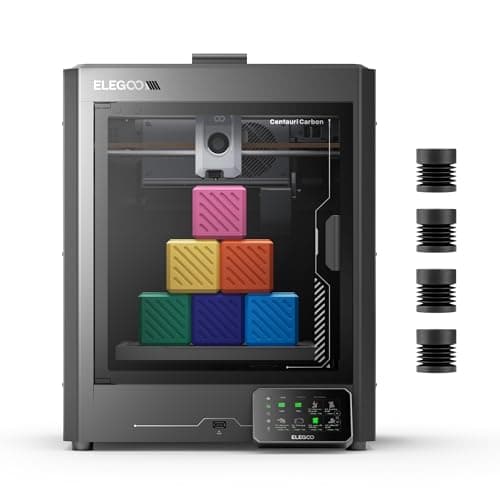
An enclosed CoreXY printer at a price that used to buy an open frame. If the reason you are hesitating about a beginner machine is that you can already see yourself outgrowing it, this is the one that answers that.
#ad Price as of October 24, 2026, from Amazon. Prices change. How we make money.
What it actually is
A boxed CoreXY machine with a steel chassis and aluminum and glass panels. The enclosure holds chamber heat, which is what lets it handle materials that shrink and peel on an open frame.
What the manufacturer states
| Figure | Value | Source |
|---|---|---|
| Build volume | 256 x 256 x 256 mm | Elegoo Centauri Carbon product specifications |
| Motion system | CoreXY | Elegoo Centauri Carbon product specifications |
| Enclosure | Fully enclosed; steel chassis with aluminum and glass shell | Elegoo Centauri Carbon product specifications |
| Maximum speed | 500 mm/s | Elegoo Centauri Carbon product specifications |
| Maximum acceleration | 20,000 mm/s2 (10,000 mm/s2 default) | Elegoo Centauri Carbon product specifications |
| Max nozzle temperature | 320 C | Elegoo Centauri Carbon product specifications |
| Max heated bed temperature | 110 C at 25 C ambient | Elegoo Centauri Carbon product specifications |
| Supported filament | PLA, PETG, ABS, ASA, TPU, PET, PC, PA and carbon or glass fiber reinforced grades | Elegoo Centauri Carbon product specifications |
| Bed leveling | 121-point auto-leveling; full-auto calibration | Elegoo Centauri Carbon product specifications |
| Print accuracy | +/- 0.1 mm | Elegoo Centauri Carbon product specifications |
| Machine size and weight | 398 x 404 x 490 mm, 17.5 kg | Elegoo Centauri Carbon product specifications |
| Rated power | 350 W at 110 V | Elegoo Centauri Carbon product specifications |
| Operating sound | 55 dB or below | Elegoo Centauri Carbon product specifications |
Read from Elegoo, Centauri Carbon product page on 2026-09-06. Where a manufacturer does not publish a figure, there is no row for it here.
What is good about it
- Fully enclosed at a price that competes with open-frame machines
- 20,000 mm/s2 rated acceleration, matching the enclosed Bambu
- 256 mm cubed — the same working envelope as an A1 or a P1S
- The enclosure contains noise and smell, which decides whether a printer can live in a bedroom
What is not
- A newer platform than the Bambu and Creality lines, so there is less community troubleshooting behind it
- An enclosure adds a heat-soak wait to PLA prints in a warm room
- Larger and heavier than any open-frame machine here
- Nothing about the enclosure makes the first print easier — it makes later prints possible
Skip this one if
Skip it if PLA is all you will ever print and your printer lives in a spare room. You are paying for a box you will not use. The enclosure earns its money on ABS, ASA and a shared living space, not on PLA in a garage.
What we cannot tell you
We have not printed on this machine. Chamber temperature in practice, panel fit and finish, and long-term CoreXY belt tension are not published numbers.
How it scored for a beginner
- Setup out of the box8.5
- Auto-calibration8.5
- First-layer forgiveness8.5
- Parts and filament availability7.5
- Running cost8.0
- Help when it goes wrong7.5
Beginner fit 8.3 / 10. That is our editorial read of how well this suits someone buying their first printer, taken off the published specifications — not a test result, and not a verdict on absolute quality. It is deliberately not marked up as a rating in this page’s structured data. How we pick.
How these were picked
We have not printed on these machines and we do not pretend to have. What we did was read each manufacturer’s own specification page, take their stated build volume, temperatures and speeds, check that every pick genuinely fits the job in this page’s title, confirm it is still being sold, and pull a live price rather than a remembered one. Every figure names the source it came from, so you can check it yourself in about a minute.
How we pick sets out the full method, including what would change a ranking.
Questions people actually ask
+−Where is the cheapest place to buy a 3D printer?
It moves, which is why we do not print a number. Manufacturer stores discount heavily and offer price protection, Amazon runs its own events, and official refurbished stock is usually the lowest price of all when the model you want is available. Check the manufacturer’s own store before assuming a marketplace is cheaper.
+−Is it better to buy direct from Bambu Lab or from Amazon?
Direct for the terms, Amazon for the convenience. Bambu Lab’s own product pages list free shipping, 30-day price protection, 30-day returns and a two-year warranty. Amazon gives you a returns process you already know and one basket for the printer, filament and accessories. Neither is wrong.
+−Can I buy a 3D printer in a store near me?
Often, yes. Micro Center carries Bambu Lab and Creality machines, with a large share of its range marked available for in-store pickup only, and Best Buy stocks Bambu Lab printers with store pickup and demo units on display in some locations. Both depend on a store being within reach of you.
+−Is a refurbished 3D printer worth buying?
An official refurbished unit, yes. Bambu Lab sells refurbished printers from its own store and states they carry the same warranty as new, which is the detail that makes the discount safe. A used machine bought privately is a different thing entirely, and not something we would recommend as a first printer.
+−Does buying from a third-party seller affect the warranty?
It can, and it is the main reason to read the sold-by line on any marketplace listing. A machine sold and shipped by the manufacturer or by the retailer itself is the straightforward case; a listing from an unfamiliar marketplace account is where warranty claims get complicated.