Roundup
The Best 3D Printers Under $500
This is the band where you stop choosing between machines and start choosing between upgrades. Size, an enclosure, or multiple colors — you can have one of them, and which one depends entirely on what you intend to print.
By Scooter M. · Published · Last reviewed
How this page is funded: the buy links below are affiliate links. If you buy through one we earn a commission, at no extra cost to you. It does not change the order of the picks or a word of what we say about them. Full disclosure.
Printers we claim to have tested: 0. Everyone in this category says they tested twenty machines. We have not tested any, and we would rather say so. What we did instead is on this page: the manufacturer’s own published specification for every pick, cited and dated; the arithmetic on what it costs to run, with the inputs shown; a live price rather than a remembered one; and a plain answer on who should skip each machine.
The short answer
Take the size upgrade first: buy the Bambu Lab A1. Running out of build volume is the constraint most first-year owners actually hit, and 256 mm cubed with a 100 °C bed covers nearly everything. Take the enclosure instead only if the printer has to live in a room where somebody sleeps, or if you already know you want ABS.
The three upgrades, and which one you actually need
Everything in this band is a competent printer. The interesting question is not which is best — it is which of three different upgrades you are buying, because you can only have one.
Size
The most commonly needed and the least exciting. Going from 180 mm cubed to 256 mm cubed is not a 40% increase in what you can make, it is closer to a tripling by volume, and it moves a lot of real objects — a desktop organizer, a helmet section, a full-size tool holder — from “print in four parts and glue” to “print.”
The hidden half of this upgrade is bed temperature. The A1’s published 100 °C ceiling against the mini’s 80 °C is what actually keeps a large PETG part stuck to the plate for six hours. Volume without bed temperature is a bigger machine that fails at bigger prints.
An enclosure
The upgrade that changes what is possible rather than what fits. A box holds chamber heat, which is what stops ABS and ASA peeling off the plate as they cool, and it contains a large share of the noise and smell. That second half is not a footnote: it is frequently the difference between a printer that lives in the room you are in and one that lives in a garage.
It buys you nothing at all in month one, when you will be printing PLA. Take it if you already know the answer to “where will this live” is somewhere sensitive.
Multi-color
The most impressive and the least necessary. A four-spool unit feeding one nozzle produces genuinely striking objects, and it does so by swapping filament mid-print — which takes longer and purges plastic into a waste tower every time it changes.
The reason we rank it third is not that it is bad. It is that on most machines it can be added later, which means buying it up front spends your budget on a second problem during the week you are still solving the first one. Buy it later, when your first-layer problems are behind you. The exception is a bundle where the multi-spool unit is included in the box and the arithmetic works out in your favor.
What each pick's manufacturer publishes, read on 2026-09-01.
| Machine | Build volume | Enclosed? | Multi-color |
|---|---|---|---|
| Bambu Lab A1 | 256 x 256 x 256 mm | No | 4 colors, AMS lite sold separately |
| Elegoo Centauri Carbon | 256 x 256 x 256 mm | Yes | Not on this model |
| Anycubic Kobra 3 Combo | 250 x 250 x 260 mm | No | 4 colors included, expandable to 8 |
| Elegoo Neptune 4 | 225 x 225 x 265 mm | No | Not on this model |
What this band does not buy you
Noticeably better print quality than the band below. This continues to surprise people and it is worth saying clearly: a well-set-up Ender-3 V3 SE running PLA produces objects that are hard to distinguish from anything on this page. You are buying capability, convenience and speed. You are not buying a prettier object.
Quick picks
Ranked on how well each one fits the job in this page's title, read off the manufacturer's own published specifications. Tap any row for the full write-up, including who should skip it.
| # | Product | Best for | Beginner fit | Price |
|---|---|---|---|---|
| 1 | 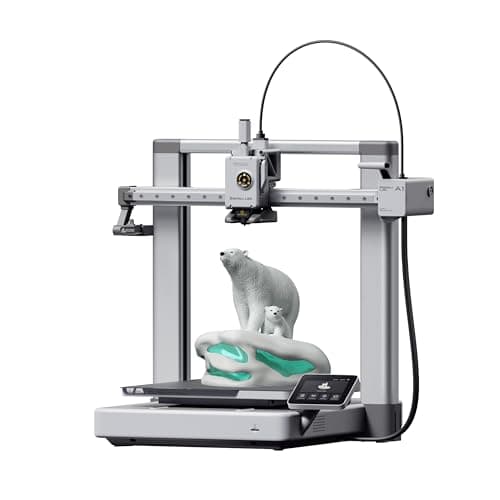 Bambu Lab A1256 x 256 x 256 mm Bambu Lab A1256 x 256 x 256 mm | Best all-round | 9.0 | $299.99 - Check price on Amazon |
| 2 | 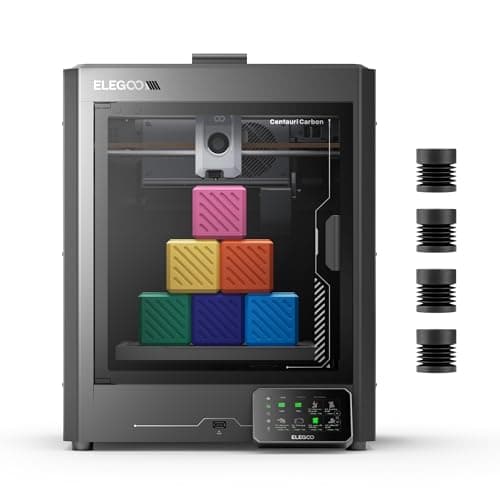 Elegoo Centauri Carbon256 x 256 x 256 mm Elegoo Centauri Carbon256 x 256 x 256 mm | Best enclosure | 8.3 | $289.99 - Check price on Amazon |
| 3 |  Anycubic Kobra 3 Combo250 x 250 x 260 mm Anycubic Kobra 3 Combo250 x 250 x 260 mm | Best multi-color | 7.8 | Check price on Amazon |
| 4 | Elegoo Neptune 4225 x 225 x 265 mm | Best specification per dollar | 8.1 | Check price on Amazon |
#1 · Best all-round
Bambu Lab A1
Bambu Lab · A first printer you will not outgrow
The A1 mini's larger sibling, and the better buy the moment you have a specific large thing in mind. Same self-calibration, 256 mm cubed instead of 180, and a 100 C bed rather than 80 C — which is the spec that actually widens what you can print.
#ad Price as of October 19, 2026, from Amazon. Prices change. How we make money.
What it actually is
The full-size version of the A1: same open-frame layout, same automatic calibration, a bigger bed and a hotter one. The extra bed temperature matters because materials that shrink as they cool need a warm plate to stay stuck to it.
Does it fit this page?
Takes the size upgrade, which is the one most first-year owners actually run into. 256 mm cubed and a 100 C bed against the A1 mini's 180 mm cubed and 80 C, with identical automatic calibration.
What the manufacturer states
| Figure | Value | Source |
|---|---|---|
| Build volume | 256 x 256 x 256 mm | Bambu Lab A1 technical specifications |
| Max hot end temperature | 300 C | Bambu Lab A1 technical specifications |
| Max build plate temperature | 100 C | Bambu Lab A1 technical specifications |
| Max toolhead speed | 500 mm/s | Bambu Lab A1 technical specifications |
| Max toolhead acceleration | 10,000 mm/s2 | Bambu Lab A1 technical specifications |
| Filaments rated ideal | PLA, PETG, TPU, PVA | Bambu Lab A1 technical specifications |
| Machine dimensions | 465 x 410 x 430 mm | Bambu Lab A1 technical specifications |
| Net weight | 8.3 kg | Bambu Lab A1 technical specifications |
| Max power | 350 W at 110 V | Bambu Lab A1 technical specifications |
Read from Bambu Lab, A1 technical specifications on 2026-09-01. Where a manufacturer does not publish a figure, there is no row for it here.
What is good about it
- 256 mm cubed covers almost everything a first-year printer is asked to make
- 100 C bed rather than the mini's 80 C, which is the difference that makes larger PETG parts stick
- Identical hands-off calibration to the A1 mini, so nothing gets harder as the machine gets bigger
- Bambu Lab publishes a full specification sheet, so every number on this page is checkable in a minute
What is not
- 465 mm wide and 8.3 kg — it needs a dedicated shelf, not a corner of a desk
- 350 W at US voltage against the mini's 150 W, so it costs meaningfully more to run
- Still open-frame, so the material limits are the same as the mini's despite the hotter bed
- Multi-color is again a separate AMS lite purchase
Skip this one if
Skip it if your desk is the only place it can go and you have not measured that desk. It is nearly half a meter wide. If you are unsure whether you will use the extra volume, the mini is the cheaper mistake.
What we cannot tell you
We have not printed on this machine. Noise at full speed, long-term belt and rod wear, and how often the auto-calibration actually needs intervention are all beyond what a specification sheet can tell you.
How it scored for a beginner
- Setup out of the box9.5
- Auto-calibration10.0
- First-layer forgiveness9.5
- Parts and filament availability9.0
- Running cost8.0
- Help when it goes wrong9.0
Beginner fit 9.0 / 10. That is our editorial read of how well this suits someone buying their first printer, taken off the published specifications — not a test result, and not a verdict on absolute quality. It is deliberately not marked up as a rating in this page’s structured data. How we pick.
#2 · Best enclosure
Elegoo Centauri Carbon
Elegoo · An enclosed printer without an enclosed-printer budget
An enclosed CoreXY printer at a price that used to buy an open frame. If the reason you are hesitating about a beginner machine is that you can already see yourself outgrowing it, this is the one that answers that.
#ad Price as of October 19, 2026, from Amazon. Prices change. How we make money.
What it actually is
A boxed CoreXY machine with a steel chassis and aluminum and glass panels. The enclosure holds chamber heat, which is what lets it handle materials that shrink and peel on an open frame.
Does it fit this page?
Takes the enclosure upgrade. Fully enclosed CoreXY with a 256 mm cubed volume and a published 20,000 mm/s2 acceleration — capability that used to sit well above this band.
What the manufacturer states
| Figure | Value | Source |
|---|---|---|
| Build volume | 256 x 256 x 256 mm | Elegoo Centauri Carbon product specifications |
| Motion system | CoreXY | Elegoo Centauri Carbon product specifications |
| Enclosure | Fully enclosed; steel chassis with aluminum and glass shell | Elegoo Centauri Carbon product specifications |
| Maximum speed | 500 mm/s | Elegoo Centauri Carbon product specifications |
| Maximum acceleration | 20,000 mm/s2 (10,000 mm/s2 default) | Elegoo Centauri Carbon product specifications |
| Max nozzle temperature | 320 C | Elegoo Centauri Carbon product specifications |
| Max heated bed temperature | 110 C at 25 C ambient | Elegoo Centauri Carbon product specifications |
| Supported filament | PLA, PETG, ABS, ASA, TPU, PET, PC, PA and carbon or glass fiber reinforced grades | Elegoo Centauri Carbon product specifications |
| Bed leveling | 121-point auto-leveling; full-auto calibration | Elegoo Centauri Carbon product specifications |
| Print accuracy | +/- 0.1 mm | Elegoo Centauri Carbon product specifications |
| Machine size and weight | 398 x 404 x 490 mm, 17.5 kg | Elegoo Centauri Carbon product specifications |
| Rated power | 350 W at 110 V | Elegoo Centauri Carbon product specifications |
| Operating sound | 55 dB or below | Elegoo Centauri Carbon product specifications |
Read from Elegoo, Centauri Carbon product page on 2026-09-06. Where a manufacturer does not publish a figure, there is no row for it here.
What is good about it
- Fully enclosed at a price that competes with open-frame machines
- 20,000 mm/s2 rated acceleration, matching the enclosed Bambu
- 256 mm cubed — the same working envelope as an A1 or a P1S
- The enclosure contains noise and smell, which decides whether a printer can live in a bedroom
What is not
- A newer platform than the Bambu and Creality lines, so there is less community troubleshooting behind it
- An enclosure adds a heat-soak wait to PLA prints in a warm room
- Larger and heavier than any open-frame machine here
- Nothing about the enclosure makes the first print easier — it makes later prints possible
Skip this one if
Skip it if PLA is all you will ever print and your printer lives in a spare room. You are paying for a box you will not use. The enclosure earns its money on ABS, ASA and a shared living space, not on PLA in a garage.
What we cannot tell you
We have not printed on this machine. Chamber temperature in practice, panel fit and finish, and long-term CoreXY belt tension are not published numbers.
How it scored for a beginner
- Setup out of the box8.5
- Auto-calibration8.5
- First-layer forgiveness8.5
- Parts and filament availability7.5
- Running cost8.0
- Help when it goes wrong7.5
Beginner fit 8.3 / 10. That is our editorial read of how well this suits someone buying their first printer, taken off the published specifications — not a test result, and not a verdict on absolute quality. It is deliberately not marked up as a rating in this page’s structured data. How we pick.
#3 · Best multi-color
Anycubic Kobra 3 Combo
Anycubic · Multi-color without a separate purchase
Multi-color in the box rather than as an upgrade. That is the whole argument for it: if the thing that made you want a printer is a model with four colors in it, this is the shortest route to printing one.
#ad We do not hold a current price for this product, so we do not show one. How we make money.
What it actually is
An open-frame printer sold together with the ACE Pro, a unit that holds four spools and feeds them into one nozzle in turn. Multi-color on a single-nozzle printer works by swapping filament mid-print, which is why it takes longer and wastes some plastic.
Does it fit this page?
Takes the color upgrade, and takes it in the box: the four-spool ACE Pro is included rather than sold separately, which is unusual and is the whole reason to consider it.
What the manufacturer states
| Figure | Value | Source |
|---|---|---|
| Build volume | 250 x 250 x 260 mm | Anycubic Kobra 3 Combo product specifications |
| Colors | 4 with the included ACE Pro; expandable to 8 | Anycubic Kobra 3 Combo product specifications |
| Maximum print speed | 600 mm/s | Anycubic Kobra 3 Combo product specifications |
| Screen | 4.3 inch color LCD | Anycubic Kobra 3 Combo product specifications |
Read from Anycubic, Kobra 3 Combo product page on 2026-09-01. Where a manufacturer does not publish a figure, there is no row for it here.
What is good about it
- The multi-color unit is included rather than sold separately
- 250 x 250 x 260 mm is a large working envelope for the money
- 600 mm/s is the highest rated speed of any machine on this site
- Four colors changes what a beginner can make on day one more than any other feature
What is not
- Single-nozzle color changes waste filament in a purge tower and add hours to a print
- Open frame, so it inherits the usual material limits
- A four-color machine is four times as many things to go wrong on your first week
- Rated 600 mm/s is a ceiling that real geometry will not reach
Skip this one if
Skip it if you have not yet printed anything. Multi-color is a second problem stacked on a first one. Almost every guide worth reading says the same thing — get comfortable in one color, then add colors — and the ACE-style units can usually be bought later.
What we cannot tell you
We have not printed on this machine. Purge waste per color change, real multi-color reliability over a long print, and ACE Pro jam frequency are all things only an owner can report.
How it scored for a beginner
- Setup out of the box7.5
- Auto-calibration8.0
- First-layer forgiveness7.5
- Parts and filament availability8.0
- Running cost7.0
- Help when it goes wrong7.5
Beginner fit 7.8 / 10. That is our editorial read of how well this suits someone buying their first printer, taken off the published specifications — not a test result, and not a verdict on absolute quality. It is deliberately not marked up as a rating in this page’s structured data. How we pick.
#4 · Best specification per dollar
Elegoo Neptune 4
Elegoo · The most specification per dollar
A lot of printer for the money: Klipper out of the box, a 300 C nozzle and a 121-point leveling mesh. It sits between the Ender and the Bambu on ease, and ahead of both on raw specification per dollar.
#ad We do not hold a current price for this product, so we do not show one. How we make money.
What it actually is
An open-frame bed-slinger shipped with Klipper firmware already installed, so the speed features that normally require a firmware project are there on day one.
Does it fit this page?
Takes none of the three upgrades and instead leaves money on the table, which is a legitimate choice. 265 mm of build height, a 300 C nozzle and Klipper pre-installed for less than the rest of this list.
What the manufacturer states
| Figure | Value | Source |
|---|---|---|
| Build volume | 225 x 225 x 265 mm | Elegoo Neptune 4 product specifications |
| Maximum print speed | 500 mm/s | Elegoo Neptune 4 product specifications |
| Auto bed leveling | 121 points (11 x 11) | Elegoo Neptune 4 product specifications |
| Max nozzle temperature | 300 C | Elegoo Neptune 4 product specifications |
| Supported filaments | PLA, TPU, PETG, ABS, ASA, nylon | Elegoo Neptune 4 product specifications |
| Firmware | Klipper, pre-installed | Elegoo Neptune 4 product specifications |
Read from Elegoo, Neptune 4 product page on 2026-09-01. Where a manufacturer does not publish a figure, there is no row for it here.
What is good about it
- 265 mm of build height, the tallest of the open-frame machines here
- 300 C nozzle and a materials list that includes ABS, ASA and nylon
- Klipper already installed, so the speed features work without a firmware project
- 121-point leveling mesh, which is a genuinely dense map of a warped plate
What is not
- Open frame, so the ABS and ASA on the materials list are aspirational without an enclosure
- A smaller community than Creality's, so fewer people have already hit your problem
- Klipper is more powerful and less familiar than the interfaces beginners usually meet
- More assembly than a Bambu, less than an old Ender
Skip this one if
Skip it if you want the fewest possible decisions. Klipper rewards curiosity and this machine hands you a lot of it on day one. If you want to press print and walk away, that is what the A1 mini is for.
What we cannot tell you
We have not printed on this machine. Real print quality at the rated speed, bed flatness out of the box, and how much Klipper tuning is actually needed are not published figures.
How it scored for a beginner
- Setup out of the box7.5
- Auto-calibration9.0
- First-layer forgiveness8.0
- Parts and filament availability8.0
- Running cost8.5
- Help when it goes wrong7.5
Beginner fit 8.1 / 10. That is our editorial read of how well this suits someone buying their first printer, taken off the published specifications — not a test result, and not a verdict on absolute quality. It is deliberately not marked up as a rating in this page’s structured data. How we pick.
How these were picked
We have not printed on these machines and we do not pretend to have. What we did was read each manufacturer’s own specification page, take their stated build volume, temperatures and speeds, check that every pick genuinely fits the job in this page’s title, confirm it is still being sold, and pull a live price rather than a remembered one. Every figure names the source it came from, so you can check it yourself in about a minute.
How we pick sets out the full method, including what would change a ranking.
Questions people actually ask
+−Is it worth spending more than $500 on a first 3D printer?
Rarely. The band above buys an enclosure with more capability and more speed, and both are aimed at materials and workflows a first year does not reach. The exception is somebody who already knows they need ABS or a shared living space — the under $1,000 page is written for exactly that person.
+−Should I get multi-color or a bigger printer?
Bigger, first. Running out of build volume is a constraint you hit by accident; multi-color is a capability you go looking for. And on most machines the multi-spool unit can be added later, whereas the frame cannot be made larger.
+−Do I need an enclosure?
For PLA, no. For ABS or ASA, effectively yes — those plastics shrink as they cool and an open frame lets them lift off the plate. The other reason to want one is noise and smell, which is about where the printer lives rather than what it prints.
Sources
Read next
- The Best 3D Printers for Cosplay
- Elegoo Centauri Carbon vs Bambu Lab P1S
- Elegoo Centauri Carbon Review
- The Best 3D Printers for Beginners
- The Best 3D Printers Under $300
- The Best 3D Printers Under $1,000
- The Best Multicolor 3D Printers for Beginners
- What Actually Belongs in a 3D Printer Starter Kit
- FlashForge Adventurer 5M Review
- Elegoo Centauri Carbon 2 Review
- FlashForge Adventurer 5M vs Bambu Lab A1