Head to head
PLA vs PLA+
The plus is not a standard, it is a marketing suffix that different companies apply to different recipes. What it reliably means is impact resistance, bought at the same printing temperatures - which makes it the rare upgrade with no learning curve attached.
By Scooter M. · Published · Last reviewed
How this page is funded: the buy links below are affiliate links. If you buy through one we earn a commission, at no extra cost to you. It does not change the order of the picks or a word of what we say about them. Full disclosure.
Printers we claim to have tested: 0. Everyone in this category says they tested twenty machines. We have not tested any, and we would rather say so. What we did instead is on this page: the manufacturer’s own published specification for every pick, cited and dated; the arithmetic on what it costs to run, with the inputs shown; a live price rather than a remembered one; and a plain answer on who should skip each machine.
The short answer
Buy ordinary PLA for your first spool and for anything decorative. Buy PLA+ for parts that get dropped, screwed into or stood on. The two print at effectively the same temperatures on the same profile, so there is nothing to learn. What changes is how a finished part fails: PLA snaps, PLA+ takes the knock.
This is one of the most-searched filament questions and one of the worst-answered, because “PLA+” is not a specification. No standards body defines it. Each manufacturer blends its own additives and puts a plus, a Pro or a 2.0 on the label. So the honest way to answer is not to compare a category against a category, but to compare published numbers against published numbers.
What the plus is supposed to mean
In practice, three things, in descending order of how reliably you actually get them.
Impact resistance. This is the real one. Plain PLA is stiff and brittle: it holds its shape beautifully and then shatters when it fails. The additives in a PLA+ blend trade a little of that rigidity for toughness, so a dropped part cracks or deforms instead of exploding. Polymaker describes its PLA Pro as engineered for durable, drop-resistant prints, which is exactly this.
Layer adhesion. Better bonding between layers, so a part is less likely to split along a print line under load. Most manufacturers claim it; few publish a figure you can check.
Surface finish. Occasionally claimed, rarely demonstrable, and the thing you should weigh least.
What the plus does NOT mean
It is not heat resistance. This is the misunderstanding that costs people parts. PLA+ softens at broadly the same temperature as PLA. A phone mount in PLA+ will still deform on a car dashboard in summer. Polymaker says so plainly about its own PLA Pro: it is not the answer if you need high heat resistance. For that you want PETG, which is a genuinely different material rather than a modified one.
It is not flexibility. A tougher PLA is still a rigid plastic. Nothing about the plus lets it bend and spring back.
It is not a printing upgrade. It will not fix stringing, warping or a bad first layer. If those are your problems, the causes are elsewhere — stringing is usually moisture, and adhesion is usually a dirty plate.
The published numbers, side by side
Read from each manufacturer's own product page on 2026-09-13.
| Overture PLA (standard) | Polymaker PolyLite PLA Pro | |
|---|---|---|
| Nozzle temperature | 190 - 220 C | 190 - 220 C |
| Bed temperature | 25 - 60 C | 30 - 60 C |
| Printing speed | Up to 300 mm/s | 50 - 200 mm/s |
| Published tolerance | +/- 0.02 mm | Not published on the product page |
| Drying | 50 C for 7 hours | 55 C for 6 hours |
| Manufacturer's own framing | Published toughness 3.1 kJ/m2, layer adhesion 38.9 MPa | Engineered for durable, drop-resistant prints |
Look at the first row, because it is the whole argument for buying PLA+ at all: the nozzle range is identical. There is no new profile, no temperature tower, no bed change. You swap the spool and print. Almost nothing else in this hobby upgrades that cleanly.
The second thing worth noticing is the speed row. Overture publishes up to 300 mm/s for its standard PLA and Polymaker publishes 50-200 mm/s for PLA Pro. If you bought a machine for its speed, the plain spool is the faster one on paper — which is the opposite of what most people assume.
When we would buy PLA+
A short, specific list, because vague advice here costs money.
Anything that gets handled every day. Hooks, handles, clips, tool holders, the bracket on the back of a monitor. Repeated small stresses are what finds PLA’s brittleness.
Anything with a screw going into it. Threading a self-tapping screw into plain PLA is how you learn what a hairline crack looks like.
Anything a child will use. Toys get thrown. A part that deforms is a better outcome than a part that produces sharp fragments.
Functional prototypes you intend to test. If the point of the print is to find out whether the design survives, do not let the material be the thing that fails first.
How to buy PLA+ without being sold a label
Since the plus means nothing on its own, judge the spool the same way you judge any other.
Does the manufacturer publish a print profile? A temperature range, a bed range, a speed range and a drying recommendation. A spool with no published numbers is a spool you are guessing at, whatever is on the label.
Does it publish a diameter tolerance? A figure like +/- 0.02 or +/- 0.03 mm means somebody measures. Silence means either nobody measures or nobody wants to say.
Does it claim heat resistance? If a PLA+ listing implies it survives a hot car, treat the whole listing with suspicion. The honest manufacturers say the opposite.
Is the price difference real? PLA+ typically sits a few dollars above standard PLA per kilogram. That is worth it for functional parts and not worth it for a shelf ornament. The live price on both buttons below is the number that decides it, not ours.
Does your printer care?
No, and that is the point. Every machine in our beginner picks is rated for PLA, and PLA+ lives inside the same temperature envelope. Bambu Lab rates the A1 series ideal for PLA; Creality publishes the Ender-3 V3 SE’s extruder as working with PLA. Neither distinguishes between PLA and PLA+, because as far as the hardware is concerned there is nothing to distinguish.
The one practical note: a tougher filament is slightly more likely to resist snapping when you pull it out of the extruder for a cold pull. Cool it a little less far than you would for plain PLA.
What we would buy for this
Chosen from the same registry as our roundups, on the manufacturer’s own published figures and a live price.
Overture PLA
Overture · Your first spool, and your tenth
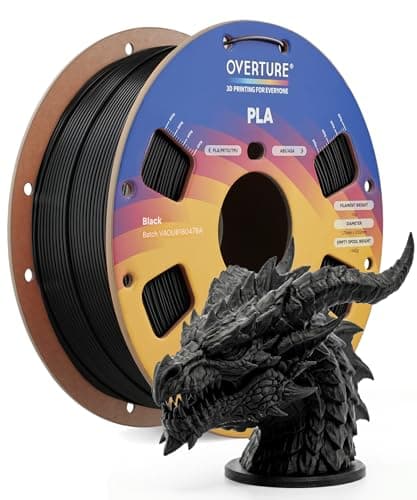
The default answer to 'what filament should I buy'. A tight published diameter tolerance, a conventional temperature range every printer profile already expects, and it is sold everywhere. Nothing about it is exciting, which is the point.
#ad Price as of October 29, 2026, from Amazon. Prices change. How we make money.
What it actually is
PLA is the plastic beginners should print. It is stiff, it needs no enclosure, it barely smells, and it sticks to a plate at low temperatures. This is a mainstream 1 kg spool of it.
What the manufacturer states
| Figure | Value | Source |
|---|---|---|
| Diameter | 1.75 mm | Overture published product specification |
| Dimensional accuracy | +/- 0.02 mm | Overture published product specification |
| Spool weight | 1 kg (2.2 lb) | Overture published product specification |
| Recommended nozzle temperature | 190 - 220 C | Overture published product specification |
| Recommended bed temperature | 25 - 60 C | Overture published product specification |
| Packaging | Dried before packing and vacuum sealed | Overture published product specification |
Read from Overture, PLA filament product page on 2026-09-01. Where a manufacturer does not publish a figure, there is no row for it here.
What is good about it
- +/- 0.02 mm published tolerance, which is as tight as mainstream PLA is quoted
- 190 - 220 C is squarely inside every stock PLA profile you will meet
- A 25 - 60 C bed range means it will stick even on an unheated or barely warm plate
- Vacuum sealed with desiccant, so a spool bought in advance is still dry when it arrives
What is not
- PLA softens in a hot car or a sunny window — this is a property of the material, not the brand
- Not the cheapest per kilogram once you start printing seriously
- Color consistency between batches of any budget filament is a real thing
- No filament is a fix for a machine that is not leveled
Skip this one if
Skip it if the part you are making will live outdoors or in a car. That is a PETG job, not a PLA one, and no PLA brand changes that.
What we cannot tell you
We have not printed this filament. Batch-to-batch color consistency and how it behaves after a year in a cupboard are things only repeated use reveals.
How it scored for a beginner
- Ease for a beginner9.5
- Published tolerance9.5
- Availability9.5
- Value per kilogram8.0
Beginner fit 9.0 / 10. That is our editorial read of how well this suits someone buying their first printer, taken off the published specifications — not a test result, and not a verdict on absolute quality. It is deliberately not marked up as a rating in this page’s structured data. How we pick.
Polymaker PolyLite PLA Pro
Polymaker · Parts that get dropped, without leaving PLA behind
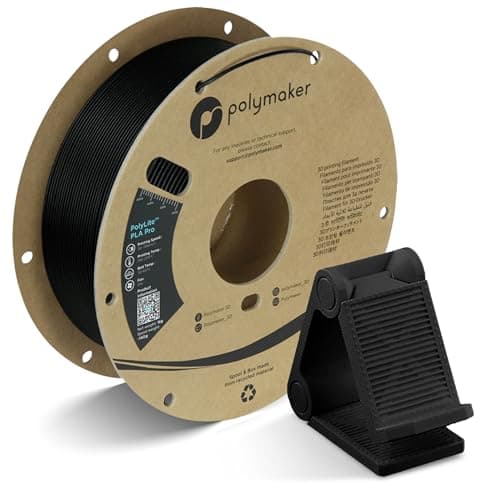
A PLA-plus in everything but the name. Polymaker publishes the same 190-220 C nozzle range as ordinary PLA and describes it as combining toughness and rigidity with normal PLA printability, which is exactly what the PLA+ label is supposed to mean and frequently does not.
#ad Price as of October 29, 2026, from Amazon. Prices change. How we make money.
What it actually is
A 1 kg spool of 1.75 mm PLA modified for impact resistance. It prints at PLA temperatures on a PLA profile; what changes is how the finished part fails - it takes a knock rather than shattering.
What the manufacturer states
| Figure | Value | Source |
|---|---|---|
| Printing temperature | 190 - 220 C | Polymaker PolyLite PLA Pro published print settings |
| Bed temperature | 30 - 60 C | Polymaker PolyLite PLA Pro published print settings |
| Printing speed | 50 - 200 mm/s | Polymaker PolyLite PLA Pro published print settings |
| Drying | 55 C for 6 hours, only if the spool has absorbed moisture | Polymaker PolyLite PLA Pro published print settings |
| Spool size | 1 kg, 1.75 mm | Polymaker PolyLite PLA Pro published print settings |
Read from Polymaker, PolyLite PLA Pro product page and print settings on 2026-09-13. Where a manufacturer does not publish a figure, there is no row for it here.
What is good about it
- Prints on an ordinary PLA profile - 190-220 C is the same range Polymaker publishes for its standard PLA, so nothing about the setup changes
- Polymaker states it is engineered for durable, drop-resistant prints, which is the one thing plain PLA is worst at
- A published 50-200 mm/s speed range, so it keeps up with a fast machine
- The full print profile is published, including separate retraction figures for direct and indirect drive
What is not
- Polymaker is explicit that it is not a heat-resistance upgrade - if the part lives in a hot car, this is not the answer
- It is not flexible either, so it does not replace TPU for anything that needs to bend
- More expensive per kilogram than the mainstream PLA on this site
- "PLA+" is not a standard, so a different brand's PLA+ may behave nothing like this one
Skip this one if
Skip it for decorative prints and for your first spool. Plain PLA is cheaper, prints identically and looks the same on a shelf. This earns its money on the brackets, clips and handles that get dropped.
What we cannot tell you
We have not printed this filament. How much of the published toughness advantage you would actually notice on a real part, and how consistent the spool is end to end, need a printer and a spool.
How it scored for a beginner
- Ease for a beginner9.0
- Published data9.5
- Toughness8.5
- Heat resistance5.0
- Value8.0
Beginner fit 8.7 / 10. That is our editorial read of how well this suits someone buying their first printer, taken off the published specifications — not a test result, and not a verdict on absolute quality. It is deliberately not marked up as a rating in this page’s structured data. How we pick.
How these were picked
We have not printed on these machines and we do not pretend to have. What we did was read each manufacturer’s own specification page, take their stated build volume, temperatures and speeds, check that every pick genuinely fits the job in this page’s title, confirm it is still being sold, and pull a live price rather than a remembered one. Every figure names the source it came from, so you can check it yourself in about a minute.
How we pick sets out the full method, including what would change a ranking.
Questions people actually ask
+−Is PLA+ stronger than PLA?
Tougher rather than stiffer. PLA+ blends trade a little rigidity for impact resistance, so parts take a knock instead of shattering. It is not stronger in the sense of holding more weight without bending, and it is not more heat resistant.
+−Can I print PLA+ with the same settings as PLA?
Essentially yes. Overture publishes 190-220 °C for its standard PLA and Polymaker publishes 190-220 °C for PLA Pro — the same range. Start with your existing PLA profile and adjust only if the spool you bought publishes something different.
+−Does PLA+ handle heat better?
No, and this is the most common misconception. Polymaker states plainly that PLA Pro is not the answer where high heat resistance is needed. For a part that lives in a car or in direct sun, move to PETG or, with an enclosure, ASA.
+−Is PLA+ worth the extra cost?
For functional parts, yes — the price gap is usually a few dollars a kilogram and the failure mode is meaningfully better. For decorative printing, no. Buy plain PLA and spend the difference on another spool.
+−Is PLA+ the same across brands?
No. “PLA+” is not a defined standard, so each manufacturer’s blend differs. Judge the individual spool on its published print profile and diameter tolerance rather than on the suffix.