Guide
How Much Does a 3D Printer Cost?
The sticker price is the easy part. This page covers the whole first year: the bands worth buying into, what filament genuinely adds, and the electricity arithmetic worked out from published wattage rather than guessed at.
By Scooter M. · Published · Last reviewed
How this page is funded: the buy links below are affiliate links. If you buy through one we earn a commission, at no extra cost to you. It does not change the order of the picks or a word of what we say about them. Full disclosure.
Printers we claim to have tested: 0. Everyone in this category says they tested twenty machines. We have not tested any, and we would rather say so. What we did instead is on this page: the manufacturer’s own published specification for every pick, cited and dated; the arithmetic on what it costs to run, with the inputs shown; a live price rather than a remembered one; and a plain answer on who should skip each machine.
The short answer
There are three bands worth buying into, and the machine is not the whole cost. Budget for the printer, at least two spools of filament, and a short list of accessories that each prevent a specific failure. Electricity is genuinely trivial: an eight-hour print on a 150 W machine costs about 22 cents at the current US average rate, and we show that arithmetic below.
The three bands
The floor: automatic leveling
There is a genuine dividing line in this market and it is a feature, not a price. Below it, you level the bed by hand and discover the Z-offset by trial and error. Above it, the machine does both. That is the single biggest predictor of whether somebody is still printing in six months, and it is why we treat it as the floor. The under $300 page is the cheapest end of it.
The middle: room, or an enclosure, or colors
The next step up does not buy better prints. It buys one of three things: a larger machine with a hotter bed, an enclosure, or multi-color in the box. You get one. Which one depends entirely on what you intend to print, and the under $500 page is organized around exactly that choice.
The top of sensible: enclosed and fast
Almost nobody buying a first printer needs this band, and the people who do know why — they want ABS, or the machine has to be quiet. See the under $1,000 page.
Filament: the recurring cost that is smaller than you think
Filament is sold by weight, in 1 kg spools, and the useful mental model is grams per object. Your slicer tells you the weight before you print. A phone stand is tens of grams. A desk organizer is a hundred or so. A large decorative piece might be three hundred.
Which means a 1 kg spool is a lot of objects — commonly twenty or thirty for a beginner printing useful desk-sized things. The arithmetic for cost per print is a division you can do in your head: spool price divided by 1,000, times the grams your slicer reports. We work through that properly on what filament costs per print.
Electricity, with the arithmetic shown
This is the number everybody worries about and nobody publishes, so here it is with every input visible.
Input 1 — the printer’s rated power. Bambu Lab publishes a 150 W maximum for the A1 mini and 350 W at 110 V for the A1. Those are peaks, drawn mainly while the bed and nozzle heat up. A printer at steady state draws considerably less. Using the peak as though it were constant therefore overstates the cost, which is the right direction for an estimate to be wrong in.
Input 2 — the electricity rate. The US Energy Information Administration’s Electric Power Monthly, Table 5.3, reports an average residential price of 18.34 cents per kilowatt-hour for June 2026. Your rate will differ; substitute it.
The arithmetic. Watts ÷ 1,000 × hours × rate.
Worked at each machine's published maximum power as though it were drawn constantly — a deliberate overestimate. Rate: 18.34 cents/kWh, EIA Electric Power Monthly Table 5.3, June 2026.
| Machine and print length | Energy used | Cost at 18.34 c/kWh |
|---|---|---|
| 150 W machine, 2-hour print | 0.30 kWh | About 6 cents |
| 150 W machine, 8-hour print | 1.20 kWh | About 22 cents |
| 150 W machine, 8 hours a day for a month | 36 kWh | About $6.60 |
| 350 W machine, 8-hour print | 2.80 kWh | About 51 cents |
| 350 W machine, 8 hours a day for a month | 84 kWh | About $15.41 |
Every figure in that table is that one multiplication. Check it yourself — that is the point of showing the inputs. And note the top row: for the machine we recommend most often, running an eight-hour print costs less than a bus fare, at a rate calculated as though the printer drew its peak power for the entire eight hours, which it does not.
The costs people forget
- A second spool. One color gets boring in a fortnight and running out mid-project is worse.
- A glue stick and isopropyl alcohol. Between them they solve most first-layer problems and cost almost nothing.
- A spare build plate. Not urgent, but plates wear and a second one means you can start the next print while prising the last one off.
- A filament dryer, later. Not on day one — your first spool arrives sealed and dry. Buy it when a spool that used to print well starts popping and stringing — the best filament dryers covers which box to get.
The full itemized first-month version of this, including which of those are genuinely necessary, is on what your first month costs.
One cost lever this page does not cover is the shop itself. Price protection, official refurbished stock and in-store pickup all change what you actually pay and how long you wait, and we compare those on where to buy a 3D printer.
What we would buy for this
Chosen from the same registry as our roundups, on the manufacturer’s own published figures and a live price.
Bambu Lab A1 mini
Bambu Lab · A genuine first printer
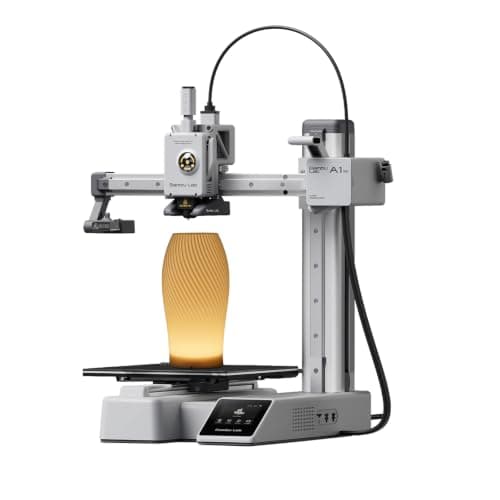
The one to get if you have never done this before. It calibrates itself before every print — bed mesh, Z-offset, flow, resonance — so the part of 3D printing that used to defeat beginners is a step you never see. The build volume is the price you pay.
#ad Price as of October 19, 2026, from Amazon. Prices change. How we make money.
What it actually is
A small open-frame filament printer. Filament is a 1.75 mm plastic string on a spool; the machine melts it and draws your object one layer at a time. Open-frame means there is no box around it, which is fine for PLA and a limitation for materials that warp.
What the manufacturer states
| Figure | Value | Source |
|---|---|---|
| Build volume | 180 x 180 x 180 mm | Bambu Lab A1 mini technical specifications |
| Max hot end temperature | 300 C | Bambu Lab A1 mini technical specifications |
| Max build plate temperature | 80 C | Bambu Lab A1 mini technical specifications |
| Max toolhead speed | 500 mm/s | Bambu Lab A1 mini technical specifications |
| Max toolhead acceleration | 10,000 mm/s2 | Bambu Lab A1 mini technical specifications |
| Filaments rated ideal | PLA, PETG, TPU, PVA | Bambu Lab A1 mini technical specifications |
| Filaments not recommended | ABS, ASA, PC, PA, PET, carbon/glass fiber reinforced | Bambu Lab A1 mini technical specifications |
| Machine dimensions | 347 x 315 x 365 mm | Bambu Lab A1 mini technical specifications |
| Net weight | 5.5 kg | Bambu Lab A1 mini technical specifications |
| Max power | 150 W | Bambu Lab A1 mini technical specifications |
Read from Bambu Lab, A1 mini technical specifications on 2026-09-01. Where a manufacturer does not publish a figure, there is no row for it here.
What is good about it
- Full auto-calibration on every print, per Bambu Lab's own specification — no paper-under-the-nozzle ritual
- Rated ideal for PLA, PETG, TPU and PVA, which covers everything a beginner should print in year one
- 150 W maximum power draw is the lowest of any printer on this site, so running cost is trivial
- 5.5 kg and 347 mm wide — it fits on a desk without rearranging the room
What is not
- 180 mm cubed is genuinely small. A full-size helmet or a large cosplay prop will not fit
- Bambu Lab rates ABS, ASA, PC and fiber-reinforced filaments as not recommended on this machine
- The multi-color AMS lite is a separate purchase, so the headline price is not the multi-color price
- Bambu Lab's own Amazon store lists this machine bundled with an LED lamp kit rather than on its own, so the price on our button is for that bundle. The bare printer is sold direct on Bambu Lab's store
- Open frame, so it is at the mercy of a draft from a window or an air conditioning vent
Skip this one if
Skip it if you already know the thing you want to print is bigger than a shoebox, or if you specifically want ABS or a carbon-fiber-filled filament. Bambu Lab itself lists those materials as not recommended here, and buying a machine you intend to use outside its rated envelope is how a first printer becomes a frustrating one.
What we cannot tell you
We have not printed on this machine. Long-term reliability, real-world noise in a quiet room, and how the textured plate holds up after a year are all things we cannot honestly report without owning one.
How it scored for a beginner
- Setup out of the box9.5
- Auto-calibration10.0
- First-layer forgiveness9.5
- Parts and filament availability9.0
- Running cost10.0
- Help when it goes wrong9.0
Beginner fit 9.2 / 10. That is our editorial read of how well this suits someone buying their first printer, taken off the published specifications — not a test result, and not a verdict on absolute quality. It is deliberately not marked up as a rating in this page’s structured data. How we pick.
Creality Ender-3 V3 SE
Creality · The smallest sensible amount of money
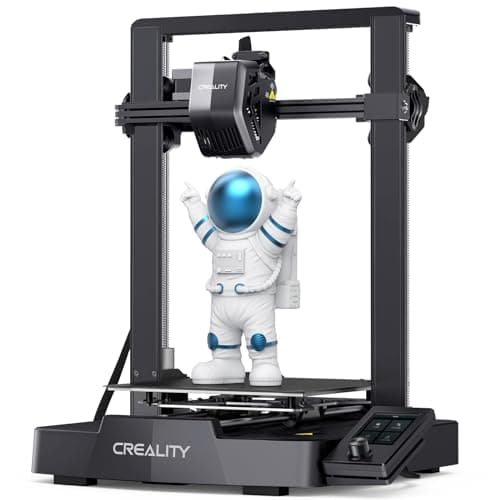
The cheap way in, and a genuinely modern one: auto bed leveling with CR Touch, automatic Z-offset from a strain sensor, and a direct-drive extruder. You will still learn more about your printer than an A1 owner does. Whether that is a feature or a cost is the whole decision.
#ad Price as of October 19, 2026, from Amazon. Prices change. How we make money.
What it actually is
An open-frame bed-slinger — the plate moves back and forth under a head that moves side to side and up. It is the classic hobby-printer layout, and this generation added the automatic setup steps the older Enders famously lacked.
What the manufacturer states
| Figure | Value | Source |
|---|---|---|
| Build volume | 220 x 220 x 250 mm | Creality Ender-3 V3 SE product specifications |
| Maximum print speed | 250 mm/s | Creality Ender-3 V3 SE product specifications |
| Typical print speed | 180 mm/s | Creality Ender-3 V3 SE product specifications |
| Acceleration | 2,500 mm/s2 | Creality Ender-3 V3 SE product specifications |
| Leveling | CR Touch auto leveling with strain-sensor Z-offset | Creality Ender-3 V3 SE product specifications |
| Extruder | Sprite direct extruder | Creality Ender-3 V3 SE product specifications |
| Filament diameter | 1.75 mm | Creality Ender-3 V3 SE product specifications |
Read from Creality, Ender-3 V3 SE product page on 2026-09-01. Where a manufacturer does not publish a figure, there is no row for it here.
What is good about it
- 220 x 220 x 250 mm is larger in every axis than the A1 mini
- Automatic bed leveling and Z-offset, which is the thing older Enders did not have
- The largest parts and community ecozystem of any machine here, by a distance
- Some assembly is required, and you will understand your printer better for it
What is not
- 250 mm/s maximum and 2,500 mm/s2 acceleration — a fraction of the A1's rated figures
- Not fully assembled out of the box, so first-print day is longer
- No filament run-out safety net of the kind Bambu specifies on the A1 series
- More of the tuning is yours to do, which is the trade for the price
Skip this one if
Skip it if the reason you are buying a printer is that you want to print things, not to own a printer. This machine is excellent value and it will ask more of you than an A1 mini will. If your patience for troubleshooting is low, spend the difference.
What we cannot tell you
We have not printed on this machine. How often the auto leveling needs re-running, the quality of the bundled build surface after a hundred prints, and assembly time for someone who has never built one are all outside what the specification tells you.
How it scored for a beginner
- Setup out of the box7.0
- Auto-calibration8.0
- First-layer forgiveness7.5
- Parts and filament availability10.0
- Running cost9.0
- Help when it goes wrong10.0
Beginner fit 8.0 / 10. That is our editorial read of how well this suits someone buying their first printer, taken off the published specifications — not a test result, and not a verdict on absolute quality. It is deliberately not marked up as a rating in this page’s structured data. How we pick.
Overture PLA
Overture · Your first spool, and your tenth
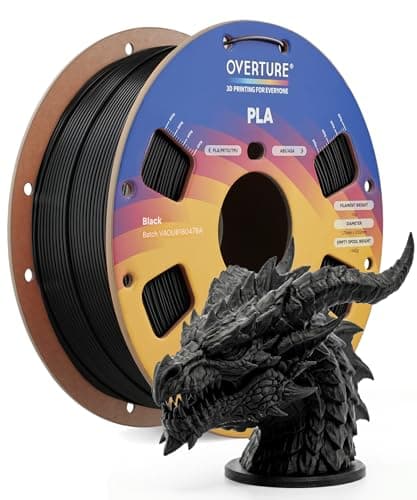
The default answer to 'what filament should I buy'. A tight published diameter tolerance, a conventional temperature range every printer profile already expects, and it is sold everywhere. Nothing about it is exciting, which is the point.
#ad Price as of October 19, 2026, from Amazon. Prices change. How we make money.
What it actually is
PLA is the plastic beginners should print. It is stiff, it needs no enclosure, it barely smells, and it sticks to a plate at low temperatures. This is a mainstream 1 kg spool of it.
What the manufacturer states
| Figure | Value | Source |
|---|---|---|
| Diameter | 1.75 mm | Overture published product specification |
| Dimensional accuracy | +/- 0.02 mm | Overture published product specification |
| Spool weight | 1 kg (2.2 lb) | Overture published product specification |
| Recommended nozzle temperature | 190 - 220 C | Overture published product specification |
| Recommended bed temperature | 25 - 60 C | Overture published product specification |
| Packaging | Dried before packing and vacuum sealed | Overture published product specification |
Read from Overture, PLA filament product page on 2026-09-01. Where a manufacturer does not publish a figure, there is no row for it here.
What is good about it
- +/- 0.02 mm published tolerance, which is as tight as mainstream PLA is quoted
- 190 - 220 C is squarely inside every stock PLA profile you will meet
- A 25 - 60 C bed range means it will stick even on an unheated or barely warm plate
- Vacuum sealed with desiccant, so a spool bought in advance is still dry when it arrives
What is not
- PLA softens in a hot car or a sunny window — this is a property of the material, not the brand
- Not the cheapest per kilogram once you start printing seriously
- Color consistency between batches of any budget filament is a real thing
- No filament is a fix for a machine that is not leveled
Skip this one if
Skip it if the part you are making will live outdoors or in a car. That is a PETG job, not a PLA one, and no PLA brand changes that.
What we cannot tell you
We have not printed this filament. Batch-to-batch color consistency and how it behaves after a year in a cupboard are things only repeated use reveals.
How it scored for a beginner
- Ease for a beginner9.5
- Published tolerance9.5
- Availability9.5
- Value per kilogram8.0
Beginner fit 9.0 / 10. That is our editorial read of how well this suits someone buying their first printer, taken off the published specifications — not a test result, and not a verdict on absolute quality. It is deliberately not marked up as a rating in this page’s structured data. How we pick.
How these were picked
We have not printed on these machines and we do not pretend to have. What we did was read each manufacturer’s own specification page, take their stated build volume, temperatures and speeds, check that every pick genuinely fits the job in this page’s title, confirm it is still being sold, and pull a live price rather than a remembered one. Every figure names the source it came from, so you can check it yourself in about a minute.
How we pick sets out the full method, including what would change a ranking.
Questions people actually ask
+−How much does a good beginner 3D printer cost?
The band worth buying into is defined by a feature rather than a price: automatic bed leveling and an automatic Z-offset. Every machine on our under $300 page clears that bar, and the live price sits inside every button.
+−How much does it cost to run a 3D printer?
Very little. Taking a 150 W published maximum as though it were constant, an eight-hour print uses 1.2 kWh, which is about 22 cents at the 18.34 cents per kilowatt-hour the EIA reported for US residential customers in June 2026. Real consumption is lower, since the peak is drawn while heating.
+−How much does 3D printing filament cost?
Filament is sold in 1 kg spools and most useful desk-sized objects weigh tens of grams, so a spool goes a long way — commonly twenty to thirty objects. The per-print arithmetic is on our filament cost page.
+−Are there hidden costs to 3D printing?
Not hidden so much as unmentioned: a second spool, a glue stick and isopropyl alcohol, a spare build plate eventually, and a filament dryer once your spools have been open a while. All of them together are a fraction of the machine.