Review
Bambu Lab P1S Review
An enclosed CoreXY machine from the company that made self-calibration normal. It is a better printer than the A1 in every measurable way and a worse first printer, and both of those things are true for the same reason.
By Scooter M. · Published · Last reviewed
How this page is funded: the buy links below are affiliate links. If you buy through one we earn a commission, at no extra cost to you. It does not change the order of the picks or a word of what we say about them. Full disclosure.
Printers we claim to have tested: 0. Everyone in this category says they tested twenty machines. We have not tested any, and we would rather say so. What we did instead is on this page: the manufacturer’s own published specification for every pick, cited and dated; the arithmetic on what it costs to run, with the inputs shown; a live price rather than a remembered one; and a plain answer on who should skip each machine.
The short answer
Buy it if you already know you want ABS or ASA, or if the printer has to live in a room where noise and smell matter. Bambu Lab rates the P1S ideal for PLA, PETG, TPU, PVA, PET, ABS and ASA — a list the open-frame A series cannot publish — and fits an activated carbon filter. If neither of those two reasons applies to you, buy an A1 and spend the difference on filament.
What this machine is for
The P1S is the enclosed member of Bambu Lab’s range and, at the time of writing, the least expensive way into a Bambu with a box around it. Its replacement, the P2S, is now the current model; the P1S is still listed new on Bambu Lab’s own US store, alongside factory refurbished units. Where each machine sits in the range is on our Bambu Lab lineup page.
Everything below is read from Bambu Lab’s own published specification table on 2026-09-06. We have not printed on this machine.
The specification, and what each figure means for you
256 × 256 × 256 mm. The same envelope as an A1, in a smaller footprint, because a CoreXY machine does not need room for the bed to travel. Bambu Lab adds a footnote worth reading: the default printable height in Bambu Studio is set to 250 mm to stop the nozzle colliding with anything left on the plate, and the last 6 mm needs a deliberate change.
All-metal hot end, 300 °C maximum; 100 °C plate. Both are the figures that make ABS and ASA printable rather than aspirational. The plate is the more important of the two — it is what keeps a tall part stuck down while its lower layers cool and try to contract.
Ideal: PLA, PETG, TPU, PVA, PET, ABS, ASA. Capable: PA, PC. Bambu Lab splits its material list into two tiers, which is more honest than a single “supported” column. Note what is not on either list: Bambu Lab states plainly that printing fiber-reinforced filaments such as glass or carbon fiber is not recommended on the P1S before an extruder and hot end upgrade is done. If carbon-filled filament is your reason for buying, this is not the machine.
500 mm/s and 20 m/s². That acceleration figure — 20,000 mm/s² in the units the rest of the industry uses — is twice what the bed-slinging A series publishes, and it is the practical benefit of CoreXY. It makes prints shorter. It does not make anything easier.
Activated carbon filter and a chamber regulator fan. Bambu Lab is specific about why: ABS and similar filaments emit odors during printing, and the filter is its answer. This, more than the material list, is what decides whether a printer can share a room with a person.
389 × 389 × 458 mm, 12.95 kg, 350 W at 110 V. Heavier than any open-frame machine we recommend and physically smaller than an A1 despite the same build volume. It wants a shelf, not a desk corner.
The camera is not a webcam
Bambu Lab publishes the chamber camera as 1280 × 720 at 0.5 frames per second, with timelapse supported. Half a frame per second is a still image every two seconds. It is genuinely useful for checking whether a print is still attached to the plate from another room, and it is not a live video feed. Buyers coming from the marketing photographs are sometimes surprised by that, so we are flagging it before you order.
Buying an outgoing model, and the refurbished option
Being the previous generation is not a defect, and it is worth being clear about what it does and does not mean. The P1S is a current, supported product that Bambu Lab still lists new; the P2S simply sits above it now. Spare parts, nozzles, build plates and the AMS are the same ecosystem, and the accumulated troubleshooting written by P1S owners over the past few years does not expire.
Bambu Lab also lists factory refurbished P1S units in its own store, at refurbished prices and, in its own words, with the same warranty as new. We cannot sell you one — the buy buttons on this site go to Amazon — and we would rather tell you it exists than pretend the only route is the one we earn on.
The genuine risk of buying an outgoing model is narrower than people fear: not support, but the possibility that the discount disappears when stock does. If the price is the reason you are choosing the P1S over the P2S, that reason has a shelf life.
What the AMS adds, and what it costs
The P1S takes Bambu Lab’s AMS, and the store lists both an AMS Combo and an AMS 2 Pro Combo alongside the bare machine. The AMS feeds four spools into the single nozzle in turn, cutting and swapping filament at every color change.
Two consequences follow from “single nozzle,” and they are the ones the marketing photographs do not show. Every color change purges the old filament into a waste block, so a multi-color model consumes materially more plastic than its finished weight. And every change takes time, so a model with frequent swaps can spend more of its run swapping than printing — a point we work through on how long a print takes.
Our position is the same as everywhere else on this site and does not depend on the brand: buy the printer, learn it in one color, add multi-color in month three if you still want it. It is one of the very few upgrades here that is genuinely deferrable at no penalty.
Living with it in a shared room
This is the second reason to buy a P1S and, in our experience of what people actually ask, an under-discussed one. Three published details bear on it.
The activated carbon filter, which Bambu Lab is explicit about: ABS and similar filaments emit odors while printing, and the filter is the answer to that. The chamber temperature regulator fan, which keeps the box at a stable temperature rather than simply hot. And the enclosure itself, which absorbs a share of the mechanical noise that an open frame broadcasts into the room.
What Bambu Lab does not publish is a decibel figure, so we cannot tell you how quiet it is in numbers, and we will not guess. What we can say is that an enclosure is the single largest structural difference between a printer that can run overnight near a bedroom and one that cannot.
What it costs to run
Bambu Lab publishes 350 W at 110 V as the maximum draw, which is the same figure as the open-frame A1 despite the enclosure — the heated plate dominates, and the box mostly retains heat rather than generating it. Maximum draw is reached while heating rather than sustained across a print, so treating it as constant overstates the cost.
Even overstated, it is small. We show the full arithmetic with its inputs, including the electricity rate we use and where it comes from, on what your first month actually costs. The short version: filament is the running cost of this hobby, and electricity is a rounding error.
Who should skip it
Anyone printing PLA. That is not a joke and it covers most first-year owners. Everything the P1S adds over an A1 — the box, the filter, the material tiers, the acceleration — is aimed at plastics and situations a first year does not reach, and none of it makes a PLA print better. Our A1 against P1S page walks the decision through with the numbers side by side.
Also skip it if fiber-filled filament is the plan, for the reason Bambu Lab itself gives above, and skip it if the budget is tight enough that the difference is real money. The cheapest good outcome in this hobby is a modest printer, a lot of filament and six months of practice.
What to buy with it
PLA for the first month regardless of why you bought it — the PLA picks are three mainstream spools. When you do move to PETG, the PETG page covers what changes. And if you are cross-shopping the enclosure itself, the Centauri Carbon comparison is the other way to spend this money.
What we would buy for this
Chosen from the same registry as our roundups, on the manufacturer’s own published figures and a live price.
Bambu Lab P1S
Bambu Lab · A first printer for someone who already knows they want ABS or ASA
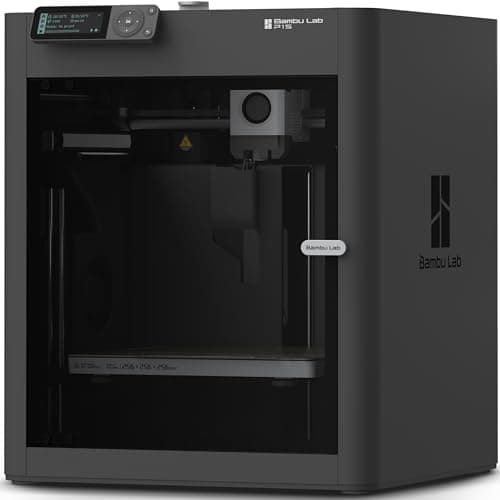
An enclosed CoreXY machine, which is a different class of thing from an A1: the bed stays still and the box holds heat, so the materials the A1 refuses become possible. It is more printer than a first-timer needs, and the right answer if you already know you want ABS.
#ad Price as of October 21, 2026, from Amazon. Prices change. How we make money.
What it actually is
A boxed printer using CoreXY motion — the print head moves in two axes while the bed only goes up and down. Keeping the bed still lets it move faster, and the enclosure keeps the chamber warm so plastics that shrink as they cool do not peel off the plate.
What the manufacturer states
| Figure | Value | Source |
|---|---|---|
| Build volume | 256 x 256 x 256 mm | Bambu Lab P1S technical specifications |
| Enclosure | Enclosed, plastic and glass | Bambu Lab P1S technical specifications |
| Max hot end temperature | 300 C | Bambu Lab P1S technical specifications |
| Max build plate temperature | 100 C | Bambu Lab P1S technical specifications |
| Max speed | 500 mm/s | Bambu Lab P1S technical specifications |
| Max acceleration | 20,000 mm/s2 | Bambu Lab P1S technical specifications |
| Nozzle | All-metal hot end, 0.4 mm included; 0.2, 0.6 and 0.8 mm optional | Bambu Lab P1S technical specifications |
| Filaments rated ideal | PLA, PETG, TPU, PVA, PET, ABS, ASA | Bambu Lab P1S technical specifications |
| Filaments rated capable | PA, PC | Bambu Lab P1S technical specifications |
| Air filter | Activated carbon | Bambu Lab P1S technical specifications |
| Physical dimensions | 389 x 389 x 458 mm | Bambu Lab P1S technical specifications |
| Net weight | 12.95 kg | Bambu Lab P1S technical specifications |
| Max power | 350 W at 110 V | Bambu Lab P1S technical specifications |
Read from Bambu Lab, P1S product page and specification table on 2026-09-06. Where a manufacturer does not publish a figure, there is no row for it here.
What is good about it
- Enclosed, so ABS and ASA are on the menu rather than off it
- CoreXY at 20,000 mm/s2 acceleration — twice the A1's rated figure
- Same 256 mm cubed volume as the A1 in a smaller footprint, because the bed does not travel
- The enclosure also contains most of the noise and the smell, which matters if it lives in a room you sit in
What is not
- Noticeably more expensive than an A1 for a beginner who will print PLA for a year
- The enclosure makes routine maintenance fiddlier than an open frame
- Nothing about it is easier to learn on than an A1 mini — it is just more capable
- Multi-color is again a separate AMS purchase
Skip this one if
Skip it if your honest answer to 'what will you print' is 'I am not sure yet'. Everything the P1S adds over an A1 is aimed at materials a beginner should not start with. Buy it when a specific project demands ABS, not before.
What we cannot tell you
We have not printed on this machine. Chamber temperature in a cold room, real ABS warping behavior and long-term fan noise are not on any specification sheet.
How it scored for a beginner
- Setup out of the box8.5
- Auto-calibration9.5
- First-layer forgiveness9.0
- Parts and filament availability9.0
- Running cost7.0
- Help when it goes wrong9.0
Beginner fit 8.4 / 10. That is our editorial read of how well this suits someone buying their first printer, taken off the published specifications — not a test result, and not a verdict on absolute quality. It is deliberately not marked up as a rating in this page’s structured data. How we pick.
How these were picked
We have not printed on these machines and we do not pretend to have. What we did was read each manufacturer’s own specification page, take their stated build volume, temperatures and speeds, check that every pick genuinely fits the job in this page’s title, confirm it is still being sold, and pull a live price rather than a remembered one. Every figure names the source it came from, so you can check it yourself in about a minute.
How we pick sets out the full method, including what would change a ranking.
Questions people actually ask
+−Is the Bambu Lab P1S worth it over the A1?
Only for the enclosure. The build volume is identical at 256 mm cubed. What the P1S adds is a heated chamber, an activated carbon filter and twice the published acceleration — which matter for ABS, ASA and for a printer living in a shared room, and matter almost not at all for PLA.
+−Can the P1S print carbon fiber filament?
Bambu Lab says not without an upgrade. Its own comparison text states that printing fiber-reinforced filaments such as glass or carbon fiber directly is not recommended on the P1S before an extruder and hot end upgrade is done. Fiber grades are abrasive and chew through a standard nozzle.
+−Should I buy the P1S or the newer P2S?
Both are enclosed and both give you 256 mm cubed. The P2S adds a hotter plate, a faster head, more rated flow and a redesigned airflow system. The P1S is the cheaper way into an enclosure while it is stocked. Our Bambu lineup page takes that decision apart.
+−Does the P1S have a live camera?
It has a chamber monitoring camera published at 1280 × 720 and 0.5 frames per second, with timelapse supported. That is a still image roughly every two seconds — useful for checking on a print, not a video stream.