Guide
How to Stop Your Prints Stringing
Fine hairs strung between the parts of a model are the most common cosmetic failure in 3D printing, and the fix people try first is almost never the one that works.
By Scooter M. · Published · Last reviewed
How this page is funded: the buy links below are affiliate links. If you buy through one we earn a commission, at no extra cost to you. It does not change the order of the picks or a word of what we say about them. Full disclosure.
Printers we claim to have tested: 0. Everyone in this category says they tested twenty machines. We have not tested any, and we would rather say so. What we did instead is on this page: the manufacturer’s own published specification for every pick, cited and dated; the arithmetic on what it costs to run, with the inputs shown; a live price rather than a remembered one; and a plain answer on who should skip each machine.
The short answer
Dry the filament before you change a single setting. Moisture is the most common cause of stringing and the one people try last, usually after an evening of retraction tuning that fixes nothing. Every filament manufacturer we cite says so on its own product page. If the spool is genuinely dry and it still strings, drop the nozzle temperature 5 °C at a time before touching retraction.
Stringing is molten plastic leaking from the nozzle while the head moves between two parts of the model, leaving a fine hair behind. It is almost always cosmetic — the part is structurally fine and the hairs brush off — but on a model with lots of separate towers or lettering it is the difference between a print you show people and one you do not.
Fix 1: dry the filament
Water absorbed from the air turns to steam inside the hot end. Steam pushes plastic out of the nozzle when nothing is supposed to be coming out, which is precisely the mechanism that creates strings. It also produces popping and crackling sounds while printing and a rough surface finish.
The manufacturers are consistent about this. Polymaker states on its PETG page that the material is very hygroscopic and that wet PETG leads to stringing and poor surface quality, and publishes 60 °C for 6 hours as the fix. Overture publishes 60 °C for 5 hours and warns against over-drying, which makes filament brittle. Bambu Lab lists “dry out before use” in its own cautions for PETG.
PLA absorbs more slowly than PETG and TPU but it does absorb. A spool left open on a shelf for a month in a humid room will string when the same spool did not when it was new. The full treatment — including whether you need a dryer or just a sealed box — is on filament storage and drying.
Fix 2: lower the nozzle temperature, 5 °C at a time
Hotter plastic is runnier, and runnier plastic leaks more readily out of a nozzle that is not being asked to extrude. If the spool is dry and it still strings, this is the next lever.
Move in 5 °C steps and stay inside the published range on the spool. Overture publishes 190-220 °C for its PLA and 230-260 °C for its PETG; Polymaker publishes 240-260 °C for PETG. There is room in every one of those ranges to come down without leaving the manufacturer’s specification.
Watch layer adhesion as you go. Too cold produces a part that looks clean and splits along the layer lines when you load it, which is a worse failure than a hair you could have brushed off.
Fix 3: check retraction, but check it second
Retraction pulls filament back up the nozzle before a travel move so there is less pressure behind the melt. It is the setting every guide leads with and the third thing we would touch, because the modern machines in this site’s beginner picks ship with retraction already tuned by the manufacturer for their own hardware. Changing it blind on a machine whose profile was tuned for you is how people spend an evening making things worse.
If you do adjust it, note that the correct figure depends on the extruder type, and manufacturers publish both. Polymaker, for example, publishes 1 mm at 20 mm/s for a direct-drive extruder and 3 mm at 40 mm/s for an indirect-drive one — a threefold difference, and proof that a number copied from someone else’s machine is meaningless.
Fix 4: raise travel speed
A faster travel move gives leaking plastic less time to fall. This is a genuinely effective and frequently overlooked adjustment, and it costs nothing in quality — travel moves are not printing, so moving faster during them affects nothing else about the part.
Fix 5: turn on combing or wipe
Most slicers can keep travel moves inside the already-printed area of the model, so any leak lands on a surface that is going to be covered anyway. Look for “combing,” “avoid crossing perimeters” or “wipe while retracting” depending on which slicer you use. It does not stop leaking; it hides it where it does no harm.
Fix 6: clean or replace the nozzle
Residue on the outside of the nozzle drags along the print and can deposit material where you do not want it, which looks like stringing and is not. A worn nozzle also produces inconsistent flow that shows up the same way. Both are covered in order on the clogged nozzle page.
Published drying guidance, read from each manufacturer's own page on 2026-09-06.
| Filament | Published drying | Manufacturer's own note |
|---|---|---|
| Overture High Speed PETG | 60 C for 5 hours | Warns that over-drying causes brittleness |
| Polymaker PETG | 60 C for 6 hours | States the material is very hygroscopic and that wet PETG strings |
| Bambu Lab PETG Basic | Dry out before use | Listed under the product's cautions for use |
When to stop tuning
At the point where the hairs brush off with a fingernail and do not come back on the next print. Perfect zero-stringing prints exist, mostly on dry filament in a stable room, and chasing the last one percent is how a hobby turns into a second job. A quick pass with a heat gun on low, or a fingernail, removes what remains on most models.
If your prints are failing rather than looking untidy, this is the wrong page — start at prints not sticking to the bed, which covers the failures that lose you the whole part rather than the finish.
What we would buy for this
Chosen from the same registry as our roundups, on the manufacturer’s own published figures and a live price.
SUNLU FilaDryer S4
SUNLU · Filament that has been open more than a few weeks
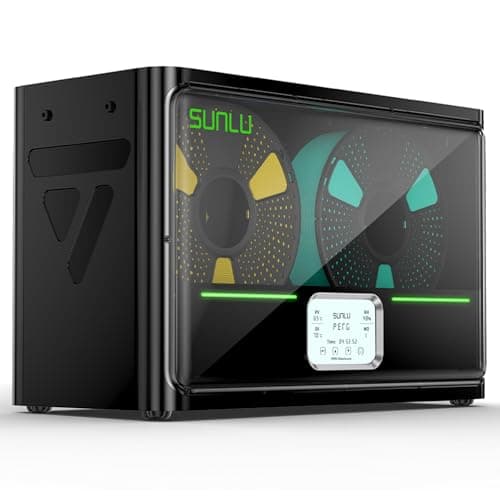
The accessory that fixes a failure most beginners misdiagnose. Filament absorbs water from the air; wet filament pops, strings and prints badly, and no amount of leveling fixes it. Four spools at once and you can print straight out of the box.
#ad Price as of October 21, 2026, from Amazon. Prices change. How we make money.
What it actually is
A heated box that drives moisture out of filament and then keeps it dry while you print from it. Plastics like PETG and nylon pull water out of ordinary room air within days, and water in the filament turns to steam in the nozzle.
What the manufacturer states
| Figure | Value | Source |
|---|---|---|
| Capacity | 4 x 1 kg spools | SUNLU FilaDryer S4 published specification |
| Temperature range | 35 - 70 C | SUNLU FilaDryer S4 published specification |
| Heater | 350 W PTC heater | SUNLU FilaDryer S4 published specification |
| Filament diameters supported | 1.75 mm, 2.85 mm, 3.0 mm | SUNLU FilaDryer S4 published specification |
Read from SUNLU, FilaDryer S4 product page on 2026-09-01. Where a manufacturer does not publish a figure, there is no row for it here.
What is good about it
- Four spools at once, which is the difference between drying filament and having dry filament
- 35 - 70 C covers PLA at the low end and nylon at the high end
- You can feed the printer directly from the box, so filament stays dry mid-print
- Fixes a whole class of print failures that look like machine problems
What is not
- A 350 W heater is more power than most printers here draw
- It is a large box that needs somewhere to live next to the printer
- Nothing about it helps on a fresh, sealed, dry spool
- Sealed boxes with desiccant do most of the same job for less money if you are only storing
Skip this one if
Skip it on day one. Your first spool arrives vacuum sealed and dry, and a dryer solves a problem you will not have for weeks. Buy it when a spool that used to print well starts popping and stringing.
What we cannot tell you
We have not used this dryer. How long a spool actually stays dry in a humid room, and how accurate the displayed temperature is, need measurement we have not done.
How it scored for a beginner
- Ease for a beginner9.0
- Fixes a real failure9.5
- Availability8.5
- Value7.5
Beginner fit 8.5 / 10. That is our editorial read of how well this suits someone buying their first printer, taken off the published specifications — not a test result, and not a verdict on absolute quality. It is deliberately not marked up as a rating in this page’s structured data. How we pick.
Overture High Speed PETG
Overture · Parts that have to survive heat or flexing
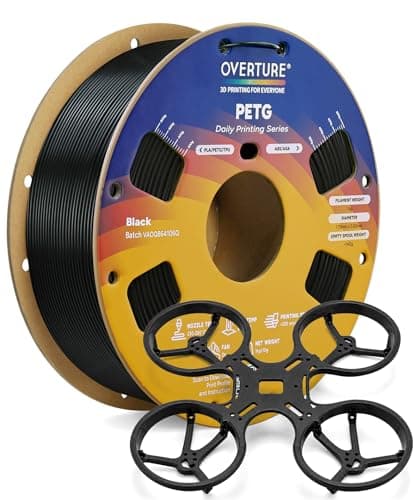
The second spool, not the first. PETG is what you move to when a part has to survive a hot car, a bit of flex or the outdoors — and it is fussier about stringing and bed adhesion than PLA in exchange.
#ad Price as of October 21, 2026, from Amazon. Prices change. How we make money.
What it actually is
PETG is a tougher, slightly flexible plastic that tolerates heat far better than PLA. It prints hotter, sticks harder to the plate, and strings more. The same material family as a drinks bottle.
What the manufacturer states
| Figure | Value | Source |
|---|---|---|
| Diameter | 1.75 mm | Overture published product specification |
| Dimensional accuracy | +/- 0.02 mm | Overture published product specification |
| Recommended nozzle temperature | 230 - 260 C | Overture published product specification |
| Recommended printing speed | 30 - 300 mm/s | Overture published product specification |
Read from Overture, High Speed PETG filament product page on 2026-09-01. Where a manufacturer does not publish a figure, there is no row for it here.
What is good about it
- Handles heat that would soften a PLA part into uselessness
- Tougher and less brittle than PLA, so it survives being dropped
- +/- 0.02 mm published tolerance, the same as Overture's PLA
- A 30 - 300 mm/s published speed range that fits current fast machines
What is not
- Strings between features far more readily than PLA
- 230 - 260 C means your printer's hot end has to be rated for it — the A1 mini's 300 C ceiling is fine, some older machines are not
- It can stick to a smooth PEI plate hard enough to damage the surface
- Absorbs moisture from the air faster than PLA, so an open spool goes off
Skip this one if
Skip it as a first spool. Learn what a good first layer looks like in PLA before you add a material that sticks too well and strings between everything. PETG is a solution to a problem you have not had yet.
What we cannot tell you
We have not printed this filament. How much stringing you get at a given retraction setting, and whether it damages a specific plate, depend on the machine and we have not tested either.
How it scored for a beginner
- Ease for a beginner6.5
- Published tolerance9.5
- Availability9.0
- Value per kilogram8.0
Beginner fit 7.9 / 10. That is our editorial read of how well this suits someone buying their first printer, taken off the published specifications — not a test result, and not a verdict on absolute quality. It is deliberately not marked up as a rating in this page’s structured data. How we pick.
How these were picked
We have not printed on these machines and we do not pretend to have. What we did was read each manufacturer’s own specification page, take their stated build volume, temperatures and speeds, check that every pick genuinely fits the job in this page’s title, confirm it is still being sold, and pull a live price rather than a remembered one. Every figure names the source it came from, so you can check it yourself in about a minute.
How we pick sets out the full method, including what would change a ranking.
Questions people actually ask
+−What causes stringing in 3D printing?
Molten plastic leaking from the nozzle during travel moves. The most common underlying cause is moisture in the filament, which turns to steam and pushes plastic out. After that: nozzle temperature too high, retraction not suited to the extruder, and slow travel moves.
+−Does drying filament actually stop stringing?
Often, yes — and it is the first thing to try. Polymaker states on its own product page that wet PETG leads to stringing and poor surface quality, and publishes 60 °C for 6 hours as the remedy. Overture publishes 60 °C for 5 hours with a warning against over-drying.
+−Should I change retraction settings to fix stringing?
Third, not first. Current machines ship with retraction tuned by the manufacturer for their own extruder, and the correct value differs by extruder type — Polymaker publishes 1 mm for direct drive and 3 mm for indirect drive. Dry the filament and adjust temperature before you touch it.
+−Why does PETG string more than PLA?
It absorbs moisture faster and prints hotter, and both make leaking more likely. It is a normal characteristic of the material rather than a fault with your printer or the spool, which is why a first month on PLA is easier.