Roundup
The Best 3D Printers on Amazon
Amazon's own ranking is driven by review volume and price history, which is not the same thing as a good first printer. This is the same shortlist judged on published specifications instead.
By Scooter M. · Published · Last reviewed
How this page is funded: the buy links below are affiliate links. If you buy through one we earn a commission, at no extra cost to you. It does not change the order of the picks or a word of what we say about them. Full disclosure.
Printers we claim to have tested: 0. Everyone in this category says they tested twenty machines. We have not tested any, and we would rather say so. What we did instead is on this page: the manufacturer’s own published specification for every pick, cited and dated; the arithmetic on what it costs to run, with the inputs shown; a live price rather than a remembered one; and a plain answer on who should skip each machine.
The short answer
The Bambu Lab A1 mini, same as anywhere else. Buying on Amazon changes the delivery and the returns policy, not which machine is the right first printer. What it does change is how you should read the page: sort order and review count are not quality signals in this category, and three things that matter are routinely absent from the listing.
What an Amazon listing will not tell you
Whether the setup is automatic
This is the single most important thing about a beginner printer and it is nearly impossible to see in a listing. “Auto leveling” appears in the bullet points of machines that mean very different things by it — some probe the bed and compensate in software, some also set the Z-offset for you, some still expect you to adjust a screw. Check the manufacturer’s own specification page before you buy; that is where the real answer is, and it is where every figure on this site comes from.
What is actually in the box
Almost every printer ships with a small sample coil of filament rather than a full spool. Sometimes it is enough for one demo model. Add a 1 kg spool to the same order — the machine is useless without it, and nobody wants to discover that on the day it arrives.
Whether a “combo” is the multi-color version
Several manufacturers sell the same printer as a bare machine and as a bundle with a multi-spool unit attached. The listings look nearly identical and the prices do not. Read the title carefully: if multi-color is what you want, it must be in the box or it is a second purchase later.
How to read the reviews, since they will be there
Review counts on printers skew heavily toward machines that have been on sale longest, which in this category correlates with being older rather than better. A printer released two years ago with fifteen thousand reviews and a printer released this year with four hundred are not comparable on that axis at all.
What is worth reading is the one- and two-star reviews, filtered for the word that describes your actual worry. If you are worried about setup, search the reviews for “level” and “assemble.” If you are worried about noise, search for “loud.” Individual complaints are noise; a repeated specific complaint is a signal.
What we would buy alongside
One spool of PLA at minimum — see the filament picks — and, if you want to spend a little more, the short list on what belongs in a starter kit. Everything on that page prevents a specific, common first-month failure, which is the only test an accessory has to pass.
If you are still deciding between bands rather than machines, the under $300 and under $500 pages ladder into each other and are the fastest way to see what an extra hundred dollars actually buys.
Quick picks
Ranked on how well each one fits the job in this page's title, read off the manufacturer's own published specifications. Tap any row for the full write-up, including who should skip it.
| # | Product | Best for | Beginner fit | Price |
|---|---|---|---|---|
| 1 | 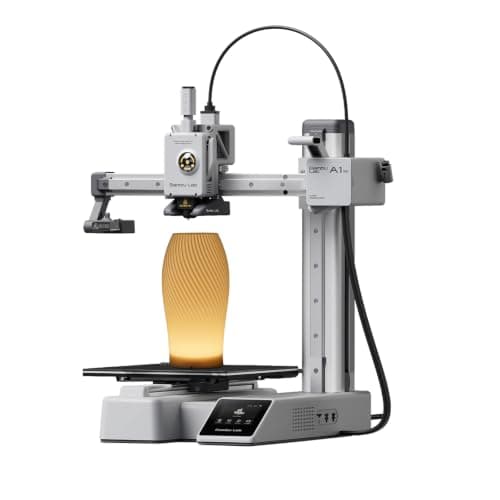 Bambu Lab A1 mini180 x 180 x 180 mm Bambu Lab A1 mini180 x 180 x 180 mm | Best overall | 9.2 | $249.00 - Check price on Amazon |
| 2 | 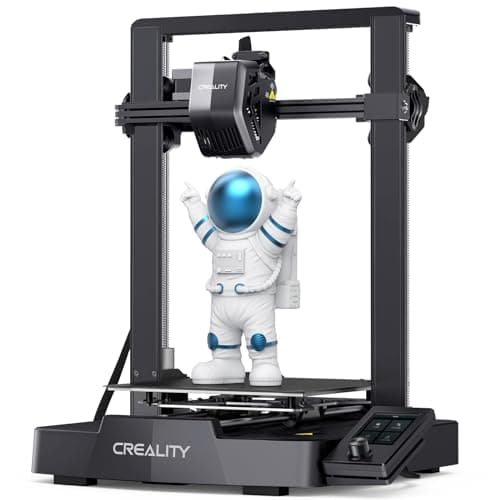 Creality Ender-3 V3 SE220 x 220 x 250 mm Creality Ender-3 V3 SE220 x 220 x 250 mm | Best budget | 8.0 | $199.00 - Check price on Amazon |
| 3 |  Elegoo Neptune 4225 x 225 x 265 mm Elegoo Neptune 4225 x 225 x 265 mm | Most spec per dollar | 8.1 | Check price on Amazon |
| 4 | Anycubic Kobra 3 Combo250 x 250 x 260 mm | Best multi-color bundle | 7.8 | Check price on Amazon |
#1 · Best overall
Bambu Lab A1 mini
Bambu Lab · A genuine first printer
The one to get if you have never done this before. It calibrates itself before every print — bed mesh, Z-offset, flow, resonance — so the part of 3D printing that used to defeat beginners is a step you never see. The build volume is the price you pay.
#ad Price as of October 19, 2026, from Amazon. Prices change. How we make money.
What it actually is
A small open-frame filament printer. Filament is a 1.75 mm plastic string on a spool; the machine melts it and draws your object one layer at a time. Open-frame means there is no box around it, which is fine for PLA and a limitation for materials that warp.
Does it fit this page?
The same pick as our main list, and the one whose listing most understates it — an Amazon page cannot easily convey that the machine calibrates itself, which is the entire reason to buy it.
What the manufacturer states
| Figure | Value | Source |
|---|---|---|
| Build volume | 180 x 180 x 180 mm | Bambu Lab A1 mini technical specifications |
| Max hot end temperature | 300 C | Bambu Lab A1 mini technical specifications |
| Max build plate temperature | 80 C | Bambu Lab A1 mini technical specifications |
| Max toolhead speed | 500 mm/s | Bambu Lab A1 mini technical specifications |
| Max toolhead acceleration | 10,000 mm/s2 | Bambu Lab A1 mini technical specifications |
| Filaments rated ideal | PLA, PETG, TPU, PVA | Bambu Lab A1 mini technical specifications |
| Filaments not recommended | ABS, ASA, PC, PA, PET, carbon/glass fiber reinforced | Bambu Lab A1 mini technical specifications |
| Machine dimensions | 347 x 315 x 365 mm | Bambu Lab A1 mini technical specifications |
| Net weight | 5.5 kg | Bambu Lab A1 mini technical specifications |
| Max power | 150 W | Bambu Lab A1 mini technical specifications |
Read from Bambu Lab, A1 mini technical specifications on 2026-09-01. Where a manufacturer does not publish a figure, there is no row for it here.
What is good about it
- Full auto-calibration on every print, per Bambu Lab's own specification — no paper-under-the-nozzle ritual
- Rated ideal for PLA, PETG, TPU and PVA, which covers everything a beginner should print in year one
- 150 W maximum power draw is the lowest of any printer on this site, so running cost is trivial
- 5.5 kg and 347 mm wide — it fits on a desk without rearranging the room
What is not
- 180 mm cubed is genuinely small. A full-size helmet or a large cosplay prop will not fit
- Bambu Lab rates ABS, ASA, PC and fiber-reinforced filaments as not recommended on this machine
- The multi-color AMS lite is a separate purchase, so the headline price is not the multi-color price
- Bambu Lab's own Amazon store lists this machine bundled with an LED lamp kit rather than on its own, so the price on our button is for that bundle. The bare printer is sold direct on Bambu Lab's store
- Open frame, so it is at the mercy of a draft from a window or an air conditioning vent
Skip this one if
Skip it if you already know the thing you want to print is bigger than a shoebox, or if you specifically want ABS or a carbon-fiber-filled filament. Bambu Lab itself lists those materials as not recommended here, and buying a machine you intend to use outside its rated envelope is how a first printer becomes a frustrating one.
What we cannot tell you
We have not printed on this machine. Long-term reliability, real-world noise in a quiet room, and how the textured plate holds up after a year are all things we cannot honestly report without owning one.
How it scored for a beginner
- Setup out of the box9.5
- Auto-calibration10.0
- First-layer forgiveness9.5
- Parts and filament availability9.0
- Running cost10.0
- Help when it goes wrong9.0
Beginner fit 9.2 / 10. That is our editorial read of how well this suits someone buying their first printer, taken off the published specifications — not a test result, and not a verdict on absolute quality. It is deliberately not marked up as a rating in this page’s structured data. How we pick.
#2 · Best budget
Creality Ender-3 V3 SE
Creality · The smallest sensible amount of money
The cheap way in, and a genuinely modern one: auto bed leveling with CR Touch, automatic Z-offset from a strain sensor, and a direct-drive extruder. You will still learn more about your printer than an A1 owner does. Whether that is a feature or a cost is the whole decision.
#ad Price as of October 19, 2026, from Amazon. Prices change. How we make money.
What it actually is
An open-frame bed-slinger — the plate moves back and forth under a head that moves side to side and up. It is the classic hobby-printer layout, and this generation added the automatic setup steps the older Enders famously lacked.
Does it fit this page?
The machine Amazon's own ranking tends to surface first in this category, and for once the popularity is deserved: automatic leveling and Z-offset at the bottom of the market.
What the manufacturer states
| Figure | Value | Source |
|---|---|---|
| Build volume | 220 x 220 x 250 mm | Creality Ender-3 V3 SE product specifications |
| Maximum print speed | 250 mm/s | Creality Ender-3 V3 SE product specifications |
| Typical print speed | 180 mm/s | Creality Ender-3 V3 SE product specifications |
| Acceleration | 2,500 mm/s2 | Creality Ender-3 V3 SE product specifications |
| Leveling | CR Touch auto leveling with strain-sensor Z-offset | Creality Ender-3 V3 SE product specifications |
| Extruder | Sprite direct extruder | Creality Ender-3 V3 SE product specifications |
| Filament diameter | 1.75 mm | Creality Ender-3 V3 SE product specifications |
Read from Creality, Ender-3 V3 SE product page on 2026-09-01. Where a manufacturer does not publish a figure, there is no row for it here.
What is good about it
- 220 x 220 x 250 mm is larger in every axis than the A1 mini
- Automatic bed leveling and Z-offset, which is the thing older Enders did not have
- The largest parts and community ecozystem of any machine here, by a distance
- Some assembly is required, and you will understand your printer better for it
What is not
- 250 mm/s maximum and 2,500 mm/s2 acceleration — a fraction of the A1's rated figures
- Not fully assembled out of the box, so first-print day is longer
- No filament run-out safety net of the kind Bambu specifies on the A1 series
- More of the tuning is yours to do, which is the trade for the price
Skip this one if
Skip it if the reason you are buying a printer is that you want to print things, not to own a printer. This machine is excellent value and it will ask more of you than an A1 mini will. If your patience for troubleshooting is low, spend the difference.
What we cannot tell you
We have not printed on this machine. How often the auto leveling needs re-running, the quality of the bundled build surface after a hundred prints, and assembly time for someone who has never built one are all outside what the specification tells you.
How it scored for a beginner
- Setup out of the box7.0
- Auto-calibration8.0
- First-layer forgiveness7.5
- Parts and filament availability10.0
- Running cost9.0
- Help when it goes wrong10.0
Beginner fit 8.0 / 10. That is our editorial read of how well this suits someone buying their first printer, taken off the published specifications — not a test result, and not a verdict on absolute quality. It is deliberately not marked up as a rating in this page’s structured data. How we pick.
#3 · Most spec per dollar
Elegoo Neptune 4
Elegoo · The most specification per dollar
A lot of printer for the money: Klipper out of the box, a 300 C nozzle and a 121-point leveling mesh. It sits between the Ender and the Bambu on ease, and ahead of both on raw specification per dollar.
#ad We do not hold a current price for this product, so we do not show one. How we make money.
What it actually is
An open-frame bed-slinger shipped with Klipper firmware already installed, so the speed features that normally require a firmware project are there on day one.
Does it fit this page?
A 300 C nozzle and a 121-point leveling mesh, which is a lot of published specification for the money and the sort of thing a listing's bullet points genuinely do convey.
What the manufacturer states
| Figure | Value | Source |
|---|---|---|
| Build volume | 225 x 225 x 265 mm | Elegoo Neptune 4 product specifications |
| Maximum print speed | 500 mm/s | Elegoo Neptune 4 product specifications |
| Auto bed leveling | 121 points (11 x 11) | Elegoo Neptune 4 product specifications |
| Max nozzle temperature | 300 C | Elegoo Neptune 4 product specifications |
| Supported filaments | PLA, TPU, PETG, ABS, ASA, nylon | Elegoo Neptune 4 product specifications |
| Firmware | Klipper, pre-installed | Elegoo Neptune 4 product specifications |
Read from Elegoo, Neptune 4 product page on 2026-09-01. Where a manufacturer does not publish a figure, there is no row for it here.
What is good about it
- 265 mm of build height, the tallest of the open-frame machines here
- 300 C nozzle and a materials list that includes ABS, ASA and nylon
- Klipper already installed, so the speed features work without a firmware project
- 121-point leveling mesh, which is a genuinely dense map of a warped plate
What is not
- Open frame, so the ABS and ASA on the materials list are aspirational without an enclosure
- A smaller community than Creality's, so fewer people have already hit your problem
- Klipper is more powerful and less familiar than the interfaces beginners usually meet
- More assembly than a Bambu, less than an old Ender
Skip this one if
Skip it if you want the fewest possible decisions. Klipper rewards curiosity and this machine hands you a lot of it on day one. If you want to press print and walk away, that is what the A1 mini is for.
What we cannot tell you
We have not printed on this machine. Real print quality at the rated speed, bed flatness out of the box, and how much Klipper tuning is actually needed are not published figures.
How it scored for a beginner
- Setup out of the box7.5
- Auto-calibration9.0
- First-layer forgiveness8.0
- Parts and filament availability8.0
- Running cost8.5
- Help when it goes wrong7.5
Beginner fit 8.1 / 10. That is our editorial read of how well this suits someone buying their first printer, taken off the published specifications — not a test result, and not a verdict on absolute quality. It is deliberately not marked up as a rating in this page’s structured data. How we pick.
#4 · Best multi-color bundle
Anycubic Kobra 3 Combo
Anycubic · Multi-color without a separate purchase
Multi-color in the box rather than as an upgrade. That is the whole argument for it: if the thing that made you want a printer is a model with four colors in it, this is the shortest route to printing one.
#ad We do not hold a current price for this product, so we do not show one. How we make money.
What it actually is
An open-frame printer sold together with the ACE Pro, a unit that holds four spools and feeds them into one nozzle in turn. Multi-color on a single-nozzle printer works by swapping filament mid-print, which is why it takes longer and wastes some plastic.
Does it fit this page?
Sold as a combo with the four-spool ACE Pro included, which makes it one of the few listings where the headline price is also the multi-color price.
What the manufacturer states
| Figure | Value | Source |
|---|---|---|
| Build volume | 250 x 250 x 260 mm | Anycubic Kobra 3 Combo product specifications |
| Colors | 4 with the included ACE Pro; expandable to 8 | Anycubic Kobra 3 Combo product specifications |
| Maximum print speed | 600 mm/s | Anycubic Kobra 3 Combo product specifications |
| Screen | 4.3 inch color LCD | Anycubic Kobra 3 Combo product specifications |
Read from Anycubic, Kobra 3 Combo product page on 2026-09-01. Where a manufacturer does not publish a figure, there is no row for it here.
What is good about it
- The multi-color unit is included rather than sold separately
- 250 x 250 x 260 mm is a large working envelope for the money
- 600 mm/s is the highest rated speed of any machine on this site
- Four colors changes what a beginner can make on day one more than any other feature
What is not
- Single-nozzle color changes waste filament in a purge tower and add hours to a print
- Open frame, so it inherits the usual material limits
- A four-color machine is four times as many things to go wrong on your first week
- Rated 600 mm/s is a ceiling that real geometry will not reach
Skip this one if
Skip it if you have not yet printed anything. Multi-color is a second problem stacked on a first one. Almost every guide worth reading says the same thing — get comfortable in one color, then add colors — and the ACE-style units can usually be bought later.
What we cannot tell you
We have not printed on this machine. Purge waste per color change, real multi-color reliability over a long print, and ACE Pro jam frequency are all things only an owner can report.
How it scored for a beginner
- Setup out of the box7.5
- Auto-calibration8.0
- First-layer forgiveness7.5
- Parts and filament availability8.0
- Running cost7.0
- Help when it goes wrong7.5
Beginner fit 7.8 / 10. That is our editorial read of how well this suits someone buying their first printer, taken off the published specifications — not a test result, and not a verdict on absolute quality. It is deliberately not marked up as a rating in this page’s structured data. How we pick.
How these were picked
We have not printed on these machines and we do not pretend to have. What we did was read each manufacturer’s own specification page, take their stated build volume, temperatures and speeds, check that every pick genuinely fits the job in this page’s title, confirm it is still being sold, and pull a live price rather than a remembered one. Every figure names the source it came from, so you can check it yourself in about a minute.
How we pick sets out the full method, including what would change a ranking.
Questions people actually ask
+−Is it safe to buy a 3D printer on Amazon?
Yes, with the usual care: buy from the manufacturer’s own storefront or an authorized seller where you can, because warranty and spare-part support flow through the seller. The bigger risk in this category is not counterfeits, it is buying an older machine that ranks well because it has been on sale for three years.
+−Does a 3D printer come with filament?
Usually only a sample coil, often just enough for the demo model. Add a 1 kg spool of PLA to the same order. It is the cheapest way to avoid a printer sitting unused for a week.
+−Do you earn a commission on these links?
Yes. Every buy link here is an Amazon affiliate link and we earn a commission if you buy through one, at no extra cost to you. It does not change the order of these picks or a word of what we say about them — the full statement is on our affiliate disclosure page.