Review
Toybox 3D Printer Review
Almost every printer marketed at families is an ordinary machine with a friendly box. This one genuinely is not, and the tradeoffs are much larger than the marketing suggests in both directions.
By Scooter M. · Published · Last reviewed
How this page is funded: the buy links below are affiliate links. If you buy through one we earn a commission, at no extra cost to you. It does not change the order of the picks or a word of what we say about them. Full disclosure.
Printers we claim to have tested: 0. Everyone in this category says they tested twenty machines. We have not tested any, and we would rather say so. What we did instead is on this page: the manufacturer’s own published specification for every pick, cited and dated; the arithmetic on what it costs to run, with the inputs shown; a live price rather than a remembered one; and a plain answer on who should skip each machine.
The short answer
Buy it only if the honest answer to “who will operate this?” is a child, unsupervised. That is the one job it does better than anything else: a printer with an unheated plate, PLA only and a model library a child can drive from a phone. Everything else — build volume, speed, what you can print, what it costs per object — is worse than a normal beginner machine, and by a wide margin.
What this machine actually is
A deliberately limited 3D printer designed so that the adult is not a required part of the loop. That framing explains every decision in the specification, and if you judge it as a general-purpose printer you will conclude it is bad value. Judged as the thing it is, it has almost no competition.
Everything below is read from Toybox’s own published information. We have not printed on this machine.
The specification, and what each figure means
70 × 80 × 90 mm build volume. Very small — less than a tenth the volume of an A1 mini, which is itself the smallest machine we recommend to adults. It prints toys, figures and small trinkets. It does not print a phone stand, a desk organizer or a replacement bracket.
An unheated plate, PLA only. This is a safety decision rather than a cost one, and it is the right one for the audience. An unheated bed removes one of the two burn risks a printer presents. It also means the material list is PLA and stays PLA forever.
60 mm/s. Roughly an eighth of the rated speed of the A1 series. Small objects keep the absolute print times reasonable, but nothing about this machine is quick.
3 kg. Light enough that a child can carry it to a table and back, which sounds trivial and is part of the design.
The part that justifies it: the workflow
The specification is not why anyone buys this. The reason is that the whole chain — find a model, send it, print it — happens in an app aimed at children, with a curated library of models that are known to print on this machine.
That matters more than it sounds. On an ordinary printer, a child who wants to print something has to find a model on a model library, judge whether it will print without supports, slice it, and get it onto the machine. Every one of those steps is a place where an adult gets summoned. Remove them and the printer gets used on a Tuesday afternoon without anyone asking permission.
The counterpart is a closed ecosystem. A curated library is a restricted library, and part of what you are buying is somebody else’s decision about what is printable.
The running-cost question, honestly
This is where we would push back hardest on the marketing. A machine that prints small objects slowly, in PLA only, is not cheap per object once you account for proprietary filament formats and any subscription tied to the model library. Before buying, check what the consumables actually cost and whether the library you are being shown requires an ongoing payment — those terms change, so we will not quote figures that would be stale by the time you read this.
For comparison, a standard 1 kg spool of mainstream PLA covers twenty to thirty desk-sized objects on an ordinary printer, and you can buy it from anyone. That flexibility is part of what you give up here.
The filament question, which is the real cost
On an ordinary printer, filament is a commodity: any 1.75 mm spool from any brand, and a kilogram covers twenty to thirty desk-sized objects. That commodity pricing is a large part of why 3D printing is cheap to run once the machine is paid for.
A machine built around a curated, child-friendly workflow is usually also built around its own filament format, and that changes the arithmetic in a way the sticker price does not show. Before buying, check what a refill costs, how much plastic it contains, and whether third-party material is an option at all. Work out the cost per spool kilogram and compare it to a mainstream spool from our PLA picks. If the gap is large, multiply it by how much a child prints in a year, because that is the number that decides whether this machine is cheap or expensive.
What a child actually prints on it
Worth being concrete, because the build volume is the thing people struggle to picture. 70 × 80 × 90 mm holds a small figure, a keychain, a cookie cutter, a bracelet, a puzzle piece, a die, a pencil topper, a doll-scale chair. It does not hold a phone stand, a headphone hook, a drawer insert or anything designed to be held in two hands.
In the first month that limit is largely invisible, because the models a child picks are small anyway. It becomes visible around the point they start wanting to print something they saw rather than something from the library, and the thing they saw was designed for a 200 mm bed.
What age this is actually for
Our honest read of the design is that it targets roughly six to eleven, and the upper end moves depending on the child rather than the calendar.
Below about six the printer is a supervised activity whatever machine you buy, and the whole argument for this one — that it removes the adult — does not apply yet.
Around six to eleven is where it fits: old enough to drive an app and press a button, young enough that an unheated plate and a curated library are genuine features rather than restrictions.
Twelve and up and the constraints start costing more than they buy. A teenager wants to print the model they found, and wants a build volume that does not veto half of them. That is a different machine, and the teenager guide covers it.
What happens when they outgrow it
They will, and it is worth deciding in advance whether that matters to you.
A Toybox that has been outgrown is a small printer that can print small things in PLA. It does not become a second machine for an adult, because an adult’s prints do not fit. The resale market for children’s printers is also thinner than for mainstream ones.
The alternative purchase — a normal beginner printer bought instead, with the child supervised on it — costs about the same, prints far more, and is still a useful household machine in three years when the child has moved on to something else. That is not an argument against the Toybox; it is the argument you should consciously have, because it is the one most buyers skip.
Who should buy something else
Parents who will be operating it anyway. If you are realistically going to be the one loading filament and starting prints, buy a normal machine. An A1 mini costs in a similar territory, prints far larger objects, runs any filament you like and will still be useful when the child loses interest. Our printers for kids roundup works through that decision properly.
Teenagers. A machine designed for a young child is the wrong purchase for somebody who wants to design their own parts. The teenager guide covers the age where the answer changes.
Anyone hoping it will grow with them. It will not. 70 × 80 × 90 mm and an unheated plate are permanent.
The honest summary
This is a specialized product that is excellent at one job and poor at all the others, sold in a category where nearly everything else is the reverse. If the job you have is the one it is good at — a child who prints things without an adult in the room — it is a reasonable purchase and a genuinely thoughtful piece of design. If it is not, almost any machine in our beginner picks is better value.
If this is a gift, the failure modes specific to giving a printer — including the two accessories nobody remembers — are on the gift guide.
What we would buy for this
Chosen from the same registry as our roundups, on the manufacturer’s own published figures and a live price.
Toybox 3D Printer
Toybox · A child printing without an adult in the room
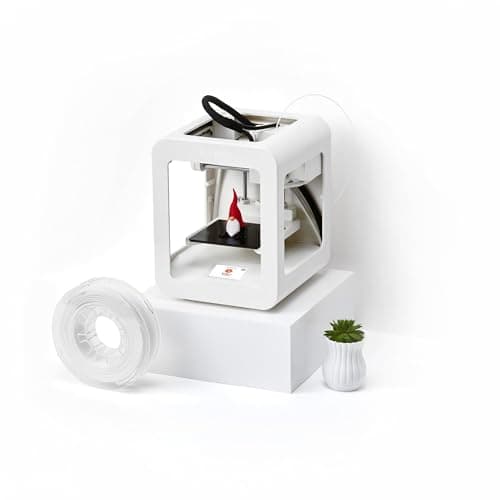
Not really a 3D printer in the sense the rest of this site means. It is a one-button toy factory a child can drive alone, and it is the only machine here where that is the design goal rather than a side effect.
#ad Price as of October 29, 2026, from Amazon. Prices change. How we make money.
What it actually is
A small, simple printer with no slicing software to learn: a child picks a model in an app and presses print. The build platform is unheated, which is why it only takes PLA and why it is safe to leave a child near.
What the manufacturer states
| Figure | Value | Source |
|---|---|---|
| Build volume | 70 x 80 x 90 mm | Toybox published specifications |
| Materials | PLA only, 1.75 mm | Toybox published specifications |
| Build platform | Magnetic, unheated | Toybox published specifications |
| Machine footprint | 190 x 190 x 230 mm | Toybox published specifications |
| Weight | 3 kg | Toybox published specifications |
| Print speed | 60 mm/s | Toybox published specifications |
Read from Toybox, product information on 2026-09-01. Where a manufacturer does not publish a figure, there is no row for it here.
What is good about it
- No slicer to learn — a child can go from idea to print without an adult
- Unheated bed and a 3 kg body, which is the safety story in one line
- 70 x 80 x 90 mm is exactly the size of the toys children actually want
- The only machine here designed around a child rather than adapted for one
What is not
- 70 x 80 x 90 mm is a tenth the volume of an A1 mini and it is not upgradeable
- PLA only, on an unheated plate — the material list ends there
- 60 mm/s is slow enough that a child will notice waiting
- A ten-year-old who is genuinely interested will outgrow it inside a year
Skip this one if
Skip it if the child is old enough to want to design their own models, or if the adult in the house also wants to print things. In both cases an A1 mini with supervision is the better machine and usually the better value.
What we cannot tell you
We have not used this machine with a child. How long the novelty lasts, how often an adult is actually called over, and print reliability over months are the questions that matter here and none of them are on a spec sheet.
How it scored for a beginner
- Setup out of the box10.0
- Auto-calibration8.0
- First-layer forgiveness8.0
- Parts and filament availability6.0
- Running cost8.0
- Help when it goes wrong6.0
Beginner fit 7.0 / 10. That is our editorial read of how well this suits someone buying their first printer, taken off the published specifications — not a test result, and not a verdict on absolute quality. It is deliberately not marked up as a rating in this page’s structured data. How we pick.
How these were picked
We have not printed on these machines and we do not pretend to have. What we did was read each manufacturer’s own specification page, take their stated build volume, temperatures and speeds, check that every pick genuinely fits the job in this page’s title, confirm it is still being sold, and pull a live price rather than a remembered one. Every figure names the source it came from, so you can check it yourself in about a minute.
How we pick sets out the full method, including what would change a ranking.
Questions people actually ask
+−Is the Toybox 3D printer good for kids?
For young children who will operate it themselves, yes — the unheated plate, PLA-only material list and app-driven model library are all aimed at removing the adult from the loop. For a child who will have a parent running it anyway, an ordinary beginner printer is far better value.
+−How big can the Toybox print?
70 × 80 × 90 mm, which is small even next to the compact machines we recommend. It prints toys and figures, not desk organizers or replacement parts.
+−Does the Toybox need a subscription?
Its model library and app are central to the product, and subscription terms for that library change over time. Check the current terms and the cost of its filament before buying, because the running cost rather than the printer is where this purchase is usually decided.
+−Toybox or a Bambu Lab A1 mini for a child?
Toybox if the child operates it alone; A1 mini in almost every other case. The A1 mini prints far larger objects, takes any 1.75 mm filament and remains useful to an adult, but it has a heated plate and expects a slicer, so it wants supervision.