Guide
What Your First Month Actually Costs
Nobody publishes this, so we worked it out. The machine, the filament, the small number of accessories that genuinely earn their place, and the electricity — with every input visible so you can substitute your own.
By Scooter M. · Published · Last reviewed
How this page is funded: the buy links below are affiliate links. If you buy through one we earn a commission, at no extra cost to you. It does not change the order of the picks or a word of what we say about them. Full disclosure.
Printers we claim to have tested: 0. Everyone in this category says they tested twenty machines. We have not tested any, and we would rather say so. What we did instead is on this page: the manufacturer’s own published specification for every pick, cited and dated; the arithmetic on what it costs to run, with the inputs shown; a live price rather than a remembered one; and a plain answer on who should skip each machine.
The short answer
Budget for the printer, two spools of filament, and about four small accessories. Electricity is negligible. An eight-hour print on a 150 W machine costs roughly 22 cents at the current US average residential rate. The arithmetic is below with every input shown, so you can redo it with your own numbers.
Line item 1: the machine
The largest single cost and the one with the most guidance elsewhere on this site. The band worth buying into is defined by a feature rather than a price: automatic bed leveling with an automatic Z-offset. Everything on the under $300 page clears it, and how much a 3D printer costs explains what each band above adds.
Line item 2: filament
Two spools, not one and not five. Two because a spool running out mid-print becomes a pause rather than a ruined part, and because one color is boring by week three. Not five because you will change your mind about color and open spools degrade in a normal room.
A kilogram is more filament than beginners expect — commonly twenty to thirty useful desk-sized objects. The per-print arithmetic is on what filament costs per print.
Line item 3: the accessories that earn their place
The test any accessory has to pass is simple: does it prevent a specific, common failure? These four do. Almost nothing else sold for these machines does.
- Isopropyl alcohol. Cleans the plate, which is the fix for most first-layer failures. Cheap and it lasts months.
- A purple washable glue stick. Helps PLA stick when it will not, and acts as a release layer so PETG does not stick hard enough to damage the plate. An ordinary school glue stick.
- A plastic scraper or spatula. Not metal. Metal scrapers destroy coated plates, and a damaged plate is one of the few genuinely expensive failures here.
- Snips or flush cutters. For trimming filament ends cleanly before loading, and for removing brims and supports. A square-cut filament end feeds properly; a squashed one jams.
The full list, including what to skip, is on the starter kit page.
Line item 4: electricity, with the arithmetic
This is the number people worry about most and nobody publishes, so here it is with every input visible.
Input 1 — the machine’s rated power. Bambu Lab publishes a 150 W maximum for the A1 mini and 350 W at 110 V for the A1. These are peak figures, drawn mainly while the bed and nozzle heat up; steady-state draw is considerably lower. Treating the peak as constant therefore overstates the cost, which is the correct direction for an estimate to err.
Input 2 — the electricity rate. The US Energy Information Administration’s Electric Power Monthly, Table 5.3, reports an average residential price of 18.34 cents per kilowatt-hour for June 2026. Your rate will differ — substitute it and redo the multiplication.
The formula. watts ÷ 1,000 × hours × rate.
Worked at each machine's published maximum power treated as constant — a deliberate overestimate. Rate: 18.34 cents/kWh, EIA Electric Power Monthly Table 5.3, June 2026.
| Scenario | Energy | Cost |
|---|---|---|
| 150 W machine, one 2-hour print | 0.30 kWh | About 6 cents |
| 150 W machine, one 8-hour print | 1.20 kWh | About 22 cents |
| 150 W machine, 2 hours a day for 30 days | 9 kWh | About $1.65 |
| 150 W machine, 8 hours a day for 30 days | 36 kWh | About $6.60 |
| 350 W machine, one 8-hour print | 2.80 kWh | About 51 cents |
| 350 W machine, 8 hours a day for 30 days | 84 kWh | About $15.41 |
Every row is that one multiplication. Check any of them — that is the point of publishing the inputs. And note that even the heaviest row assumes eight hours of printing every single day for a month at peak draw, which nobody actually does in their first month.
What we deliberately left out
A filament dryer. Not a month-one purchase. Your first spools arrive vacuum sealed and dry, and a dryer solves a problem that appears after weeks of open exposure. Buy it when a spool that used to print well starts popping. Storage and drying covers the free version in the meantime.
A spare build plate. Useful eventually, not now.
Upgrades. Every upgrade sold for these machines solves a problem you have not had. Wait until a specific failure points at a specific part.
Software. Genuinely free. The slicer your manufacturer supplies is free, the good alternatives are free, and the model libraries are largely free. This is one of the few hobbies where the software column is a zero.
The month-one summary
What actually appears on the bill in the first thirty days.
| Item | When | Notes |
|---|---|---|
| The printer | Day one | The band with automatic leveling; see our picks |
| Two 1 kg spools of PLA | Day one, with the machine | The coil in the box is a sample |
| Isopropyl alcohol | Day one | Cleans the plate - fixes most first-layer failures |
| Glue stick | Day one | Adhesion for PLA, release layer for PETG |
| Plastic scraper | Day one | Never metal on a coated plate |
| Snips | Day one | A square filament end feeds; a squashed one jams |
| Electricity | Ongoing | Single-digit dollars a month at realistic use |
| Filament dryer | Not yet | Buy when a spool starts popping, not before |
What we would buy for this
Chosen from the same registry as our roundups, on the manufacturer’s own published figures and a live price.
Overture PLA
Overture · Your first spool, and your tenth
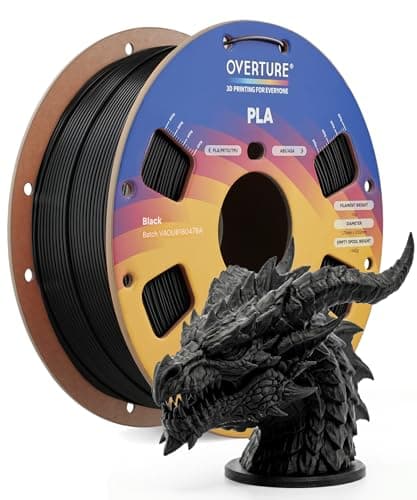
The default answer to 'what filament should I buy'. A tight published diameter tolerance, a conventional temperature range every printer profile already expects, and it is sold everywhere. Nothing about it is exciting, which is the point.
#ad Price as of October 19, 2026, from Amazon. Prices change. How we make money.
What it actually is
PLA is the plastic beginners should print. It is stiff, it needs no enclosure, it barely smells, and it sticks to a plate at low temperatures. This is a mainstream 1 kg spool of it.
What the manufacturer states
| Figure | Value | Source |
|---|---|---|
| Diameter | 1.75 mm | Overture published product specification |
| Dimensional accuracy | +/- 0.02 mm | Overture published product specification |
| Spool weight | 1 kg (2.2 lb) | Overture published product specification |
| Recommended nozzle temperature | 190 - 220 C | Overture published product specification |
| Recommended bed temperature | 25 - 60 C | Overture published product specification |
| Packaging | Dried before packing and vacuum sealed | Overture published product specification |
Read from Overture, PLA filament product page on 2026-09-01. Where a manufacturer does not publish a figure, there is no row for it here.
What is good about it
- +/- 0.02 mm published tolerance, which is as tight as mainstream PLA is quoted
- 190 - 220 C is squarely inside every stock PLA profile you will meet
- A 25 - 60 C bed range means it will stick even on an unheated or barely warm plate
- Vacuum sealed with desiccant, so a spool bought in advance is still dry when it arrives
What is not
- PLA softens in a hot car or a sunny window — this is a property of the material, not the brand
- Not the cheapest per kilogram once you start printing seriously
- Color consistency between batches of any budget filament is a real thing
- No filament is a fix for a machine that is not leveled
Skip this one if
Skip it if the part you are making will live outdoors or in a car. That is a PETG job, not a PLA one, and no PLA brand changes that.
What we cannot tell you
We have not printed this filament. Batch-to-batch color consistency and how it behaves after a year in a cupboard are things only repeated use reveals.
How it scored for a beginner
- Ease for a beginner9.5
- Published tolerance9.5
- Availability9.5
- Value per kilogram8.0
Beginner fit 9.0 / 10. That is our editorial read of how well this suits someone buying their first printer, taken off the published specifications — not a test result, and not a verdict on absolute quality. It is deliberately not marked up as a rating in this page’s structured data. How we pick.
SUNLU FilaDryer S4
SUNLU · Filament that has been open more than a few weeks
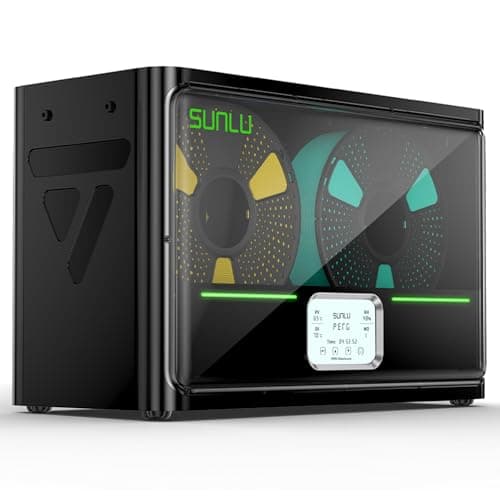
The accessory that fixes a failure most beginners misdiagnose. Filament absorbs water from the air; wet filament pops, strings and prints badly, and no amount of leveling fixes it. Four spools at once and you can print straight out of the box.
#ad Price as of October 19, 2026, from Amazon. Prices change. How we make money.
What it actually is
A heated box that drives moisture out of filament and then keeps it dry while you print from it. Plastics like PETG and nylon pull water out of ordinary room air within days, and water in the filament turns to steam in the nozzle.
What the manufacturer states
| Figure | Value | Source |
|---|---|---|
| Capacity | 4 x 1 kg spools | SUNLU FilaDryer S4 published specification |
| Temperature range | 35 - 70 C | SUNLU FilaDryer S4 published specification |
| Heater | 350 W PTC heater | SUNLU FilaDryer S4 published specification |
| Filament diameters supported | 1.75 mm, 2.85 mm, 3.0 mm | SUNLU FilaDryer S4 published specification |
Read from SUNLU, FilaDryer S4 product page on 2026-09-01. Where a manufacturer does not publish a figure, there is no row for it here.
What is good about it
- Four spools at once, which is the difference between drying filament and having dry filament
- 35 - 70 C covers PLA at the low end and nylon at the high end
- You can feed the printer directly from the box, so filament stays dry mid-print
- Fixes a whole class of print failures that look like machine problems
What is not
- A 350 W heater is more power than most printers here draw
- It is a large box that needs somewhere to live next to the printer
- Nothing about it helps on a fresh, sealed, dry spool
- Sealed boxes with desiccant do most of the same job for less money if you are only storing
Skip this one if
Skip it on day one. Your first spool arrives vacuum sealed and dry, and a dryer solves a problem you will not have for weeks. Buy it when a spool that used to print well starts popping and stringing.
What we cannot tell you
We have not used this dryer. How long a spool actually stays dry in a humid room, and how accurate the displayed temperature is, need measurement we have not done.
How it scored for a beginner
- Ease for a beginner9.0
- Fixes a real failure9.5
- Availability8.5
- Value7.5
Beginner fit 8.5 / 10. That is our editorial read of how well this suits someone buying their first printer, taken off the published specifications — not a test result, and not a verdict on absolute quality. It is deliberately not marked up as a rating in this page’s structured data. How we pick.
How these were picked
We have not printed on these machines and we do not pretend to have. What we did was read each manufacturer’s own specification page, take their stated build volume, temperatures and speeds, check that every pick genuinely fits the job in this page’s title, confirm it is still being sold, and pull a live price rather than a remembered one. Every figure names the source it came from, so you can check it yourself in about a minute.
How we pick sets out the full method, including what would change a ranking.
Questions people actually ask
+−How much does it cost to set up a 3D printer?
The machine, two spools of filament, and four small accessories that each prevent a specific failure — alcohol, a glue stick, a plastic scraper and snips. Electricity adds single-digit dollars a month at realistic use.
+−How much electricity does a 3D printer use per print?
Taking a 150 W published maximum as though it were drawn constantly, an eight-hour print uses 1.2 kWh — about 22 cents at the 18.34 cents per kilowatt-hour the EIA reported for US residential customers in June 2026. Actual use is lower, because the peak is drawn while heating.
+−What do I need to buy on day one?
The printer, two spools of PLA, isopropyl alcohol, a glue stick, a plastic scraper and a pair of snips. That is the whole list. A filament dryer and a spare plate are later purchases.
+−Is 3D printing software expensive?
No — it is one of the few hobbies where that column is zero. The slicer your manufacturer supplies is free, the leading alternatives are free, and the large model libraries are largely free.