Review
Creality Ender-3 V3 KE Review
The Ender that stopped being slow. Creality put Klipper-based firmware, input shaping and a linear rail on its budget line, and the result is a machine rated at twice the speed of its cheaper sibling for a fairly small step in price.
By Scooter M. · Published · Last reviewed
How this page is funded: the buy links below are affiliate links. If you buy through one we earn a commission, at no extra cost to you. It does not change the order of the picks or a word of what we say about them. Full disclosure.
Printers we claim to have tested: 0. Everyone in this category says they tested twenty machines. We have not tested any, and we would rather say so. What we did instead is on this page: the manufacturer’s own published specification for every pick, cited and dated; the arithmetic on what it costs to run, with the inputs shown; a live price rather than a remembered one; and a plain answer on who should skip each machine.
The short answer
Buy it if you want an Ender and you do not want to wait around. Creality publishes 500 mm/s, a 300 °C copper nozzle with a 60 W ceramic heater, a linear rail on the X axis and Creality OS built on Klipper. That is a materially different machine from the Ender-3 V3 SE, which is rated at 250 mm/s. Buy the SE instead if the price gap is real money to you, because speed is the least important thing about a first printer.
What this machine is for
Somebody who wants the Ender ecosystem — cheap parts everywhere, a decade of forum answers, a machine that comes apart — without the thing that made older Enders frustrating, which was waiting.
It is also, quietly, the cheapest way onto Klipper firmware without installing Klipper yourself. That matters to a particular kind of owner and not at all to everyone else, and we will try to be clear about which one you are.
Everything below is read from Creality’s own product page on 2026-09-19. We have not printed on this machine, and we say so on every page that recommends one.
The specification, and what each figure means for you
220 × 220 × 240 mm. Slightly more floor area than a Bambu A1 mini and 10 mm less height than the SE. Comfortably enough for the desk objects, brackets and game pieces that make up a first year.
500 mm/s rated maximum. Twice the SE’s figure and level with the Bambu A1 series. Creality footnotes the number, and so do we: rated speed is a straight-line ceiling that no object with corners in it reaches. What it genuinely buys is shorter prints on large, simple shapes — how long a 3D print takes explains why the acceleration figure matters more.
Creality OS, based on Klipper. This is the interesting one. Klipper moves the motion maths onto a more capable processor, which is how a bed-slinger reaches speeds that used to need a CoreXY frame. Creality also publishes input shaping, which compensates for the vibration that speed causes and is the difference between fast prints and fast prints with ghosting down one side. Creality links open source files for the firmware.
A linear rail on the X axis. A steel rail with a ball-bearing carriage instead of wheels running in a groove. Creality quotes a 0.04 friction coefficient and attributes the figure to its own lab. In practice this is the part that should keep the machine accurate as it ages, because wheels wear and develop play.
300 °C copper nozzle, 60 W ceramic heater, bi-metal heatbreak. The heater is what lets it push plastic fast enough to use the speed, and the copper-and-titanium heatbreak is there to stop heat creeping up into the cold zone, which is a genuine cause of jams on long prints. Creality attributes the 300 °C figure to its own lab at a 25 °C room temperature.
Two part cooling fans, one each side. Useful precisely because it prints fast: plastic laid down quickly has less time to set before the next layer arrives.
One-tap self test. Creality publishes automatic leveling and Z-offset from a single tap, plus automatic filament loading. If those terms are new, bed leveling and Z-offset explains both — but on this machine you should not have to touch either.
LAN and cloud printing. Control from a PC through Creality Print or a phone through the Creality Cloud app, with print farm management if you end up with several. Worth knowing that cloud control means an account.
The ABS claim we would not rely on
Creality lists the KE as handling Hyper PLA, PETG, ABS, TPU 95A and ASA. Four of those five we would agree with without qualification.
ABS and ASA are the exception, and not because Creality is being dishonest — the hot end genuinely reaches the temperatures those plastics need. The problem is the rest of the machine. Both materials contract measurably as they cool, and on an open frame the bottom of a tall part has already shrunk while the top is still going down hot, so the corners lift. No nozzle temperature fixes that; only a warm chamber does.
Expect small, flat ABS parts to work and anything tall to warp. If engineering plastics are genuinely the plan, the honest answer is an enclosure — see the best enclosed 3D printers and PETG against ABS, which works through why PETG covers most of what people want ABS for.
KE or SE? The comparison most buyers are making
Published figures, read from Creality's own product pages. KE read 2026-09-19; SE read 2026-09-01.
| Ender-3 V3 KE | Ender-3 V3 SE | |
|---|---|---|
| Build volume | 220 x 220 x 240 mm | 220 x 220 x 250 mm |
| Rated max speed | 500 mm/s | 250 mm/s |
| Firmware | Creality OS, Klipper-based, input shaping | Not published as Klipper-based |
| Hot end | 300 C, 60 W ceramic heater, bi-metal heatbreak | Sprite direct extruder |
| X axis | Linear rail | Not published as linear rail |
| Rated filaments | Hyper PLA, PETG, ABS, TPU 95A, ASA | PLA, PETG, flexible TPU |
| Assembly | Required | Required |
| Auto setup | One-tap self test: leveling and Z-offset | CR Touch leveling, strain-sensor Z-offset |
Read that table and the honest summary is: the KE is a faster, more capable machine, and the SE prints the same objects more slowly. If your printing is PLA and PETG desk objects — which describes almost every first year — the SE produces the same results and costs less. We say this consistently across the site and we are not going to stop saying it because a spec sheet is exciting.
The KE earns the difference in three situations. You print large objects often enough that hours matter. You want the higher hot end temperature and the wider published material list, which adds ABS and ASA to the SE’s PLA, PETG and TPU — with the caveat above about what an open frame can really do with them. Or you specifically want Klipper and the tinkering that opens up.
What the linear rail is actually for
Worth a paragraph because it is the specification most likely to matter in two years and least likely to matter in two weeks.
The older Ender pattern runs the print head on plastic wheels rolling inside an aluminum groove. That works, it is cheap, and the wheels are a wear item: as they flatten, play develops, and play shows up as inaccuracy long before anything actually breaks. Tightening the eccentric nuts is one of the classic recurring Ender chores.
A steel rail with a ball-bearing carriage does not wear that way. Creality quotes a 0.04 friction coefficient from its own lab, and says the rail is built from stiff steel to stay accurate after long use. For a machine that is also being asked to move quickly, that combination is the point: speed without rigidity is how ghosting and ringing appear on a finished part.
A note on where to buy it
Worth flagging because it was true while we were writing: Creality’s own store listed the KE as out of stock, while Amazon had it in stock and sold by Creality’s official store there. Availability on this model moves, so the live price on the button is the one that counts, and if it disappears from one channel it is worth checking the other. What changes between channels — warranty, returns, price protection — is on where to buy a 3D printer.
Who should skip it
Anyone who wants to press print and walk away. This machine arrives in parts and expects an evening of assembly. The automation is good once it is together, but a Bambu A1 mini arrives built and calibrates itself, and for somebody who wants objects rather than a machine that is the better purchase. The whole argument is on Bambu Lab against Creality.
Anyone on a tight budget. The SE is cheaper and does the same job more slowly.
Anyone who needs ABS or ASA to work properly. Open frame, no chamber heat. Buy an enclosure instead.
What to buy with it
A kilogram of PLA at minimum — the coil in the box is a sample. The filament page for the Ender-3 V3 covers what Creality rates this extruder for and which spools fit inside those limits. Then read setting up your first printer before the box arrives, because an evening of assembly goes better when you know what is coming.
What we would buy for this
Chosen from the same registry as our roundups, on the manufacturer’s own published figures and a live price.
Creality Ender-3 V3 KE
Creality · An Ender that keeps up with the fast machines
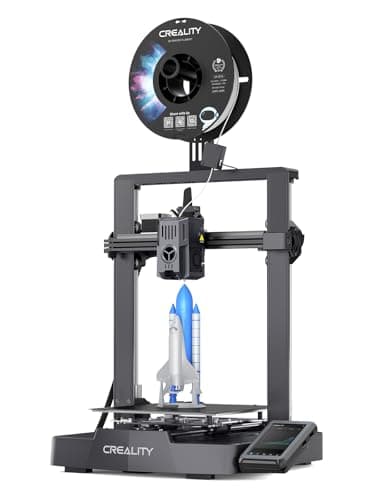
The SE with the speed problem fixed. Same family, same automatic setup, but rated to 500 mm/s and running a Klipper-style interface. The one to buy if you want an Ender and you do not want to wait around.
#ad Price as of September 19, 2026, from Amazon. Prices change. How we make money.
What it actually is
The faster model in the Ender-3 V3 line. Klipper is firmware that does the motion maths on a more capable processor, which is how a bed-slinger reaches speeds that used to require a CoreXY frame.
What the manufacturer states
| Figure | Value | Source |
|---|---|---|
| Build volume | 220 x 220 x 240 mm | Creality Ender-3 V3 KE product specifications |
| Maximum print speed | 500 mm/s | Creality Ender-3 V3 KE product specifications |
| Leveling | CR Touch auto leveling with strain-sensor Z-offset | Creality Ender-3 V3 KE product specifications |
| Print accuracy | +/- 0.1 mm | Creality Ender-3 V3 KE product specifications |
| Layer height | 0.1 - 0.35 mm | Creality Ender-3 V3 KE product specifications |
| Max nozzle temperature | 300 C, copper nozzle (Creality Lab figure, tested at 25 C room temperature) | Creality Ender-3 V3 KE product page |
| Hot end | 60 W ceramic heater with a bi-metal copper and titanium alloy heatbreak | Creality Ender-3 V3 KE product page |
| Motion | Linear rail on the X axis with a ball-bearing carriage | Creality Ender-3 V3 KE product page |
| Firmware | Creality OS, based on Klipper; input shaping and motion advance | Creality Ender-3 V3 KE product page |
| Part cooling | Two model cooling fans, one on each side of the printhead | Creality Ender-3 V3 KE product page |
| Supported filaments | Hyper PLA, PETG, ABS, TPU 95A, ASA | Creality Ender-3 V3 KE product page |
| Connectivity | LAN and cloud printing; control from Creality Print or the Creality Cloud app over Wi-Fi | Creality Ender-3 V3 KE product page |
Read from Creality, Ender-3 V3 KE product page on 2026-09-19. Where a manufacturer does not publish a figure, there is no row for it here.
What is good about it
- 500 mm/s rated maximum — twice the SE's figure, and level with the A1 series
- Klipper-style firmware and interface, which is what most fast printers now run
- Same Creality parts ecosystem as the rest of the Ender line
- 10 mm shorter in Z than the SE, which almost never matters
What is not
- Costs more than the SE, and the SE is the cheaper mistake if you are unsure
- Rated speed is a ceiling, not a promise — every printer's usable speed is lower
- Still an open frame, with the same material limits
- Slightly less build height than the SE
- Creality lists ABS and ASA as supported, but this is an open frame with no chamber heat - expect warping on anything tall in either
Skip this one if
Skip it if your budget is tight enough that the difference between this and the SE is real money. The SE prints the same objects, more slowly. Speed is the least important thing about a first printer.
What we cannot tell you
We have not printed on this machine. Whether the rated 500 mm/s is usable on real geometry, and how the Klipper interface behaves for someone who has never seen one, are questions a spec sheet does not answer.
How it scored for a beginner
- Setup out of the box7.5
- Auto-calibration8.0
- First-layer forgiveness7.5
- Parts and filament availability10.0
- Running cost8.5
- Help when it goes wrong9.5
Beginner fit 8.2 / 10. That is our editorial read of how well this suits someone buying their first printer, taken off the published specifications — not a test result, and not a verdict on absolute quality. It is deliberately not marked up as a rating in this page’s structured data. How we pick.
How these were picked
We have not printed on these machines and we do not pretend to have. What we did was read each manufacturer’s own specification page, take their stated build volume, temperatures and speeds, check that every pick genuinely fits the job in this page’s title, confirm it is still being sold, and pull a live price rather than a remembered one. Every figure names the source it came from, so you can check it yourself in about a minute.
How we pick sets out the full method, including what would change a ranking.
Questions people actually ask
+−Is the Creality Ender-3 V3 KE worth it over the SE?
Only if speed or Klipper matters to you. Creality rates the KE at 500 mm/s against the SE’s 250 mm/s and gives it a 300 °C hot end, a linear rail and Klipper-based firmware. For PLA and PETG desk objects the SE produces the same results for less money.
+−Does the Ender-3 V3 KE run Klipper?
Creality OS is built on Klipper, and Creality publishes input shaping and motion advance alongside it plus links to open source files. It is the cheapest route onto Klipper firmware without installing it yourself.
+−Can the Ender-3 V3 KE print ABS?
Creality lists ABS and ASA among its supported filaments, and the hot end reaches the temperatures they need. But it is an open-frame machine with no chamber heat, so tall ABS parts will warp at the corners regardless. Small flat parts are realistic; anything larger wants an enclosure.
+−Does the Ender-3 V3 KE need assembly?
Yes, though Creality describes it as quick assembly with a self-test for calibration and automatic filament loading afterward. Budget an evening rather than a coffee break, and do not plan to print something you promised somebody the same day.
+−Is the Ender-3 V3 KE good for beginners?
It is capable of it — the setup steps that historically defeated beginners are automated behind a one-tap self test. It is not the easiest first printer, because it arrives in parts. If you want the least friction, an assembled self-calibrating machine is the better first buy.