Roundup
The Best Filament for Miniatures
Small, detailed models are the hardest thing to ask of a filament printer. The spool matters less than the nozzle and the layer height - but it does matter, and consistency is the property to buy.
By Scooter M. · Published · Last reviewed
How this page is funded: the buy links below are affiliate links. If you buy through one we earn a commission, at no extra cost to you. It does not change the order of the picks or a word of what we say about them. Full disclosure.
Printers we claim to have tested: 0. Everyone in this category says they tested twenty machines. We have not tested any, and we would rather say so. What we did instead is on this page: the manufacturer’s own published specification for every pick, cited and dated; the arithmetic on what it costs to run, with the inputs shown; a live price rather than a remembered one; and a plain answer on who should skip each machine.
The short answer
Buy consistent PLA, fit a 0.2 mm nozzle, and slow down. For small detailed models the filament’s published diameter tolerance matters more than its brand, and the printer settings matter more than either. And the honest answer nobody selling filament wants to give: if miniatures are the main reason you are printing, a resin printer will beat any filament on this page.
This page is about getting the best out of a filament printer you already own or are about to buy. If you have not chosen a machine yet and miniatures are the whole point, read our miniatures printer roundup and FDM versus resin first, because that decision matters far more than the spool.
What actually limits detail on a filament printer
In rough order of impact, and only one of these is the filament:
1. Nozzle diameter. A standard 0.4 mm nozzle cannot lay a feature thinner than 0.4 mm. Dropping to a 0.2 mm nozzle is the single biggest improvement available for miniatures, and it costs a few dollars. It also roughly doubles print time.
2. Layer height. Thinner layers mean less visible stepping on curved surfaces — a face, a cloak, a helmet. 0.1 mm or below is where miniatures start looking like miniatures.
3. Speed. Small models have tiny layers, and a printer rushing through them does not give each layer time to cool before the next arrives. Slow down.
4. The filament. Here at number four, and it matters in one specific way: consistency. If the diameter varies, the extruder pushes a varying amount of plastic, and at 0.1 mm layers that shows up immediately as blobs, thin patches and lost detail.
5. Color. Not a joke. Fine detail is much harder to see on a shiny black model than on a light gray one. If you are painting them anyway, print in light gray and judge the detail properly.
How we judged these
Published diameter tolerance, first. The one filament property that directly affects fine detail. We ranked on the published figure, not on impressions.
Published settings that suit slow printing. A manufacturer publishing a conservative speed range is more useful here than one publishing a very fast one.
Toughness. Miniatures are handled constantly. Thin parts — spears, antennae, outstretched arms — snap. A filament that is a little tougher than standard PLA earns its place.
We have not printed miniatures with these spools, and we are not going to tell you which one produced a sharper face. Nobody should believe that claim from a site without a photograph of the result.
Why PLA, and not the others
Why the material shortlist is shorter than it looks.
| Material | For miniatures | Why |
|---|---|---|
| PLA | Yes | Stiff, prints cool, holds fine detail well and does not string much. The right default. |
| PLA+ / PLA Pro | Yes, slightly better | Same printing behavior, tougher. Thin parts survive handling better. |
| PETG | No | Stringier and more prone to blobbing — exactly the failures that ruin small detail. |
| ABS / ASA | No | Shrink as they cool, which distorts small features. Needs an enclosure for no benefit here. |
| TPU | No | Flexible. A bendy miniature is not what anyone wants. |
Matte PLA is worth a mention. A matte surface scatters light and hides layer lines, which genuinely helps a model look better before paint. We have not verified a matte PLA to this site’s standard, so we are not ranking one — but if you find a matte spool from a brand in our brand roundup, it is a reasonable thing to try.
The picks
Polymaker PolyLite PLA Pro — tougher, and well documented
Published at 190-220 C, a 30-60 C bed and 50-200 mm/s, with drying at 55 C for six hours if needed. Polymaker rates PLA Pro as tougher than standard PLA while printing essentially the same way, which is the right trade for models with thin protruding parts.
The honest downsides: Polymaker publishes a heat resistance score that is the weakest of its materials — this is still PLA, and a miniature left in a car will soften. It also costs more than plain PLA, and for a display piece that never gets handled the extra toughness does nothing.
Overture PLA — the tolerance pick
+/- 0.02 mm published diameter tolerance, 190-220 C nozzle, 25-60 C bed, dried and vacuum sealed before shipping. At 0.1 mm layers, that consistency is the property that shows, and Overture publishes the tightest figure of anything in our registry while being among the cheapest.
The honest downsides: standard PLA is brittle, and thin parts will snap. Overture’s documentation is also thinner than Polymaker’s if you want to tune carefully.
Polymaker PolyLite PLA — for slow and careful
Published at 190-230 C, 25-60 C bed and a suggested 40-60 mm/s. That conservative speed range is a mismatch for a fast printer in general and a good match for miniatures in particular, because slow is what you want anyway.
The honest downsides: the published +/- 0.05 mm diameter tolerance is the loosest of the three, which is the wrong direction for this specific job. It is here for the documentation and the sensible speed guidance rather than for consistency.
The settings that matter more than the spool
Fit a 0.2 mm nozzle. The single highest-impact change available. Both the P1S and the Kobra S1 list a 0.2 mm nozzle as an option.
Drop to 0.1 mm layers or below. Slower, and the reason curved surfaces stop looking stepped.
Slow the outer wall down. Most slicers let you set the outer perimeter speed separately. It is the only part you will see.
Keep the filament dry. Damp filament pops and strings as it prints, and on a 15 mm figure a single string is across the whole model. See storage and drying and our stringing guide.
Print at an angle or use supports thoughtfully. A design decision rather than a filament one, but it affects the result more than choosing between the three spools above.
The honest limit of filament miniatures
Where filament does win: terrain and scenery, larger models, anything you want to print a lot of cheaply, and anything you would rather not handle chemicals for. Those are real advantages and they are why plenty of people print miniatures on filament machines quite happily.
The short version
Polymaker PLA Pro if the models get handled, Overture PLA if you want the tightest published tolerance for the least money. Then spend your attention on a 0.2 mm nozzle, a 0.1 mm layer height and a slower outer wall, because those will do more for your results than any spool on this page.
Quick picks
Ranked on how well each one fits the job in this page's title, read off the manufacturer's own published specifications. Tap any row for the full write-up, including who should skip it.
| # | Product | Best for | Beginner fit | Price |
|---|---|---|---|---|
| 1 | 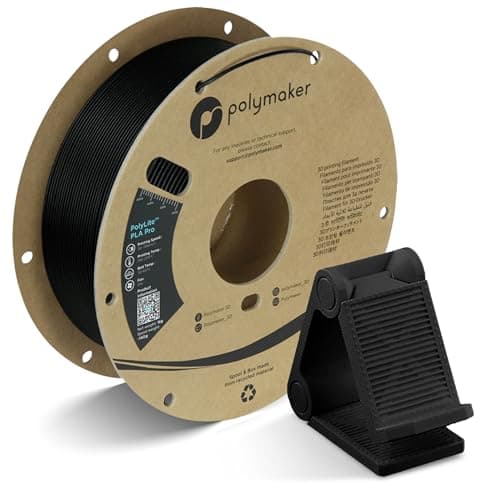 Polymaker PolyLite PLA ProPolymaker Polymaker PolyLite PLA ProPolymaker | Best overall | 8.7 | $19.99 - Check price on Amazon |
| 2 | 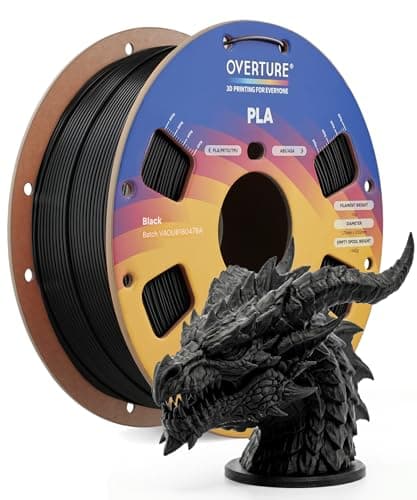 Overture PLAOverture Overture PLAOverture | Best consistency for the money | 9.0 | $13.98 - Check price on Amazon |
| 3 |  Polymaker PolyLite PLAPolymaker Polymaker PolyLite PLAPolymaker | Best for slow, careful prints | 8.7 | Check price on Amazon |
#1 · Best overall
Polymaker PolyLite PLA Pro
Polymaker · Parts that get dropped, without leaving PLA behind
A PLA-plus in everything but the name. Polymaker publishes the same 190-220 C nozzle range as ordinary PLA and describes it as combining toughness and rigidity with normal PLA printability, which is exactly what the PLA+ label is supposed to mean and frequently does not.
#ad Price as of September 21, 2026, from Amazon. Prices change. How we make money.
What it actually is
A 1 kg spool of 1.75 mm PLA modified for impact resistance. It prints at PLA temperatures on a PLA profile; what changes is how the finished part fails - it takes a knock rather than shattering.
Does it fit this page?
Miniatures get handled, dropped and knocked off tables, and ordinary PLA is brittle. Polymaker publishes 190-220 C, a 30-60 C bed and a 50-200 mm/s range for PLA Pro, and rates it as tougher than standard PLA without leaving PLA's easy printing behind. The published data is the best of the three, which matters when you are tuning for fine detail.
What the manufacturer states
| Figure | Value | Source |
|---|---|---|
| Printing temperature | 190 - 220 C | Polymaker PolyLite PLA Pro published print settings |
| Bed temperature | 30 - 60 C | Polymaker PolyLite PLA Pro published print settings |
| Printing speed | 50 - 200 mm/s | Polymaker PolyLite PLA Pro published print settings |
| Drying | 55 C for 6 hours, only if the spool has absorbed moisture | Polymaker PolyLite PLA Pro published print settings |
| Spool size | 1 kg, 1.75 mm | Polymaker PolyLite PLA Pro published print settings |
Read from Polymaker, PolyLite PLA Pro product page and print settings on 2026-09-13. Where a manufacturer does not publish a figure, there is no row for it here.
What is good about it
- Prints on an ordinary PLA profile - 190-220 C is the same range Polymaker publishes for its standard PLA, so nothing about the setup changes
- Polymaker states it is engineered for durable, drop-resistant prints, which is the one thing plain PLA is worst at
- A published 50-200 mm/s speed range, so it keeps up with a fast machine
- The full print profile is published, including separate retraction figures for direct and indirect drive
What is not
- Polymaker is explicit that it is not a heat-resistance upgrade - if the part lives in a hot car, this is not the answer
- It is not flexible either, so it does not replace TPU for anything that needs to bend
- More expensive per kilogram than the mainstream PLA on this site
- "PLA+" is not a standard, so a different brand's PLA+ may behave nothing like this one
Skip this one if
Skip it for decorative prints and for your first spool. Plain PLA is cheaper, prints identically and looks the same on a shelf. This earns its money on the brackets, clips and handles that get dropped.
What we cannot tell you
We have not printed this filament. How much of the published toughness advantage you would actually notice on a real part, and how consistent the spool is end to end, need a printer and a spool.
How it scored for a beginner
- Ease for a beginner9.0
- Published data9.5
- Toughness8.5
- Heat resistance5.0
- Value8.0
Beginner fit 8.7 / 10. That is our editorial read of how well this suits someone buying their first printer, taken off the published specifications — not a test result, and not a verdict on absolute quality. It is deliberately not marked up as a rating in this page’s structured data. How we pick.
#2 · Best consistency for the money
Overture PLA
Overture · Your first spool, and your tenth
The default answer to 'what filament should I buy'. A tight published diameter tolerance, a conventional temperature range every printer profile already expects, and it is sold everywhere. Nothing about it is exciting, which is the point.
#ad Price as of September 21, 2026, from Amazon. Prices change. How we make money.
What it actually is
PLA is the plastic beginners should print. It is stiff, it needs no enclosure, it barely smells, and it sticks to a plate at low temperatures. This is a mainstream 1 kg spool of it.
Does it fit this page?
The +/- 0.02 mm published diameter tolerance is the single most relevant number on this page. Fine detail at a 0.1 mm layer height is exactly where inconsistent filament diameter shows up as blobs and thin spots. Overture publishes the tightest figure here and costs the least of the three.
What the manufacturer states
| Figure | Value | Source |
|---|---|---|
| Diameter | 1.75 mm | Overture published product specification |
| Dimensional accuracy | +/- 0.02 mm | Overture published product specification |
| Spool weight | 1 kg (2.2 lb) | Overture published product specification |
| Recommended nozzle temperature | 190 - 220 C | Overture published product specification |
| Recommended bed temperature | 25 - 60 C | Overture published product specification |
| Packaging | Dried before packing and vacuum sealed | Overture published product specification |
Read from Overture, PLA filament product page on 2026-09-01. Where a manufacturer does not publish a figure, there is no row for it here.
What is good about it
- +/- 0.02 mm published tolerance, which is as tight as mainstream PLA is quoted
- 190 - 220 C is squarely inside every stock PLA profile you will meet
- A 25 - 60 C bed range means it will stick even on an unheated or barely warm plate
- Vacuum sealed with desiccant, so a spool bought in advance is still dry when it arrives
What is not
- PLA softens in a hot car or a sunny window — this is a property of the material, not the brand
- Not the cheapest per kilogram once you start printing seriously
- Color consistency between batches of any budget filament is a real thing
- No filament is a fix for a machine that is not leveled
Skip this one if
Skip it if the part you are making will live outdoors or in a car. That is a PETG job, not a PLA one, and no PLA brand changes that.
What we cannot tell you
We have not printed this filament. Batch-to-batch color consistency and how it behaves after a year in a cupboard are things only repeated use reveals.
How it scored for a beginner
- Ease for a beginner9.5
- Published tolerance9.5
- Availability9.5
- Value per kilogram8.0
Beginner fit 9.0 / 10. That is our editorial read of how well this suits someone buying their first printer, taken off the published specifications — not a test result, and not a verdict on absolute quality. It is deliberately not marked up as a rating in this page’s structured data. How we pick.
#3 · Best for slow, careful prints
Polymaker PolyLite PLA
Polymaker · A print you do not want to repeat
The spool to buy when a print matters. Polymaker publishes a proper technical data sheet rather than a marketing bullet list, and a wider 190 - 230 C window gives you room to raise the temperature when a layer is not bonding.
#ad We do not hold a current price for this product, so we do not show one. How we make money.
What it actually is
A mainstream PLA from a manufacturer that publishes full technical data sheets for its materials. Same plastic family as any other PLA; the difference is documentation and consistency rather than chemistry.
Does it fit this page?
Polymaker's suggested 40-60 mm/s speed range is conservative for a modern printer, and on miniatures that is a feature rather than a limitation - small detailed models print better slowly. Published at 190-230 C with a 25-60 C bed and a +/- 0.05 mm diameter tolerance, which is looser than Overture's.
What the manufacturer states
| Figure | Value | Source |
|---|---|---|
| Diameter | 1.75 mm (+/- 0.05 mm) | Polymaker PolyLite PLA technical data sheet |
| Spool weight | 1 kg | Polymaker PolyLite PLA technical data sheet |
| Extrusion temperature | 190 - 230 C | Polymaker PolyLite PLA technical data sheet |
| Bed temperature | 25 - 60 C | Polymaker PolyLite PLA technical data sheet |
| Suggested printing speed | 40 - 60 mm/s | Polymaker PolyLite PLA technical data sheet |
Read from Polymaker, PolyLite PLA technical data sheet on 2026-09-01. Where a manufacturer does not publish a figure, there is no row for it here.
What is good about it
- Polymaker publishes a full technical data sheet, which is rarer in filament than it should be
- 190 - 230 C is a wider usable window than most PLA quotes, which helps with layer bonding
- Consistent enough that a working profile tends to keep working on the next spool
- Widely stocked, so replacing a color mid-project is realistic
What is not
- The published diameter tolerance is +/- 0.05 mm, looser than Overture's quoted +/- 0.02 mm
- Costs more per kilogram than the budget spools
- The suggested 40 - 60 mm/s speed is conservative for a printer rated at 500 mm/s
- Still PLA, with all of PLA's heat limits
Skip this one if
Skip it if you are printing your first Benchy and learning what the buttons do. Buy the cheaper spool, make your mistakes on it, and save this for the print you actually care about.
What we cannot tell you
We have not printed this filament. Real-world spool-to-spool variation and how the published speed range holds up on a fast machine need testing we have not done.
How it scored for a beginner
- Ease for a beginner9.0
- Published tolerance8.0
- Availability9.0
- Value per kilogram7.5
Beginner fit 8.7 / 10. That is our editorial read of how well this suits someone buying their first printer, taken off the published specifications — not a test result, and not a verdict on absolute quality. It is deliberately not marked up as a rating in this page’s structured data. How we pick.
How these were picked
We have not printed on these machines and we do not pretend to have. What we did was read each manufacturer’s own specification page, take their stated build volume, temperatures and speeds, check that every pick genuinely fits the job in this page’s title, confirm it is still being sold, and pull a live price rather than a remembered one. Every figure names the source it came from, so you can check it yourself in about a minute.
How we pick sets out the full method, including what would change a ranking.
Questions people actually ask
+−What filament is best for 3D printed miniatures?
PLA, and specifically a PLA with a tightly published diameter tolerance. Consistency is the filament property that affects fine detail most. A PLA+ or PLA Pro variant is worth the small premium if the models will be handled, because standard PLA is brittle in thin sections.
+−Can an FDM printer do tabletop miniatures?
Yes, with a 0.2 mm nozzle, layer heights of 0.1 mm or below and slow outer walls. The results are good and they are not resin. For 28 mm figures with faces, a resin printer is clearly better; for terrain, scenery and larger models, filament is often the better choice.
+−Is matte PLA better for miniatures?
A matte surface hides layer lines, which genuinely helps an unpainted model look better. We have not verified a specific matte spool to the standard this site uses, so we have not ranked one, but the principle is sound.
+−Should I use PETG for miniatures?
No. PETG strings and blobs more readily than PLA, and those are exactly the failures that destroy small detail. Save PETG for functional parts that need heat resistance or toughness.