Roundup
3D Printer Enclosures
An enclosure is the most misunderstood accessory in 3D printing. It fixes warping and drafts. It does not make the air safe. Get that distinction right and the buying decision becomes simple.
By Scooter M. · Published · Last reviewed
How this page is funded: the buy links below are affiliate links. If you buy through one we earn a commission, at no extra cost to you. It does not change the order of the picks or a word of what we say about them. Full disclosure.
Printers we claim to have tested: 0. Everyone in this category says they tested twenty machines. We have not tested any, and we would rather say so. What we did instead is on this page: the manufacturer’s own published specification for every pick, cited and dated; the arithmetic on what it costs to run, with the inputs shown; a live price rather than a remembered one; and a plain answer on who should skip each machine.
The short answer
An enclosure traps heat and keeps dust and drafts out. It does not filter fumes. If you print PLA and PETG you almost certainly do not need one. If you want to print ABS or ASA, you need a chamber that holds its heat — and if you are buying a printer anyway, buying one that is already enclosed is usually better value than buying an open printer and a tent to put over it.
“3D printer enclosure” is one of the most searched accessories in this hobby, and a lot of the people searching it are solving the wrong problem. Some want to stop a tall print curling off the plate. Some want the machine quieter. A good number believe an enclosure makes the air in the room safe, and that one is simply not true. This page separates those, because the right purchase is completely different in each case.
How we judged these
We have not used any of these products. Everything below is read off what the manufacturer publishes, and where a manufacturer publishes nothing we say so rather than filling the gap. Four things decided the order:
Does it fix the problem you actually have? Warping and drafts are a heat problem. Smell is a chemistry problem. Noise is a mechanical problem. A product that fixes one and is sold as fixing all three gets marked down.
Is the claim checkable? A published dimension, a published material, a published fit list. “Constant temperature” with no temperature attached to it is marketing, and we flag it as such.
What is the all-in cost? An open printer plus an enclosure plus a filter often costs more than an enclosed printer that was engineered as one piece.
Does it suit a first setup? This site is written for someone buying their first machine. Something that needs modification to be useful does not belong here.
What an enclosure actually does
It keeps the air around the print warm and still. This is the whole mechanism, and everything useful follows from it. Hot plastic shrinks as it cools. If the bottom of a tall print has cooled and set while the top is still being laid down hot, the part pulls itself off the plate at the corners. That is warping, and a steady, warmer chamber is the fix.
It stops drafts. A window, a door, an air conditioning vent or a fan pointed the wrong way can ruin a print that would otherwise have been fine. If your printer lives somewhere with moving air, an enclosure is worth having even for PLA. Our guide to where to put your 3D printer covers the placement side of this.
It keeps dust off the machine. Dust on a lead screw or in a fan is a slow, real problem, and a cover between prints genuinely helps.
It takes some noise off. Creality states its enclosure reduces printing noise. No manufacturer we checked publishes a decibel figure for the difference, so treat this as a real but unquantified benefit.
What an enclosure does not do
It also does not turn an open-frame printer into a machine that can print ABS well. A tent has no heater. It holds whatever warmth the bed and hot end give off, which helps, but it is not the same as a chamber that a manufacturer designed, tested and published figures for. Creality markets this enclosure for “constant temperature printing” and publishes no temperature anywhere on the page.
And it is not automatically safer. Trapping heat around a printer’s own power supply and electronics is a trade-off, not a free win, and none of the manufacturers we read publish guidance on it.
Which materials actually need one
Based on the temperature ranges each filament manufacturer publishes.
| Material | Needs an enclosure? | Why |
|---|---|---|
| PLA | No | Prints cool and barely shrinks. An enclosure can even trap too much heat around the part and soften it. |
| PETG | No, but drafts hurt it | More forgiving than ABS. A cover helps in a cold or breezy room, but plenty of people print it in the open with no trouble. |
| TPU | No | Flexible filament fails for feed reasons, not temperature reasons. An enclosure does not help. |
| ABS and ASA | Yes, genuinely | These shrink hard as they cool and will curl off the plate in open air. This is the case where a chamber is the difference between a part and a failure. |
| Carbon-fiber blends | Usually | The base polymer decides it. PLA-CF is fine open; ABS-CF and PA-CF want a chamber. |
The short version: the materials a beginner actually prints do not need an enclosure. If you are still deciding what to put on the machine, our guide to filament types and the PETG versus ABS comparison are the two worth reading before you spend anything on hardware.
The three routes, and who each one is for
1. A tent over the printer you already own. Cheap, reversible, folds away. This is the right answer if you own an open-frame machine, you are happy with it, and you have a specific problem — a cold room, a draft, dust, a tall PETG print that keeps lifting. It is the wrong answer if you bought it to print ABS safely indoors.
2. Buy a printer that is already enclosed. If you have not bought the printer yet, this is almost always the better decision. An enclosed machine has the chamber, the fans and usually a filter engineered together, and you are not paying twice. Our enclosed printer roundup ranks the machines themselves; this page is about what to do when you already own something open.
3. Build one. An IKEA Lack table enclosure is a well-known community build and it works. We do not rank DIY builds here because there is no manufacturer, no published specification and no way for us to tell you honestly what you are getting. If you already know you want to build one, you do not need this page.
The picks
One add-on enclosure and two machines that do not need one, because in most of the situations that lead people to this search the second option is the better spend.
Creality Multifunction Enclosure — the add-on
Creality publishes the small size as 480 x 600 x 720 mm and lists the Ender-3 family it fits: V3 SE, V3 KE, Ender-3, Pro, V2, V2 Neo, S1 and Neo. The material is described as flame retardant, and it is stated to be waterproof, dustproof and noise-reducing. That is a real, checkable set of claims for about the price of two spools.
What is not published is anything numerical about temperature. “Thermal insulation printing at constant temperature” is the claim; no chamber figure supports it. Nor is the flame-retardant claim attached to any standard or rating. This variant has a fan interface and does not include a fan. Medium and Large have been showing sold out on Creality’s own store, so the small size is effectively the one you can buy.
Buy it to stop drafts, dust and noise around an Ender. Do not buy it expecting to print ABS through the winter.
Bambu Lab P1S — the machine most people should buy instead
The P1S is the honest counter-argument to this entire page. It is a sealed CoreXY machine with the chamber and the filtration designed in, and it costs less than many people expect. If you are reading this before you have bought a printer, compare the all-in cost of an open machine plus an enclosure plus a filter against one P1S, and the arithmetic usually settles it. Our full P1S review goes through the specifications; the A1 versus P1S comparison is the one to read if you are weighing enclosed against open in the same brand.
The honest downside: it is a closed ecosystem, it costs meaningfully more than an Ender plus a tent, and if you only ever print PLA you will have paid for a chamber you never use.
Elegoo Centauri Carbon 2 Combo — if the point is ABS and ASA
Fully enclosed behind a tempered glass door, a 350 C nozzle, a 110 C bed, 121-point auto-leveling, a built-in nano mineral crystal filter and a chamber temperature regulator fan — with Elegoo’s CANVAS multi-material unit included in the Combo. Elegoo lists ABS, ABS-CF, ASA, ASA-CF, PC and PA in its “superior” material tier, which is the tier that justifies an enclosure in the first place.
The honest downsides are real. The 500 mm/s headline sits next to Elegoo’s own recommended 250 mm/s. The filament waste bin is not in the box — Elegoo’s footnote says you print it yourself from a file on the supplied USB drive. Multi-color printing purges filament on every color change, so that bin fills faster than new owners expect. And Elegoo publishes no noise figure, which matters more on a machine running chamber fans.
If you buy a tent, three things to get right
Leave the electronics outside if you can. On most bed-slingers the power supply and mainboard hang under the frame. Warm air rises into them inside a sealed tent. Nobody publishes a safe chamber temperature for these machines, which is precisely why we would not run one hot and unattended.
Do not run ABS in a sealed tent in a room you are sitting in. The enclosure concentrates the fumes and then hands them to you when you unzip it. Ventilate the room, or use a machine with real filtration.
Watch PLA overheat. This catches people out. PLA in a warm enclosure can soften, droop on overhangs and jam in the extruder. If you print mostly PLA and you bought an enclosure for dust, leave a panel or the zip open while it runs.
So do you need one?
If you are printing PLA in a normal room: no. Spend the money on filament and read the bed adhesion guide instead, because the problem you are having is almost certainly a dirty plate rather than a cold one.
If your printer sits in a garage, a conservatory or next to a drafty window: a tent is a cheap, sensible purchase.
If you want ABS or ASA: you want a real enclosed machine, not a cover. And if you want the air to be cleaner, that is a separate purchase with a separate page.
Quick picks
Ranked on how well each one fits the job in this page's title, read off the manufacturer's own published specifications. Tap any row for the full write-up, including who should skip it.
| # | Product | Best for | Beginner fit | Price |
|---|---|---|---|---|
| 1 | 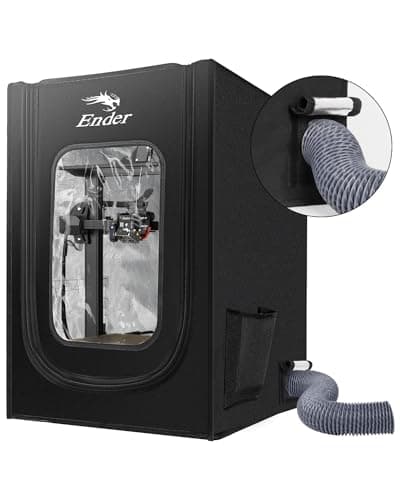 Creality Multifunction EnclosureCreality Creality Multifunction EnclosureCreality | Best add-on enclosure | 7.5 | $36.09 - Check price on Amazon |
| 2 | 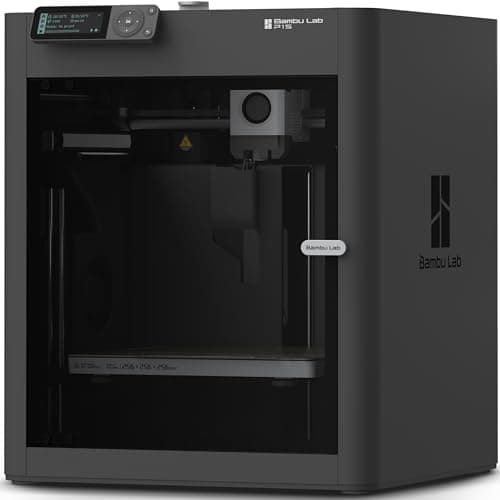 Bambu Lab P1S256 x 256 x 256 mm Bambu Lab P1S256 x 256 x 256 mm | Best enclosed printer instead | 8.4 | $399.00 - Check price on Amazon |
| 3 | 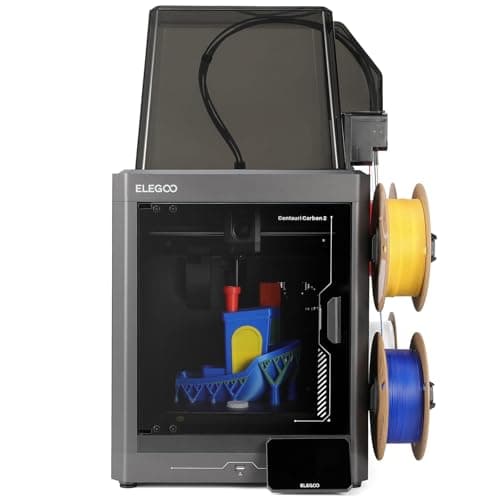 Elegoo Centauri Carbon 2 Combo256 x 256 x 256 mm Elegoo Centauri Carbon 2 Combo256 x 256 x 256 mm | Best enclosed machine for multi-color | 8.4 | $399.00 - Check price on Amazon |
#1 · Best add-on enclosure
Creality Multifunction Enclosure
Creality · Keeping drafts, dust and noise away from an open-frame printer
A flame-retardant fabric tent that goes round a printer you already own. It holds heat in and dust out for about the price of two spools of filament - and it does nothing at all about fumes, which is the thing people usually buy it for.
#ad Price as of September 21, 2026, from Amazon. Prices change. How we make money.
What it actually is
A zip-up fabric cover on a frame that sits over an open printer. It traps the heat the printer makes, which keeps the air around the print at a steadier temperature and stops a cold draft from lifting a corner off the plate.
Does it fit this page?
The cheapest honest answer if you already own an open-frame printer. Creality publishes the size as 480 x 600 x 720 mm and lists the Ender-3 family it fits, the fabric is described as flame retardant, and it costs roughly what two spools of filament cost. It has a fan interface and no fan, and Creality publishes no chamber temperature - so treat it as draft-proofing and dust-proofing, not as a heated chamber.
What the manufacturer states
| Figure | Value | Source |
|---|---|---|
| Size (Small) | 480 x 600 x 720 mm - the size on the Amazon listing | Creality Multifunction Enclosure product page |
| Other published sizes | Medium 73 x 65 x 72 cm; Large 70 x 75 x 90 cm; Enclosure Plus 1000 x 800 x 1000 mm | Creality Multifunction Enclosure product page |
| Fire safety | Creality describes the material as flame retardant; no standard or rating is published | Creality Multifunction Enclosure product page |
| Sealing | Waterproof and dustproof, and Creality states it reduces printing noise | Creality Multifunction Enclosure product page |
| Temperature | Marketed for thermal insulation and constant-temperature printing; no chamber temperature figure is published | Creality Multifunction Enclosure product page |
| Ventilation | This variant has a fan interface but ships without a fan | Creality Multifunction Enclosure product page |
| Fit | Listed for Ender-3 V3 SE and KE, Ender-3, Ender-3 Pro, V2, V2 Neo, S1 and Neo | Creality Multifunction Enclosure product page |
Read from Creality, 3D Printer Multifunction Enclosure product page on 2026-09-21. Where a manufacturer does not publish a figure, there is no row for it here.
What is good about it
- Costs about what two spools of filament cost
- Fits the Ender-3 family, which is the most common open-frame printer there is
- Flame-retardant fabric, and it keeps dust off the machine between prints
- Folds away, unlike buying a second, enclosed printer
What is not
- It does not filter anything. A tent traps heat, not fumes - if fumes are the worry this is the wrong product
- Creality publishes no chamber temperature, so how much warmer it actually runs is unknown
- Flame retardant is claimed with no standard or rating attached to it
- No fan is included on this variant despite the fan interface
- Trapping heat around the printer's own electronics is not always wanted - Creality does not publish guidance on that
- The Medium and Large sizes have been showing sold out on Creality's own store
Skip this one if
Skip it if you bought it to make ABS or ASA safe indoors. It will help those materials stick, and it will do nothing for the fumes they give off. Skip it too if your printer is already enclosed.
What we cannot tell you
We have not used this enclosure. How warm the chamber actually gets, how much noise it really removes, and how the fabric holds up next to a hot end over a year are all unmeasured, and Creality publishes numbers for none of them.
How it scored for a beginner
- Ease for a beginner9.0
- Fixes a real failure7.5
- Published data5.5
- Value9.0
Beginner fit 7.5 / 10. That is our editorial read of how well this suits someone buying their first printer, taken off the published specifications — not a test result, and not a verdict on absolute quality. It is deliberately not marked up as a rating in this page’s structured data. How we pick.
#2 · Best enclosed printer instead
Bambu Lab P1S
Bambu Lab · A first printer for someone who already knows they want ABS or ASA
An enclosed CoreXY machine, which is a different class of thing from an A1: the bed stays still and the box holds heat, so the materials the A1 refuses become possible. It is more printer than a first-timer needs, and the right answer if you already know you want ABS.
#ad Price as of September 21, 2026, from Amazon. Prices change. How we make money.
What it actually is
A boxed printer using CoreXY motion — the print head moves in two axes while the bed only goes up and down. Keeping the bed still lets it move faster, and the enclosure keeps the chamber warm so plastics that shrink as they cool do not peel off the plate.
Does it fit this page?
If you are buying a printer anyway, buying one that is already enclosed is almost always the better spend. The P1S is a sealed CoreXY machine with a chamber and a carbon filter designed into it, rather than a tent draped over a machine that was designed to be open. No tent gives you filtration, and this does.
What the manufacturer states
| Figure | Value | Source |
|---|---|---|
| Build volume | 256 x 256 x 256 mm | Bambu Lab P1S technical specifications |
| Enclosure | Enclosed, plastic and glass | Bambu Lab P1S technical specifications |
| Max hot end temperature | 300 C | Bambu Lab P1S technical specifications |
| Max build plate temperature | 100 C | Bambu Lab P1S technical specifications |
| Max speed | 500 mm/s | Bambu Lab P1S technical specifications |
| Max acceleration | 20,000 mm/s2 | Bambu Lab P1S technical specifications |
| Nozzle | All-metal hot end, 0.4 mm included; 0.2, 0.6 and 0.8 mm optional | Bambu Lab P1S technical specifications |
| Filaments rated ideal | PLA, PETG, TPU, PVA, PET, ABS, ASA | Bambu Lab P1S technical specifications |
| Filaments rated capable | PA, PC | Bambu Lab P1S technical specifications |
| Air filter | Activated carbon | Bambu Lab P1S technical specifications |
| Physical dimensions | 389 x 389 x 458 mm | Bambu Lab P1S technical specifications |
| Net weight | 12.95 kg | Bambu Lab P1S technical specifications |
| Max power | 350 W at 110 V | Bambu Lab P1S technical specifications |
Read from Bambu Lab, P1S product page and specification table on 2026-09-06. Where a manufacturer does not publish a figure, there is no row for it here.
What is good about it
- Enclosed, so ABS and ASA are on the menu rather than off it
- CoreXY at 20,000 mm/s2 acceleration — twice the A1's rated figure
- Same 256 mm cubed volume as the A1 in a smaller footprint, because the bed does not travel
- The enclosure also contains most of the noise and the smell, which matters if it lives in a room you sit in
What is not
- Noticeably more expensive than an A1 for a beginner who will print PLA for a year
- The enclosure makes routine maintenance fiddlier than an open frame
- Nothing about it is easier to learn on than an A1 mini — it is just more capable
- Multi-color is again a separate AMS purchase
Skip this one if
Skip it if your honest answer to 'what will you print' is 'I am not sure yet'. Everything the P1S adds over an A1 is aimed at materials a beginner should not start with. Buy it when a specific project demands ABS, not before.
What we cannot tell you
We have not printed on this machine. Chamber temperature in a cold room, real ABS warping behavior and long-term fan noise are not on any specification sheet.
How it scored for a beginner
- Setup out of the box8.5
- Auto-calibration9.5
- First-layer forgiveness9.0
- Parts and filament availability9.0
- Running cost7.0
- Help when it goes wrong9.0
Beginner fit 8.4 / 10. That is our editorial read of how well this suits someone buying their first printer, taken off the published specifications — not a test result, and not a verdict on absolute quality. It is deliberately not marked up as a rating in this page’s structured data. How we pick.
#3 · Best enclosed machine for multi-color
Elegoo Centauri Carbon 2 Combo
Elegoo · One enclosed machine that prints everything, including multi-color
An enclosed CoreXY with a 350 C nozzle, 121-point leveling and multi-color included, at a price that used to buy an open frame. The catch is the one Elegoo prints in its own footnotes: the filament waste bin is not in the box, you print it yourself.
#ad Price as of September 21, 2026, from Amazon. Prices change. How we make money.
What it actually is
A fully enclosed CoreXY printer sold with Elegoo's CANVAS multi-material unit. Enclosed means the chamber holds its heat, which is what stops ABS and ASA from curling off the plate.
Does it fit this page?
Enclosed with a tempered glass door, a 350 C nozzle and a built-in nano mineral crystal filter, with Elegoo's CANVAS multi-material unit included. If the reason you want an enclosure is ABS, ASA or carbon-fiber blends, this is a machine built around that from the start. Elegoo's own recommended speed is 250 mm/s, half the 500 on the box.
What the manufacturer states
| Figure | Value | Source |
|---|---|---|
| Build volume | 256 x 256 x 256 mm | Elegoo Centauri Carbon 2 specification table |
| Printing speed | Up to 500 mm/s; Elegoo's own recommended figure is 250 mm/s | Elegoo Centauri Carbon 2 specification table |
| Acceleration | 10,000 mm/s2 default, 20,000 mm/s2 maximum | Elegoo Centauri Carbon 2 specification table |
| Max nozzle temperature | 350 C | Elegoo Centauri Carbon 2 specification table |
| Max heated bed temperature | 110 C at 25 C ambient | Elegoo Centauri Carbon 2 specification table |
| Printing accuracy | +/- 0.1 mm | Elegoo Centauri Carbon 2 specification table |
| Layer thickness | 0.1 - 0.4 mm, 0.2 mm recommended | Elegoo Centauri Carbon 2 specification table |
| Extruder | Dual-gear direct extruder, 1 fan; brass-hardened steel 0.4 mm nozzle | Elegoo Centauri Carbon 2 specification table |
| Leveling | 121-point auto-leveling | Elegoo Centauri Carbon 2 specification table |
| Build plate | Dual-sided spring steel sheet - textured PEI and a PLA-specific surface | Elegoo Centauri Carbon 2 specification table |
| Heat break | Titanium alloy | Elegoo Centauri Carbon 2 specification table |
| Z axis | 3 lead screws and 3 linear guide rods | Elegoo Centauri Carbon 2 specification table |
| Multi-color | CANVAS capability - included with the Combo, sold separately for the base machine | Elegoo Centauri Carbon 2 specification table |
| Supported filament | Ideal: PLA, PETG, TPU, PLA-CF. Superior: ABS/ABS-CF, ASA/ASA-CF, PET/PET-CF, PETG-CF, PC, PA. Capable: PPS/PPS-CF/PPS-GF, PPA-CF/PPA-GF | Elegoo Centauri Carbon 2 specification table |
| Ambient temperature | 5 - 40 C | Elegoo Centauri Carbon 2 specification table |
| Screen and system | 5-inch color capacitive touchscreen running ELEGOO OS | Elegoo Centauri Carbon 2 specification table |
| Connectivity | USB and Wi-Fi | Elegoo Centauri Carbon 2 specification table |
| Slicing software | ElegooSlicer recommended; Orca and Cura also supported | Elegoo Centauri Carbon 2 specification table |
| Filtration | Built-in nano mineral crystal filter and a chamber temperature regulator fan | Elegoo Centauri Carbon 2 specification table |
Read from Elegoo, Centauri Carbon 2 product page and specification table on 2026-09-21. Where a manufacturer does not publish a figure, there is no row for it here.
What is good about it
- Fully enclosed with a tempered glass door, which is what ABS and ASA actually need
- 350 C nozzle - the highest published figure of any machine on this site under $500
- Multi-color is included rather than an upgrade, unlike most machines at this price
- 121-point leveling and a dual-sided PEI plate, so the first layer is not the owner's problem
- Built-in filter and a chamber regulator fan, which no open-frame machine can offer
What is not
- The 500 mm/s headline sits next to Elegoo's own recommended 250 mm/s - half the number on the box
- The filament waste bin is not supplied; Elegoo's footnote says you print it yourself from a file on the USB drive
- Multi-color printing wastes filament on every color change, and the bin fills fast
- Elegoo publishes no noise figure, which matters more on an enclosed machine that runs fans
- Elegoo's own store has been showing it sold out, so availability has been through Amazon rather than direct
- More machine than a first-time buyer needs if the plan is PLA models and nothing else
Skip this one if
Skip it if you only ever intend to print PLA. You would be paying for a heated chamber, a 350 C nozzle and a multi-material unit to do a job a $249 open frame does just as well.
What we cannot tell you
We have not printed on this machine. How quiet the enclosure really is, how much filament CANVAS wastes per color change, and how long the nano mineral crystal filter lasts are all unpublished and would need a unit in hand.
How it scored for a beginner
- Setup out of the box8.5
- Auto-calibration9.0
- First-layer forgiveness9.0
- Material range9.5
- Running cost7.0
- Published data8.5
Beginner fit 8.4 / 10. That is our editorial read of how well this suits someone buying their first printer, taken off the published specifications — not a test result, and not a verdict on absolute quality. It is deliberately not marked up as a rating in this page’s structured data. How we pick.
How these were picked
We have not printed on these machines and we do not pretend to have. What we did was read each manufacturer’s own specification page, take their stated build volume, temperatures and speeds, check that every pick genuinely fits the job in this page’s title, confirm it is still being sold, and pull a live price rather than a remembered one. Every figure names the source it came from, so you can check it yourself in about a minute.
How we pick sets out the full method, including what would change a ranking.
Questions people actually ask
+−Does a 3D printer enclosure stop the smell?
No. A plain enclosure traps fumes rather than removing them, and releases them when you open it. Removing smell needs activated carbon, either in a machine with filtration designed in or in a separate unit. An enclosure and a filter are different products solving different problems.
+−Do I need an enclosure for PLA?
No. PLA prints cool and barely shrinks, and a warm enclosure can actually make PLA worse by softening overhangs and heat-creeping in the extruder. The only good reason to enclose a PLA printer is drafts, dust or noise.
+−Is it cheaper to buy an enclosure or an enclosed printer?
An add-on enclosure is cheaper today. An enclosed printer is usually better value overall if you have not bought a machine yet, because you get the chamber, the fans and the filtration engineered together rather than a cover over hardware that was designed to be open.
+−Will an enclosure make my printer quieter?
Somewhat. Creality states its enclosure reduces printing noise, but no manufacturer we read publishes a decibel figure for the difference, so we cannot tell you how much. It muffles; it does not silence.
+−Are fabric 3D printer enclosures a fire risk?
Creality describes the fabric as flame retardant but does not attach a standard or rating to that claim, so it cannot be verified from the published material. Enclosing a printer also traps heat around its own electronics. We would not run any printer unattended, enclosed or not.