Guide
3D Printer Air Purifiers and Ventilation
The honest answer for most beginners is a window, not a purchase. Here is what a printer actually emits, when a filter genuinely earns its place, and why the cheap mini purifiers are mostly sold to the wrong people.
By Scooter M. · Published · Last reviewed
How this page is funded: the buy links below are affiliate links. If you buy through one we earn a commission, at no extra cost to you. It does not change the order of the picks or a word of what we say about them. Full disclosure.
Printers we claim to have tested: 0. Everyone in this category says they tested twenty machines. We have not tested any, and we would rather say so. What we did instead is on this page: the manufacturer’s own published specification for every pick, cited and dated; the arithmetic on what it costs to run, with the inputs shown; a live price rather than a remembered one; and a plain answer on who should skip each machine.
The short answer
If you print PLA or PETG in a normal, ventilated room, you do not need an air purifier. Put the printer somewhere with moving air and you have solved it. Filtration starts to matter when you print ABS or ASA, or when the printer lives in a bedroom, a closed office or anywhere someone sleeps — and at that point an enclosed machine with filtration built in is usually a better answer than a separate box.
This is a question worth taking seriously and worth getting in proportion. A desktop 3D printer melts plastic, and melting plastic releases things into the air. It is also not a chemical plant. The useful framing is: what it releases, how much it matters for the material you actually print, and what the cheapest thing is that fixes it.
What a printer actually gives off
Two categories, and they need different solutions, which is the source of most of the confusion in this topic.
Ultrafine particles. Tiny solid particles thrown off as the filament melts. These are what a HEPA filter is for, and what a PM2.5 sensor measures.
Volatile organic compounds. Gases. These are what you smell. A HEPA filter does nothing to them — they pass straight through. Only activated carbon holds on to them, and only while it has capacity left.
How much this matters depends on the filament
PLA prints coolest and is the least troublesome of the common filaments. It is also what almost every beginner prints. This is the main reason our answer for most readers is ventilation rather than hardware.
PETG prints hotter than PLA and smells faintly. Still fine in a room with some air movement.
ABS and ASA are the materials that change the answer. They print hot, they smell strongly, and they are the reason filtration exists as a product category. If you are moving to these, read PETG versus ABS first — a good number of people who think they need ABS actually need PETG, and PETG removes this problem entirely.
Ventilation first, because it is free
Before buying anything, get the placement right. This does more than any filter you can buy, and it costs nothing.
Not a bedroom. The single most useful rule. A printer running an eight-hour job next to where someone sleeps is the one scenario worth changing regardless of material.
A room you can air out. A window that opens, or a door left ajar to a larger space.
Not a sealed cupboard. People put printers in cabinets for noise and then wonder why the room smells when they open it. Our placement guide goes through this properly, including the temperature and humidity side.
When a purifier genuinely earns its place
Three situations, and if none of them describe you, keep your money.
You print ABS or ASA regularly. This is the real case. Strong smell, and the material that filtration was designed around.
The printer cannot be moved somewhere ventilated. A studio flat, a shared office, a room with no opening window.
Someone in the house is sensitive. Asthma, a small child, anyone who reacts to the smell. Worth solving properly.
The options, cheapest first
Move the printer — free
Always try this first. It outperforms every product below for PLA and PETG.
An enclosure on its own — does not solve this
Worth stating plainly because it is the most common mistake in this topic. A fabric or acrylic enclosure traps fumes and then releases them when you open it. It is a heat and dust product. It is not a filtration product.
The $20 mini purifiers — mostly the wrong product
Anycubic and Elegoo both sell small carbon purifier pucks for around twenty dollars. They are designed for resin printers, where the unit sits inside a small sealed chamber with the resin. Dropping one next to an open FDM printer in a room is not the same job, and neither manufacturer publishes an airflow figure for it. They are not a scam; they are simply sold to a lot of people solving a different problem.
Creality Air Purifier (FDM version) — the one with published numbers
The reason this is the only standalone unit we will name: Creality actually publishes figures. 250 m3/h airflow, a 1000-hour filter life, 99 percent or better filtration efficiency, a real-time PM2.5 display and high-density activated carbon rather than a pad. Almost nothing else in this category publishes an airflow number at all.
The honest problems with it are just as real. It costs more than several complete beginner printers — more than a whole FlashForge Adventurer 5M — which is very hard to justify on a first setup. The PM2.5 display measures particles, and the compounds that make ABS smell are gases, so the number on the front is not measuring the thing you are most likely worried about. The 99 percent figure is published without the particle size it refers to, which makes it impossible to compare against anything. The filter is a 1000-hour consumable. And Creality publishes no noise figure for a unit that runs a fan for the length of every print.
An enclosed printer with filtration built in — usually the best spend
If you have not bought the printer yet, this is the answer that makes the separate purifier unnecessary. The Bambu Lab P1S is a sealed machine with carbon filtration designed into it. The Elegoo Centauri Carbon 2 has a built-in nano mineral crystal filter and a chamber temperature regulator fan, and Elegoo lists ABS and ASA in its top material tier. Buying one machine that was engineered around the problem beats buying an open machine, a tent and a filter box separately.
What we cannot tell you
We have not measured the air around any printer, and we are not going to pretend otherwise. We have not run a particle counter, we have not tested how much VOC load any of these filters actually captures, and no manufacturer in this category publishes independent test data we could point you at. What we can do is repeat the figures each manufacturer publishes, say clearly which ones publish nothing, and be honest that the free fix works for the materials most of our readers print.
If this matters to you medically, that is a question for a doctor and not for a 3D printing site.
What we would buy for this
Chosen from the same registry as our roundups, on the manufacturer’s own published figures and a live price.
Creality Air Purifier (FDM version)
Creality · Someone already printing ABS or ASA indoors who wants a measurement, not a guess
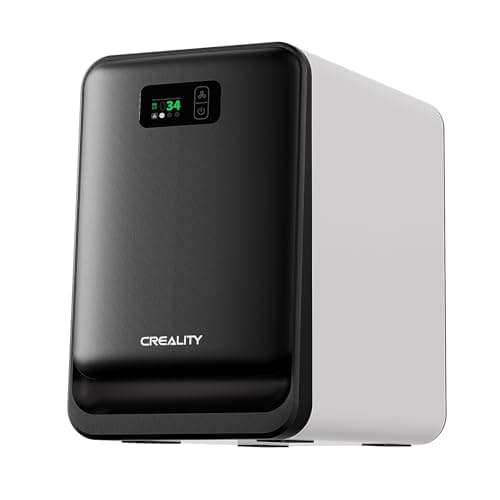
The only unit here that publishes an airflow figure and shows you a live particle reading instead of asking you to trust it. It also costs more than a whole Adventurer 5M, which is the number to sit with before buying one.
#ad Price as of September 21, 2026, from Amazon. Prices change. How we make money.
What it actually is
A standalone filter unit that sits beside or under the printer and pulls the air around it through a dense activated-carbon bed. Activated carbon is the part that holds on to the smell-producing compounds a hot nozzle gives off.
What the manufacturer states
| Figure | Value | Source |
|---|---|---|
| Airflow | 250 m3/h turbo airflow | Creality Air Purifier FDM version product page |
| Filtration efficiency | 99 percent or better; Creality does not publish the particle size that figure refers to | Creality Air Purifier FDM version product page |
| Filter life | 1000 hours | Creality Air Purifier FDM version product page |
| Monitoring | Real-time PM2.5 display | Creality Air Purifier FDM version product page |
| Filter media | High-density activated carbon | Creality Air Purifier FDM version product page |
| Airflow pattern | 360 degree all-round purification | Creality Air Purifier FDM version product page |
| Control | Smart touch control | Creality Air Purifier FDM version product page |
| Compatibility | Creality states it fits most FDM 3D printers | Creality Air Purifier FDM version product page |
Read from Creality, Air Purifier FDM version product page on 2026-09-21. Where a manufacturer does not publish a figure, there is no row for it here.
What is good about it
- Publishes a real airflow number, which almost nothing else in this category does
- The PM2.5 readout tells you whether it is doing anything, instead of asking you to assume
- Dense activated carbon rather than the thin pad in the $20 units
- Not tied to one printer - it stands next to whatever you own
What is not
- It costs more than several complete beginner printers, which is very hard to justify for a first setup
- PM2.5 measures particles. The compounds that make ABS smell are gases, and the display does not show those
- The 99 percent figure is published without the particle size it applies to, so it cannot be compared with anything
- The filter is a 1000-hour consumable, so there is a running cost the sticker price does not show
- Creality publishes no noise figure, and this is a fan unit that runs for the whole print
Skip this one if
Skip it if you print PLA and PETG, which is what almost every beginner prints. An open window and sensible placement do the job, and this is a large amount of money for a problem you do not have yet.
What we cannot tell you
We have not used this unit. Whether 250 m3/h is enough for a given room, how much of the VOC load the carbon actually captures, and how loud it is are all unmeasured here, and Creality publishes no noise figure or VOC test data.
How it scored for a beginner
- Ease for a beginner8.5
- Fixes a real failure7.5
- Published data7.0
- Value4.5
Beginner fit 7.0 / 10. That is our editorial read of how well this suits someone buying their first printer, taken off the published specifications — not a test result, and not a verdict on absolute quality. It is deliberately not marked up as a rating in this page’s structured data. How we pick.
Bambu Lab P1S
Bambu Lab · A first printer for someone who already knows they want ABS or ASA
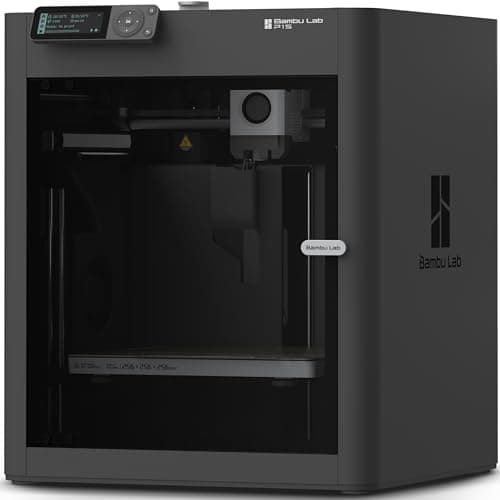
An enclosed CoreXY machine, which is a different class of thing from an A1: the bed stays still and the box holds heat, so the materials the A1 refuses become possible. It is more printer than a first-timer needs, and the right answer if you already know you want ABS.
#ad Price as of September 21, 2026, from Amazon. Prices change. How we make money.
What it actually is
A boxed printer using CoreXY motion — the print head moves in two axes while the bed only goes up and down. Keeping the bed still lets it move faster, and the enclosure keeps the chamber warm so plastics that shrink as they cool do not peel off the plate.
What the manufacturer states
| Figure | Value | Source |
|---|---|---|
| Build volume | 256 x 256 x 256 mm | Bambu Lab P1S technical specifications |
| Enclosure | Enclosed, plastic and glass | Bambu Lab P1S technical specifications |
| Max hot end temperature | 300 C | Bambu Lab P1S technical specifications |
| Max build plate temperature | 100 C | Bambu Lab P1S technical specifications |
| Max speed | 500 mm/s | Bambu Lab P1S technical specifications |
| Max acceleration | 20,000 mm/s2 | Bambu Lab P1S technical specifications |
| Nozzle | All-metal hot end, 0.4 mm included; 0.2, 0.6 and 0.8 mm optional | Bambu Lab P1S technical specifications |
| Filaments rated ideal | PLA, PETG, TPU, PVA, PET, ABS, ASA | Bambu Lab P1S technical specifications |
| Filaments rated capable | PA, PC | Bambu Lab P1S technical specifications |
| Air filter | Activated carbon | Bambu Lab P1S technical specifications |
| Physical dimensions | 389 x 389 x 458 mm | Bambu Lab P1S technical specifications |
| Net weight | 12.95 kg | Bambu Lab P1S technical specifications |
| Max power | 350 W at 110 V | Bambu Lab P1S technical specifications |
Read from Bambu Lab, P1S product page and specification table on 2026-09-06. Where a manufacturer does not publish a figure, there is no row for it here.
What is good about it
- Enclosed, so ABS and ASA are on the menu rather than off it
- CoreXY at 20,000 mm/s2 acceleration — twice the A1's rated figure
- Same 256 mm cubed volume as the A1 in a smaller footprint, because the bed does not travel
- The enclosure also contains most of the noise and the smell, which matters if it lives in a room you sit in
What is not
- Noticeably more expensive than an A1 for a beginner who will print PLA for a year
- The enclosure makes routine maintenance fiddlier than an open frame
- Nothing about it is easier to learn on than an A1 mini — it is just more capable
- Multi-color is again a separate AMS purchase
Skip this one if
Skip it if your honest answer to 'what will you print' is 'I am not sure yet'. Everything the P1S adds over an A1 is aimed at materials a beginner should not start with. Buy it when a specific project demands ABS, not before.
What we cannot tell you
We have not printed on this machine. Chamber temperature in a cold room, real ABS warping behavior and long-term fan noise are not on any specification sheet.
How it scored for a beginner
- Setup out of the box8.5
- Auto-calibration9.5
- First-layer forgiveness9.0
- Parts and filament availability9.0
- Running cost7.0
- Help when it goes wrong9.0
Beginner fit 8.4 / 10. That is our editorial read of how well this suits someone buying their first printer, taken off the published specifications — not a test result, and not a verdict on absolute quality. It is deliberately not marked up as a rating in this page’s structured data. How we pick.
Elegoo Centauri Carbon 2 Combo
Elegoo · One enclosed machine that prints everything, including multi-color
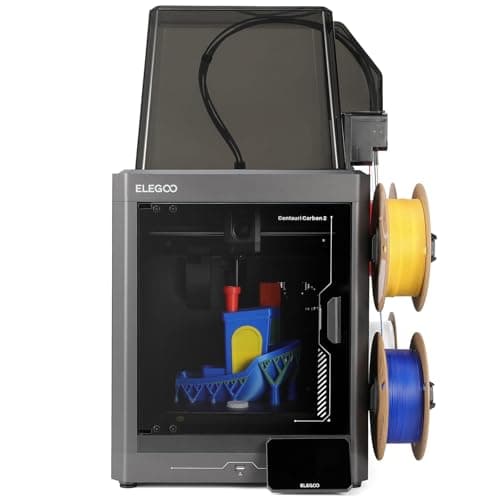
An enclosed CoreXY with a 350 C nozzle, 121-point leveling and multi-color included, at a price that used to buy an open frame. The catch is the one Elegoo prints in its own footnotes: the filament waste bin is not in the box, you print it yourself.
#ad Price as of September 21, 2026, from Amazon. Prices change. How we make money.
What it actually is
A fully enclosed CoreXY printer sold with Elegoo's CANVAS multi-material unit. Enclosed means the chamber holds its heat, which is what stops ABS and ASA from curling off the plate.
What the manufacturer states
| Figure | Value | Source |
|---|---|---|
| Build volume | 256 x 256 x 256 mm | Elegoo Centauri Carbon 2 specification table |
| Printing speed | Up to 500 mm/s; Elegoo's own recommended figure is 250 mm/s | Elegoo Centauri Carbon 2 specification table |
| Acceleration | 10,000 mm/s2 default, 20,000 mm/s2 maximum | Elegoo Centauri Carbon 2 specification table |
| Max nozzle temperature | 350 C | Elegoo Centauri Carbon 2 specification table |
| Max heated bed temperature | 110 C at 25 C ambient | Elegoo Centauri Carbon 2 specification table |
| Printing accuracy | +/- 0.1 mm | Elegoo Centauri Carbon 2 specification table |
| Layer thickness | 0.1 - 0.4 mm, 0.2 mm recommended | Elegoo Centauri Carbon 2 specification table |
| Extruder | Dual-gear direct extruder, 1 fan; brass-hardened steel 0.4 mm nozzle | Elegoo Centauri Carbon 2 specification table |
| Leveling | 121-point auto-leveling | Elegoo Centauri Carbon 2 specification table |
| Build plate | Dual-sided spring steel sheet - textured PEI and a PLA-specific surface | Elegoo Centauri Carbon 2 specification table |
| Heat break | Titanium alloy | Elegoo Centauri Carbon 2 specification table |
| Z axis | 3 lead screws and 3 linear guide rods | Elegoo Centauri Carbon 2 specification table |
| Multi-color | CANVAS capability - included with the Combo, sold separately for the base machine | Elegoo Centauri Carbon 2 specification table |
| Supported filament | Ideal: PLA, PETG, TPU, PLA-CF. Superior: ABS/ABS-CF, ASA/ASA-CF, PET/PET-CF, PETG-CF, PC, PA. Capable: PPS/PPS-CF/PPS-GF, PPA-CF/PPA-GF | Elegoo Centauri Carbon 2 specification table |
| Ambient temperature | 5 - 40 C | Elegoo Centauri Carbon 2 specification table |
| Screen and system | 5-inch color capacitive touchscreen running ELEGOO OS | Elegoo Centauri Carbon 2 specification table |
| Connectivity | USB and Wi-Fi | Elegoo Centauri Carbon 2 specification table |
| Slicing software | ElegooSlicer recommended; Orca and Cura also supported | Elegoo Centauri Carbon 2 specification table |
| Filtration | Built-in nano mineral crystal filter and a chamber temperature regulator fan | Elegoo Centauri Carbon 2 specification table |
Read from Elegoo, Centauri Carbon 2 product page and specification table on 2026-09-21. Where a manufacturer does not publish a figure, there is no row for it here.
What is good about it
- Fully enclosed with a tempered glass door, which is what ABS and ASA actually need
- 350 C nozzle - the highest published figure of any machine on this site under $500
- Multi-color is included rather than an upgrade, unlike most machines at this price
- 121-point leveling and a dual-sided PEI plate, so the first layer is not the owner's problem
- Built-in filter and a chamber regulator fan, which no open-frame machine can offer
What is not
- The 500 mm/s headline sits next to Elegoo's own recommended 250 mm/s - half the number on the box
- The filament waste bin is not supplied; Elegoo's footnote says you print it yourself from a file on the USB drive
- Multi-color printing wastes filament on every color change, and the bin fills fast
- Elegoo publishes no noise figure, which matters more on an enclosed machine that runs fans
- Elegoo's own store has been showing it sold out, so availability has been through Amazon rather than direct
- More machine than a first-time buyer needs if the plan is PLA models and nothing else
Skip this one if
Skip it if you only ever intend to print PLA. You would be paying for a heated chamber, a 350 C nozzle and a multi-material unit to do a job a $249 open frame does just as well.
What we cannot tell you
We have not printed on this machine. How quiet the enclosure really is, how much filament CANVAS wastes per color change, and how long the nano mineral crystal filter lasts are all unpublished and would need a unit in hand.
How it scored for a beginner
- Setup out of the box8.5
- Auto-calibration9.0
- First-layer forgiveness9.0
- Material range9.5
- Running cost7.0
- Published data8.5
Beginner fit 8.4 / 10. That is our editorial read of how well this suits someone buying their first printer, taken off the published specifications — not a test result, and not a verdict on absolute quality. It is deliberately not marked up as a rating in this page’s structured data. How we pick.
How these were picked
We have not printed on these machines and we do not pretend to have. What we did was read each manufacturer’s own specification page, take their stated build volume, temperatures and speeds, check that every pick genuinely fits the job in this page’s title, confirm it is still being sold, and pull a live price rather than a remembered one. Every figure names the source it came from, so you can check it yourself in about a minute.
How we pick sets out the full method, including what would change a ranking.
Questions people actually ask
+−Do 3D printers need ventilation?
For PLA and PETG in an ordinary room with some air movement, normal ventilation is enough. For ABS and ASA, yes — those print hot, smell strongly, and want either a well-ventilated space or a machine with filtration designed in. The one rule worth following regardless of material is not to run a printer overnight in a bedroom.
+−Does a HEPA filter remove 3D printing fumes?
Only partly. HEPA captures particles. The compounds that produce the smell are gases and pass straight through HEPA — those need activated carbon. A unit sold for 3D printing should have real carbon in it, not a thin pad, and most of the cheap ones do not say how much they contain.
+−Is 3D printing safe indoors?
Printing PLA in a ventilated room is the normal, ordinary case and is what most of this hobby does. The situations worth changing are printing ABS or ASA without ventilation, and running any printer in a room where someone sleeps. We are not in a position to give you medical advice; if you have a specific health concern, ask a doctor.
+−Are the cheap mini 3D printer purifiers worth it?
They were designed for resin printers, where the unit sits inside a small sealed chamber. Next to an open FDM printer in a room they are doing a much harder job, and neither Anycubic nor Elegoo publishes an airflow figure that would let you judge whether it works.