Review
Elegoo Centauri Carbon 2 Review
Enclosed, a 350 C nozzle, 121-point leveling and a multi-material unit in the box, at a price that not long ago bought an open frame. The compromises are real, and Elegoo prints one of them in a footnote.
By Scooter M. · Published · Last reviewed
How this page is funded: the buy links below are affiliate links. If you buy through one we earn a commission, at no extra cost to you. It does not change the order of the picks or a word of what we say about them. Full disclosure.
Printers we claim to have tested: 0. Everyone in this category says they tested twenty machines. We have not tested any, and we would rather say so. What we did instead is on this page: the manufacturer’s own published specification for every pick, cited and dated; the arithmetic on what it costs to run, with the inputs shown; a live price rather than a remembered one; and a plain answer on who should skip each machine.
The short answer
Buy the Combo if you want one machine that prints everything, including multi-color, and you do not want to buy an enclosure later. Elegoo publishes a 256 mm cube, a 350 C nozzle, a 110 C bed, 121-point auto-leveling and a built-in filter, with the CANVAS multi-material unit included. The catches: the 500 mm/s headline sits beside Elegoo’s own recommended 250 mm/s, and the filament waste bin is not in the box — you print it yourself.
We have not printed on this machine. Everything below comes from Elegoo’s published specification table and product page, read carefully including the footnotes, which on this product are where the interesting information is.
Why an enclosed machine matters here
The name is the clue. Carbon-fiber blends and the engineering plastics — ABS, ASA, PC, PA — all shrink hard as they cool, and in open air a tall part in any of them lifts off the plate at the corners. A chamber that holds its heat is the fix, and it is not something you can add convincingly afterwards. Our enclosure guide goes through why a fabric tent is not the same thing.
Elegoo backs this with a tiered material list rather than a vague claim. PLA, PETG, TPU and PLA-CF are rated “ideal”; ABS/ABS-CF, ASA/ASA-CF, PET/PET-CF, PETG-CF, PC and PA are “superior”; and the PPS and PPA families are “capable”. Publishing three tiers rather than one long list of everything the marketing department could think of is a good sign.
The specification
All figures from Elegoo's published Centauri Carbon 2 specification table.
| Specification | Figure | What it means |
|---|---|---|
| Build volume | 256 x 256 x 256 mm | A generous cube, matching the Bambu A1 and P1S and larger than the Kobra S1's 250 mm. |
| Printing speed | Up to 500 mm/s; Elegoo recommends 250 mm/s | The recommended figure is the honest one. Half the number on the box. |
| Acceleration | 10,000 default / 20,000 mm/s2 max | Publishing a default as well as a maximum is unusually straight. |
| Max nozzle temperature | 350 C | The highest published figure of any machine on this site under $500. This is what unlocks PC and PA. |
| Max bed temperature | 110 C at 25 C ambient | Stating the ambient the figure was measured at is good practice and rare. |
| Leveling | 121-point auto-leveling | Automatic, and dense. The first layer is not the owner's problem. |
| Build plate | Dual-sided spring steel, textured PEI and a PLA-specific surface | Two surfaces on one plate. Flip it rather than buying a second. |
| Extruder | Dual-gear direct, brass-hardened steel 0.4 mm nozzle | Hardened steel matters: carbon-fiber filament grinds a brass nozzle out of shape. |
| Z axis | 3 lead screws, 3 linear guide rods | Three screws rather than one or two keeps the plate level as it descends. |
| Multi-color | CANVAS, included with the Combo | The base machine lists CANVAS as sold separately. The Combo is the one with it in the box. |
| Filtration | Nano mineral crystal filter and a chamber regulator fan | Built in, which no open-frame machine can offer. |
| Screen and system | 5-inch capacitive touchscreen, ELEGOO OS | Slices with ElegooSlicer, Orca or Cura. Accepts STEP files as well as STL and 3MF. |
The footnotes, which is where the real information is
The second footnote worth knowing is the speed. Elegoo puts “Recommended 250 mm/s” directly beside the 500 mm/s maximum in its own table. We would rather a manufacturer did that than not, but it does mean the headline number should be read as a ceiling the machine can touch rather than a speed it works at.
The third is availability. Elegoo’s own store has been showing the Centauri Carbon 2 Combo sold out, and the stock that exists has been moving through Amazon. That is worth knowing before you plan a purchase around it. Our guide to where to buy a 3D printer covers why direct-versus-marketplace matters for warranty and support.
Multi-color, and what it costs you
CANVAS is Elegoo’s multi-material unit, and the Combo includes it. This is the right way to buy multi-color: bundled units are substantially cheaper than adding one later, which we cover in the bundle guide.
What nobody enjoys discovering afterwards is the waste. Every color change means purging the old filament out of the nozzle before the new one comes through, and that purged plastic is thrown away. A four-color print can use noticeably more filament than the model itself weighs. This is true of every system of this type, not just Elegoo’s — our guide to printing in multiple colors explains the mechanism and the alternatives.
How it compares
Against the Bambu P1S. Both enclosed CoreXY machines with a 256 mm cube. Bambu publishes 300 C at the nozzle against Elegoo’s 350 C, and the P1S needs the AMS bought separately where the Combo includes CANVAS. Bambu’s ecosystem and software are more polished and its community is far larger. Our Centauri Carbon versus P1S comparison works through the first-generation version of this matchup.
Against the Anycubic Kobra S1 Combo. Also enclosed, also multi-color in the box, 250 mm cube against 256, and a 320 C nozzle against 350 C. Anycubic publishes noise figures — 46 dB standard, 44 dB quiet — and Elegoo publishes none, which counts for something on an enclosed machine. See how Anycubic compares as a brand.
Against an open machine and an enclosure. Cheaper up front to buy open and add a tent, but you get no filtration, no chamber fan and no published chamber behavior. If enclosed printing is the goal, buy enclosed.
The honest downsides
No published noise figure. The most significant gap. This is an enclosed machine with a chamber regulator fan and an auxiliary cooling fan, and Elegoo publishes nothing about how loud that is. Anycubic publishes decibel figures for its competing machine.
The waste bin is not in the box. Small, but it is the part you need on the first multi-color print.
Multi-color wastes filament. Inherent to the approach, but it is a running cost that does not appear on any spec sheet.
It is more machine than many first buyers need. If your plan is PLA models, you would be paying for a heated chamber, a 350 C nozzle and a multi-material unit to do a job a $249 open frame does just as well. That is the single best argument against it.
Availability has been patchy. Sold out direct, stock on Amazon.
Who should buy it
Someone who knows they want ABS, ASA or carbon-fiber blends, or who wants multi-color without a second purchase, and who would rather buy one capable machine than upgrade in a year. On published specifications it is a lot of printer for the money.
Skip it if you print PLA and expect to keep printing PLA. Skip it too if quiet running matters to you and you want that confirmed before buying, because Elegoo does not publish it. Our enclosed printer roundup and the under-$500 roundup both place it against the alternatives.
What we cannot tell you
We have not run this machine. How quiet the enclosure actually is, how much filament CANVAS purges per color change, how long the nano mineral crystal filter lasts before it stops working, and how Elegoo support responds are all unpublished and unmeasured here. On the noise question in particular, there is no figure to look up.
What we would buy for this
Chosen from the same registry as our roundups, on the manufacturer’s own published figures and a live price.
Elegoo Centauri Carbon 2 Combo
Elegoo · One enclosed machine that prints everything, including multi-color
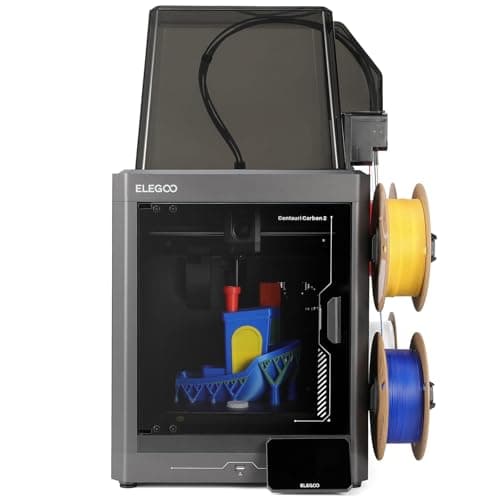
An enclosed CoreXY with a 350 C nozzle, 121-point leveling and multi-color included, at a price that used to buy an open frame. The catch is the one Elegoo prints in its own footnotes: the filament waste bin is not in the box, you print it yourself.
#ad Price as of September 21, 2026, from Amazon. Prices change. How we make money.
What it actually is
A fully enclosed CoreXY printer sold with Elegoo's CANVAS multi-material unit. Enclosed means the chamber holds its heat, which is what stops ABS and ASA from curling off the plate.
What the manufacturer states
| Figure | Value | Source |
|---|---|---|
| Build volume | 256 x 256 x 256 mm | Elegoo Centauri Carbon 2 specification table |
| Printing speed | Up to 500 mm/s; Elegoo's own recommended figure is 250 mm/s | Elegoo Centauri Carbon 2 specification table |
| Acceleration | 10,000 mm/s2 default, 20,000 mm/s2 maximum | Elegoo Centauri Carbon 2 specification table |
| Max nozzle temperature | 350 C | Elegoo Centauri Carbon 2 specification table |
| Max heated bed temperature | 110 C at 25 C ambient | Elegoo Centauri Carbon 2 specification table |
| Printing accuracy | +/- 0.1 mm | Elegoo Centauri Carbon 2 specification table |
| Layer thickness | 0.1 - 0.4 mm, 0.2 mm recommended | Elegoo Centauri Carbon 2 specification table |
| Extruder | Dual-gear direct extruder, 1 fan; brass-hardened steel 0.4 mm nozzle | Elegoo Centauri Carbon 2 specification table |
| Leveling | 121-point auto-leveling | Elegoo Centauri Carbon 2 specification table |
| Build plate | Dual-sided spring steel sheet - textured PEI and a PLA-specific surface | Elegoo Centauri Carbon 2 specification table |
| Heat break | Titanium alloy | Elegoo Centauri Carbon 2 specification table |
| Z axis | 3 lead screws and 3 linear guide rods | Elegoo Centauri Carbon 2 specification table |
| Multi-color | CANVAS capability - included with the Combo, sold separately for the base machine | Elegoo Centauri Carbon 2 specification table |
| Supported filament | Ideal: PLA, PETG, TPU, PLA-CF. Superior: ABS/ABS-CF, ASA/ASA-CF, PET/PET-CF, PETG-CF, PC, PA. Capable: PPS/PPS-CF/PPS-GF, PPA-CF/PPA-GF | Elegoo Centauri Carbon 2 specification table |
| Ambient temperature | 5 - 40 C | Elegoo Centauri Carbon 2 specification table |
| Screen and system | 5-inch color capacitive touchscreen running ELEGOO OS | Elegoo Centauri Carbon 2 specification table |
| Connectivity | USB and Wi-Fi | Elegoo Centauri Carbon 2 specification table |
| Slicing software | ElegooSlicer recommended; Orca and Cura also supported | Elegoo Centauri Carbon 2 specification table |
| Filtration | Built-in nano mineral crystal filter and a chamber temperature regulator fan | Elegoo Centauri Carbon 2 specification table |
Read from Elegoo, Centauri Carbon 2 product page and specification table on 2026-09-21. Where a manufacturer does not publish a figure, there is no row for it here.
What is good about it
- Fully enclosed with a tempered glass door, which is what ABS and ASA actually need
- 350 C nozzle - the highest published figure of any machine on this site under $500
- Multi-color is included rather than an upgrade, unlike most machines at this price
- 121-point leveling and a dual-sided PEI plate, so the first layer is not the owner's problem
- Built-in filter and a chamber regulator fan, which no open-frame machine can offer
What is not
- The 500 mm/s headline sits next to Elegoo's own recommended 250 mm/s - half the number on the box
- The filament waste bin is not supplied; Elegoo's footnote says you print it yourself from a file on the USB drive
- Multi-color printing wastes filament on every color change, and the bin fills fast
- Elegoo publishes no noise figure, which matters more on an enclosed machine that runs fans
- Elegoo's own store has been showing it sold out, so availability has been through Amazon rather than direct
- More machine than a first-time buyer needs if the plan is PLA models and nothing else
Skip this one if
Skip it if you only ever intend to print PLA. You would be paying for a heated chamber, a 350 C nozzle and a multi-material unit to do a job a $249 open frame does just as well.
What we cannot tell you
We have not printed on this machine. How quiet the enclosure really is, how much filament CANVAS wastes per color change, and how long the nano mineral crystal filter lasts are all unpublished and would need a unit in hand.
How it scored for a beginner
- Setup out of the box8.5
- Auto-calibration9.0
- First-layer forgiveness9.0
- Material range9.5
- Running cost7.0
- Published data8.5
Beginner fit 8.4 / 10. That is our editorial read of how well this suits someone buying their first printer, taken off the published specifications — not a test result, and not a verdict on absolute quality. It is deliberately not marked up as a rating in this page’s structured data. How we pick.
How these were picked
We have not printed on these machines and we do not pretend to have. What we did was read each manufacturer’s own specification page, take their stated build volume, temperatures and speeds, check that every pick genuinely fits the job in this page’s title, confirm it is still being sold, and pull a live price rather than a remembered one. Every figure names the source it came from, so you can check it yourself in about a minute.
How we pick sets out the full method, including what would change a ranking.
Questions people actually ask
+−Does the Centauri Carbon 2 come with multi-color?
The Combo does — it includes Elegoo’s CANVAS multi-material unit. The base Centauri Carbon 2 lists CANVAS capability as “sold separately”. If multi-color is why you are buying, make sure you are looking at the Combo.
+−Is the Centauri Carbon 2 really 500 mm/s?
Elegoo publishes “up to 500 mm/s” with a recommended figure of 250 mm/s in the same table. Treat 500 as a ceiling and 250 as the working speed the manufacturer itself suggests.
+−Can it print ABS and carbon fiber?
Elegoo rates ABS, ABS-CF, ASA, ASA-CF, PET-CF, PETG-CF, PC and PA in its “superior” material tier, and the machine has the enclosure, the 350 C nozzle and the hardened steel nozzle those need. PLA-CF sits in the “ideal” tier.
+−What is not included with the Centauri Carbon 2?
The filament waste bin. Elegoo’s footnote states customers print it themselves from a model on the supplied USB drive or stored in the machine.
+−Centauri Carbon 2 or Bambu P1S?
The Elegoo publishes a hotter nozzle and includes multi-color in the Combo. The Bambu has the larger community, the more polished software and a published track record. If you want maximum material range per dollar, the Elegoo; if you want the smoothest experience, the Bambu.