Head to head
Anycubic vs Bambu Lab
Two brands that both sell enclosed, multi-color, auto-calibrating printers to beginners, and arrive at it from opposite directions. One competes on what is in the box. The other competes on what happens after you open it.
By Scooter M. · Published · Last reviewed
How this page is funded: the buy links below are affiliate links. If you buy through one we earn a commission, at no extra cost to you. It does not change the order of the picks or a word of what we say about them. Full disclosure.
Printers we claim to have tested: 0. Everyone in this category says they tested twenty machines. We have not tested any, and we would rather say so. What we did instead is on this page: the manufacturer’s own published specification for every pick, cited and dated; the arithmetic on what it costs to run, with the inputs shown; a live price rather than a remembered one; and a plain answer on who should skip each machine.
The short answer
Buy Bambu Lab if you want the smoothest possible first printer. Buy Anycubic if you want the most hardware per dollar and you are comfortable being slightly further from the crowd. Anycubic bundles the multi-color unit into its Combo price and publishes noise figures Bambu does not match. Bambu has the better software, the far larger community, and the machine most people should buy first.
This is a brand comparison rather than a machine comparison, because that is genuinely how the choice presents itself: two companies selling enclosed, self-calibrating, multi-color-capable printers to the same beginner at overlapping prices. We have not printed on any of these machines; what follows is what each company publishes, and where one publishes something the other does not.
The headline machines
Published manufacturer figures. Anycubic Kobra S1 Combo against the two Bambu machines a beginner actually chooses between.
| Anycubic Kobra S1 Combo | Bambu Lab P1S | Bambu Lab A1 | |
|---|---|---|---|
| Frame | Enclosed CoreXY | Enclosed CoreXY | Open bed-slinger |
| Build volume | 250 x 250 x 250 mm | 256 x 256 x 256 mm | 256 x 256 x 256 mm |
| Max nozzle | 320 C | 300 C | 300 C |
| Max plate | 120 C | 100 C | 100 C |
| Speed | 300 mm/s recommended, 600 max | 500 mm/s max | 500 mm/s max |
| Acceleration | 10,000 recommended, 20,000 max | 20,000 mm/s2 | 10,000 mm/s2 |
| Multi-color | ACE Pro included, 4 colors | AMS sold separately | AMS lite sold separately |
| Published noise | 46 dB standard, 44 dB quiet, at 1 m | Not published | Not published |
| Camera | Built in, 480P | Built in | Not built in |
| Filament drying | In the ACE Pro, up to 55 C | No | No |
Where Anycubic wins
Multi-color is in the box. The Kobra S1 Combo includes the ACE Pro four-color unit at the Combo price. Both Bambu machines list their multi-material unit as a separate purchase. If multi-color is part of the plan from day one, this is the single biggest difference in the table, and it is a large one in money terms.
It publishes noise figures. Anycubic states 46 dB or below in standard mode and 44 dB or below in quiet mode, measured one meter from the front. Bambu publishes no noise specification for the A1 or the P1S. On a machine that may run for eight hours in a room you use, a published number beats no number. This matters most if the printer is going anywhere near a living space — see where to put your 3D printer.
Hotter nozzle and plate. 320 C and 120 C against Bambu’s 300 C and 100 C. More material headroom on paper.
Active drying built into the multi-color unit. The ACE Pro dries filament up to 55 C while it feeds. Damp filament is one of the most common causes of a mysteriously bad print, and this removes a separate purchase — see our dryer roundup for what that purchase would otherwise cost.
Where Bambu wins
The out-of-box experience. This is not a specification and it is the most important thing about a first printer. Bambu’s machines calibrate themselves thoroughly and reliably, the slicer is good, and the path from unboxing to a printed object is shorter than anyone else’s. Our A1 review goes through why that machine keeps ending up as our first recommendation.
The community. Far larger. When something goes wrong at 11pm, the number of people who have already had your exact problem matters enormously. This is a real, practical advantage that does not appear on any spec sheet.
Model availability. Bambu’s MakerWorld has profiles tuned for its own machines, so a downloaded model often prints correctly with no adjustment. Our guide to where to download models covers the wider picture.
An open machine that is genuinely good. The A1 is the best open-frame printer we have looked at for a first buyer, and Anycubic has no direct equivalent we can recommend — its older Kobra 3 Combo no longer has a reliable Amazon listing.
Where Anycubic loses ground
The listings are fragmented. This is a real, practical problem rather than a criticism of the hardware. Anycubic runs several concurrent Amazon listings for the same machine, and they come and go. We have had to re-point a buy link on this site when an official listing for the Kobra S1 Combo went unavailable within three days. Bambu’s Amazon presence is a single, stable store.
TPU does not go through the ACE Pro. Anycubic states this plainly, which is to its credit, but it is a limit: flexible filament has to be fed externally. Our TPU roundup explains why multi-spool feeders and flexible filament generally do not mix.
Fewer people to ask. The mirror of Bambu’s community advantage.
Where Bambu loses ground
Multi-color costs extra, and it adds up. Buying an A1 or P1S and adding the AMS later is the expensive route to the same place.
No published noise figures. A genuine gap for a company that otherwise publishes good specifications.
A more closed ecosystem. Bambu’s machines are designed to be used Bambu’s way. For most beginners that is a feature. If you expect to modify things, it is a constraint, and Prusa is the brand that comparison usually leads to.
So which brand?
First printer, no multi-color plans, wants it to just work: Bambu, and specifically the A1. The experience advantage is worth more to a first-time owner than any line in the table above.
Wants multi-color from day one on a fixed budget: Anycubic. Getting the ACE Pro included rather than added later is the cheapest honest route into multi-color printing, and the published noise figures are a bonus if the machine shares a room with you.
Wants enclosed and expects to print ABS or ASA: Either — both make a capable enclosed machine. Compare the P1S against the Kobra S1 Combo on price on the day, because they trade places.
Still deciding whether to buy at all: start with is a 3D printer worth it rather than with a brand.
For a broader brand picture, our Bambu versus Creality comparison covers the other matchup most beginners run into, and the beginner roundup ranks the individual machines across all three brands.
What we would buy for this
Chosen from the same registry as our roundups, on the manufacturer’s own published figures and a live price.
Anycubic Kobra S1 Combo
Anycubic · Multi-color printing in an enclosure, bought as one box
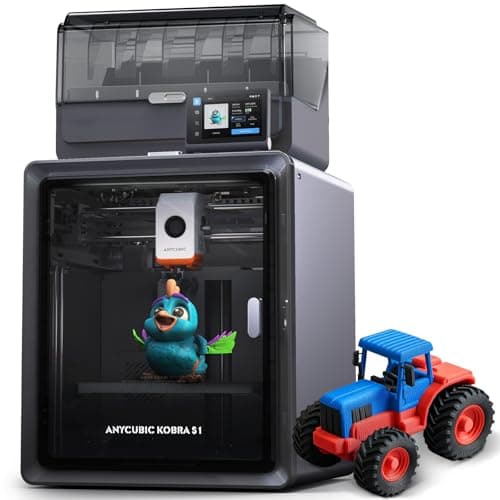
An enclosed CoreXY printer that ships with its four-color unit in the box, and that unit dries filament while it prints. Anycubic publishes a 320 C nozzle, a 120 C plate and 250 mm cubed. The catches are in its own footnotes: the dryer stops at 55 C, TPU cannot go through it, and eight colors means buying a second one.
#ad Price as of September 21, 2026, from Amazon. Prices change. How we make money.
What it actually is
A fully enclosed CoreXY printer bundled with the ACE Pro, Anycubic's four-spool feeder. The ACE Pro swaps filaments for multi-color prints and heats the spools while it does, so the filament stays dry during long jobs.
What the manufacturer states
| Figure | Value | Source |
|---|---|---|
| Build volume | 250 x 250 x 250 mm | Anycubic Kobra S1 Combo specification table |
| Construction | Fully enclosed CoreXY | Anycubic Kobra S1 Combo specification table |
| Print speed | 300 mm/s recommended; 600 mm/s maximum | Anycubic Kobra S1 Combo specification table |
| Acceleration | 10,000 mm/s2 recommended; 20,000 mm/s2 maximum | Anycubic Kobra S1 Combo specification table |
| Nozzle | 320 C max; 0.4 mm standard, 0.25 / 0.6 / 0.8 mm sold separately | Anycubic Kobra S1 Combo specification table |
| Plate | 120 C max, PEI spring steel | Anycubic Kobra S1 Combo specification table |
| Supported filaments | PLA, PETG, ABS, ASA, TPU 95A (TPU not compatible with the ACE Pro) | Anycubic Kobra S1 Combo specification table |
| Multi-color | 4 colors with the included ACE Pro; 8 needs a second ACE Pro and an eight-color feeding module | Anycubic Kobra S1 Combo specification table |
| Active drying | Supported in the ACE Pro, up to 55 C | Anycubic Kobra S1 Combo specification table |
| Leveling and calibration | LeviQ 3.0 auto-leveling, Z-offset, flow calibration, resonance compensation | Anycubic Kobra S1 Combo specification table |
| Noise | 46 dB or below standard, 44 dB or below quiet mode, measured 1 m from the front | Anycubic Kobra S1 Combo specification table |
| Weight | Printer 18 kg; ACE Pro 4.6 kg | Anycubic Kobra S1 Combo specification table |
| Dimensions | Printer 400 x 410 x 490 mm; ACE Pro 365.94 x 282.84 x 234.5 mm | Anycubic Kobra S1 Combo specification table |
| Camera | Built in, 480P | Anycubic Kobra S1 Combo specification table |
Read from Anycubic, Kobra S1 Combo product page and specification table on 2026-09-17. Where a manufacturer does not publish a figure, there is no row for it here.
What is good about it
- The four-color unit is in the box, so the Combo price is the multi-color price
- The ACE Pro heats spools while printing, per Anycubic, which keeps filament dry through a long multi-color job
- A 120 C plate and a 320 C nozzle - the highest published plate temperature of any enclosed printer on this site
- Anycubic publishes filament entanglement detection and AI spaghetti detection alongside auto-resume after run-out
What is not
- The ACE Pro dries at 55 C at most, below the 60 C PETG and 70 C ABS and ASA routines filament makers publish
- TPU 95A cannot go through the ACE Pro, per Anycubic's own footnote - flexible filament is single-color only
- Eight colors needs a second ACE Pro and an extra feeding module, not just a second unit
- An 18 kg printer plus a 4.6 kg feeder is a lot of desk, and Anycubic lists a 1-year printer warranty
Skip this one if
Skip it if multi-color is not the reason you are buying. You are paying for a feeder and a box, and a single-color first year is better spent on an open-frame machine and a lot of filament. Skip it too if TPU in multiple colors is the plan, because Anycubic says that combination does not work.
What we cannot tell you
We have not printed on this machine. How reliably the ACE Pro swaps filament over hundreds of changes, whether 55 C drying keeps PETG usable in a humid room, and how the published noise figures compare to a real room are all owner questions.
How it scored for a beginner
- Setup out of the box8.0
- Auto-calibration9.0
- First-layer forgiveness8.5
- Parts and filament availability8.0
- Running cost7.0
- Help when it goes wrong7.5
Beginner fit 7.9 / 10. That is our editorial read of how well this suits someone buying their first printer, taken off the published specifications — not a test result, and not a verdict on absolute quality. It is deliberately not marked up as a rating in this page’s structured data. How we pick.
Bambu Lab P1S
Bambu Lab · A first printer for someone who already knows they want ABS or ASA
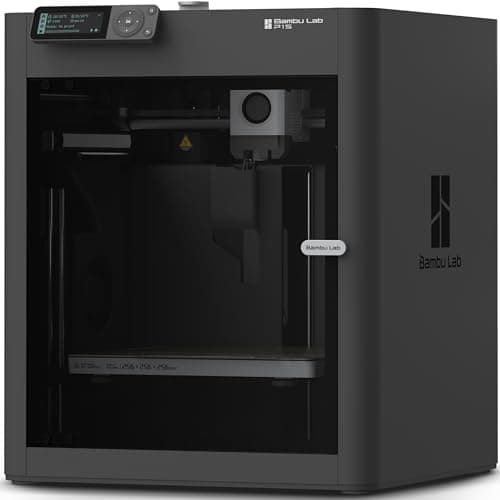
An enclosed CoreXY machine, which is a different class of thing from an A1: the bed stays still and the box holds heat, so the materials the A1 refuses become possible. It is more printer than a first-timer needs, and the right answer if you already know you want ABS.
#ad Price as of September 21, 2026, from Amazon. Prices change. How we make money.
What it actually is
A boxed printer using CoreXY motion — the print head moves in two axes while the bed only goes up and down. Keeping the bed still lets it move faster, and the enclosure keeps the chamber warm so plastics that shrink as they cool do not peel off the plate.
What the manufacturer states
| Figure | Value | Source |
|---|---|---|
| Build volume | 256 x 256 x 256 mm | Bambu Lab P1S technical specifications |
| Enclosure | Enclosed, plastic and glass | Bambu Lab P1S technical specifications |
| Max hot end temperature | 300 C | Bambu Lab P1S technical specifications |
| Max build plate temperature | 100 C | Bambu Lab P1S technical specifications |
| Max speed | 500 mm/s | Bambu Lab P1S technical specifications |
| Max acceleration | 20,000 mm/s2 | Bambu Lab P1S technical specifications |
| Nozzle | All-metal hot end, 0.4 mm included; 0.2, 0.6 and 0.8 mm optional | Bambu Lab P1S technical specifications |
| Filaments rated ideal | PLA, PETG, TPU, PVA, PET, ABS, ASA | Bambu Lab P1S technical specifications |
| Filaments rated capable | PA, PC | Bambu Lab P1S technical specifications |
| Air filter | Activated carbon | Bambu Lab P1S technical specifications |
| Physical dimensions | 389 x 389 x 458 mm | Bambu Lab P1S technical specifications |
| Net weight | 12.95 kg | Bambu Lab P1S technical specifications |
| Max power | 350 W at 110 V | Bambu Lab P1S technical specifications |
Read from Bambu Lab, P1S product page and specification table on 2026-09-06. Where a manufacturer does not publish a figure, there is no row for it here.
What is good about it
- Enclosed, so ABS and ASA are on the menu rather than off it
- CoreXY at 20,000 mm/s2 acceleration — twice the A1's rated figure
- Same 256 mm cubed volume as the A1 in a smaller footprint, because the bed does not travel
- The enclosure also contains most of the noise and the smell, which matters if it lives in a room you sit in
What is not
- Noticeably more expensive than an A1 for a beginner who will print PLA for a year
- The enclosure makes routine maintenance fiddlier than an open frame
- Nothing about it is easier to learn on than an A1 mini — it is just more capable
- Multi-color is again a separate AMS purchase
Skip this one if
Skip it if your honest answer to 'what will you print' is 'I am not sure yet'. Everything the P1S adds over an A1 is aimed at materials a beginner should not start with. Buy it when a specific project demands ABS, not before.
What we cannot tell you
We have not printed on this machine. Chamber temperature in a cold room, real ABS warping behavior and long-term fan noise are not on any specification sheet.
How it scored for a beginner
- Setup out of the box8.5
- Auto-calibration9.5
- First-layer forgiveness9.0
- Parts and filament availability9.0
- Running cost7.0
- Help when it goes wrong9.0
Beginner fit 8.4 / 10. That is our editorial read of how well this suits someone buying their first printer, taken off the published specifications — not a test result, and not a verdict on absolute quality. It is deliberately not marked up as a rating in this page’s structured data. How we pick.
Bambu Lab A1
Bambu Lab · A first printer you will not outgrow
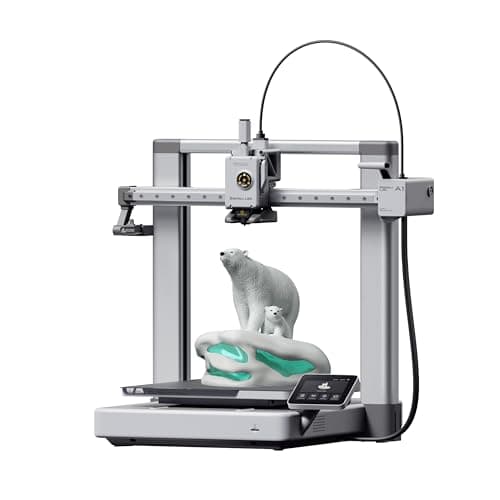
The A1 mini's larger sibling, and the better buy the moment you have a specific large thing in mind. Same self-calibration, 256 mm cubed instead of 180, and a 100 C bed rather than 80 C — which is the spec that actually widens what you can print.
#ad Price as of September 21, 2026, from Amazon. Prices change. How we make money.
What it actually is
The full-size version of the A1: same open-frame layout, same automatic calibration, a bigger bed and a hotter one. The extra bed temperature matters because materials that shrink as they cool need a warm plate to stay stuck to it.
What the manufacturer states
| Figure | Value | Source |
|---|---|---|
| Build volume | 256 x 256 x 256 mm | Bambu Lab A1 technical specifications |
| Max hot end temperature | 300 C | Bambu Lab A1 technical specifications |
| Max build plate temperature | 100 C | Bambu Lab A1 technical specifications |
| Max toolhead speed | 500 mm/s | Bambu Lab A1 technical specifications |
| Max toolhead acceleration | 10,000 mm/s2 | Bambu Lab A1 technical specifications |
| Filaments rated ideal | PLA, PETG, TPU, PVA | Bambu Lab A1 technical specifications |
| Machine dimensions | 465 x 410 x 430 mm | Bambu Lab A1 technical specifications |
| Net weight | 8.3 kg | Bambu Lab A1 technical specifications |
| Max power | 350 W at 110 V | Bambu Lab A1 technical specifications |
Read from Bambu Lab, A1 technical specifications on 2026-09-01. Where a manufacturer does not publish a figure, there is no row for it here.
What is good about it
- 256 mm cubed covers almost everything a first-year printer is asked to make
- 100 C bed rather than the mini's 80 C, which is the difference that makes larger PETG parts stick
- Identical hands-off calibration to the A1 mini, so nothing gets harder as the machine gets bigger
- Bambu Lab publishes a full specification sheet, so every number on this page is checkable in a minute
What is not
- 465 mm wide and 8.3 kg — it needs a dedicated shelf, not a corner of a desk
- 350 W at US voltage against the mini's 150 W, so it costs meaningfully more to run
- Still open-frame, so the material limits are the same as the mini's despite the hotter bed
- Multi-color is again a separate AMS lite purchase
Skip this one if
Skip it if your desk is the only place it can go and you have not measured that desk. It is nearly half a meter wide. If you are unsure whether you will use the extra volume, the mini is the cheaper mistake.
What we cannot tell you
We have not printed on this machine. Noise at full speed, long-term belt and rod wear, and how often the auto-calibration actually needs intervention are all beyond what a specification sheet can tell you.
How it scored for a beginner
- Setup out of the box9.5
- Auto-calibration10.0
- First-layer forgiveness9.5
- Parts and filament availability9.0
- Running cost8.0
- Help when it goes wrong9.0
Beginner fit 9.0 / 10. That is our editorial read of how well this suits someone buying their first printer, taken off the published specifications — not a test result, and not a verdict on absolute quality. It is deliberately not marked up as a rating in this page’s structured data. How we pick.
How these were picked
We have not printed on these machines and we do not pretend to have. What we did was read each manufacturer’s own specification page, take their stated build volume, temperatures and speeds, check that every pick genuinely fits the job in this page’s title, confirm it is still being sold, and pull a live price rather than a remembered one. Every figure names the source it came from, so you can check it yourself in about a minute.
How we pick sets out the full method, including what would change a ranking.
Questions people actually ask
+−Is Anycubic as good as Bambu Lab?
On published hardware specifications Anycubic competes well — a hotter nozzle and plate, multi-color included in the Combo price, and noise figures Bambu does not publish. Bambu’s advantage is in the experience: better software, a much larger community and a more reliable path from box to first print. For a first printer that experience usually matters more.
+−Which is cheaper for multi-color printing?
Anycubic, clearly. The Kobra S1 Combo includes the ACE Pro four-color unit at the Combo price, whereas both Bambu machines list their AMS or AMS lite as a separate purchase. Buying a multi-material unit later is always the expensive route.
+−Which brand is quieter?
Anycubic is the only one of the two that publishes a figure — 46 dB standard and 44 dB in quiet mode, measured a meter from the front of the Kobra S1. Bambu publishes no noise specification for the A1 or P1S, so no honest comparison is possible.
+−Can both print ABS and ASA?
The enclosed machines can. The Kobra S1 Combo and the P1S are both enclosed and both list ABS and ASA as supported. The open-frame Bambu A1 does not — an open frame cannot hold the chamber heat those materials need.