Guide
Is a 3D Printer Bundle Worth It?
A bundle is a printer plus a box of extras at one price. Some of those extras you will use in week one. Some will sit in a drawer for the life of the machine. Here is how to tell which bundle is which.
By Scooter M. · Published · Last reviewed
How this page is funded: the buy links below are affiliate links. If you buy through one we earn a commission, at no extra cost to you. It does not change the order of the picks or a word of what we say about them. Full disclosure.
Printers we claim to have tested: 0. Everyone in this category says they tested twenty machines. We have not tested any, and we would rather say so. What we did instead is on this page: the manufacturer’s own published specification for every pick, cited and dated; the arithmetic on what it costs to run, with the inputs shown; a live price rather than a remembered one; and a plain answer on who should skip each machine.
The short answer
A bundle is worth it when the extras are filament and a spare nozzle, and it is not worth it when the extras are a tool kit you already have. The test is simple: price the printer on its own, price the two or three items in the bundle you would genuinely buy anyway, and compare. Extra filament almost always passes that test. A twelve-piece “deburring kit” almost never does.
This question comes up constantly and it deserves a straight answer rather than a shrug, because the bundles on offer genuinely differ. Some are a real discount on things you will use. Some are a printer at full price with $15 of accessories and a bigger number crossed out.
What is usually in a bundle
Bundles are assembled by the seller rather than defined by any standard, so the contents vary. In practice you see some combination of these:
How often each item earns its place, in our view.
| Item | Will you use it? | Verdict |
|---|---|---|
| Extra filament (1-4 spools) | Yes, immediately | The one item that reliably justifies a bundle. You will get through a kilogram faster than you expect. |
| Spare nozzles | Eventually, yes | Worth having. Nozzles wear and clog, and a spare turns a dead evening into a ten-minute fix. |
| Spare build plate or PEI sheet | Maybe, in year one | Genuinely useful if it is the right plate for your machine. Check that it is. |
| PTFE tube, couplers, belts | Rarely in the first year | Real spare parts, but ones a beginner is unlikely to fit. Low value at purchase time. |
| Tool kit (scrapers, hex keys, cutters) | You probably own most of it | Printers already ship with the hex keys you need. The scraper is the only piece most people use. |
| Glue stick, tape, adhesive spray | Usually not | Modern PEI plates do not need adhesive. If prints are not sticking, the plate is dirty. |
How to judge a bundle in two minutes
1. Find the printer’s standalone price. Nearly every machine is sold on its own as well. That is your baseline.
2. Cross out everything in the bundle you would not have bought. Be strict. If you would not have added a glue stick to your basket, it is worth zero to you, not its list price.
3. Price what is left. Filament and nozzles are easy to price. Our filament cost guide has real per-kilogram figures.
4. Compare. If the bundle premium is less than the value of what is left, buy the bundle. If not, buy the printer and pick your own filament.
A worked example
Numbers invented to show the method, not quoted from any listing. Say a printer sells on its own, and the bundle version of the same machine costs forty dollars more and adds three spools of unbranded filament, a twelve-piece tool kit, a glue stick and a spare PTFE tube.
Cross out what you would not have bought. The tool kit duplicates what ships in the box. The glue stick is unnecessary on a PEI plate. The PTFE tube is a spare you will not fit this year. All three are worth zero to you regardless of their list price.
Price what is left. Three kilograms of filament. If you would have bought three kilograms anyway, and a kilogram of budget filament costs more than about thirteen dollars, the bundle premium is already covered and everything else is free. If you would only have bought one spool, you are paying forty dollars for one kilogram you wanted and two you did not — and that is a worse deal than buying the printer alone.
The answer flips on one question: how much filament you were going to buy anyway. That is why there is no universal verdict on bundles, and why anyone who tells you they are always a rip-off or always a bargain has not done the arithmetic. Our filament cost guide has the real per-kilogram figures to run it with.
The bundle nobody warns you about
The pattern worth recognizing is a generous-looking bundle attached to a machine that is a generation behind. The extras are real and the discount is real, and you still end up with a printer that needs manual bed leveling in a year when that problem is solved. Every hour spent on a first layer is worth more than a spare nozzle.
Check the machine against the beginner roundup first and let the bundle break a tie between two machines you would be happy with either way. Never let it choose the machine.
When the bundle genuinely wins
When it includes multiple spools of a brand you would buy. This is the clearest case. Filament is a consumable you are certain to need, and buying three or four kilograms at once is normally cheaper per kilogram anyway.
When the bundle is the multi-color version of the machine. This is the most valuable “bundle” of all and it is not really an accessory bundle at all — it is a different product. A Combo that pairs a printer with its multi-material unit costs far less than buying the unit separately later. Our multi-color roundup covers which of those are worth it.
When you are buying a gift. One box that contains everything needed to print something on the first afternoon has real value that a spreadsheet does not capture. Our gift guide is built around exactly that.
When to buy separately
When you want specific filament. If you already know you want matte black PLA or a particular PETG, bundle spools are a step backwards. Our PLA roundup and PETG roundup name the spools worth choosing deliberately.
When the extras are a tool kit. Most printers ship with the hex keys, a scraper and a nozzle-cleaning needle. A second set is not a benefit.
When the bundle blocks a better machine. The worst outcome here is buying a weaker printer because its bundle looked generous. The machine matters enormously; a spare PTFE tube does not. Start from the beginner printer roundup and treat the bundle as a tiebreaker, never as the deciding factor.
What you actually need alongside the printer
Independent of bundles, the honest shopping list for a first printer is short. Filament, a way to keep it dry, and something to get prints off the plate. That is most of it. Our starter kit guide works through the full list and what each item is for; this page is only about whether to buy those things pre-packed with the machine.
The one item worth flagging here, because it is almost never in a bundle and it is the accessory most beginners end up buying second, is a filament dryer. Damp filament is a real and frustrating failure mode, and no amount of spare nozzles addresses it.
The short version
Bundles are neither a scam nor a bargain by default. Count only the items you would have bought anyway, price those, and compare against the printer alone. In our reading of what is normally on offer, extra filament and a spare nozzle are worth paying a small premium for; adhesive, tool kits and consumable spares usually are not. And never let a generous bundle talk you into the wrong machine.
What we would buy for this
Chosen from the same registry as our roundups, on the manufacturer’s own published figures and a live price.
Bambu Lab A1
Bambu Lab · A first printer you will not outgrow
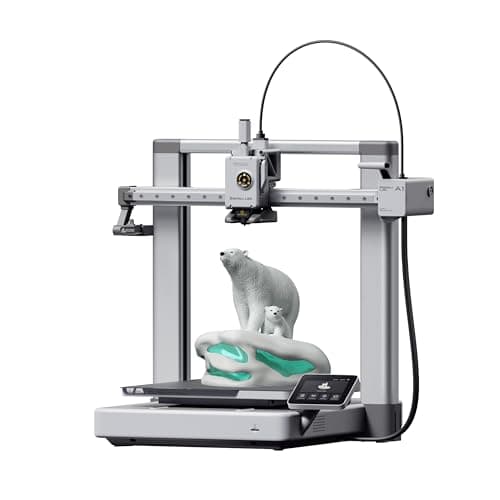
The A1 mini's larger sibling, and the better buy the moment you have a specific large thing in mind. Same self-calibration, 256 mm cubed instead of 180, and a 100 C bed rather than 80 C — which is the spec that actually widens what you can print.
#ad Price as of September 21, 2026, from Amazon. Prices change. How we make money.
What it actually is
The full-size version of the A1: same open-frame layout, same automatic calibration, a bigger bed and a hotter one. The extra bed temperature matters because materials that shrink as they cool need a warm plate to stay stuck to it.
What the manufacturer states
| Figure | Value | Source |
|---|---|---|
| Build volume | 256 x 256 x 256 mm | Bambu Lab A1 technical specifications |
| Max hot end temperature | 300 C | Bambu Lab A1 technical specifications |
| Max build plate temperature | 100 C | Bambu Lab A1 technical specifications |
| Max toolhead speed | 500 mm/s | Bambu Lab A1 technical specifications |
| Max toolhead acceleration | 10,000 mm/s2 | Bambu Lab A1 technical specifications |
| Filaments rated ideal | PLA, PETG, TPU, PVA | Bambu Lab A1 technical specifications |
| Machine dimensions | 465 x 410 x 430 mm | Bambu Lab A1 technical specifications |
| Net weight | 8.3 kg | Bambu Lab A1 technical specifications |
| Max power | 350 W at 110 V | Bambu Lab A1 technical specifications |
Read from Bambu Lab, A1 technical specifications on 2026-09-01. Where a manufacturer does not publish a figure, there is no row for it here.
What is good about it
- 256 mm cubed covers almost everything a first-year printer is asked to make
- 100 C bed rather than the mini's 80 C, which is the difference that makes larger PETG parts stick
- Identical hands-off calibration to the A1 mini, so nothing gets harder as the machine gets bigger
- Bambu Lab publishes a full specification sheet, so every number on this page is checkable in a minute
What is not
- 465 mm wide and 8.3 kg — it needs a dedicated shelf, not a corner of a desk
- 350 W at US voltage against the mini's 150 W, so it costs meaningfully more to run
- Still open-frame, so the material limits are the same as the mini's despite the hotter bed
- Multi-color is again a separate AMS lite purchase
Skip this one if
Skip it if your desk is the only place it can go and you have not measured that desk. It is nearly half a meter wide. If you are unsure whether you will use the extra volume, the mini is the cheaper mistake.
What we cannot tell you
We have not printed on this machine. Noise at full speed, long-term belt and rod wear, and how often the auto-calibration actually needs intervention are all beyond what a specification sheet can tell you.
How it scored for a beginner
- Setup out of the box9.5
- Auto-calibration10.0
- First-layer forgiveness9.5
- Parts and filament availability9.0
- Running cost8.0
- Help when it goes wrong9.0
Beginner fit 9.0 / 10. That is our editorial read of how well this suits someone buying their first printer, taken off the published specifications — not a test result, and not a verdict on absolute quality. It is deliberately not marked up as a rating in this page’s structured data. How we pick.
Creality Space Pi Filament Dryer
Creality · Knowing when the spool is actually dry
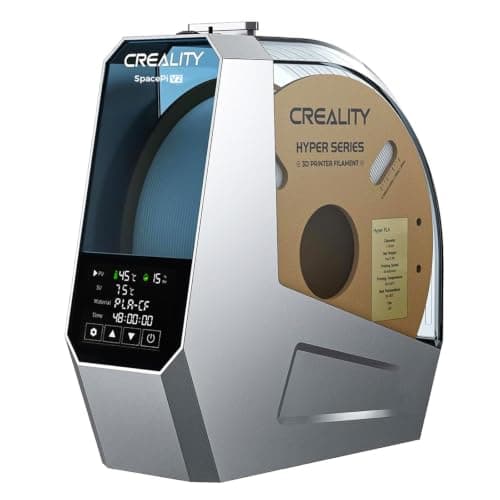
The one that tells you whether it worked. Creality publishes real-time humidity and temperature monitoring alongside a 45-70 C range and a 0-48 hour timer, and the humidity readout is the difference between drying filament and hoping you dried filament.
#ad Price as of September 21, 2026, from Amazon. Prices change. How we make money.
What it actually is
A heated, fan-circulated box that holds a spool of filament and drives the absorbed moisture out of it. The filament can be fed to the printer while it sits inside, so it works as storage as well as a dryer.
What the manufacturer states
| Figure | Value | Source |
|---|---|---|
| Temperature range | 45 - 70 C, adjustable | Creality Space Pi Filament Dryer product page |
| Drying timer | 0 - 48 hours | Creality Space Pi Filament Dryer product page |
| Monitoring | Real-time humidity and temperature readout | Creality Space Pi Filament Dryer product page |
| Heating | 360 degree PTC hot-air heating | Creality Space Pi Filament Dryer product page |
| Presets | One-key settings for 12 filament types | Creality Space Pi Filament Dryer product page |
| Spool capacity | Not published on the manufacturer's page | Creality Space Pi Filament Dryer product page |
Read from Creality, Space Pi Filament Dryer product page on 2026-09-13. Where a manufacturer does not publish a figure, there is no row for it here.
What is good about it
- A real-time humidity readout, which is the only way to tell a dry spool from a warm one
- 45-70 C covers PLA at the low end and the engineering plastics at the top
- A 0-48 hour timer, so a long overnight dry does not need babysitting
- One-key presets for twelve filament types removes the one setting people get wrong
What is not
- Creality does not publish a spool capacity or a wattage figure on the product page, so we cannot quote either
- Single-spool designs mean drying a second color is a second session
- A dryer is a month-three purchase, not a day-one one - your first spool arrives sealed
- Nothing about it helps a spool that is already fine
Skip this one if
Skip it if your filament lives in its sealed bag with the desiccant between prints. A sealed box and a fresh desiccant pack prevent the problem for a fraction of this price; a dryer fixes it after the fact.
What we cannot tell you
We have not used this dryer. How accurate the humidity sensor is, how evenly the box heats in a cold room, and how long a spool stays dry after a session are all things that need measurement we have not done.
How it scored for a beginner
- Ease for a beginner9.0
- Published data7.0
- Tells you it worked9.5
- Capacity6.5
- Value8.5
Beginner fit 8.6 / 10. That is our editorial read of how well this suits someone buying their first printer, taken off the published specifications — not a test result, and not a verdict on absolute quality. It is deliberately not marked up as a rating in this page’s structured data. How we pick.
Overture PLA
Overture · Your first spool, and your tenth
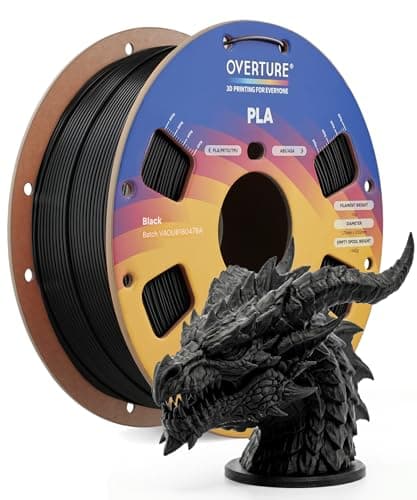
The default answer to 'what filament should I buy'. A tight published diameter tolerance, a conventional temperature range every printer profile already expects, and it is sold everywhere. Nothing about it is exciting, which is the point.
#ad Price as of September 21, 2026, from Amazon. Prices change. How we make money.
What it actually is
PLA is the plastic beginners should print. It is stiff, it needs no enclosure, it barely smells, and it sticks to a plate at low temperatures. This is a mainstream 1 kg spool of it.
What the manufacturer states
| Figure | Value | Source |
|---|---|---|
| Diameter | 1.75 mm | Overture published product specification |
| Dimensional accuracy | +/- 0.02 mm | Overture published product specification |
| Spool weight | 1 kg (2.2 lb) | Overture published product specification |
| Recommended nozzle temperature | 190 - 220 C | Overture published product specification |
| Recommended bed temperature | 25 - 60 C | Overture published product specification |
| Packaging | Dried before packing and vacuum sealed | Overture published product specification |
Read from Overture, PLA filament product page on 2026-09-01. Where a manufacturer does not publish a figure, there is no row for it here.
What is good about it
- +/- 0.02 mm published tolerance, which is as tight as mainstream PLA is quoted
- 190 - 220 C is squarely inside every stock PLA profile you will meet
- A 25 - 60 C bed range means it will stick even on an unheated or barely warm plate
- Vacuum sealed with desiccant, so a spool bought in advance is still dry when it arrives
What is not
- PLA softens in a hot car or a sunny window — this is a property of the material, not the brand
- Not the cheapest per kilogram once you start printing seriously
- Color consistency between batches of any budget filament is a real thing
- No filament is a fix for a machine that is not leveled
Skip this one if
Skip it if the part you are making will live outdoors or in a car. That is a PETG job, not a PLA one, and no PLA brand changes that.
What we cannot tell you
We have not printed this filament. Batch-to-batch color consistency and how it behaves after a year in a cupboard are things only repeated use reveals.
How it scored for a beginner
- Ease for a beginner9.5
- Published tolerance9.5
- Availability9.5
- Value per kilogram8.0
Beginner fit 9.0 / 10. That is our editorial read of how well this suits someone buying their first printer, taken off the published specifications — not a test result, and not a verdict on absolute quality. It is deliberately not marked up as a rating in this page’s structured data. How we pick.
How these were picked
We have not printed on these machines and we do not pretend to have. What we did was read each manufacturer’s own specification page, take their stated build volume, temperatures and speeds, check that every pick genuinely fits the job in this page’s title, confirm it is still being sold, and pull a live price rather than a remembered one. Every figure names the source it came from, so you can check it yourself in about a minute.
How we pick sets out the full method, including what would change a ranking.
Questions people actually ask
+−Are 3D printer bundles worth it?
It depends almost entirely on whether the bundle contains filament. Extra spools are a consumable you are certain to use, so a bundle built around them is usually good value. A bundle built around a tool kit, glue and spare PTFE tubing usually is not, because printers already ship with basic tools and modern PEI plates do not need adhesive.
+−Should I buy nozzles and spare parts separately?
Spare nozzles are worth having either way — they are cheap and a clog is the most common thing that stops a printer. Belts, PTFE tubing and couplers are real spares but ones most beginners will not fit in the first year, so paying extra for them at purchase is rarely worth it.
+−Is a Combo bundle the same as an accessory bundle?
No, and the distinction matters. A Combo normally pairs the printer with its multi-material unit, which is a major piece of hardware that costs considerably more bought later. That is usually excellent value. An accessory bundle is a printer plus consumables, and needs judging item by item.
+−How much filament should I buy with a first printer?
One or two kilograms is a sensible start. That is enough to get well past the first few projects without committing to colors you may not want once you know what you enjoy printing.