Roundup
The Best ABS Filament
ABS is the toughest, most heat-resistant material most beginners will consider, and the one most likely to waste a spool. The three brands here publish contradictory advice about it - which is the most useful thing on this page.
By Scooter M. · Published · Last reviewed
How this page is funded: the buy links below are affiliate links. If you buy through one we earn a commission, at no extra cost to you. It does not change the order of the picks or a word of what we say about them. Full disclosure.
Printers we claim to have tested: 0. Everyone in this category says they tested twenty machines. We have not tested any, and we would rather say so. What we did instead is on this page: the manufacturer’s own published specification for every pick, cited and dated; the arithmetic on what it costs to run, with the inputs shown; a live price rather than a remembered one; and a plain answer on who should skip each machine.
The short answer
Most people reading this should buy PETG instead. ABS needs a genuinely enclosed printer, it warps if the chamber is cold, it smells, and it yellows in sunlight. If you have an enclosed machine and you need real heat resistance, Elegoo ABS is the one to buy — not because the plastic is better, but because Elegoo is the only brand here that publishes the chamber temperature and says outright that an enclosure is required.
We have not printed any of these spools. Everything below is what each manufacturer publishes, read carefully — and the most useful finding is that they do not agree with each other. One says an enclosure is required; another says recommended. One publishes a maximum speed more than four times another’s. Those disagreements are the real content of this page.
How we judged these
ABS is the material where published data matters most, because it is the material most likely to fail in ways a beginner cannot diagnose. Four criteria, set before we looked at any spool:
1. Does it publish a chamber temperature? The single most important ABS figure and the one almost nobody prints. Bed and nozzle temperatures are easy; the air around the part is what decides whether it stays on the plate.
2. Is it honest about the requirements? A brand that says “enclosure required” is more use to you than one that says “recommended” and lets you find out.
3. Are the settings complete? Nozzle, bed, speed and a drying procedure. A gap in that list is a gap you fill by guessing.
4. Diameter tolerance. Less critical on ABS than on fine-detail PLA work, but still a real indicator of manufacturing control.
We did not rank on price. All three sit within a couple of dollars of each other and that is not where the decision is.
Before you buy: is ABS actually the material you need?
What ABS is genuinely good at: heat resistance well beyond PLA and PETG, toughness that survives being dropped, and the ability to be smoothed with acetone vapor into a finish no other common filament matches. Tool handles, brackets near a heat source, automotive interior parts, enclosures for electronics that warm up.
What it is bad at: everything about the printing process. It shrinks hard as it cools, which is why the chamber matters. It needs glue on the plate. It smells strongly. And it does none of that better than ASA if the part is going outside — our ABS versus ASA comparison and outdoor filament guide both land on ASA for sun exposure.
The enclosure requirement, and where the brands disagree
This is the part worth reading twice, because the three manufacturers do not say the same thing about the same material.
What each manufacturer publishes for its own ABS. Read across the rows, not down the columns.
| Elegoo ABS | Polymaker PolyLite ABS | Overture ABS | |
|---|---|---|---|
| Nozzle | 240 - 280 C | 245 - 265 C | 230 - 250 C |
| Bed | 90 - 100 C | 90 - 100 C | 90 - 110 C |
| Chamber | 45 - 60 C published | Not published | Not published |
| Enclosure | Required | Advised for optimal results; listed as required hardware | Recommended |
| Speed | Under 220 mm/s | 30 - 50 mm/s | Not published |
| Plate glue | Required | Not published | Not published |
| Drying | Not published | 70 C for 6 hours | Not published |
| Diameter tolerance | Not published | Not published on this page | +/- 0.02 mm |
The speed row is the one to sit with. Elegoo publishes a ceiling of 220 mm/s. Polymaker publishes a range of 30-50 mm/s. These are the same material, and that is a gap of more than four times. We cannot reconcile them and we are not going to pretend otherwise — neither company publishes the test conditions behind its number.
The practical read: treat Polymaker’s 30-50 mm/s as where to start on a first ABS print and Elegoo’s 220 mm/s as what a well-tuned, properly heated enclosed machine might reach. Starting at the top of that range on a first attempt is how you get a warped part and no idea which variable caused it.
The chamber row matters just as much. Elegoo’s 45-60 C is the only published chamber figure we found, and it quietly rules something out: a fabric enclosure tent over an open-frame printer will not reach it. A tent traps whatever heat the bed and hot end give off; it has no heater and Creality publishes no temperature for it. If you are buying ABS on the basis that you will add a tent, that plan does not meet Elegoo’s own stated requirement.
The picks
1. Elegoo ABS — best documented
Elegoo publishes what the others leave out: a 45-60 C chamber temperature, a 240-280 C nozzle range, a 90-100 C bed that it notes depends on your printer and plate type, a speed ceiling under 220 mm/s, a 20 percent RH storage limit and a recommended nozzle of 0.2 mm or larger. It also states two requirements flatly — enclosed printing required, build plate glue required.
That second one is genuinely useful. Plenty of people print their first ABS part on a bare PEI plate, watch a corner lift, and start changing temperatures. Elegoo tells you before you buy that glue is part of the process for this material.
The honest downsides. Glue is an extra consumable and an extra step, and it has to be cleaned off the plate afterwards. The published 220 mm/s sits uncomfortably far from Polymaker’s figure, as covered above. The 45-60 C chamber is not reachable on the cheap tent enclosures many people pair with ABS. It sells mainly through Elegoo’s own store rather than being stocked everywhere. And it publishes no diameter tolerance, which Overture does.
2. Polymaker PolyLite ABS — best for a first ABS print
Polymaker publishes 245-265 C at the nozzle, 90-100 C at the bed, a conservative 30-50 mm/s, and — alone among these three — a drying procedure: 70 C for six hours. Polymaker’s documentation is the best in the filament business generally, and that consistency is why it appears across this site from PLA to PETG to ASA.
Polymaker also markets this specifically as a low-warp, low-odor ABS and lists an enclosure that can trap ambient air and keep it hot under the hardware you need. Both claims point at the same thing: this is the spool aimed at someone printing ABS for the first time.
The 30-50 mm/s range is the reason this is the right first ABS spool even though it is not the best documented overall. Slow printing gives each layer time to bond to the one under it, and layer adhesion is exactly what fails when ABS goes wrong. Starting where the manufacturer says to start is how you learn whether your machine can do ABS at all.
The honest downsides. 30-50 mm/s is genuinely slow on a machine rated to 500, and an ABS part at that speed is a long print. Polymaker publishes no chamber temperature, which is the figure that would tell you whether your enclosure is warm enough. It publishes no diameter tolerance on this product page. And its bed range tops out at 100 C, which on a Bambu P1S means running the plate at its published maximum with no headroom.
3. Overture ABS — tightest tolerance
Overture publishes +/- 0.02 mm diameter accuracy and names the method behind it: a CCD diameter measuring system with closed-loop adaptive manufacturing control. That is more than most brands offer, and Overture applies the same standard across its range, which is why it is our default pick in the brand comparison. It also publishes the widest bed range here at 90-110 C, ships vacuum sealed with desiccant, and has a glossy finish that suits display parts.
The honest downsides, and they are why it is third. Overture calls an enclosed chamber “recommended”. Elegoo calls it required, and Elegoo is closer to the truth — a tall ABS part in open air will curl off the plate regardless of which word the product page uses. It publishes no printing speed at all, which is the figure you most want when stepping up from PLA, and no drying temperature or time, so a spool that has absorbed moisture leaves you guessing. Its nozzle ceiling is the lowest here at 250 C. And a glossy finish shows layer lines and blemishes that a matte surface hides.
What you actually need alongside the spool
A genuinely enclosed printer. Not a tent. Our enclosed printer roundup covers the machines; the Centauri Carbon 2 and the P1S are the two most people end up choosing.
Ventilation. ABS smells strongly, and this is the one material where that is worth planning for rather than tolerating. Our ventilation and filtration page is honest that for PLA you need nothing and for ABS you need something.
Glue, if you follow Elegoo’s guidance. A basic glue stick. This is one of the few cases where the adhesive that bundle sellers push is actually justified — see the bundle guide for when it is not.
Dry storage. Elegoo publishes a 20 percent RH limit. Sealed boxes and desiccant cost very little; a dryer is the month-three purchase. Our storage guide covers the difference.
Settings to start with, and why
Use the manufacturer’s published numbers for the spool you actually bought — they are on this page and they differ. Beyond that, three things matter more than any temperature tweak:
Keep the door shut and the room still. Opening an enclosure mid-print drops the chamber temperature and you will see it as a split in the layers at exactly that height.
Slow the first layer right down and give it a hot bed. Almost every ABS failure starts at the plate.
Turn part cooling down or off. This is the setting that surprises people coming from PLA. PLA wants the fan; ABS cools too fast with it and the layers stop bonding.
The short version
If you do not have an enclosed printer, buy PETG and come back to this page when you do. If the part is going outside, buy ASA. If you have the machine and need the heat resistance: Elegoo ABS for the published requirements, Polymaker for a cautious first print, Overture if consistency of diameter matters most to you and you accept two missing figures.
Quick picks
Ranked on how well each one fits the job in this page's title, read off the manufacturer's own published specifications. Tap any row for the full write-up, including who should skip it.
| # | Product | Best for | Beginner fit | Price |
|---|---|---|---|---|
| 1 | 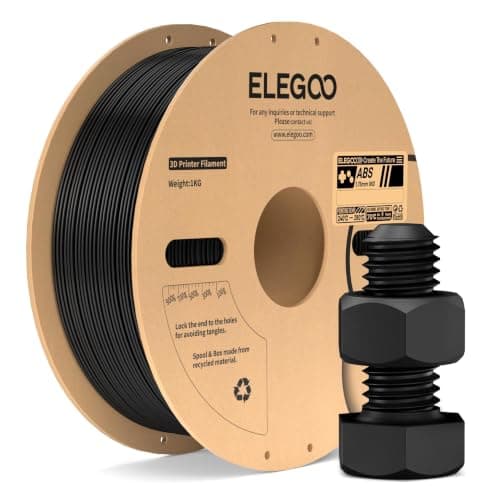 Elegoo ABSElegoo Elegoo ABSElegoo | Best documented | 7.8 | $17.09 - Check price on Amazon |
| 2 | 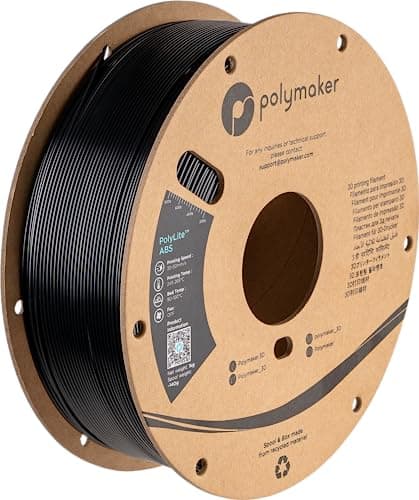 Polymaker PolyLite ABSPolymaker Polymaker PolyLite ABSPolymaker | Best for a first ABS print | 7.6 | $17.10 - Check price on Amazon |
| 3 | 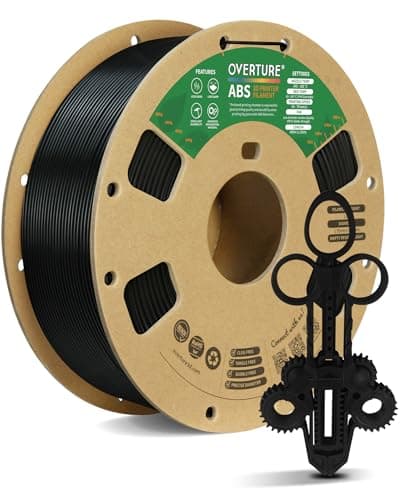 Overture ABSOverture Overture ABSOverture | Tightest tolerance | 7.5 | $17.99 - Check price on Amazon |
#1 · Best documented
Elegoo ABS
Elegoo · Knowing before you buy what ABS actually demands
The only ABS here that publishes a chamber temperature - 45-60 C - which is the figure that actually decides whether ABS works. It also states plainly that an enclosure is required and that you will need glue on the plate. Two honest sentences most filament pages leave out.
#ad Price as of September 22, 2026, from Amazon. Prices change. How we make money.
What it actually is
A 1 kg spool of 1.75 mm ABS. The useful thing about this one is not the plastic, it is the specification sheet: Elegoo publishes the chamber temperature, the humidity limit and the two requirements other brands soften into suggestions.
Does it fit this page?
The only ABS here that publishes a chamber temperature - 45-60 C - which is the figure that actually decides whether ABS works. Elegoo also states plainly that enclosed printing is REQUIRED and that build plate glue is REQUIRED, rather than softening either into a suggestion, and publishes a 20 percent RH storage limit. Its 240-280 C nozzle range is the widest here.
What the manufacturer states
| Figure | Value | Source |
|---|---|---|
| Nozzle temperature | 240 - 280 C | Elegoo ABS printing parameter table |
| Bed temperature | 90 - 100 C, depending on the printer and build plate type | Elegoo ABS printing parameter table |
| Chamber temperature | 45 - 60 C | Elegoo ABS printing parameter table |
| Printing speed | Under 220 mm/s | Elegoo ABS printing parameter table |
| Enclosed printing | Required | Elegoo ABS printing parameter table |
| Build plate glue | Required | Elegoo ABS printing parameter table |
| Printing and storage humidity | 20 percent RH or below, sealed with desiccant | Elegoo ABS printing parameter table |
| Recommended nozzle | 0.2 mm or larger | Elegoo ABS printing parameter table |
| Spool size | 1 kg, 1.75 mm | Elegoo ABS printing parameter table |
Read from Elegoo, ABS filament product page and parameter table on 2026-09-22. Where a manufacturer does not publish a figure, there is no row for it here.
What is good about it
- Publishes a chamber temperature of 45-60 C - the single most useful ABS figure, and almost nobody else publishes it
- States that enclosed printing is REQUIRED rather than recommended, which is the honest position
- States that build plate glue is required, instead of letting you find out on the first failed print
- Publishes a storage humidity limit of 20 percent RH, so you know what dry actually means
- The widest published nozzle range here, 240-280 C
What is not
- Glue on the plate is an extra consumable and an extra step every print, and it has to be cleaned off
- The published 'under 220 mm/s' is far above what Polymaker publishes for its ABS at 30-50 mm/s - treat 220 as a ceiling for a well-tuned enclosed machine, not a starting point
- That 45-60 C chamber figure is NOT reachable in a fabric enclosure, which is worth knowing before you buy a tent to go with it
- Sold through Elegoo's own store rather than widely stocked, so availability is narrower than Overture's
- No published diameter tolerance, which Overture does publish
Skip this one if
Skip it if you do not have a genuinely enclosed printer. Elegoo tells you this itself on the product page, and it is the clearest statement of the requirement any of these three brands makes.
What we cannot tell you
We have not printed this spool. Whether 220 mm/s is achievable on a real machine without losing layer adhesion, how much glue is actually needed, and how it compares with the other two on warping are all unmeasured here.
How it scored for a beginner
- Ease for a beginner4.0
- Published data9.5
- Toughness8.5
- Heat resistance9.0
- Value8.5
Beginner fit 7.8 / 10. That is our editorial read of how well this suits someone buying their first printer, taken off the published specifications — not a test result, and not a verdict on absolute quality. It is deliberately not marked up as a rating in this page’s structured data. How we pick.
#2 · Best for a first ABS print
Polymaker PolyLite ABS
Polymaker · Parts that must survive heat, on a printer with an enclosure
The classic engineering plastic, and the one that most punishes an open-frame printer. Polymaker publishes a 245-265 C nozzle and a 90-100 C bed, and a printing speed range of 30-50 mm/s, which tells you plainly that this is not a material you rush.
#ad Price as of September 22, 2026, from Amazon. Prices change. How we make money.
What it actually is
A 1 kg spool of 1.75 mm ABS. ABS is tough and heat-resistant and it contracts measurably as it cools, which is why it lifts off an unheated, unenclosed plate and why it is an enclosure-only material in practice.
Does it fit this page?
The most conservative published settings of the three, and the only one with a drying procedure attached: 245-265 C nozzle, 90-100 C bed, 30-50 mm/s, dry at 70 C for 6 hours. If this is your first spool of ABS, printing slowly at a manufacturer's own stated speed is how you find out whether the machine can do it before you have burned a kilogram.
What the manufacturer states
| Figure | Value | Source |
|---|---|---|
| Printing temperature | 245 - 265 C | Polymaker PolyLite ABS published print settings |
| Bed temperature | 90 - 100 C | Polymaker PolyLite ABS published print settings |
| Printing speed | 30 - 50 mm/s | Polymaker PolyLite ABS published print settings |
| Drying | 70 C for 6 hours | Polymaker PolyLite ABS published print settings |
| Spool size | 1 kg, 1.75 mm | Polymaker PolyLite ABS published print settings |
Read from Polymaker, PolyLite ABS product page and print settings on 2026-09-13. Where a manufacturer does not publish a figure, there is no row for it here.
What is good about it
- Genuinely heat-resistant in a way no PLA is, which is the whole reason to move up to it
- Tough and machinable - it can be sanded, drilled and glued with solvent in ways PLA resists
- Polymaker publishes the full profile including the bed range, so there is no guessing at 90-100 C
- Cheaper per kilogram than ASA, its outdoor-rated sibling
What is not
- The published 30-50 mm/s speed range is a fraction of what a modern machine can do - ABS parts take much longer
- It needs a 90-100 C bed and an enclosure. On an open frame it will lift, and no setting fixes that
- It emits a noticeable smell while printing, which is why enclosed machines fit carbon filters
- Not UV stable - leave an ABS part outdoors and it goes chalky and brittle
Skip this one if
Skip it entirely if your printer is open-frame. Bambu Lab rates ABS as not recommended on the A series and Creality does not list it for the Ender-3 V3 SE's extruder. Buying it for an open machine is buying a spool you cannot use.
What we cannot tell you
We have not printed this filament. How strong the smell really is in a room with the door shut, and how much warping survives a properly heated chamber, are things only a unit and a spool can answer.
How it scored for a beginner
- Ease for a beginner4.0
- Published data9.0
- Toughness8.5
- Heat resistance9.0
- Value8.5
Beginner fit 7.6 / 10. That is our editorial read of how well this suits someone buying their first printer, taken off the published specifications — not a test result, and not a verdict on absolute quality. It is deliberately not marked up as a rating in this page’s structured data. How we pick.
#3 · Tightest tolerance
Overture ABS
Overture · A first ABS spool, if the printer is already enclosed
The most consistent ABS of the three on published figures - Overture states a +/- 0.02 mm tolerance held by a CCD measuring system and closed-loop control. It also publishes the widest bed range at 90-110 C. Read its enclosure wording carefully: Overture says an enclosed chamber is recommended where Elegoo says required.
#ad Price as of September 22, 2026, from Amazon. Prices change. How we make money.
What it actually is
A 1 kg spool of 1.75 mm ABS with a glossy finish. ABS is the tough, heat-resistant plastic used for things like tool handles and automotive trim - the material people mean when they say a part feels like a proper manufactured product rather than a print.
Does it fit this page?
Overture publishes +/- 0.02 mm diameter accuracy and, unusually, names the method behind it - a CCD measuring system with closed-loop control. It also publishes the widest bed range at 90-110 C and ships vacuum sealed with desiccant. It is third because it publishes no speed, no drying procedure, and calls an enclosure 'recommended' when it is not optional.
What the manufacturer states
| Figure | Value | Source |
|---|---|---|
| Dimensional accuracy | +/- 0.02 mm, held with a CCD diameter measuring system and closed-loop control | Overture ABS recommended settings |
| Nozzle temperature | 230 - 250 C | Overture ABS recommended settings |
| Heated bed | 90 - 110 C | Overture ABS recommended settings |
| Enclosure | Enclosed chamber recommended | Overture ABS recommended settings |
| Packaging | Vacuum sealed with desiccant | Overture ABS recommended settings |
| Spool size | 1 kg, 1.75 mm | Overture ABS recommended settings |
| Finish | Glossy | Overture ABS recommended settings |
| Printing speed | Not published on the manufacturer's page | Overture ABS recommended settings |
| Drying procedure | Not published on the manufacturer's page | Overture ABS recommended settings |
Read from Overture, ABS filament product page and recommended settings on 2026-09-22. Where a manufacturer does not publish a figure, there is no row for it here.
What is good about it
- The tightest published diameter tolerance of the three ABS spools here at +/- 0.02 mm
- Overture names the method behind that figure - CCD measurement and closed-loop control - rather than just asserting it
- The widest published bed range, 90-110 C, which gives you room to push adhesion up
- Vacuum sealed with desiccant, so the spool arrives ready rather than needing drying first
What is not
- Says an enclosure is 'recommended'. Elegoo says 'required' for the same material, and Elegoo is closer to the truth - a tall ABS part in open air will curl off the plate
- Publishes no printing speed at all, which is the figure you most want when moving from PLA
- Publishes no drying temperature or time, so if the spool does absorb moisture you are guessing
- The lowest published nozzle ceiling here at 250 C, against Elegoo's 280 C
- A glossy finish shows layer lines and blemishes more than a matte one does
Skip this one if
Skip it if your printer is an open frame. Overture's softer 'recommended' wording does not change the physics, and you will spend the spool learning that. Buy PETG instead.
What we cannot tell you
We have not printed this spool. Whether the +/- 0.02 mm figure holds across a whole reel, how badly it warps on a given machine, and how the glossy surface finishes compared with the others are all things we have not measured.
How it scored for a beginner
- Ease for a beginner4.0
- Published data7.0
- Toughness8.5
- Heat resistance9.0
- Value8.5
Beginner fit 7.5 / 10. That is our editorial read of how well this suits someone buying their first printer, taken off the published specifications — not a test result, and not a verdict on absolute quality. It is deliberately not marked up as a rating in this page’s structured data. How we pick.
How these were picked
We have not printed on these machines and we do not pretend to have. What we did was read each manufacturer’s own specification page, take their stated build volume, temperatures and speeds, check that every pick genuinely fits the job in this page’s title, confirm it is still being sold, and pull a live price rather than a remembered one. Every figure names the source it came from, so you can check it yourself in about a minute.
How we pick sets out the full method, including what would change a ranking.
Questions people actually ask
+−Do you need an enclosure to print ABS?
Yes, in practice. Elegoo states outright that enclosed printing is required for its ABS and publishes a 45-60 C chamber temperature; Overture calls an enclosure “recommended”. ABS shrinks hard as it cools, so in open air a tall part curls off the plate. A fabric enclosure tent is not the same thing as a heated chamber and will not reach the published figure.
+−How fast can you print ABS?
The manufacturers disagree sharply. Polymaker publishes 30-50 mm/s for its ABS; Elegoo publishes a ceiling under 220 mm/s. Neither states the conditions behind its number. Start at the low end on a first ABS print — layer adhesion is what fails when ABS goes wrong, and slower printing helps it.
+−Is ABS or PETG better?
PETG for almost every beginner. It is tough, resists heat well enough for most household parts, and prints on an open-frame machine with no chamber, no glue and no smell. Choose ABS only when you need heat resistance beyond PETG or the ability to acetone-smooth the finish, and only if your printer is enclosed.
+−Why does my ABS print keep warping?
Almost always chamber temperature. The part is cooling unevenly because the air around it is too cold, so the bottom contracts while the top is still hot. Close the enclosure, stop opening it mid-print, turn the part cooling fan down, and make sure the bed is at the published temperature. Glue on the plate helps hold the first layer while the rest builds.
+−Does ABS need to be dried?
It absorbs moisture like every other filament. Polymaker publishes a drying procedure of 70 C for six hours; Elegoo publishes a storage limit of 20 percent relative humidity. Overture publishes neither, though it ships vacuum sealed with desiccant. Keep it sealed between prints and drying rarely becomes necessary.