Head to head
Bambu Lab P1S vs P2S
These two machines share a build volume, a nozzle temperature and an acceleration figure. What separates them is a hotter bed, a harder nozzle, real filtration, and almost three times the power draw.
By Scooter M. · Published · Last reviewed
How this page is funded: the buy links below are affiliate links. If you buy through one we earn a commission, at no extra cost to you. It does not change the order of the picks or a word of what we say about them. Full disclosure.
Printers we claim to have tested: 0. Everyone in this category says they tested twenty machines. We have not tested any, and we would rather say so. What we did instead is on this page: the manufacturer’s own published specification for every pick, cited and dated; the arithmetic on what it costs to run, with the inputs shown; a live price rather than a remembered one; and a plain answer on who should skip each machine.
The short answer
Buy the P1S unless you specifically need one of three things. The two machines have the same 256 mm cubed build volume, the same 300 °C nozzle ceiling and the same 20,000 mm/s2 acceleration. The P2S earns its premium only if you want (1) ABS or ASA with real headroom and VOC filtration, (2) the AMS 2 Pro, which dries filament while it feeds, or (3) a hardened steel nozzle as standard for carbon-fiber blends. If none of those is on your list, the extra money buys a printer that does the same job and draws 1000 W against the P1S’s 350 W.
We have not printed on either machine. Every figure below is from Bambu Lab’s own published specifications for each model, and the interesting part of this comparison is how much of the spec sheet is simply identical.
What is the same
Worth establishing first, because it is most of the machine and it is the reason the honest answer leans toward the cheaper one.
Build volume: 256 x 256 x 256 mm on both. Not a millimeter of difference. If you were hoping the newer machine prints bigger things, it does not.
Max nozzle temperature: 300 °C on both. The ceiling that decides which materials are possible is unchanged. Both are rated for ABS and ASA; neither reaches comfortably into PC and PA territory.
Max acceleration: 20,000 mm/s2 on both. On real models with small features, acceleration governs print time far more than top speed does — a printer spends most of its time speeding up and slowing down rather than at maximum velocity. The two are level here.
Both are enclosed CoreXY machines with activated carbon filtration, both calibrate themselves, and both take the same 0.2, 0.4, 0.6 and 0.8 mm nozzles.
What the P2S actually adds
Bambu Lab's published specifications for each machine. Rows where the two differ.
| Specification | P1S | P2S | Does it matter? |
|---|---|---|---|
| Max heatbed temperature | 100 C | 110 C | Yes, for ABS specifically — see below |
| Max toolhead speed | 500 mm/s | 600 mm/s | Marginally. Acceleration is identical and matters more |
| Max hot end flow | Not published | 40 mm3/s | Yes for large single-wall prints; Bambu publishes no P1S figure to compare |
| Nozzle supplied | All-metal, 0.4 mm | Hardened steel, 0.4 mm | Yes if you print carbon-fiber blends |
| Filtration | Activated carbon | Activated carbon, VOC and particulate | Yes if ABS or ASA is the plan |
| Multi-color unit | AMS, 4 colors | AMS 2 Pro, 4 colors, dries filament | Yes — the drying is a genuine upgrade |
| Net weight | 12.95 kg | 14.9 kg | Only for moving it |
| Footprint | 389 x 389 x 458 mm | 392 x 406 x 478 mm | Slightly — check your shelf |
| Max power | 350 W at 110 V | 1000 W at 110 V | Yes. See the running cost section |
The bed temperature difference is more useful than it looks
If you never print ABS or ASA, those ten degrees do nothing for you. PLA wants a bed in the 35-60 °C range and PETG somewhere around 60-70 °C, both far below either machine’s ceiling. Our ABS roundup covers what those materials actually demand, and it is worth reading before paying for the capability.
The power draw, and what it costs to run
This is the difference nobody mentions and the one we would want to know. Bambu publishes 350 W at 110 V for the P1S and 1000 W at 110 V for the P2S — the P2S draws nearly three times as much at peak.
Two things to keep in proportion. First, these are peak figures drawn mainly while the bed and chamber heat up, not a constant load, so treating them as continuous overstates the cost. Second, even overstated, the numbers are small: our setup cost page works this out from published wattage against the current published US residential electricity rate, with the arithmetic shown so you can substitute your own. A 350 W machine run eight hours a day for a month lands around a few dollars; a 1000 W machine treated the same way lands near fifteen.
So it is not a reason to avoid the P2S. It is a reason not to buy one for capability you will not use, and it is worth knowing if the printer shares a circuit with anything else.
The AMS difference is the strongest argument for the P2S
Both machines take a separately sold multi-color unit. The P1S’s AMS feeds four colors. The P2S’s AMS 2 Pro feeds four colors and dries the filament while it feeds.
That matters more than it sounds. Damp filament is the most misdiagnosed fault in this hobby — it produces popping, stringing, rough surfaces and weak layers, all of which look like the printer failing. Our storage and drying guide covers the problem and our dryer roundup covers what solving it separately costs. If you were going to buy a dryer anyway, the AMS 2 Pro folds that purchase into the printer.
The honest counterpoint: multi-color printing purges filament at every color change, so it wastes plastic regardless of which unit you own. Our guide to printing in multiple colors explains the mechanism before you commit.
Who should buy which
Buy the P1S if you print PLA and PETG, you want an enclosure mainly for dust, noise and draft-proofing, and you would rather put the difference toward filament. It is the cheapest route into a properly enclosed CoreXY machine and it remains our pick in the enclosed printer roundup. Our full P1S review has the detail.
Buy the P2S if ABS or ASA is a real plan rather than a maybe, if you want VOC filtration because the printer lives in a room you use, or if you were going to buy both a multi-color unit and a filament dryer. Our P2S review covers it on its own terms.
Buy neither if this is your first printer and you are not sure what you want to make. An open-frame A1 prints the same PLA models for substantially less, and the A1 versus P1S comparison is the decision most first-time buyers are actually facing.
The honest downsides of each
P1S. The 100 °C bed has no headroom for ABS. The supplied nozzle is all-metal rather than hardened steel, so carbon-fiber blends will wear it. Filtration is plain activated carbon with no VOC rating published. And the AMS does not dry filament.
P2S. It costs meaningfully more for a machine with an identical build volume and nozzle ceiling. It draws nearly three times the peak power. It is 2 kg heavier and slightly larger in every dimension. And Bambu publishes no noise figure for either machine, which is a real gap on an enclosed printer running chamber fans — Anycubic publishes decibel figures for its competing machine, as we noted in Anycubic versus Bambu Lab.
What we cannot tell you
How much quieter or louder one is than the other, because Bambu publishes no decibel figure for either. Whether the P2S’s 600 mm/s is usable on real geometry when its acceleration is identical to the P1S’s. And how much filament the AMS 2 Pro purges per color change compared with the original AMS. All three would need the machines in hand.
What we would buy for this
Chosen from the same registry as our roundups, on the manufacturer’s own published figures and a live price.
Bambu Lab P1S
Bambu Lab · A first printer for someone who already knows they want ABS or ASA
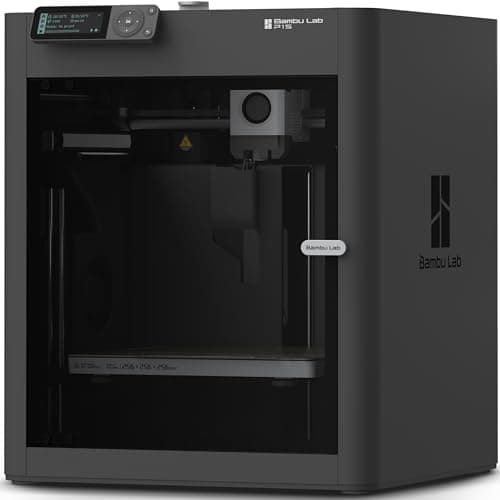
An enclosed CoreXY machine, which is a different class of thing from an A1: the bed stays still and the box holds heat, so the materials the A1 refuses become possible. It is more printer than a first-timer needs, and the right answer if you already know you want ABS.
#ad Price as of September 27, 2026, from Amazon. Prices change. How we make money.
What it actually is
A boxed printer using CoreXY motion — the print head moves in two axes while the bed only goes up and down. Keeping the bed still lets it move faster, and the enclosure keeps the chamber warm so plastics that shrink as they cool do not peel off the plate.
What the manufacturer states
| Figure | Value | Source |
|---|---|---|
| Build volume | 256 x 256 x 256 mm | Bambu Lab P1S technical specifications |
| Enclosure | Enclosed, plastic and glass | Bambu Lab P1S technical specifications |
| Max hot end temperature | 300 C | Bambu Lab P1S technical specifications |
| Max build plate temperature | 100 C | Bambu Lab P1S technical specifications |
| Max speed | 500 mm/s | Bambu Lab P1S technical specifications |
| Max acceleration | 20,000 mm/s2 | Bambu Lab P1S technical specifications |
| Nozzle | All-metal hot end, 0.4 mm included; 0.2, 0.6 and 0.8 mm optional | Bambu Lab P1S technical specifications |
| Filaments rated ideal | PLA, PETG, TPU, PVA, PET, ABS, ASA | Bambu Lab P1S technical specifications |
| Filaments rated capable | PA, PC | Bambu Lab P1S technical specifications |
| Air filter | Activated carbon | Bambu Lab P1S technical specifications |
| Physical dimensions | 389 x 389 x 458 mm | Bambu Lab P1S technical specifications |
| Net weight | 12.95 kg | Bambu Lab P1S technical specifications |
| Max power | 350 W at 110 V | Bambu Lab P1S technical specifications |
Read from Bambu Lab, P1S product page and specification table on 2026-09-06. Where a manufacturer does not publish a figure, there is no row for it here.
What is good about it
- Enclosed, so ABS and ASA are on the menu rather than off it
- CoreXY at 20,000 mm/s2 acceleration — twice the A1's rated figure
- Same 256 mm cubed volume as the A1 in a smaller footprint, because the bed does not travel
- The enclosure also contains most of the noise and the smell, which matters if it lives in a room you sit in
What is not
- Noticeably more expensive than an A1 for a beginner who will print PLA for a year
- The enclosure makes routine maintenance fiddlier than an open frame
- Nothing about it is easier to learn on than an A1 mini — it is just more capable
- Multi-color is again a separate AMS purchase
Skip this one if
Skip it if your honest answer to 'what will you print' is 'I am not sure yet'. Everything the P1S adds over an A1 is aimed at materials a beginner should not start with. Buy it when a specific project demands ABS, not before.
What we cannot tell you
We have not printed on this machine. Chamber temperature in a cold room, real ABS warping behavior and long-term fan noise are not on any specification sheet.
How it scored for a beginner
- Setup out of the box8.5
- Auto-calibration9.5
- First-layer forgiveness9.0
- Parts and filament availability9.0
- Running cost7.0
- Help when it goes wrong9.0
Beginner fit 8.4 / 10. That is our editorial read of how well this suits someone buying their first printer, taken off the published specifications — not a test result, and not a verdict on absolute quality. It is deliberately not marked up as a rating in this page’s structured data. How we pick.
Bambu Lab P2S
Bambu Lab · An enclosed printer bought to keep, not to learn on
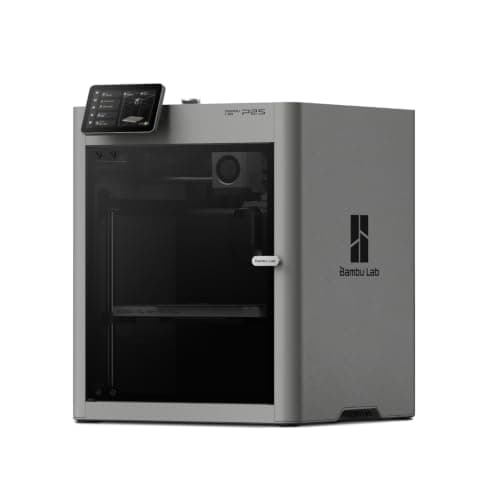
The P1S rebuilt: the same 256 mm cubed enclosed box, a hotter plate, a faster head and a cooling system that draws outside air so the door can stay shut on PLA. It is the enclosed Bambu to buy if you are buying one to keep, and it is still more machine than a first month needs.
#ad Price as of September 27, 2026, from Amazon. Prices change. How we make money.
What it actually is
An enclosed CoreXY printer — the head moves in two axes while the plate only rises, and a box surrounds the whole thing. The box holds heat, which is what keeps plastics that shrink as they cool stuck to the plate, and it holds most of the noise and smell as well.
What the manufacturer states
| Figure | Value | Source |
|---|---|---|
| Build volume | 256 x 256 x 256 mm | Bambu Lab P2S technical specifications |
| Enclosure | Enclosed; plastic and glass outer frame, plastic and steel chassis | Bambu Lab P2S technical specifications |
| Max nozzle temperature | 300 C | Bambu Lab P2S technical specifications |
| Max heatbed temperature | 110 C | Bambu Lab P2S technical specifications |
| Max toolhead speed | 600 mm/s | Bambu Lab P2S technical specifications |
| Max toolhead acceleration | 20,000 mm/s2 | Bambu Lab P2S technical specifications |
| Max hot end flow | 40 mm3/s | Bambu Lab P2S technical specifications |
| Nozzle | Hardened steel, 0.4 mm included; 0.2, 0.6 and 0.8 mm supported | Bambu Lab P2S technical specifications |
| Filaments supported | PLA, PETG, ABS, ASA, TPU, PET, PA, PC, PVA and carbon or glass fiber reinforced grades | Bambu Lab P2S technical specifications |
| Filtration | Activated carbon; VOC and particulate filtration supported | Bambu Lab P2S technical specifications |
| Physical dimensions | 392 x 406 x 478 mm | Bambu Lab P2S technical specifications |
| Net weight | 14.9 kg | Bambu Lab P2S technical specifications |
| Max power | 1000 W at 110 V | Bambu Lab P2S technical specifications |
Read from Bambu Lab, P2S technical specifications on 2026-09-04. Where a manufacturer does not publish a figure, there is no row for it here.
What is good about it
- Enclosed, with an activated carbon filter Bambu Lab rates for VOC and particulate filtration — the version of ABS printing that belongs in a room you sit in
- The Adaptive Airflow System draws cool air from outside the chamber, so Bambu Lab states low-temperature filaments can be printed with the door closed
- A 110 C plate against the P1S's 100 C and a rated 40 mm3/s flow, so large parts in engineering plastics are less of a gamble
- Auto bed leveling, nozzle offset and flow calibration are all documented and automatic, so nothing about setup is harder than an A1's
What is not
- It is the most expensive machine on this site's beginner shortlist, and every advantage it holds is aimed at materials a first year does not reach
- 1000 W at 110 V while the plate heats — several times the draw of an A1 mini, and worth knowing before it shares a circuit with a space heater
- 14.9 kg and 478 mm tall, so it is a shelf machine rather than a desk machine
- Multi-color still means buying the AMS 2 Pro, so the headline price is not the multi-color price
Skip this one if
Skip it if you have not yet printed anything. The P2S is a better machine than an A1 in every measurable way and not a better first machine, because almost none of what it adds shows up in PLA. Buy it when a project names ABS, ASA or a fiber-filled filament out loud.
What we cannot tell you
We have not printed on this machine. How quiet it really is with the door shut, whether the carbon filter meaningfully changes the smell of ABS in a small room, and how the servo extruder holds up over a year are not answerable from a specification sheet.
How it scored for a beginner
- Setup out of the box8.5
- Auto-calibration9.5
- First-layer forgiveness9.0
- Parts and filament availability9.0
- Running cost6.5
- Help when it goes wrong9.0
Beginner fit 8.5 / 10. That is our editorial read of how well this suits someone buying their first printer, taken off the published specifications — not a test result, and not a verdict on absolute quality. It is deliberately not marked up as a rating in this page’s structured data. How we pick.
How these were picked
We have not printed on these machines and we do not pretend to have. What we did was read each manufacturer’s own specification page, take their stated build volume, temperatures and speeds, check that every pick genuinely fits the job in this page’s title, confirm it is still being sold, and pull a live price rather than a remembered one. Every figure names the source it came from, so you can check it yourself in about a minute.
How we pick sets out the full method, including what would change a ranking.
Questions people actually ask
+−Is the P2S worth it over the P1S?
Only for three specific reasons: a 110 °C bed instead of 100 °C, which gives ABS real headroom; VOC and particulate filtration instead of plain activated carbon; and the AMS 2 Pro, which dries filament while feeding it. Build volume, nozzle temperature and acceleration are identical, so if you print PLA and PETG the P1S does the same job for less.
+−How much power does the Bambu P2S use?
Bambu publishes a maximum of 1000 W at 110 V for the P2S, against 350 W at 110 V for the P1S. Those are peaks drawn mainly while heating rather than a constant load. Our setup cost page converts published wattage into a running cost using a cited electricity rate, with the arithmetic shown.
+−Do the P1S and P2S print the same size?
Yes — both are 256 x 256 x 256 mm. There is no build volume advantage to the newer machine at all.
+−Can the P1S print ABS?
Bambu rates ABS and ASA as ideal filaments for the P1S, so yes. The practical catch is the plate: Polymaker publishes a 90-100 °C bed range for its ABS and the P1S tops out at exactly 100 °C, so you are running at the ceiling. The P2S’s 110 °C leaves margin.
+−Which is quieter, the P1S or P2S?
We cannot tell you. Bambu Lab publishes no noise specification for either machine, so there is no figure to compare and we have not measured them.