Head to head
Anycubic Kobra S1 vs Elegoo Centauri
Two fully enclosed CoreXY machines with multi-color in the box, at the cheapest money that buys either. One publishes a far more complete specification; the other is cheaper, slightly bigger, and the one Elegoo will actually sell you new.
By Scooter M. · Published · Last reviewed
How this page is funded: the buy links below are affiliate links. If you buy through one we earn a commission, at no extra cost to you. It does not change the order of the picks or a word of what we say about them. Full disclosure.
Printers we claim to have tested: 0. Everyone in this category says they tested twenty machines. We have not tested any, and we would rather say so. What we did instead is on this page: the manufacturer’s own published specification for every pick, cited and dated; the arithmetic on what it costs to run, with the inputs shown; a live price rather than a remembered one; and a plain answer on who should skip each machine.
The short answer
Buy the Elegoo Centauri 2 Combo if price decides it, and the Anycubic Kobra S1 Combo if you want the better-documented machine with filament drying built into its multi-color unit. First, though, a correction that affects the search you ran: the Centauri Carbon is Used-only on Amazon and the Centauri Carbon 2 Combo no longer has an Amazon listing at all. The Centauri you can buy new is the Centauri 2, and that is what this page compares.
The Elegoo naming situation, because it changes the question
We verified all of this against live Amazon listings on 18 October 2026, because it is the single most useful thing on this page:
- Elegoo Centauri Carbon — the original. Live, but the offer from ELEGOO Official US is Used, at a price barely below a new Centauri 2. We flagged this on the Centauri Carbon review and it has not changed.
- Elegoo Centauri Carbon 2 Combo — no Amazon listing. Searching for it returns the Centauri 2 Combo instead. The line was renamed. Our generational comparison records how that happened.
- Elegoo Centauri 2 Combo — live, New, from ELEGOO Official US. This is the machine. There is also a non-Combo Centauri 2 for less, without the multi-material unit.
So if an older comparison told you to weigh a Kobra S1 against a Centauri Carbon 2, that comparison is about a machine you cannot buy new. This one is not.
How we judged this
Both of these are enclosed CoreXY machines sold as combos with multi-color included, which makes them unusually directly comparable. We read each manufacturer’s own specification page, took their published figures, and ranked on what decides a first year with an enclosed machine: what the manufacturer actually publishes, build volume, the temperature ceilings that decide which plastics are on the menu, and how the multi-color unit handles filament. We have not printed on either machine.
The specifications, side by side
Manufacturer-published figures. Anycubic Kobra S1 Combo read 2026-09-17; Elegoo Centauri 2 Combo read 2026-10-14. 'Not published' means the manufacturer's own page does not state it.
| Anycubic Kobra S1 Combo | Elegoo Centauri 2 Combo | |
|---|---|---|
| Construction | Fully enclosed CoreXY | Fully enclosed CoreXY, aluminum frame |
| Build volume | 250 x 250 x 250 mm | 256 x 256 x 256 mm |
| Max nozzle temperature | 320 C | Not published |
| Max plate temperature | 120 C, PEI spring steel | Not published |
| Print speed | 300 mm/s recommended, 600 mm/s maximum | 500 mm/s maximum |
| Acceleration | 10,000 mm/s2 recommended, 20,000 mm/s2 maximum | 20,000 mm/s2 maximum |
| Multi-color | 4 colors with the included ACE Pro | 4 colors with the included CANVAS |
| Active filament drying | Yes, in the ACE Pro, up to 55 C | Not published |
| Supported filaments | PLA, PETG, ABS, ASA, TPU 95A (TPU not via the ACE Pro) | Not published |
| Calibration | Published auto routine | Full-auto, described as out of the box |
| Chamber camera | Published | Built in |
| Leveling point count | Not published | Not published |
Where the Kobra S1 Combo wins
It publishes a real specification, and that is not a small thing. Anycubic states a 320 °C nozzle, a 120 °C plate, a supported-filament list, and — unusually — both a recommended and a maximum speed and acceleration. Elegoo publishes neither a nozzle nor a plate temperature for the Centauri 2, which means you cannot check it against a filament’s published requirements before you buy. For an enclosed machine, whose whole purpose is materials that need heat, that is the wrong specification to leave out.
That gap is also a reversal. Elegoo is normally the brand that publishes more — we said so in Elegoo vs Creality, where its filament parameter tables are the best in our registry. The Centauri 2 is documented noticeably worse than the Carbon 2 it replaced.
Active drying inside the multi-color unit, up to 55 °C. This is the Kobra S1 Combo’s genuinely distinctive feature and no other machine in our registry publishes it. A multi-material unit holds four spools in open air for weeks while you print one of them, and filament absorbs water from the air — which is the published cause of the stringing, popping and brittle layers people blame on the printer. Our storage and drying guide goes through what wet filament actually does, and the dryer roundup covers buying that capability separately. Having it in the AMS means you do not have to.
It names TPU, and names the catch. Anycubic lists TPU 95A as supported and says plainly that it will not feed through the ACE Pro. That is exactly the honesty we want: a capability and its limitation in the same sentence. See the TPU roundup for what to buy if flexibles matter to you.
Where the Centauri 2 Combo wins
Price, by a clear margin. It is the cheapest route into a fully enclosed multi-color machine that we have found. The live prices are in the buy buttons below.
Six more millimeters per axis. 256 against 250 is a 2.4 percent difference per axis and about 7 percent on volume. It is marginal, but it also happens to match the de facto standard plate size that Bambu’s P1S and A1 use, so models sized for a 256 mm plate fit without thinking about it.
Multi-color in the box, from a brand already in the ecosystem. CANVAS comes with the Combo. Elegoo also makes some of the better-documented filament we have looked at, including the only ABS in our registry that publishes a chamber temperature — see the ABS roundup.
Which one, for which buyer
- Cheapest enclosed multi-color machine: Centauri 2 Combo.
- You want to know what you are buying: Kobra S1 Combo. Published nozzle and plate temperatures, a filament list, and honest recommended-versus-maximum speeds.
- You live somewhere humid: Kobra S1 Combo, for the 55 °C active drying in the ACE Pro.
- ABS or ASA is the actual goal: Kobra S1 Combo, purely because you can check its 320 °C nozzle and 120 °C plate against what your spool asks for. You cannot do that with the Centauri 2.
- This is your first printer: honestly, neither. An A1 mini teaches you more for a third of the money, and the beginner roundup explains why enclosure is a second-printer feature.
- You were about to buy the original Centauri Carbon: do not, at least not on Amazon. The offer there is Used at a price close to a new Centauri 2.
What we cannot tell you
We have not printed on either machine. How well each auto-calibration routine actually works, how much filament each multi-material unit purges per color change, how loud either is with the door shut, and whether the ACE Pro’s drying is enough on its own in a damp room are all open. Neither specification sheet answers them, and the biggest gap — Elegoo’s missing temperature figures — is a gap in the published data rather than in our reading of it.
What we would buy for this
Chosen from the same registry as our roundups, on the manufacturer’s own published figures and a live price.
Elegoo Centauri 2 Combo
Elegoo · One enclosed machine that prints everything, including multi-color
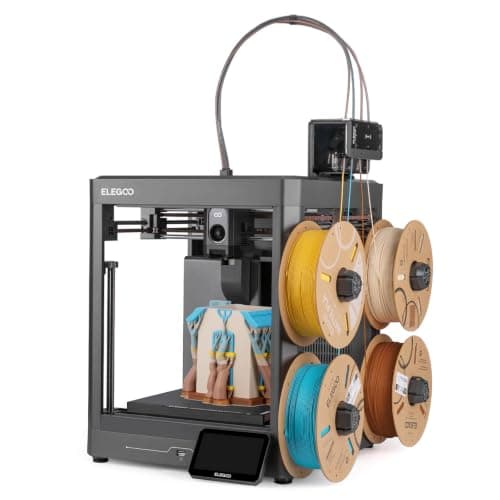
Elegoo's replacement for the Centauri Carbon 2 Combo, and it arrived cheaper: an enclosed CoreXY rated to 500 mm/s with the CANVAS multi-material unit in the box. Read the spec table below for what it actually says, because Elegoo publishes less about this machine than it did about the one it replaces.
#ad Price as of October 19, 2026, from Amazon. Prices change. How we make money.
What it actually is
A fully enclosed CoreXY printer sold with Elegoo's CANVAS multi-material unit, so multi-color printing is in the box rather than an upgrade. Enclosed means the chamber holds its heat, which is what stops ABS and ASA curling off the plate.
What the manufacturer states
| Figure | Value | Source |
|---|---|---|
| Build volume | 256 x 256 x 256 mm | Elegoo Centauri 2 Combo product page |
| Maximum speed | 500 mm/s | Elegoo Centauri 2 Combo product page |
| Maximum acceleration | 20,000 mm/s2 | Elegoo Centauri 2 Combo product page |
| Motion system | CoreXY on a rigid aluminum frame | Elegoo Centauri 2 Combo product page |
| Calibration | Full-auto calibration, described as right out of the box | Elegoo Centauri 2 Combo product page |
| Multi-color | CANVAS multi-material unit, included with the Combo | Elegoo Centauri 2 Combo product page |
| Chamber camera | Built in, for watching a print remotely | Elegoo Centauri 2 Combo product page |
| Filament run-out | Run-out alert | Elegoo Centauri 2 Combo product page |
| Power-loss recovery | Yes | Elegoo Centauri 2 Combo product page |
| Nozzle maintenance | Heatbed nozzle wiper, and a spare wiper in the box | Elegoo Centauri 2 Combo product page |
| Vibration handling | Active vibration compensation | Elegoo Centauri 2 Combo product page |
Read from Elegoo, Centauri 2 Combo product page on 2026-10-14. Where a manufacturer does not publish a figure, there is no row for it here.
What is good about it
- Multi-color is included rather than an upgrade, which is still unusual at this price
- Fully enclosed, which is what ABS and ASA actually need
- 500 mm/s and 20,000 mm/s2 both published, on a CoreXY frame rather than a moving bed
- A chamber camera, run-out alert and power-loss recovery, none of which the open frames here offer
- It launched below the price of the Centauri Carbon 2 Combo it replaces
What is not
- Elegoo publishes noticeably less about this machine than about the Carbon 2 it replaces - no nozzle or plate temperature, no leveling point count, no accuracy figure and no supported-filament matrix on its product page
- Rated speed is a ceiling, not a promise, and Elegoo published a recommended 250 mm/s for the previous model
- Multi-color printing wastes filament on every color change
- Elegoo publishes no noise figure, which matters more on an enclosed machine that runs fans
- Elegoo's own store has been showing it sold out, so availability has been through Amazon rather than direct
- More machine than a first-time buyer needs if the plan is PLA models and nothing else
Skip this one if
Skip it if you only ever intend to print PLA. You would be paying for a heated chamber and a multi-material unit to do a job a $249 open frame does just as well. Skip it too if you want the fuller specification sheet Elegoo published for the Carbon 2 - this page is thinner because its source is.
What we cannot tell you
We have not printed on this machine, and Elegoo publishes less about it than we would like. The nozzle and plate temperature ceilings, the leveling point count, the printing accuracy and the supported-filament list are all absent from its product page, so we do not state them - and we will not copy them across from the Carbon 2, which is a different machine.
How it scored for a beginner
- Setup out of the box8.5
- Auto-calibration8.5
- First-layer forgiveness8.5
- Material range8.5
- Running cost7.0
- Published data6.5
Beginner fit 8.2 / 10. That is our editorial read of how well this suits someone buying their first printer, taken off the published specifications — not a test result, and not a verdict on absolute quality. It is deliberately not marked up as a rating in this page’s structured data. How we pick.
Anycubic Kobra S1 Combo
Anycubic · Multi-color printing in an enclosure, bought as one box
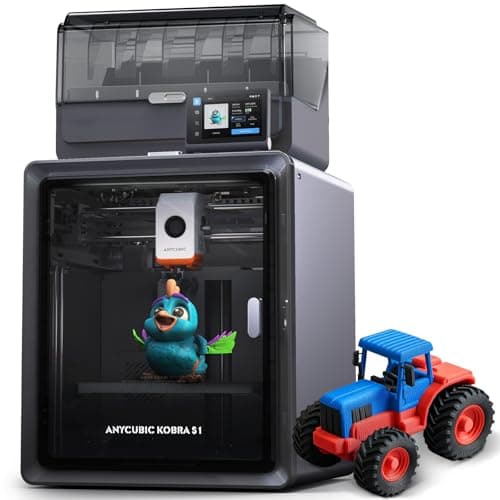
An enclosed CoreXY printer that ships with its four-color unit in the box, and that unit dries filament while it prints. Anycubic publishes a 320 C nozzle, a 120 C plate and 250 mm cubed. The catches are in its own footnotes: the dryer stops at 55 C, TPU cannot go through it, and eight colors means buying a second one.
#ad Price as of October 19, 2026, from Amazon. Prices change. How we make money.
What it actually is
A fully enclosed CoreXY printer bundled with the ACE Pro, Anycubic's four-spool feeder. The ACE Pro swaps filaments for multi-color prints and heats the spools while it does, so the filament stays dry during long jobs.
What the manufacturer states
| Figure | Value | Source |
|---|---|---|
| Build volume | 250 x 250 x 250 mm | Anycubic Kobra S1 Combo specification table |
| Construction | Fully enclosed CoreXY | Anycubic Kobra S1 Combo specification table |
| Print speed | 300 mm/s recommended; 600 mm/s maximum | Anycubic Kobra S1 Combo specification table |
| Acceleration | 10,000 mm/s2 recommended; 20,000 mm/s2 maximum | Anycubic Kobra S1 Combo specification table |
| Nozzle | 320 C max; 0.4 mm standard, 0.25 / 0.6 / 0.8 mm sold separately | Anycubic Kobra S1 Combo specification table |
| Plate | 120 C max, PEI spring steel | Anycubic Kobra S1 Combo specification table |
| Supported filaments | PLA, PETG, ABS, ASA, TPU 95A (TPU not compatible with the ACE Pro) | Anycubic Kobra S1 Combo specification table |
| Multi-color | 4 colors with the included ACE Pro; 8 needs a second ACE Pro and an eight-color feeding module | Anycubic Kobra S1 Combo specification table |
| Active drying | Supported in the ACE Pro, up to 55 C | Anycubic Kobra S1 Combo specification table |
| Leveling and calibration | LeviQ 3.0 auto-leveling, Z-offset, flow calibration, resonance compensation | Anycubic Kobra S1 Combo specification table |
| Noise | 46 dB or below standard, 44 dB or below quiet mode, measured 1 m from the front | Anycubic Kobra S1 Combo specification table |
| Weight | Printer 18 kg; ACE Pro 4.6 kg | Anycubic Kobra S1 Combo specification table |
| Dimensions | Printer 400 x 410 x 490 mm; ACE Pro 365.94 x 282.84 x 234.5 mm | Anycubic Kobra S1 Combo specification table |
| Camera | Built in, 480P | Anycubic Kobra S1 Combo specification table |
Read from Anycubic, Kobra S1 Combo product page and specification table on 2026-09-17. Where a manufacturer does not publish a figure, there is no row for it here.
What is good about it
- The four-color unit is in the box, so the Combo price is the multi-color price
- The ACE Pro heats spools while printing, per Anycubic, which keeps filament dry through a long multi-color job
- A 120 C plate and a 320 C nozzle - the highest published plate temperature of any enclosed printer on this site
- Anycubic publishes filament entanglement detection and AI spaghetti detection alongside auto-resume after run-out
What is not
- The ACE Pro dries at 55 C at most, below the 60 C PETG and 70 C ABS and ASA routines filament makers publish
- TPU 95A cannot go through the ACE Pro, per Anycubic's own footnote - flexible filament is single-color only
- Eight colors needs a second ACE Pro and an extra feeding module, not just a second unit
- An 18 kg printer plus a 4.6 kg feeder is a lot of desk, and Anycubic lists a 1-year printer warranty
Skip this one if
Skip it if multi-color is not the reason you are buying. You are paying for a feeder and a box, and a single-color first year is better spent on an open-frame machine and a lot of filament. Skip it too if TPU in multiple colors is the plan, because Anycubic says that combination does not work.
What we cannot tell you
We have not printed on this machine. How reliably the ACE Pro swaps filament over hundreds of changes, whether 55 C drying keeps PETG usable in a humid room, and how the published noise figures compare to a real room are all owner questions.
How it scored for a beginner
- Setup out of the box8.0
- Auto-calibration9.0
- First-layer forgiveness8.5
- Parts and filament availability8.0
- Running cost7.0
- Help when it goes wrong7.5
Beginner fit 7.9 / 10. That is our editorial read of how well this suits someone buying their first printer, taken off the published specifications — not a test result, and not a verdict on absolute quality. It is deliberately not marked up as a rating in this page’s structured data. How we pick.
How these were picked
We have not printed on these machines and we do not pretend to have. What we did was read each manufacturer’s own specification page, take their stated build volume, temperatures and speeds, check that every pick genuinely fits the job in this page’s title, confirm it is still being sold, and pull a live price rather than a remembered one. Every figure names the source it came from, so you can check it yourself in about a minute.
How we pick sets out the full method, including what would change a ranking.
Questions people actually ask
+−Can I still buy the Elegoo Centauri Carbon?
New, not easily. On 18 October 2026 the Amazon offer for the original Centauri Carbon from ELEGOO Official US was a Used unit at $289.99, which is close to the price of a new Centauri 2. The Centauri Carbon 2 Combo has no Amazon listing at all — searching for it returns the Centauri 2 Combo. The Centauri you can buy new today is the Centauri 2.
+−Which is better, the Kobra S1 or the Centauri 2?
Centauri 2 Combo if price decides it — it is the cheapest enclosed multi-color machine we have found, and it is 6 mm larger per axis. Kobra S1 Combo if documentation and filament handling matter: Anycubic publishes a 320 °C nozzle, a 120 °C plate, a supported-filament list and active drying to 55 °C inside the ACE Pro, where Elegoo publishes none of the equivalent figures.
+−Does the Kobra S1 print TPU?
Anycubic lists TPU 95A as supported and states that it is not compatible with the ACE Pro multi-material unit, so flexible filament has to be fed directly. That is a normal limitation — TPU is too soft to push reliably through a long multi-material path. Our TPU roundup covers the spools.
+−Do I actually need the multi-color unit?
Probably not at first. Both machines sell for less without it, color changes purge filament, and most people’s first fifty prints are a single color. Buying the machine alone and adding the unit later is a reasonable plan on either. See how to 3D print multiple colors.
+−Is either of these a good first printer?
Neither, really. An enclosure is a second-printer feature: it matters for ABS and ASA, and a first year should be a PLA year. A Bambu Lab A1 mini costs a fraction as much and removes more decisions. If you are set on starting enclosed, read the enclosed roundup first.