Roundup
Running a 3D Printer in an Apartment
Yes, you can. An apartment adds three constraints a house does not have, and only one of them is noise in the way people mean it. Get the motion system and the filtration right and the rest is furniture arithmetic.
By Scooter M. · Published · Last reviewed
How this page is funded: the buy links below are affiliate links. If you buy through one we earn a commission, at no extra cost to you. It does not change the order of the picks or a word of what we say about them. Full disclosure.
Printers we claim to have tested: 0. Everyone in this category says they tested twenty machines. We have not tested any, and we would rather say so. What we did instead is on this page: the manufacturer’s own published specification for every pick, cited and dated; the arithmetic on what it costs to run, with the inputs shown; a live price rather than a remembered one; and a plain answer on who should skip each machine.
The short answer
Yes — if you choose a machine with a fixed plate rather than a moving one, and if you stay on PLA unless the printer is enclosed and filtered. Those two conditions cover almost every apartment problem. For the smallest space get a Bambu Lab A1 mini; if it shares a wall with a bedroom, get an enclosed machine like the P1S instead.
We have a page on 3D printers for home use that ranks on footprint, noise and running cost. This one is narrower on purpose, because an apartment adds three things a house does not: somebody lives directly below you, you may not be able to ventilate the room, and the machine has to be re-packable when the lease ends. Those change the answer, and in one case they change the ranking.
How we picked, before the picks
Four criteria, in this order. We have not printed on any of these machines and we do not pretend to have — every figure is the manufacturer’s own published number.
- Where the vibration goes. The one criterion a house-focused page does not need.
- What the machine does with its own air. Published filtration, not claims about smell.
- Real footprint, including clearance. Published dimensions and weight, and whether the manufacturer publishes them at all.
- What it draws. Published rated power, because apartment circuits are shared.
1. A moving plate is the apartment problem nobody names
When people ask whether a printer is “loud” they mean airborne sound. In an apartment the bigger issue is usually structural: a bed-slinger accelerates its print plate back and forth many times a second, and that reciprocating mass couples into the table, into the floor, and into the ceiling of the unit below. Airborne sound is stopped by a wall. Structure-borne vibration is not — it is carried by it.
A CoreXY machine keeps the plate stationary and moves only the light gantry, so there is far less mass being thrown around. That is why this page ranks differently from our home-use page: the Ender-3 V3 SE is our cheapest general recommendation and it is not a pick here, because it is a bed-slinger and the unit below you did not agree to it.
Two things that genuinely help, whichever machine you pick: put it on something solid and heavy rather than a flexing shelf, and do not stand it on a desk that touches a shared wall. Where to put a 3D printer covers surfaces properly. We have not measured any of these machines in a room and we will not quote a decibel figure we did not take.
2. If you cannot open a window, the filament decides everything
This is the constraint that catches people out. Plenty of apartments have a bedroom with no openable window, or a single shared ventilation stack, or a landlord rule about both.
PLA is fine in that situation: it has a faint, mildly sweet smell most people stop noticing within a week. ABS and ASA are not fine. They want ventilation, and in an apartment “ventilation” may not be available to you at any price. That means the apartment answer is not just “start with PLA” (which we say to everyone) — it is that ABS may never be on your menu in this home, which is a reason not to pay for a machine sold on its ability to print it.
The one published specification that moves the needle here is filtration. The P1S publishes activated carbon filtration; the Elegoo Centauri 2 publishes none, and neither does the A1 mini, which is open-frame anyway. If fumes are a real worry, the air purifier page is an honest answer to whether you need one, and PLA vs PETG covers the only two materials you should be considering in a flat.
3. Footprint, which is bigger than the dimensions
A printer’s published dimensions are the machine at rest. You also need clearance to open the front, lift the top and get a spool on and off. A machine that technically fits a shelf and cannot be loaded on that shelf does not fit.
Manufacturer-published physical figures. A1 mini read 2026-09-01; P1S read 2026-09-01; Centauri 2 Combo read 2026-10-14. 'Not published' means the manufacturer's own page does not state it.
| Bambu A1 mini | Bambu Lab P1S | Elegoo Centauri 2 Combo | |
|---|---|---|---|
| Build volume | 180 x 180 x 180 mm | 256 x 256 x 256 mm | 256 x 256 x 256 mm |
| Motion | Bed-slinger | CoreXY (fixed plate) | CoreXY (fixed plate) |
| Enclosed | No | Yes, plastic and glass | Yes |
| Filtration | None | Activated carbon | Not published |
| Machine dimensions | 347 x 315 x 365 mm | Not published | Not published |
| Net weight | 5.5 kg | Not published | Not published |
| Rated max power | 150 W | Not published | Not published |
Note the awkward thing that table shows: the A1 mini is the only one of the three that publishes its size, weight and power, and it is also the one that is a bed-slinger. So the top pick wins on everything an apartment can measure and loses on the vibration criterion, which is why it is first for a studio and second for a shared bedroom wall. We would rather show you that tension than hide it.
4. What it costs to run, and why it is not a problem
Apartment circuits are shared and people worry about this more than they need to. The A1 mini publishes a 150 W rated maximum. Taking that peak as though it were constant — which overstates it, because most of the draw is heating up — an eight-hour print uses 1.2 kWh. At the 18.34 cents per kilowatt-hour the US Energy Information Administration reported for residential customers in June 2026, that is about 22 cents. We show the whole calculation with its inputs on the setup cost page so you can substitute your own rate.
For scale, a Bambu A1 publishes 350 W and the P2S publishes 1000 W against the P1S’s 350 W. A kilowatt on a shared apartment circuit is worth a thought; 150 W is not.
What about a dorm, or a bedroom?
Same logic, tighter. In a room where somebody sleeps, the enclosed CoreXY machine is the only sensible choice and you should still not print overnight in that room for the first few weeks. If the printer is for a student or a teenager, the teenagers roundup is the better starting point, and the kids page covers younger users where the answer changes again.
What we cannot tell you
We have not run any of these machines in a flat and we have not measured one. So: how much a given bed-slinger actually transmits through a particular floor, whether your neighbor will notice, and how effective the P1S’s activated carbon filter is in a closed room are all beyond what a specification page can tell you. What we can do is name the physics, rank on what manufacturers publish, and point out that two of the three machines here do not publish their own dimensions.
If you are still deciding whether to buy at all, is a 3D printer worth it is the honest version, and how to choose a 3D printer runs the six decisions in order.
Quick picks
Ranked on how well each one fits the job in this page's title, read off the manufacturer's own published specifications. Tap any row for the full write-up, including who should skip it.
| # | Product | Best for | Beginner fit | Price |
|---|---|---|---|---|
| 1 | 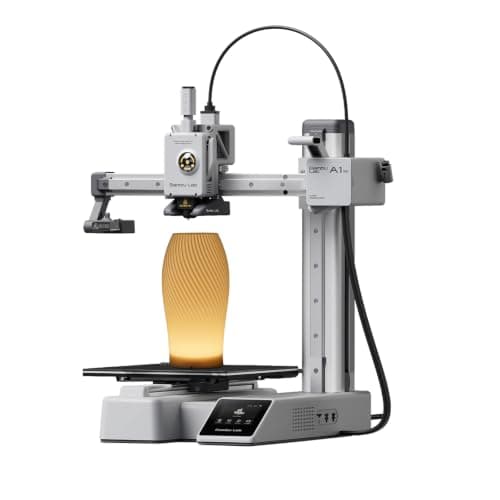 Bambu Lab A1 mini180 x 180 x 180 mm Bambu Lab A1 mini180 x 180 x 180 mm | Best for a small apartment | 9.2 | $249.00 - Check price on Amazon |
| 2 | 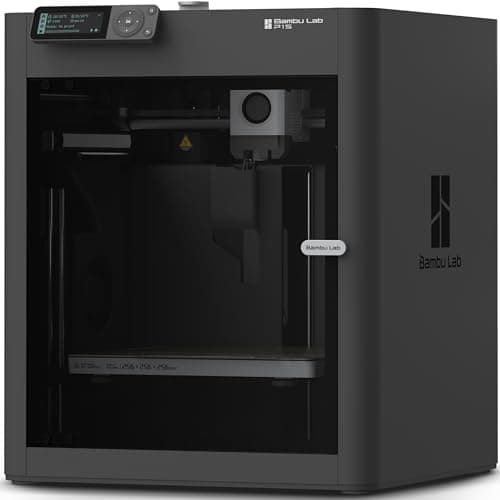 Bambu Lab P1S256 x 256 x 256 mm Bambu Lab P1S256 x 256 x 256 mm | Best if it shares a wall or a bedroom | 8.4 | $399.00 - Check price on Amazon |
| 3 | 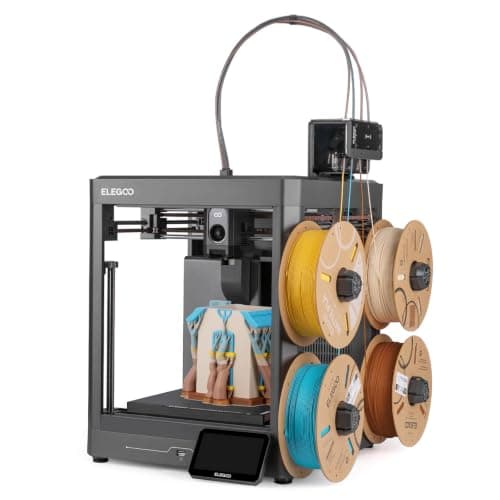 Elegoo Centauri 2 Combo256 x 256 x 256 mm Elegoo Centauri 2 Combo256 x 256 x 256 mm | Cheapest enclosed option | 8.2 | $328.99 - Check price on Amazon |
#1 · Best for a small apartment
Bambu Lab A1 mini
Bambu Lab · A genuine first printer
The one to get if you have never done this before. It calibrates itself before every print — bed mesh, Z-offset, flow, resonance — so the part of 3D printing that used to defeat beginners is a step you never see. The build volume is the price you pay.
#ad Price as of October 19, 2026, from Amazon. Prices change. How we make money.
What it actually is
A small open-frame filament printer. Filament is a 1.75 mm plastic string on a spool; the machine melts it and draws your object one layer at a time. Open-frame means there is no box around it, which is fine for PLA and a limitation for materials that warp.
Does it fit this page?
The only one of these three picks that publishes all three numbers an apartment actually needs: 347 x 315 x 365 mm, 5.5 kg and a 150 W rated maximum. It fits on furniture you already own and draws less than a games console.
What the manufacturer states
| Figure | Value | Source |
|---|---|---|
| Build volume | 180 x 180 x 180 mm | Bambu Lab A1 mini technical specifications |
| Max hot end temperature | 300 C | Bambu Lab A1 mini technical specifications |
| Max build plate temperature | 80 C | Bambu Lab A1 mini technical specifications |
| Max toolhead speed | 500 mm/s | Bambu Lab A1 mini technical specifications |
| Max toolhead acceleration | 10,000 mm/s2 | Bambu Lab A1 mini technical specifications |
| Filaments rated ideal | PLA, PETG, TPU, PVA | Bambu Lab A1 mini technical specifications |
| Filaments not recommended | ABS, ASA, PC, PA, PET, carbon/glass fiber reinforced | Bambu Lab A1 mini technical specifications |
| Machine dimensions | 347 x 315 x 365 mm | Bambu Lab A1 mini technical specifications |
| Net weight | 5.5 kg | Bambu Lab A1 mini technical specifications |
| Max power | 150 W | Bambu Lab A1 mini technical specifications |
Read from Bambu Lab, A1 mini technical specifications on 2026-09-01. Where a manufacturer does not publish a figure, there is no row for it here.
What is good about it
- Full auto-calibration on every print, per Bambu Lab's own specification — no paper-under-the-nozzle ritual
- Rated ideal for PLA, PETG, TPU and PVA, which covers everything a beginner should print in year one
- 150 W maximum power draw is the lowest of any printer on this site, so running cost is trivial
- 5.5 kg and 347 mm wide — it fits on a desk without rearranging the room
What is not
- 180 mm cubed is genuinely small. A full-size helmet or a large cosplay prop will not fit
- Bambu Lab rates ABS, ASA, PC and fiber-reinforced filaments as not recommended on this machine
- The multi-color AMS lite is a separate purchase, so the headline price is not the multi-color price
- Bambu Lab's own Amazon store lists this machine bundled with an LED lamp kit rather than on its own, so the price on our button is for that bundle. The bare printer is sold direct on Bambu Lab's store
- Open frame, so it is at the mercy of a draft from a window or an air conditioning vent
Skip this one if
Skip it if you already know the thing you want to print is bigger than a shoebox, or if you specifically want ABS or a carbon-fiber-filled filament. Bambu Lab itself lists those materials as not recommended here, and buying a machine you intend to use outside its rated envelope is how a first printer becomes a frustrating one.
What we cannot tell you
We have not printed on this machine. Long-term reliability, real-world noise in a quiet room, and how the textured plate holds up after a year are all things we cannot honestly report without owning one.
How it scored for a beginner
- Setup out of the box9.5
- Auto-calibration10.0
- First-layer forgiveness9.5
- Parts and filament availability9.0
- Running cost10.0
- Help when it goes wrong9.0
Beginner fit 9.2 / 10. That is our editorial read of how well this suits someone buying their first printer, taken off the published specifications — not a test result, and not a verdict on absolute quality. It is deliberately not marked up as a rating in this page’s structured data. How we pick.
#2 · Best if it shares a wall or a bedroom
Bambu Lab P1S
Bambu Lab · A first printer for someone who already knows they want ABS or ASA
An enclosed CoreXY machine, which is a different class of thing from an A1: the bed stays still and the box holds heat, so the materials the A1 refuses become possible. It is more printer than a first-timer needs, and the right answer if you already know you want ABS.
#ad Price as of October 19, 2026, from Amazon. Prices change. How we make money.
What it actually is
A boxed printer using CoreXY motion — the print head moves in two axes while the bed only goes up and down. Keeping the bed still lets it move faster, and the enclosure keeps the chamber warm so plastics that shrink as they cool do not peel off the plate.
Does it fit this page?
Enclosed, and the only pick here that publishes activated carbon filtration — which is the specification that matters when you cannot open a window. CoreXY motion also keeps the plate still, so less goes into the floor.
What the manufacturer states
| Figure | Value | Source |
|---|---|---|
| Build volume | 256 x 256 x 256 mm | Bambu Lab P1S technical specifications |
| Enclosure | Enclosed, plastic and glass | Bambu Lab P1S technical specifications |
| Max hot end temperature | 300 C | Bambu Lab P1S technical specifications |
| Max build plate temperature | 100 C | Bambu Lab P1S technical specifications |
| Max speed | 500 mm/s | Bambu Lab P1S technical specifications |
| Max acceleration | 20,000 mm/s2 | Bambu Lab P1S technical specifications |
| Nozzle | All-metal hot end, 0.4 mm included; 0.2, 0.6 and 0.8 mm optional | Bambu Lab P1S technical specifications |
| Filaments rated ideal | PLA, PETG, TPU, PVA, PET, ABS, ASA | Bambu Lab P1S technical specifications |
| Filaments rated capable | PA, PC | Bambu Lab P1S technical specifications |
| Air filter | Activated carbon | Bambu Lab P1S technical specifications |
| Physical dimensions | 389 x 389 x 458 mm | Bambu Lab P1S technical specifications |
| Net weight | 12.95 kg | Bambu Lab P1S technical specifications |
| Max power | 350 W at 110 V | Bambu Lab P1S technical specifications |
Read from Bambu Lab, P1S product page and specification table on 2026-09-06. Where a manufacturer does not publish a figure, there is no row for it here.
What is good about it
- Enclosed, so ABS and ASA are on the menu rather than off it
- CoreXY at 20,000 mm/s2 acceleration — twice the A1's rated figure
- Same 256 mm cubed volume as the A1 in a smaller footprint, because the bed does not travel
- The enclosure also contains most of the noise and the smell, which matters if it lives in a room you sit in
What is not
- Noticeably more expensive than an A1 for a beginner who will print PLA for a year
- The enclosure makes routine maintenance fiddlier than an open frame
- Nothing about it is easier to learn on than an A1 mini — it is just more capable
- Multi-color is again a separate AMS purchase
Skip this one if
Skip it if your honest answer to 'what will you print' is 'I am not sure yet'. Everything the P1S adds over an A1 is aimed at materials a beginner should not start with. Buy it when a specific project demands ABS, not before.
What we cannot tell you
We have not printed on this machine. Chamber temperature in a cold room, real ABS warping behavior and long-term fan noise are not on any specification sheet.
How it scored for a beginner
- Setup out of the box8.5
- Auto-calibration9.5
- First-layer forgiveness9.0
- Parts and filament availability9.0
- Running cost7.0
- Help when it goes wrong9.0
Beginner fit 8.4 / 10. That is our editorial read of how well this suits someone buying their first printer, taken off the published specifications — not a test result, and not a verdict on absolute quality. It is deliberately not marked up as a rating in this page’s structured data. How we pick.
#3 · Cheapest enclosed option
Elegoo Centauri 2 Combo
Elegoo · One enclosed machine that prints everything, including multi-color
Elegoo's replacement for the Centauri Carbon 2 Combo, and it arrived cheaper: an enclosed CoreXY rated to 500 mm/s with the CANVAS multi-material unit in the box. Read the spec table below for what it actually says, because Elegoo publishes less about this machine than it did about the one it replaces.
#ad Price as of October 19, 2026, from Amazon. Prices change. How we make money.
What it actually is
A fully enclosed CoreXY printer sold with Elegoo's CANVAS multi-material unit, so multi-color printing is in the box rather than an upgrade. Enclosed means the chamber holds its heat, which is what stops ABS and ASA curling off the plate.
Does it fit this page?
The cheapest route to an enclosed CoreXY machine, so a fixed plate and a closed box on a budget. Elegoo publishes no filtration, no dimensions and no weight, which is exactly the information an apartment needs.
What the manufacturer states
| Figure | Value | Source |
|---|---|---|
| Build volume | 256 x 256 x 256 mm | Elegoo Centauri 2 Combo product page |
| Maximum speed | 500 mm/s | Elegoo Centauri 2 Combo product page |
| Maximum acceleration | 20,000 mm/s2 | Elegoo Centauri 2 Combo product page |
| Motion system | CoreXY on a rigid aluminum frame | Elegoo Centauri 2 Combo product page |
| Calibration | Full-auto calibration, described as right out of the box | Elegoo Centauri 2 Combo product page |
| Multi-color | CANVAS multi-material unit, included with the Combo | Elegoo Centauri 2 Combo product page |
| Chamber camera | Built in, for watching a print remotely | Elegoo Centauri 2 Combo product page |
| Filament run-out | Run-out alert | Elegoo Centauri 2 Combo product page |
| Power-loss recovery | Yes | Elegoo Centauri 2 Combo product page |
| Nozzle maintenance | Heatbed nozzle wiper, and a spare wiper in the box | Elegoo Centauri 2 Combo product page |
| Vibration handling | Active vibration compensation | Elegoo Centauri 2 Combo product page |
Read from Elegoo, Centauri 2 Combo product page on 2026-10-14. Where a manufacturer does not publish a figure, there is no row for it here.
What is good about it
- Multi-color is included rather than an upgrade, which is still unusual at this price
- Fully enclosed, which is what ABS and ASA actually need
- 500 mm/s and 20,000 mm/s2 both published, on a CoreXY frame rather than a moving bed
- A chamber camera, run-out alert and power-loss recovery, none of which the open frames here offer
- It launched below the price of the Centauri Carbon 2 Combo it replaces
What is not
- Elegoo publishes noticeably less about this machine than about the Carbon 2 it replaces - no nozzle or plate temperature, no leveling point count, no accuracy figure and no supported-filament matrix on its product page
- Rated speed is a ceiling, not a promise, and Elegoo published a recommended 250 mm/s for the previous model
- Multi-color printing wastes filament on every color change
- Elegoo publishes no noise figure, which matters more on an enclosed machine that runs fans
- Elegoo's own store has been showing it sold out, so availability has been through Amazon rather than direct
- More machine than a first-time buyer needs if the plan is PLA models and nothing else
Skip this one if
Skip it if you only ever intend to print PLA. You would be paying for a heated chamber and a multi-material unit to do a job a $249 open frame does just as well. Skip it too if you want the fuller specification sheet Elegoo published for the Carbon 2 - this page is thinner because its source is.
What we cannot tell you
We have not printed on this machine, and Elegoo publishes less about it than we would like. The nozzle and plate temperature ceilings, the leveling point count, the printing accuracy and the supported-filament list are all absent from its product page, so we do not state them - and we will not copy them across from the Carbon 2, which is a different machine.
How it scored for a beginner
- Setup out of the box8.5
- Auto-calibration8.5
- First-layer forgiveness8.5
- Material range8.5
- Running cost7.0
- Published data6.5
Beginner fit 8.2 / 10. That is our editorial read of how well this suits someone buying their first printer, taken off the published specifications — not a test result, and not a verdict on absolute quality. It is deliberately not marked up as a rating in this page’s structured data. How we pick.
How these were picked
We have not printed on these machines and we do not pretend to have. What we did was read each manufacturer’s own specification page, take their stated build volume, temperatures and speeds, check that every pick genuinely fits the job in this page’s title, confirm it is still being sold, and pull a live price rather than a remembered one. Every figure names the source it came from, so you can check it yourself in about a minute.
How we pick sets out the full method, including what would change a ranking.
Questions people actually ask
+−Can you use a 3D printer in an apartment?
Yes, with two conditions: pick a machine with a fixed plate (CoreXY) rather than a moving one, because a bed-slinger pushes vibration through the floor into the unit below; and stay on PLA unless the machine is enclosed and filtered, because ABS and ASA want ventilation an apartment may not be able to give you. On those two conditions an apartment is a perfectly normal place to print.
+−Will my neighbors hear my 3D printer?
Airborne sound is roughly between a laptop and a vacuum cleaner and a wall stops most of it. The part that travels is vibration through the floor, which is why the motion system matters more than the decibel figure: a bed-slinger throws its plate back and forth many times a second and a CoreXY machine does not. Put it on something solid and heavy, and not against a shared wall. We have not measured these machines in a room and will not quote a decibel number we did not take.
+−Is it safe to have a 3D printer in a bedroom?
With PLA and an enclosed machine, it is reasonable. The nozzle reaches 300 °C and the bed 80 to 100 °C, so it is a burn risk rather than a fire risk, and an enclosure handles that. The things we would actually do: keep it out of a bedroom for the first few weeks while you learn what a normal print sounds like, have a working smoke alarm in the room, and read the air purifier page if ventilation is limited.
+−Does a 3D printer smell?
PLA has a faint, mildly sweet smell that most people stop noticing. ABS and ASA are a different matter and want real ventilation, which is the single thing an apartment is most likely not able to provide. Since a first year should be a PLA year anyway, this is usually a non-issue — but it is a reason not to buy a machine priced for its ABS ability if you cannot open a window.
+−How much electricity does a 3D printer use in an apartment?
Very little. The A1 mini publishes a 150 W rated maximum; treating that peak as constant, an eight-hour print is 1.2 kWh, about 22 cents at the 18.34 cents per kWh the US EIA reported for residential customers in June 2026. Real consumption is lower. Larger machines draw more — the Bambu P2S publishes 1000 W — which is worth a thought on a shared circuit.
+−What is the quietest 3D printer for an apartment?
We have not measured any of these machines, so we will not name a quietest. What we can say from published specifications is that an enclosed CoreXY machine is the quieter architecture on both counts: the box contains airborne sound, and the fixed plate means far less mass is being accelerated into your floor. Of our picks that is the P1S or the Centauri 2 Combo.