Head to head
FlashForge Adventurer 5M vs Bambu Lab A1
A CoreXY machine against a bed-slinger at roughly the same money. On paper the motion system wins; in practice the decision turns on bed temperature, build volume and which company will still be answering questions in two years.
By Scooter M. · Published · Last reviewed
How this page is funded: the buy links below are affiliate links. If you buy through one we earn a commission, at no extra cost to you. It does not change the order of the picks or a word of what we say about them. Full disclosure.
Printers we claim to have tested: 0. Everyone in this category says they tested twenty machines. We have not tested any, and we would rather say so. What we did instead is on this page: the manufacturer’s own published specification for every pick, cited and dated; the arithmetic on what it costs to run, with the inputs shown; a live price rather than a remembered one; and a plain answer on who should skip each machine.
The short answer
Buy the Bambu Lab A1 for a first printer. It gives you a 256 mm cube against 220, a 300 °C nozzle against 280 °C, and an ecosystem that makes the first month close to uneventful. Both machines publish a 100 °C plate, so the bed is not a difference between them. Buy the Adventurer 5M instead if you specifically want CoreXY motion at this price, or if the A1 is out of budget.
Both of these are machines we would hand to a friend, which is not true of most pairs at this price. The honest version of this comparison is that the gap is small and the tiebreakers are unglamorous.
How we judged this
Same method as every comparison here, stated before the verdict rather than after it. We read each manufacturer’s own specification page, took their published figures, and ranked on the four things that decide a first year: how much calibration the machine does for itself, whether the build volume fits real objects, which plastics the manufacturer rates for it, and how easy it is to get help and parts. We have not printed on either machine. Speed came last, because it almost always should — how to choose a 3D printer explains why.
The specifications, side by side
Manufacturer-published figures. Bambu Lab A1 read 2026-09-01; FlashForge Adventurer 5M read 2026-09-19.
| Bambu Lab A1 | FlashForge Adventurer 5M | |
|---|---|---|
| Motion system | Bed-slinger (moving plate) | CoreXY (fixed plate, gantry moves) |
| Shell | Open frame | Open frame |
| Build volume | 256 x 256 x 256 mm | 220 x 220 x 220 mm |
| Build volume in liters | 16.8 L | 10.6 L |
| Max nozzle temperature | 300 C | 280 C |
| Max plate temperature | 100 C | 100 C |
| Speed | 500 mm/s toolhead | 600 mm/s max travel (FlashForge states travel) |
| Acceleration | 10,000 mm/s2 | 20,000 mm/s2 |
| Nozzle change | Whole hotend assembly | Quick-detach, stated at 3 seconds |
| Nozzle sizes | 0.2 / 0.4 / 0.6 / 0.8 mm | 0.25 / 0.4 / 0.6 / 0.8 mm |
| Plate | Textured PEI | Flexible removable PEI steel |
| Filaments rated ideal | PLA, PETG, TPU, PVA | See FlashForge's list |
| Multi-color | AMS lite available | Not available |
| Machine dimensions | 465 x 410 x 430 mm | Published by FlashForge |
| Net weight | 8.3 kg | Published by FlashForge |
| Max power | 350 W at 110 V | Published by FlashForge |
Where the Adventurer 5M genuinely wins
CoreXY at this price is unusual, and it is not a gimmick. On a bed-slinger the print plate whips back and forth many times a second, and the taller and heavier your part gets, the more that movement shows up as ripples on the side of it. CoreXY keeps the plate still and moves only the lightweight gantry. On tall prints that is a real quality difference, and it is also why the Adventurer 5M can publish 20,000 mm/s² of acceleration against the A1’s 10,000.
Three-second nozzle changes. FlashForge publishes quick-detach nozzles in four sizes. On the A1 you swap the whole hotend assembly. If you expect to move between a 0.4 mm nozzle for detail and a 0.6 for speed, that is a genuine convenience — and it is also the cheaper path when a nozzle clogs beyond saving, which the clogged nozzle page covers.
It is the cheaper machine. Both buy buttons below carry a live price, so check rather than take our word for it.
Where the A1 wins, and why it wins the decision
Build volume, by 59 percent. 256 mm cubed is 16.8 liters against 10.6. That is the single biggest practical difference between these two machines, and unlike acceleration it is a difference you hit. Measure the thing you actually want to print before you decide this does not matter.
A 300 °C nozzle against 280 °C. Twenty degrees sounds trivial and is not, at the top of the range. ABS and ASA are published at nozzle temperatures that sit close to 280 °C, so the A1 has headroom and the Adventurer 5M is working at its ceiling. Our PETG vs ABS comparison shows the published ranges. Note that neither of these is a machine for ABS anyway — both are open-frame, and ABS wants a box.
The ecosystem, which is the part spec sheets never show. Bambu’s slicer ships tuned profiles for its own machines and its own filament, its model platform is enormous, and the amount of written help available for an A1 problem dwarfs what exists for an Adventurer 5M. On a first printer that is worth more than 10,000 mm/s². It is the same reason we rate Creality’s parts ecosystem highly in Elegoo vs Creality.
Multi-color is available later. The A1 takes the AMS lite. The Adventurer 5M has no multi-material option. If four colors might ever appeal, one of these machines can grow into it and the other cannot — see the multicolor roundup.
Which one, for which buyer
- First printer, no strong opinions: the A1. More volume, hotter nozzle, better support, and it can grow into multi-color.
- You print tall, thin objects: the Adventurer 5M. CoreXY is the right motion system for that and the ripple difference is real.
- Budget is the binding constraint: the Adventurer 5M, or step down to the A1 mini, which keeps Bambu’s calibration and ecosystem for less than either of these.
- You want to swap nozzle sizes often: the Adventurer 5M, on the three-second quick-detach.
- ABS or ASA is the goal: neither. Both are open-frame. Read the enclosed roundup instead.
What we cannot tell you
We have not printed on either machine, so the things owners care most about — which is quieter in a room, which first layer is more forgiving when you get the Z-offset slightly wrong, whose support answers an email — are not things we can report. What we can do is show you both manufacturers’ published numbers next to each other, name which of them are measured differently, and say plainly which way we would go.
What we would buy for this
Chosen from the same registry as our roundups, on the manufacturer’s own published figures and a live price.
Bambu Lab A1
Bambu Lab · A first printer you will not outgrow
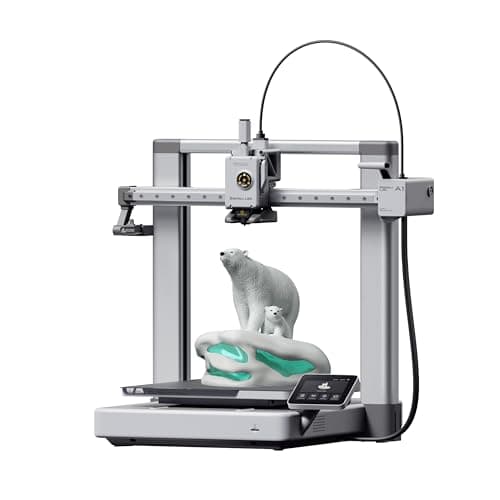
The A1 mini's larger sibling, and the better buy the moment you have a specific large thing in mind. Same self-calibration, 256 mm cubed instead of 180, and a 100 C bed rather than 80 C — which is the spec that actually widens what you can print.
#ad Price as of October 19, 2026, from Amazon. Prices change. How we make money.
What it actually is
The full-size version of the A1: same open-frame layout, same automatic calibration, a bigger bed and a hotter one. The extra bed temperature matters because materials that shrink as they cool need a warm plate to stay stuck to it.
What the manufacturer states
| Figure | Value | Source |
|---|---|---|
| Build volume | 256 x 256 x 256 mm | Bambu Lab A1 technical specifications |
| Max hot end temperature | 300 C | Bambu Lab A1 technical specifications |
| Max build plate temperature | 100 C | Bambu Lab A1 technical specifications |
| Max toolhead speed | 500 mm/s | Bambu Lab A1 technical specifications |
| Max toolhead acceleration | 10,000 mm/s2 | Bambu Lab A1 technical specifications |
| Filaments rated ideal | PLA, PETG, TPU, PVA | Bambu Lab A1 technical specifications |
| Machine dimensions | 465 x 410 x 430 mm | Bambu Lab A1 technical specifications |
| Net weight | 8.3 kg | Bambu Lab A1 technical specifications |
| Max power | 350 W at 110 V | Bambu Lab A1 technical specifications |
Read from Bambu Lab, A1 technical specifications on 2026-09-01. Where a manufacturer does not publish a figure, there is no row for it here.
What is good about it
- 256 mm cubed covers almost everything a first-year printer is asked to make
- 100 C bed rather than the mini's 80 C, which is the difference that makes larger PETG parts stick
- Identical hands-off calibration to the A1 mini, so nothing gets harder as the machine gets bigger
- Bambu Lab publishes a full specification sheet, so every number on this page is checkable in a minute
What is not
- 465 mm wide and 8.3 kg — it needs a dedicated shelf, not a corner of a desk
- 350 W at US voltage against the mini's 150 W, so it costs meaningfully more to run
- Still open-frame, so the material limits are the same as the mini's despite the hotter bed
- Multi-color is again a separate AMS lite purchase
Skip this one if
Skip it if your desk is the only place it can go and you have not measured that desk. It is nearly half a meter wide. If you are unsure whether you will use the extra volume, the mini is the cheaper mistake.
What we cannot tell you
We have not printed on this machine. Noise at full speed, long-term belt and rod wear, and how often the auto-calibration actually needs intervention are all beyond what a specification sheet can tell you.
How it scored for a beginner
- Setup out of the box9.5
- Auto-calibration10.0
- First-layer forgiveness9.5
- Parts and filament availability9.0
- Running cost8.0
- Help when it goes wrong9.0
Beginner fit 9.0 / 10. That is our editorial read of how well this suits someone buying their first printer, taken off the published specifications — not a test result, and not a verdict on absolute quality. It is deliberately not marked up as a rating in this page’s structured data. How we pick.
FlashForge Adventurer 5M
FlashForge · A first CoreXY machine without paying CoreXY money
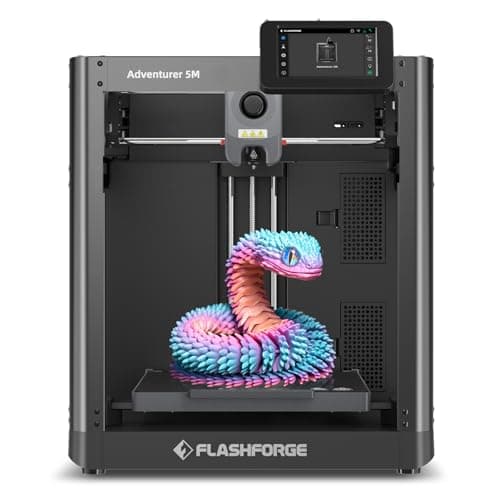
A CoreXY frame, a 280 C direct-drive hot end and a nozzle you swap in three seconds, at the price most brands charge for a bed-slinger. Read FlashForge's own spec table before you believe the 600 mm/s on the box - that number is the travel speed, not the print speed.
#ad Price as of October 19, 2026, from Amazon. Prices change. How we make money.
What it actually is
An open-frame CoreXY printer. CoreXY means the print head moves in both X and Y while the bed only moves down, so there is no heavy bed swinging back and forth - the layout fast printers use.
What the manufacturer states
| Figure | Value | Source |
|---|---|---|
| Build volume | 220 x 220 x 220 mm | FlashForge Adventurer 5M specification table |
| Speed | Max travel speed 600 mm/s (FlashForge's spec table states this as TRAVEL speed) | FlashForge Adventurer 5M specification table |
| Acceleration | Max 20,000 mm/s2 | FlashForge Adventurer 5M specification table |
| Extruder | Direct drive, quantity 1 | FlashForge Adventurer 5M specification table |
| Max extruder temperature | 280 C | FlashForge Adventurer 5M specification table |
| Platform temperature | 100 C | FlashForge Adventurer 5M specification table |
| Build plate | Flexible removable PEI steel plate | FlashForge Adventurer 5M specification table |
| Nozzle diameters | 0.25 / 0.4 / 0.6 / 0.8 mm, quick-detach in 3 seconds | FlashForge Adventurer 5M specification table |
| Shell | Open | FlashForge Adventurer 5M specification table |
| Leveling | Automatic Datum Management (ADM) real-time adjustment and auto-leveling | FlashForge Adventurer 5M specification table |
| Display | 4.3-inch touchscreen | FlashForge Adventurer 5M specification table |
| Connectivity | Wi-Fi, Ethernet, USB | FlashForge Adventurer 5M specification table |
| Supported filament | PLA and PETG recommended on the 0.4 mm nozzle; TPU, PLA-CF and PETG-CF on the 0.6 mm nozzle | FlashForge Adventurer 5M specification table |
| Machine size | 363 x 376 x 413 mm excluding the screen and spool holder | FlashForge Adventurer 5M specification table |
| Power | AC 100-120 / 200-240 V, 50/60 Hz, 350 W | FlashForge Adventurer 5M specification table |
| Assembly | 95 percent pre-assembled; only the display and filament holder fit on | FlashForge Adventurer 5M specification table |
| Warranty | 1-year limited on the printer, 3 months on extruder parts | FlashForge Adventurer 5M specification table |
| Noise and air filtration | Both rows are left blank on FlashForge's published spec table | FlashForge Adventurer 5M specification table |
Read from FlashForge, Adventurer 5M product page and specification table on 2026-09-21. Where a manufacturer does not publish a figure, there is no row for it here.
What is good about it
- A CoreXY frame at a bed-slinger price, which is unusual under $300
- 280 C direct-drive hot end - hotter than most machines in this bracket
- Quick-detach nozzles in four diameters, changed without tools
- Flexible PEI plate and a filament run-out sensor, both of which prevent common first-print failures
- 95 percent pre-assembled, so the box-to-first-print path is short
What is not
- The headline 600 mm/s is the TRAVEL speed on FlashForge's own spec table, not a print speed - the machine does not lay plastic that fast
- Open frame, so ABS and ASA will warp; FlashForge's enclosure is a separate purchase and its own FAQ recommends PLA and PETG
- FlashForge leaves both the noise and the air-filtration rows blank on its spec table, so neither can be checked before buying
- 220 mm cube is the smallest build volume of the machines on this site in its price range
- Single extruder, so no multi-color printing without changing filament by hand
Skip this one if
Skip it if you want to print ABS or ASA. This is an open frame and the enclosure is sold separately, so the all-in price stops being competitive. Buy something already enclosed instead.
What we cannot tell you
We have not printed on this machine. How loud it actually is, what print speed it sustains on real geometry, and how well the quick-detach nozzle seals after repeated swaps are all things the spec table does not answer - and FlashForge publishes no noise figure at all.
How it scored for a beginner
- Setup out of the box9.0
- Auto-calibration8.5
- First-layer forgiveness8.0
- Parts and filament availability8.0
- Running cost8.5
- Published data7.0
Beginner fit 8.3 / 10. That is our editorial read of how well this suits someone buying their first printer, taken off the published specifications — not a test result, and not a verdict on absolute quality. It is deliberately not marked up as a rating in this page’s structured data. How we pick.
How these were picked
We have not printed on these machines and we do not pretend to have. What we did was read each manufacturer’s own specification page, take their stated build volume, temperatures and speeds, check that every pick genuinely fits the job in this page’s title, confirm it is still being sold, and pull a live price rather than a remembered one. Every figure names the source it came from, so you can check it yourself in about a minute.
How we pick sets out the full method, including what would change a ranking.
Questions people actually ask
+−Is CoreXY better than a bed-slinger?
For tall prints, yes — the plate stays still, so the part is not being shaken while it is built. For short, wide prints the difference is small. A bed-slinger is also simpler and cheaper to repair. CoreXY is a reason to prefer the Adventurer 5M, not a reason to ignore a 59 percent larger build volume on the A1.
+−Which is better for a complete beginner?
The Bambu Lab A1, mostly on things that are not specifications: the slicer ships tuned profiles for the machine and the filament, and there is far more written help available when something goes wrong. Our beginner roundup ranks the A1 third overall and the A1 mini first.
+−Does the Adventurer 5M really print at 600 mm/s?
FlashForge publishes 600 mm/s as maximum travel speed in its own specification table — head movement without extruding. Actual printing speed is limited by how fast plastic melts and cools, which is far below that on any machine. Treat published speed figures as the least useful number on a spec sheet.
+−Can either of these print ABS?
Not well. Both are open-frame, and ABS warps without a warm, still chamber. The A1’s 300 °C nozzle gives it more headroom than the Adventurer 5M’s 280 °C, but the missing enclosure is the real blocker on both. If ABS or ASA is the goal, look at enclosed machines or at boxing a printer you already own.
+−Can the Adventurer 5M do multi-color?
No. FlashForge does not offer a multi-material unit for it. The A1 takes Bambu’s AMS lite, so it can be upgraded to four colors later. If multi-color is a maybe rather than a no, that is a meaningful point for the A1.