Review
Creality K2 Plus Review
Creality's largest enclosed machine for a home, read off Creality's own parameter table. A genuinely capable printer, and the wrong answer to almost every question a first-time buyer is actually asking.
By Scooter M. · Published · Last reviewed
How this page is funded: the buy links below are affiliate links. If you buy through one we earn a commission, at no extra cost to you. It does not change the order of the picks or a word of what we say about them. Full disclosure.
Printers we claim to have tested: 0. Everyone in this category says they tested twenty machines. We have not tested any, and we would rather say so. What we did instead is on this page: the manufacturer’s own published specification for every pick, cited and dated; the arithmetic on what it costs to run, with the inputs shown; a live price rather than a remembered one; and a plain answer on who should skip each machine.
The short answer
Do not buy the Creality K2 Plus as a first 3D printer. It is a real machine — a 350 × 350 × 350 mm enclosed CoreXY with a 350 °C nozzle, a 120 °C bed and an actively heated chamber — but it costs roughly five times a Bambu Lab A1 mini and nothing about it makes your first month easier. Buy it only if you have already measured the thing you want to print and it will not fit in a 256 mm cube.
We have not printed on this machine and we do not pretend to have. Every figure below is Creality’s own published number, read from its parameter table on 18 October 2026, and the places where Creality publishes nothing are called out as gaps rather than filled in.
Who this machine is for, in one line each
- Best for: somebody who has outgrown a 256 mm cube and can name the part that did not fit.
- Also good for: printing ASA, PA-CF or PPA-CF, where an actively heated chamber and a 350 °C hardened steel nozzle are the entry requirements rather than luxuries.
- Skip it if: this is your first printer, or if you want to print TPU — Creality’s own supported-filament list does not include it.
What Creality publishes
Creality's own published figures for the K2 Plus, read from its parameter table and product page on 2026-10-18. Blank rows are specifications Creality does not publish.
| Specification | Published figure |
|---|---|
| Build volume | 350 x 350 x 350 mm |
| Motion system | CoreXY frame, enclosed |
| Chamber | Actively heated. No temperature figure published |
| Nozzle temperature | 350 C |
| Heatbed temperature | 120 C |
| Nozzle | Hardened steel, all-metal hotend, direct drive |
| Nozzle diameters | 0.4 mm default; 0.2 / 0.6 / 0.8 mm compatible |
| Printing speed | 600 mm/s |
| Acceleration | 30,000 mm/s2 or less |
| Layer height | 0.05 to 0.3 mm |
| Printing accuracy | 100 mm +/- 0.1 |
| Supported filaments | PLA, PA-CF, ASA, PLA-CF, PETG, PET, PPA-CF, ABS |
| Multi-color | One CFS unit included; up to 16 colors with four |
| Cameras | Dual AI cameras, stated to adjust flow and alert failures |
| Machine dimensions, weight, rated power | Not published |
The three figures that actually matter here
350 mm cubed is 42.9 liters, and that is the whole pitch
A 350 mm cube holds 42.9 liters. A 256 mm cube — the Bambu A1, the P1S, the Elegoo Centauri 2 — holds 16.8. The A1 mini’s 180 mm cube holds 5.8. So this machine is seven times the A1 mini and two and a half times the mainstream enclosed band, and that ratio is the only reason to consider it.
It is also the specification people most reliably over-buy. Build volume feels like headroom and is mostly unused: the honest test is whether you can name a specific object, with dimensions, that will not fit in 256 mm. If you cannot, you are paying for air. We go through that arithmetic properly on how to choose a 3D printer.
350 °C and 120 °C put real engineering plastics on the menu
These are the highest published temperatures of any machine in our registry. For context, the P1S publishes 300 °C at the nozzle and a 100 °C bed; the P2S moves the bed to 110 °C and that was enough to matter, because Polymaker publishes a 90 to 100 °C bed range for its ABS and the P1S left no headroom. The K2 Plus has 20 °C of headroom over the top of that range.
The 350 °C nozzle and the hardened steel it is made from are what make PA-CF and PPA-CF plausible rather than theoretical. Carbon-filled filament is abrasive and eats brass; here the abrasion-resistant nozzle is what ships, not a parts order. Our ABS roundup covers what those materials actually ask of a machine.
TPU is missing from Creality’s own list
Creality’s supported-filament row reads: PLA, PA-CF, ASA, PLA-CF, PETG, PET, PPA-CF, ABS. TPU is not on it. That is not an oversight we are inferring — it is a published list, and flexible filament is absent from it.
This is worth naming because TPU is the material most new owners actually get excited about: phone cases, grips, gaskets, anything that squashes. A $249 A1 mini rates TPU as ideal. A $1,199 K2 Plus does not list it. If flexibles are on your list, read the TPU roundup before you choose a machine, not after.
What Creality does not publish, and why we mind
Creality publishes a proper parameter table — speed, acceleration, layer height, accuracy, the filament list, the Wi-Fi standard. That is more than several manufacturers manage, and we said so in Elegoo vs Creality.
But four things are missing, and on a machine this large they are the four a buyer needs most: machine dimensions, net weight, rated power and the chamber temperature. A 350 mm enclosed cube is furniture. It needs a surface that can hold it, clearance to open, and a circuit that can feed it, and Creality will not tell you any of those numbers on its own pages. The chamber gap matters differently: “actively heated” without a figure cannot be checked against the 90 to 100 °C bed and warm chamber that ABS wants.
Compare Bambu Lab, which publishes machine dimensions, weight and rated power for every model, which is how we were able to do the running-cost arithmetic on the setup cost page. We cannot do that arithmetic for this machine.
How it compares with the machines you would otherwise buy
Manufacturer-published figures. K2 Plus read 2026-10-18; P1S and A1 mini read 2026-09-01; Centauri 2 Combo read 2026-10-14.
| Creality K2 Plus | Bambu Lab P1S | Elegoo Centauri 2 Combo | Bambu A1 mini | |
|---|---|---|---|---|
| Build volume | 350 x 350 x 350 mm | 256 x 256 x 256 mm | 256 x 256 x 256 mm | 180 x 180 x 180 mm |
| Enclosed | Yes, actively heated | Yes | Yes | No |
| Max nozzle | 350 C | 300 C | Not published | 300 C |
| Max plate | 120 C | 100 C | Not published | 80 C |
| Speed | 600 mm/s | 500 mm/s | 500 mm/s | 500 mm/s |
| TPU on the maker's list | No | Yes | Not published | Yes, rated ideal |
| Multi-color included | 4 colors (one CFS) | No | Yes (CANVAS) | No |
Read that table as a buyer rather than a spec collector. The K2 Plus wins every row it should win and loses the one that decides a first printer: the A1 mini rates TPU as ideal, costs a fifth as much, and calibrates itself before every print. The P1S is the machine most people who think they want a K2 Plus should buy instead, and the Centauri comparison covers the cheaper enclosed route.
What we cannot tell you
We have not printed on it. So: how hot the chamber actually gets, how loud a 30,000 mm/s² machine is in a room you also live in, whether the AI flow-rate correction helps or fights you, and how much filament each CFS color change purges are all open questions. The specification does not settle them and we will not invent answers. If those matter to you, buy from somewhere with a returns window.
What we can tell you is what the published numbers mean, which gaps exist, and that the honest answer for most people reading a review of a $1,199 printer is a cheaper machine. If you are weighing whether to spend this at all, start with is a 3D printer worth it.
What we would buy for this
Chosen from the same registry as our roundups, on the manufacturer’s own published figures and a live price.
Creality K2 Plus Combo
Creality · Somebody who already knows they need a 350 mm cube and engineering plastics
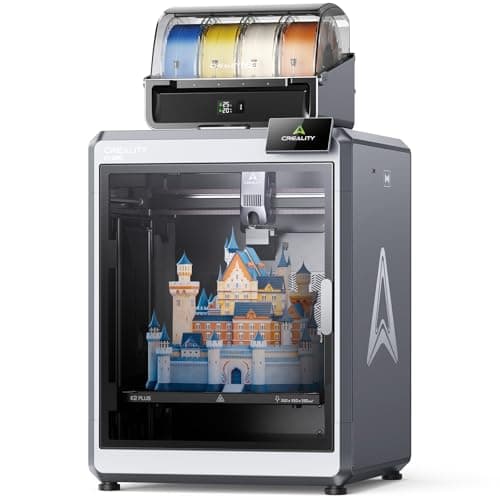
The biggest, hottest, fastest machine Creality sells to a home, and the one furthest from what a first printer should be. A 350 mm cube with a 350 C nozzle and a 120 C bed is real capability; Creality's own filament list quietly leaves TPU off it, and the price is five times a machine that would teach you more.
#ad Price as of October 19, 2026, from Amazon. Prices change. How we make money.
What it actually is
A fully enclosed CoreXY filament printer with an actively heated chamber, sold in a Combo with one CFS multi-material unit so it can print four colors out of the box and up to sixteen with more units. Everything about it is scaled up: the plate, the temperatures, the speed and the footprint.
What the manufacturer states
| Figure | Value | Source |
|---|---|---|
| Build volume | 350 x 350 x 350 mm | Creality K2 Plus CFS Combo parameter table |
| Motion system | CoreXY frame, fully enclosed with an actively heated chamber; Creality publishes no chamber temperature figure | Creality K2 Plus CFS Combo parameter table |
| Nozzle temperature | 350 C | Creality K2 Plus CFS Combo parameter table |
| Heatbed temperature | 120 C | Creality K2 Plus CFS Combo parameter table |
| Nozzle | Hardened steel, all-metal hotend, direct drive; default 0.4 mm, compatible 0.2 / 0.6 / 0.8 mm | Creality K2 Plus CFS Combo parameter table |
| Printing speed | 600 mm/s | Creality K2 Plus CFS Combo parameter table |
| Acceleration | 30,000 mm/s2 or less | Creality K2 Plus CFS Combo parameter table |
| Layer height | 0.05 to 0.3 mm | Creality K2 Plus CFS Combo parameter table |
| Printing accuracy | 100 mm +/- 0.1 | Creality K2 Plus CFS Combo parameter table |
| Supported filaments | PLA, PA-CF, ASA, PLA-CF, PETG, PET, PPA-CF, ABS. TPU is not on Creality's list | Creality K2 Plus CFS Combo parameter table |
| Multi-color | One CFS unit in the Combo; Creality publishes up to 16 colors with CFS x4 | Creality K2 Plus CFS Combo parameter table |
| Cameras | Dual AI cameras, which Creality says adjust flow rate and alert failures | Creality K2 Plus CFS Combo parameter table |
| Connectivity | Wi-Fi 2.4 and 5 GHz (802.11 a/b/g/n/ac), Ethernet, USB flash drive, Creality Cloud; 32 GB onboard storage | Creality K2 Plus CFS Combo parameter table |
Read from Creality, K2 Plus CFS Combo parameter table and product page on 2026-10-18. Where a manufacturer does not publish a figure, there is no row for it here.
What is good about it
- 350 x 350 x 350 mm is 42.9 liters, more than two and a half times the volume of a 256 mm cube
- 350 C nozzle and 120 C bed are the highest published figures of any machine in our registry
- Hardened steel nozzle and an all-metal hotend as standard, so carbon-filled filament does not need a parts order first
- An actively heated chamber rather than a passively warm box, which is what ASA and PA-CF actually want
- Creality publishes a real parameter table — speed, acceleration, layer height, accuracy and the full filament list
What is not
- TPU is absent from Creality's own supported-filament list, so the most fun beginner material is off the menu
- Creality publishes no chamber temperature, no machine dimensions, no weight and no rated power anywhere we could find
- No leveling point count is published, where Elegoo's Neptune 4 publishes 121 points and Bambu publishes its routine
- It is roughly five times the price of this site's top beginner pick and nothing about it makes month one easier
- A 350 mm cube with an enclosure is furniture, not a desk accessory, and Creality will not tell you how big or heavy
Skip this one if
Skip it if this is your first printer, and skip it if you have not already drawn the thing you want to print and measured it. Build volume is the specification people most reliably over-buy: almost every first print fits inside 180 mm, and the money this machine costs over an A1 mini buys about forty kilograms of filament.
What we cannot tell you
We have not printed on this machine. How hot the chamber actually gets, how loud a 30,000 mm/s2 machine is in a room, whether the AI flow-rate correction helps or fights you, and how much filament the CFS wastes on a color change are all things Creality's parameter table does not answer and we will not guess at.
How it scored for a beginner
- Setup out of the box7.0
- Auto-calibration7.5
- First-layer forgiveness7.5
- Parts and filament availability9.0
- Running cost5.0
- Help when it goes wrong8.5
Beginner fit 6.8 / 10. That is our editorial read of how well this suits someone buying their first printer, taken off the published specifications — not a test result, and not a verdict on absolute quality. It is deliberately not marked up as a rating in this page’s structured data. How we pick.
How these were picked
We have not printed on these machines and we do not pretend to have. What we did was read each manufacturer’s own specification page, take their stated build volume, temperatures and speeds, check that every pick genuinely fits the job in this page’s title, confirm it is still being sold, and pull a live price rather than a remembered one. Every figure names the source it came from, so you can check it yourself in about a minute.
How we pick sets out the full method, including what would change a ranking.
Questions people actually ask
+−Is the Creality K2 Plus good for beginners?
No. It is a capable machine and a poor first one. It costs roughly five times the Bambu Lab A1 mini, it is large enough to need dedicated furniture, and none of what you pay extra for — the 350 mm cube, the 350 °C nozzle, the heated chamber — makes a first month easier. A beginner printer should remove decisions, not add capability.
+−Can the K2 Plus print TPU?
Creality’s own supported-filament list for the K2 Plus reads PLA, PA-CF, ASA, PLA-CF, PETG, PET, PPA-CF and ABS. TPU is not on it. We would take that list at its word. If flexible filament is something you want to print, the Bambu A1 and A1 mini both rate TPU as ideal, and our TPU roundup covers the spools.
+−What is the K2 Plus build volume?
Creality publishes 350 × 350 × 350 mm, which is 42.9 liters. For comparison, a 256 mm cube is 16.8 liters and the A1 mini’s 180 mm cube is 5.8 liters. Before paying for it, name the object that needs more than 256 mm — most first-year prints fit inside 180.
+−How big and heavy is the K2 Plus?
Creality does not publish machine dimensions, net weight or rated power for the K2 Plus on its product or support pages, and we will not quote a retailer’s figure as though it were the manufacturer’s. Plan for it as furniture rather than a desk accessory, confirm the dimensions with the seller before ordering, and see where to put a 3D printer for the surface requirements.
+−K2 Plus or Bambu Lab P1S?
P1S, for almost everybody. It is a fraction of the price, it is a 256 mm cube rather than 350, it rates TPU, and Bambu publishes the dimensions, weight and power figures Creality does not. Choose the K2 Plus over the P1S only if you need the extra volume or the 350 °C nozzle for carbon-filled engineering filament. Our Bambu Lab vs Creality page covers the brand-level trade.