Guide
How Long Do 3D Printers Last?
The parts that wear out are cheap and replaceable. What ends a printer's life is a manufacturer that stopped stocking them. That makes longevity a purchasing decision, not a maintenance one.
By Scooter M. · Published · Last reviewed
How this page is funded: the buy links below are affiliate links. If you buy through one we earn a commission, at no extra cost to you. It does not change the order of the picks or a word of what we say about them. Full disclosure.
Printers we claim to have tested: 0. Everyone in this category says they tested twenty machines. We have not tested any, and we would rather say so. What we did instead is on this page: the manufacturer’s own published specification for every pick, cited and dated; the arithmetic on what it costs to run, with the inputs shown; a live price rather than a remembered one; and a plain answer on who should skip each machine.
The short answer
Nothing on a desktop 3D printer wears out in a way you cannot fix cheaply — what kills one is a manufacturer that stopped selling the parts. So “how long will it last” is really “will parts still exist”, and that is decided before you buy. On that measure the Prusa CORE One+ is the strongest (Prusa states nothing is glued and spares stay stocked for years), the Creality Ender-3 V3 SE is next on sheer ubiquity, and Bambu machines are the most automated and the most dependent on one supplier.
We have not owned any of these machines for years, so we are not going to quote you a number of hours. What we can do is separate the parts that genuinely wear from the parts that do not, show what each costs, and name what we found about repairability while verifying every machine in our registry — including two cases where a machine we had already written about stopped being purchasable.
How we judged this
Longevity cannot be read off a spec table, so we used three things we could check: what the manufacturer states in writing about serviceability and spare parts; whether the consumable parts are generic or proprietary; and what actually happened to the machines in our own registry over thirteen months of monthly verification. The third is the only part of this that is first-hand, and it turned out to be the most useful.
What actually wears out, in order of how soon
The consumable parts of a desktop filament printer, with what replacement typically involves. Costs are qualitative because they vary by machine and we do not hand-type prices.
| Part | Why it goes | Replacement |
|---|---|---|
| Build plate surface | The PEI coating loses grip from scraping, oils and adhesive | A spring steel sheet. The cheapest part on this list, and the one you replace first |
| Nozzle | Abrasion. Brass goes fast with carbon or glass-filled filament, slowly with PLA | Cheap if the nozzle is separate; a whole hotend assembly on some machines |
| PTFE tube and extruder gears | The filament path scars and the drive gears fill with dust | Cheap, and usually a ten-minute job |
| Belts | They stretch, which shows up as dimensional drift rather than failure | Cheap. Most machines have a tensioner, so often an adjustment not a part |
| Fans | Bearings get noisy, then stop. The hotend fan is the one that matters | Cheap, and the single most common unplanned repair |
| Stepper motors, mainboard, power supply | These generally do not wear out at hobby duty cycles | Expensive, rare, and the point at which availability decides everything |
Read that list again and notice the pattern: the first five rows are cheap and routine, and the sixth is the one that ends a machine. A mainboard failure on a printer whose manufacturer still sells mainboards is a $60 inconvenience. The same failure on a discontinued machine is the end of it.
A separate and more common story: the machine still works and you stop using it because an unfixed first-layer problem made it annoying. That is not a lifespan question, it is a bed adhesion and Z-offset question, and it is worth ruling out before you blame the hardware.
The thing that actually decides lifespan: can you still buy the part?
We verify every product in our registry against live listings every month, which means we have watched this happen rather than theorized about it. Three findings from our own records:
- The Creality Ender-3 V3 KE went discontinued. We verified the line dead on Amazon in October 2026 and updated its review. The machine was barely two years old.
- The Elegoo Centauri Carbon 2 Combo stopped having an Amazon listing at all within months of launch — the line was renamed to Centauri 2. The original Centauri Carbon is now offered Used. We recorded both on the Kobra S1 vs Centauri comparison.
- The Bambu Lab A2L is a current product that Bambu does not sell through Amazon. Not discontinued — just not in that channel. We say so plainly on its review.
That is three channel or lifecycle events in thirteen months, on a registry of about forty products. Model churn in this category is fast, and it is the real risk to a machine you intend to keep.
The three repairability models, and what each buys you
Stated policy: Prusa
Prusa publishes two sentences that no other manufacturer in our registry publishes: “Nothing is glued. Everything comes apart with a screwdriver,” and “We keep spare parts in stock for years after release.” It also sells the CORE One+ as an assembly kit, which means the documentation for taking it apart is the documentation for building it.
That is the strongest longevity case available, and it is also most of why the machine costs what it does. Which means it is worth nothing to somebody who never intends to open the case — the honest caveat we also make in Prusa vs Bambu Lab.
Ubiquity: Creality
The Ender line is the most widely owned family of printers in the hobby. The practical effect is that every part is sold by multiple sellers, generic replacements fit, and every failure mode has already been written up by somebody. Creality does not promise this; the installed base provides it.
Note the limit, though: the V3 KE above was a Creality machine, and being Creality did not stop the model going away. Ubiquity protects the parts, not the model. Our Elegoo vs Creality comparison weighs this against Elegoo’s better documentation.
Integration: Bambu Lab
Bambu machines remove the most decisions, and they do it by integrating hard. The flip side is proprietary: on the A1 family the nozzle is part of a hotend assembly rather than a separate screw-in part, so a worn nozzle is a bigger order than it would be on an Ender. Parts come from Bambu and its resellers rather than from a generic market.
For a first printer we still recommend the A1 mini first, because surviving week one matters more than surviving year eight. But it is a real trade and we would rather name it.
What makes a printer last longer, in practice
- Keep the filament dry. Wet filament is the published cause of more failures than any mechanical issue, and it is entirely preventable — storage and drying covers it, and the dryer roundup covers buying the capability.
- Replace the build surface rather than fighting it. It is the cheapest part on the machine and the one most likely to be the actual problem.
- Use a hardened nozzle before abrasive filament, not after. Carbon and glass-filled filament chews brass. The machines that ship hardened steel — the K2 Plus does — save you that order.
- Put it somewhere sensible. Dust, drafts and a wobbly surface each shorten the useful life of a machine in different ways. Where to put a 3D printer goes through it.
- Buy the machine you can get parts for. This is the only one of the five that you cannot do after the fact, which is why it is on a buying page rather than a maintenance one.
So which machine lasts?
A longevity read rather than a spec comparison. 'Stated in writing' means the manufacturer publishes a commitment, not that we have tested it.
| Machine | Parts story | Longevity read |
|---|---|---|
| Prusa CORE One+ | Stated in writing: nothing glued, spares stocked for years | Strongest. You are paying for it, so only worth it if you will use it |
| Creality Ender-3 V3 SE | Largest installed base in the hobby; generic parts fit | Very strong for parts, weaker for model continuity |
| Bambu Lab A1 mini / A1 | Proprietary hotend assemblies; single-supplier channel | Good while supported; the integration that helps week one limits year eight |
| Elegoo Centauri line | Line renamed within months; original now offered Used | Weakest on continuity of the three, on our own verification records |
If you want the longevity-first machine, it is the Prusa and you should read the full review including the part where we tell you the manufacturer’s own store was over $300 cheaper than Amazon. If you want the practical answer for a first printer, it is still an A1 mini, and how to choose a 3D printer explains why longevity is the fifth decision rather than the first.
What we cannot tell you
We have not run any of these machines for five years, so any specific hour count would be invented and we are not going to invent one. We also cannot tell you how long a given manufacturer will keep stocking a given part — only what they say about it and what we have watched happen to the machines we track. Treat the churn above as the measurement and the policy statements as the promise.
What we would buy for this
Chosen from the same registry as our roundups, on the manufacturer’s own published figures and a live price.
Prusa CORE One+
Prusa Research · Somebody who wants to own the machine, not just its output
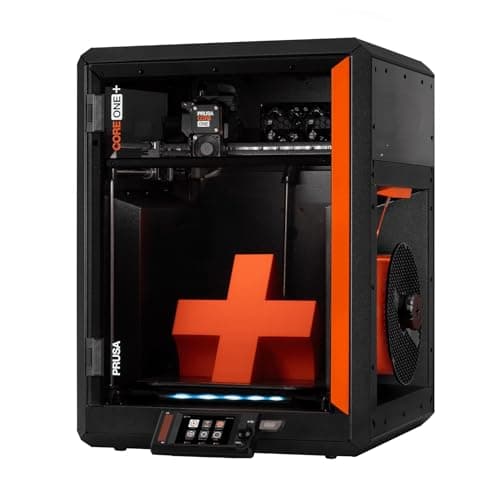
The machine people mean when they say they want something they can fix. Prusa publishes a 250 x 220 x 270 mm enclosed CoreXY with an actively controlled chamber up to 55 C, and says plainly that nothing on it is glued and everything comes apart with a screwdriver.
#ad Price as of October 19, 2026, from Amazon. Prices change. How we make money.
What it actually is
A fully enclosed CoreXY printer with a heated, ventilated chamber, built around an all-steel structural enclosure. It is designed to be disassembled and repaired, with spare parts stocked for years, and it costs several times what a first printer should.
What the manufacturer states
| Figure | Value | Source |
|---|---|---|
| Build volume | 250 x 220 x 270 mm (14.9 liters) | Prusa Research CORE One+ product page |
| Motion and frame | Fully enclosed CoreXY; all-steel structural enclosure | Prusa Research CORE One+ product page |
| Chamber | Actively controlled, heats to 55 C, with smart ventilation | Prusa Research CORE One+ product page |
| Materials | ASA, ABS, PC, PA and other advanced materials, plus standard 1.75 mm filament | Prusa Research CORE One+ product page |
| Vibration control | Input Shaper firmware compensation | Prusa Research CORE One+ product page |
| Serviceability | Nothing glued; disassembles with a screwdriver, spare parts stocked for years | Prusa Research CORE One+ product page |
Read from Prusa Research, CORE One+ product page on 2026-09-13. Where a manufacturer does not publish a figure, there is no row for it here.
What is good about it
- An actively heated chamber to 55 C, which is a genuine step beyond the passively warm boxes in the band below
- Built to be repaired: Prusa states nothing is glued, everything comes apart with a screwdriver, and parts are stocked for years
- Prusa publishes 50 percent less desk space than an MK4S in an enclosure with 30 percent more print volume
- Smart ventilation means the door stays shut for PLA rather than being propped open
What is not
- It costs several times what this site's beginner picks cost, and nothing about it makes a first month easier
- 250 x 220 x 270 mm is less floor area than the 256 mm cubed machines it competes with, even though total volume is higher
- The repairability that justifies the price is worth nothing to somebody who never intends to open the machine
- Sold on Amazon by Amazon rather than by Prusa, so warranty and support routing is worth checking before you order
Skip this one if
Skip it if this is your first printer. Everything you are paying for - the chamber, the steel, the serviceability - is aimed at somebody who already knows what they want to print and expects to keep the machine for a decade. Buy an A1 mini and come back in two years.
What we cannot tell you
We have not printed on this machine. Whether the chamber control makes ABS genuinely uneventful, how loud it is, and whether the repairability premium pays back over years are all owner questions we cannot answer from a specification page.
How it scored for a beginner
- Setup out of the box8.0
- Auto-calibration9.0
- First-layer forgiveness8.5
- Parts and filament availability10.0
- Running cost6.0
- Help when it goes wrong9.5
Beginner fit 7.4 / 10. That is our editorial read of how well this suits someone buying their first printer, taken off the published specifications — not a test result, and not a verdict on absolute quality. It is deliberately not marked up as a rating in this page’s structured data. How we pick.
Creality Ender-3 V3 SE
Creality · The smallest sensible amount of money
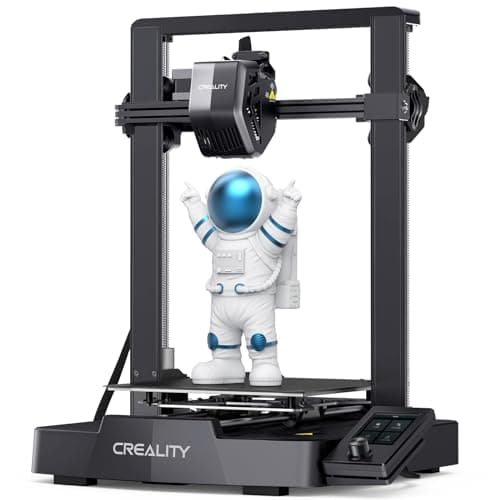
The cheap way in, and a genuinely modern one: auto bed leveling with CR Touch, automatic Z-offset from a strain sensor, and a direct-drive extruder. You will still learn more about your printer than an A1 owner does. Whether that is a feature or a cost is the whole decision.
#ad Price as of October 19, 2026, from Amazon. Prices change. How we make money.
What it actually is
An open-frame bed-slinger — the plate moves back and forth under a head that moves side to side and up. It is the classic hobby-printer layout, and this generation added the automatic setup steps the older Enders famously lacked.
What the manufacturer states
| Figure | Value | Source |
|---|---|---|
| Build volume | 220 x 220 x 250 mm | Creality Ender-3 V3 SE product specifications |
| Maximum print speed | 250 mm/s | Creality Ender-3 V3 SE product specifications |
| Typical print speed | 180 mm/s | Creality Ender-3 V3 SE product specifications |
| Acceleration | 2,500 mm/s2 | Creality Ender-3 V3 SE product specifications |
| Leveling | CR Touch auto leveling with strain-sensor Z-offset | Creality Ender-3 V3 SE product specifications |
| Extruder | Sprite direct extruder | Creality Ender-3 V3 SE product specifications |
| Filament diameter | 1.75 mm | Creality Ender-3 V3 SE product specifications |
Read from Creality, Ender-3 V3 SE product page on 2026-09-01. Where a manufacturer does not publish a figure, there is no row for it here.
What is good about it
- 220 x 220 x 250 mm is larger in every axis than the A1 mini
- Automatic bed leveling and Z-offset, which is the thing older Enders did not have
- The largest parts and community ecozystem of any machine here, by a distance
- Some assembly is required, and you will understand your printer better for it
What is not
- 250 mm/s maximum and 2,500 mm/s2 acceleration — a fraction of the A1's rated figures
- Not fully assembled out of the box, so first-print day is longer
- No filament run-out safety net of the kind Bambu specifies on the A1 series
- More of the tuning is yours to do, which is the trade for the price
Skip this one if
Skip it if the reason you are buying a printer is that you want to print things, not to own a printer. This machine is excellent value and it will ask more of you than an A1 mini will. If your patience for troubleshooting is low, spend the difference.
What we cannot tell you
We have not printed on this machine. How often the auto leveling needs re-running, the quality of the bundled build surface after a hundred prints, and assembly time for someone who has never built one are all outside what the specification tells you.
How it scored for a beginner
- Setup out of the box7.0
- Auto-calibration8.0
- First-layer forgiveness7.5
- Parts and filament availability10.0
- Running cost9.0
- Help when it goes wrong10.0
Beginner fit 8.0 / 10. That is our editorial read of how well this suits someone buying their first printer, taken off the published specifications — not a test result, and not a verdict on absolute quality. It is deliberately not marked up as a rating in this page’s structured data. How we pick.
Bambu Lab A1 mini
Bambu Lab · A genuine first printer
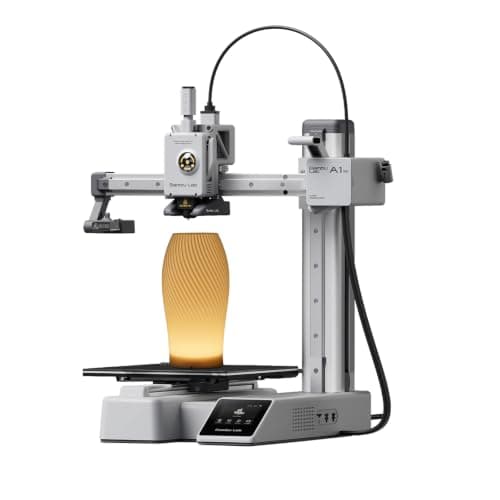
The one to get if you have never done this before. It calibrates itself before every print — bed mesh, Z-offset, flow, resonance — so the part of 3D printing that used to defeat beginners is a step you never see. The build volume is the price you pay.
#ad Price as of October 19, 2026, from Amazon. Prices change. How we make money.
What it actually is
A small open-frame filament printer. Filament is a 1.75 mm plastic string on a spool; the machine melts it and draws your object one layer at a time. Open-frame means there is no box around it, which is fine for PLA and a limitation for materials that warp.
What the manufacturer states
| Figure | Value | Source |
|---|---|---|
| Build volume | 180 x 180 x 180 mm | Bambu Lab A1 mini technical specifications |
| Max hot end temperature | 300 C | Bambu Lab A1 mini technical specifications |
| Max build plate temperature | 80 C | Bambu Lab A1 mini technical specifications |
| Max toolhead speed | 500 mm/s | Bambu Lab A1 mini technical specifications |
| Max toolhead acceleration | 10,000 mm/s2 | Bambu Lab A1 mini technical specifications |
| Filaments rated ideal | PLA, PETG, TPU, PVA | Bambu Lab A1 mini technical specifications |
| Filaments not recommended | ABS, ASA, PC, PA, PET, carbon/glass fiber reinforced | Bambu Lab A1 mini technical specifications |
| Machine dimensions | 347 x 315 x 365 mm | Bambu Lab A1 mini technical specifications |
| Net weight | 5.5 kg | Bambu Lab A1 mini technical specifications |
| Max power | 150 W | Bambu Lab A1 mini technical specifications |
Read from Bambu Lab, A1 mini technical specifications on 2026-09-01. Where a manufacturer does not publish a figure, there is no row for it here.
What is good about it
- Full auto-calibration on every print, per Bambu Lab's own specification — no paper-under-the-nozzle ritual
- Rated ideal for PLA, PETG, TPU and PVA, which covers everything a beginner should print in year one
- 150 W maximum power draw is the lowest of any printer on this site, so running cost is trivial
- 5.5 kg and 347 mm wide — it fits on a desk without rearranging the room
What is not
- 180 mm cubed is genuinely small. A full-size helmet or a large cosplay prop will not fit
- Bambu Lab rates ABS, ASA, PC and fiber-reinforced filaments as not recommended on this machine
- The multi-color AMS lite is a separate purchase, so the headline price is not the multi-color price
- Bambu Lab's own Amazon store lists this machine bundled with an LED lamp kit rather than on its own, so the price on our button is for that bundle. The bare printer is sold direct on Bambu Lab's store
- Open frame, so it is at the mercy of a draft from a window or an air conditioning vent
Skip this one if
Skip it if you already know the thing you want to print is bigger than a shoebox, or if you specifically want ABS or a carbon-fiber-filled filament. Bambu Lab itself lists those materials as not recommended here, and buying a machine you intend to use outside its rated envelope is how a first printer becomes a frustrating one.
What we cannot tell you
We have not printed on this machine. Long-term reliability, real-world noise in a quiet room, and how the textured plate holds up after a year are all things we cannot honestly report without owning one.
How it scored for a beginner
- Setup out of the box9.5
- Auto-calibration10.0
- First-layer forgiveness9.5
- Parts and filament availability9.0
- Running cost10.0
- Help when it goes wrong9.0
Beginner fit 9.2 / 10. That is our editorial read of how well this suits someone buying their first printer, taken off the published specifications — not a test result, and not a verdict on absolute quality. It is deliberately not marked up as a rating in this page’s structured data. How we pick.
How these were picked
We have not printed on these machines and we do not pretend to have. What we did was read each manufacturer’s own specification page, take their stated build volume, temperatures and speeds, check that every pick genuinely fits the job in this page’s title, confirm it is still being sold, and pull a live price rather than a remembered one. Every figure names the source it came from, so you can check it yourself in about a minute.
How we pick sets out the full method, including what would change a ranking.
Questions people actually ask
+−How many years does a 3D printer last?
Long enough that wear is rarely what ends it. The parts that genuinely consume — build surface, nozzle, PTFE tube, belts, fans — are cheap and replaceable. What ends a printer’s life is a failure in a part the manufacturer no longer stocks. We will not quote an hour figure we have not measured; the useful question is whether parts will still be sold, which you decide at purchase.
+−What is the most reliable 3D printer?
On repairability, the Prusa CORE One+, because Prusa states in writing that nothing is glued and that spares stay in stock for years. On parts availability, the Creality Ender line, because its installed base means every part is sold by somebody. We have not run long-term reliability testing and will not present a ranking as though we had.
+−What breaks first on a 3D printer?
The build plate surface loses its grip before anything mechanical fails, and it is the cheapest part to replace. After that, the hotend cooling fan is the most common unplanned repair. Both are routine. If prints have started failing, check bed adhesion and the nozzle before you conclude the machine is worn out.
+−Are 3D printer parts easy to get?
It depends entirely on the machine. Creality Ender parts are sold by dozens of sellers and generic replacements fit. Prusa publishes a commitment to stock spares for years. Bambu’s A1 family uses a hotend assembly rather than a separate nozzle, so replacements come from Bambu’s channel. Check this before buying, not after something breaks.
+−Do 3D printers get discontinued quickly?
Faster than most buyers expect. Across thirteen months of monthly verification on roughly forty products we recorded a Creality Ender-3 V3 KE going discontinued, an Elegoo Centauri Carbon 2 Combo losing its Amazon listing entirely as the line was renamed, and the original Centauri Carbon moving to a Used-only offer. Model churn is the real longevity risk in this category.
+−Does running a printer constantly wear it out faster?
It consumes the consumables faster — nozzle, build surface, fans — which are the cheap parts. Hobby duty cycles do not meaningfully shorten the life of the motors, mainboard or power supply. The bigger risk from heavy use is running abrasive filament through a brass nozzle, which is a parts question with a five-dollar answer.